
1. Introduction
This manual provides detailed instructions for the setup, operation, maintenance, and troubleshooting of your MILESEEY GenePro G1 Golf Rangefinder. Please read this manual thoroughly to ensure proper use and to maximize the device's performance.

Figure 1.1: MILESEEY GenePro G1 Golf Rangefinder
2. Product Features
The MILESEEY GenePro G1 is a advanced golf rangefinder designed to provide precise distance measurements and course information. Key features include:
- Preloaded Courses: Access to over 43,000 global golf courses with free lifetime updates. No subscription required.
- AMOLED Touchscreen: A large 2.13-inch AMOLED display offers clear visuals in various lighting conditions and intuitive touch navigation.
- Dynamic GPS Yardages: Provides real-time distances to the front, center, and back of the green.
- SmartSlope Technology: Calculates distances adjusted for elevation, temperature, and humidity. Features a rotating switch for tournament compliance.
- Flag-Lock with Vibration: Achieves fast and accurate flag-lock within 0.1 seconds, with vibration feedback, up to 600 yards.
- Durability: Equipped with IP65 protection for rain and fog resistance, and 6X magnification optics.
- Ball-to-Pin Mode: Allows measurement between any two points on the course.
- Score Card & Performance Tracking: Integrated score card and shot data tracking that syncs with the MILESEEY Golf App for post-round analysis.

Figure 2.1: GenePro G1 Touchscreen Interface
3. Setup
3.1 Unboxing and Initial Inspection
Upon opening the package, verify that all components are present:
- GenePro G1 Rangefinder
- USB-C Cable
- Snap Hook
- Carrying Case
- Quick Start Guide
- User Manual (this document)
- Lens Cleaning Cloth

Figure 3.1: Included Accessories
3.2 Charging the Device
Before first use, fully charge the GenePro G1. Connect the provided USB-C cable to the device and a compatible USB power source. The battery indicator on the screen will show charging status. A full charge provides approximately 3-4 rounds of golf with GPS enabled.
3.3 Power On/Off
To power on the device, press and hold the power button located on the top of the unit. To power off, press and hold the power button again until the device shuts down.
3.4 Course Updates
The GenePro G1 comes with over 43,000 golf courses preloaded. If a newly opened course or an unlisted course is encountered, please contact MILESEEY customer support. The technical team can add it remotely, typically within one week.
4. Operating Instructions
4.1 Basic Ranging (Laser Mode)
To measure distance using the laser:
- Look through the eyepiece and aim the reticle at your target.
- Press the measurement button (typically on the side or top) to activate the laser.
- The distance to the target will be displayed on the internal display and the touchscreen. The maximum laser range is 1300 yards.
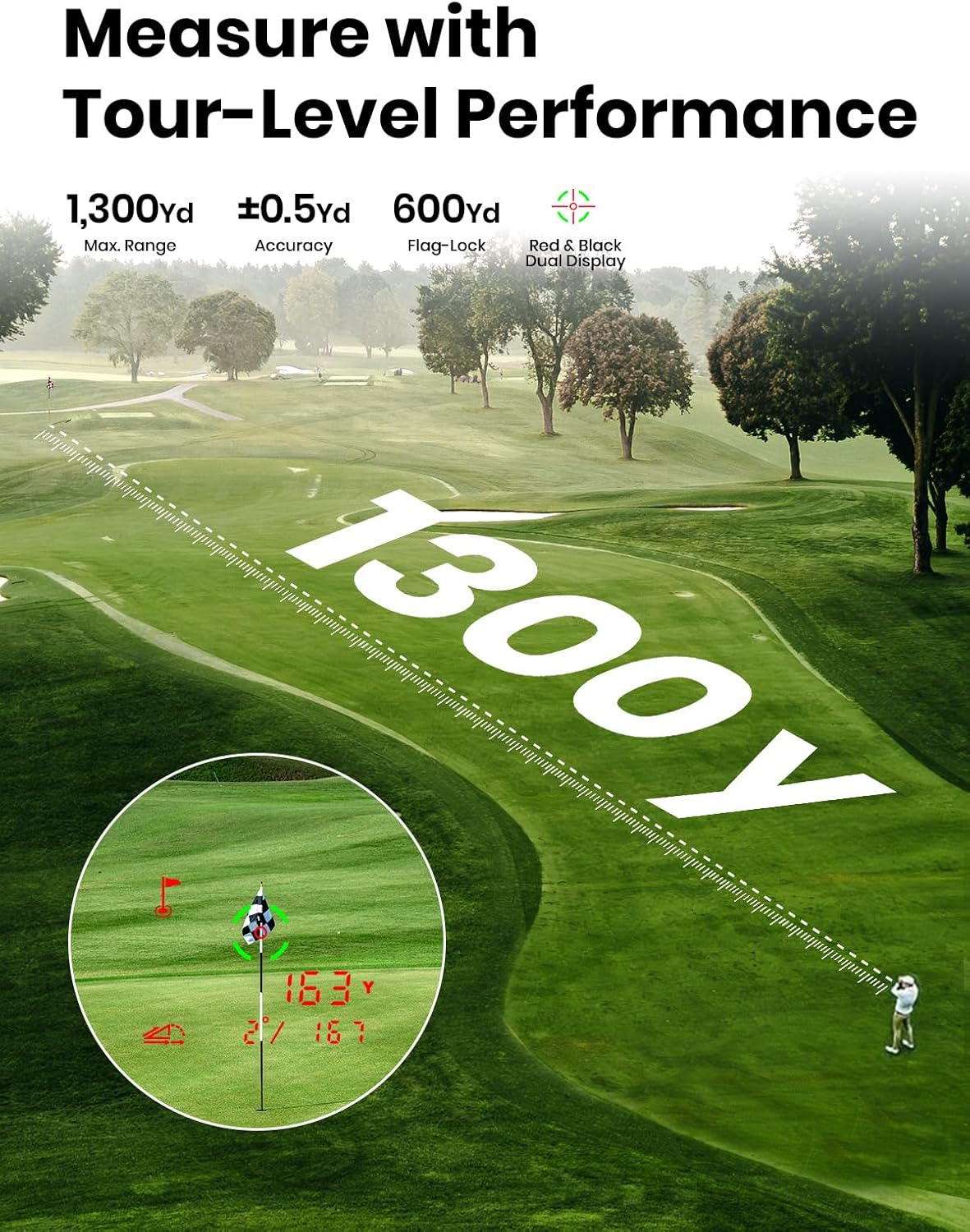
Figure 4.1: Laser Ranging Capability
4.2 GPS Mode and Course View
The GenePro G1 automatically detects your location and displays the current course. The touchscreen provides a visual representation of the hole.
- Front, Center, Back (FCB) Distances: The device displays distances to the front, center, and back of the green.
- Touchscreen Navigation: Swipe on the touchscreen to view different parts of the course or access various features.

Figure 4.2: GPS Distances to Green
4.3 SmartSlope Function
SmartSlope calculates adjusted distances based on elevation changes, temperature, and humidity. This feature can be toggled on or off.
- Activating/Deactivating Slope: Use the external rotating switch on the device to enable or disable the slope function.
- Tournament Compliance: Ensure the slope function is deactivated for tournament play to comply with rules.
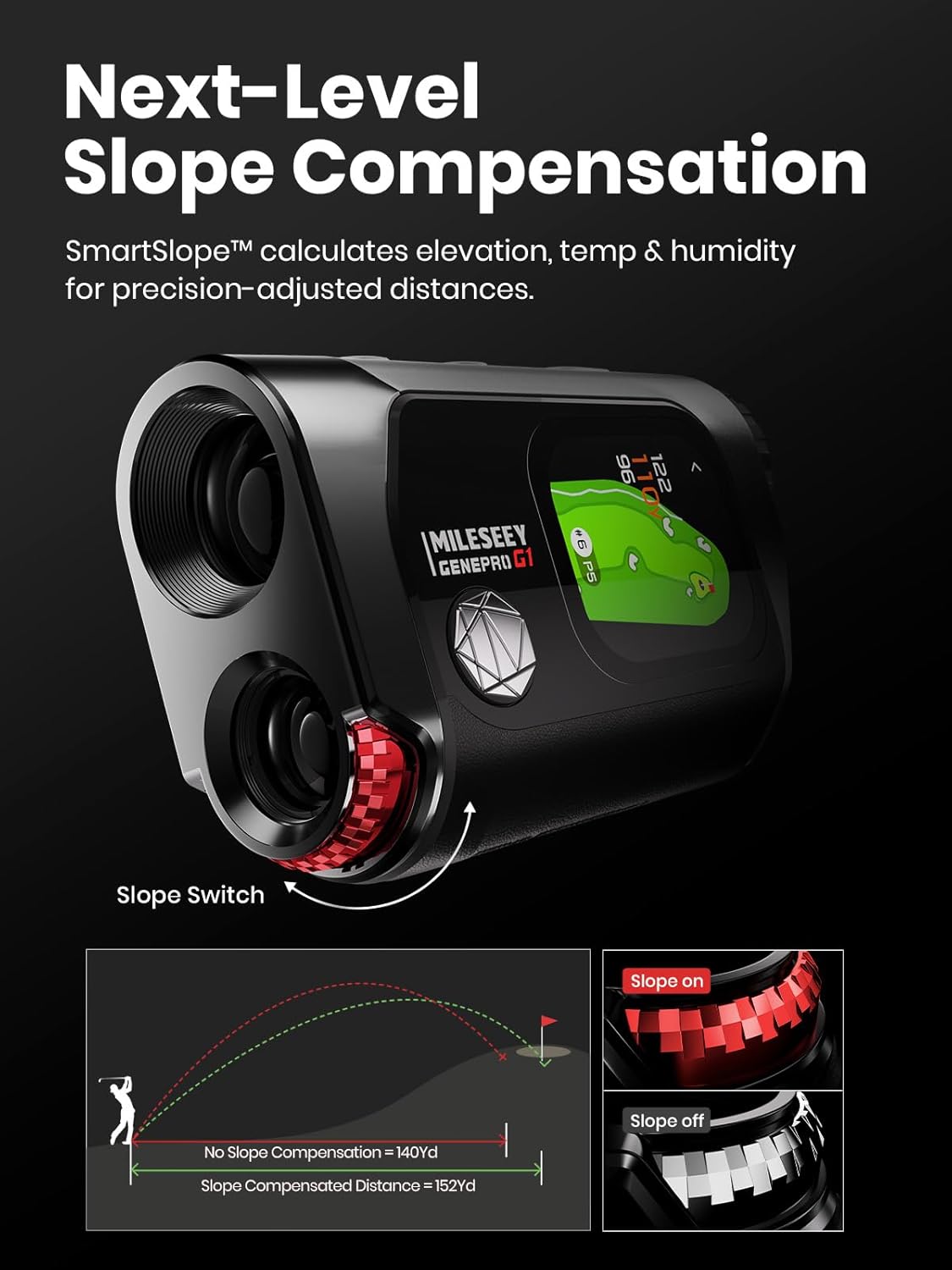
Figure 4.3: SmartSlope Feature and Tournament Switch
4.4 Flag-Lock with Vibration
This feature helps to lock onto the flagstick accurately, even with background objects.
- Aim the reticle at the flagstick.
- Press the measurement button. The device will vibrate once the flag is locked, and the distance will be displayed. This function works up to 600 yards.
4.5 Ball-to-Pin Mode
The patented Ball-to-Pin mode allows you to measure the distance between any two points on the course.
- Activate Ball-to-Pin mode via the touchscreen menu.
- Measure the distance to your ball's position.
- Then, measure the distance to the pin. The device will calculate the distance between the ball and the pin.

Figure 4.4: Ball-to-Pin Measurement
4.6 Score Card and Performance Tracking
The GenePro G1 includes an integrated score card feature. Shot data can be collected and synced to the MILESEEY Golf App for detailed post-round analysis.
5. Maintenance
5.1 Cleaning
Use the provided lens cleaning cloth to gently wipe the optical lenses. For the device body, use a soft, dry cloth. Avoid abrasive materials or harsh chemicals.
5.2 Storage
Store the GenePro G1 in its sturdy carrying case when not in use to protect it from damage. The device does not contain a magnet, as magnets can interfere with GPS functionality. Ensure the device is stored in a cool, dry place.
5.3 Water Resistance
The GenePro G1 features IP65 protection, making it resistant to rain and fog. While it can withstand splashes and light rain, it is not designed for submersion in water.
6. Troubleshooting
- Inaccurate Readings: Ensure the lens is clean and there are no obstructions. For GPS readings, ensure the device has a clear view of the sky. Laser and GPS measurements should typically be within 5 yards of each other.
- Course Not Found: If your golf course is not listed, refer to Section 3.4 for instructions on requesting a course update.
- Device Not Powering On: Ensure the device is fully charged. If the issue persists, contact customer support.
7. Specifications
| Feature | Specification |
|---|---|
| Brand | MiLESEEY |
| Model Name | GenePro G1 |
| Color | Black |
| Material | Magnesium-aluminum alloy |
| Item Weight | 300 Grams |
| Max Laser Measuring Range | 1300 Yards |
| Flag-Lock Range | 600 Yards |
| Accuracy | ±0.5 Yard |
| Response Time | 0.1 Seconds |
| Magnification | 6X |
| Wide FOV | 7.5° |
| Transmission | 90% |
| Battery Capacity | 1000mAh (Rechargeable) |
| Water Protection | IP65 (Rain & Fog Mode) |

Figure 7.1: Optical Performance
8. Warranty and Support
8.1 Manufacturer's Warranty
The MILESEEY GenePro G1 Golf Rangefinder comes with a 5-year manufacturer's warranty. Please retain your proof of purchase for warranty claims.
8.2 Customer Support
For technical assistance, warranty inquiries, or to request updates for golf courses, please contact MILESEEY customer support through their official website or the contact information provided with your product packaging.