
Introduction
This manual provides instructions for the setup, operation, and maintenance of your replacement remote control for Casio Projectors. Please read this manual thoroughly before use to ensure proper functionality and to maximize the lifespan of your device.
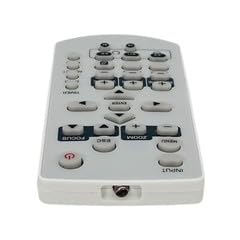
Image 1: Overview of the replacement remote control.
Package Contents
- 1 x Replacement Remote Control
Note: Batteries are not included and must be purchased separately. This is a replacement remote control and may not offer all functions of the original remote. Minor scratches may be present due to bulk item storage.
Setup
1. Battery Installation
- Locate the battery compartment on the back of the remote control.
- Slide open the battery cover.
- Insert two AAA batteries (not included), ensuring the correct polarity (+ and -) as indicated inside the compartment.
- Close the battery cover securely.
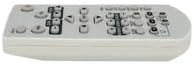
Image 2: Battery compartment for AAA batteries.
2. Pairing (Not Required)
This remote control operates via infrared (IR) technology and typically does not require pairing. It is designed to work directly with compatible Casio projector models upon battery installation.
Operating Instructions
Point the remote control directly at the infrared receiver on your Casio projector. Ensure there are no obstructions between the remote and the projector.
Basic Functions:
- Power On/Off: Press the POWER button to turn the projector on or off.
- Input Selection: Use the INPUT or source buttons to cycle through available input sources (e.g., HDMI, VGA).
- Navigation: Use the directional arrow buttons (UP, DOWN, LEFT, RIGHT) and the ENTER or OK button to navigate menus.
- Volume Control: If your projector has audio output, use the VOLUME +/- buttons to adjust the sound level.
- Menu Access: Press the MENU button to access the projector's on-screen display (OSD) menu.
- Exit/Back: Use the EXIT or BACK button to close menus or return to the previous screen.
Refer to your Casio projector's original manual for specific functions and button layouts, as this replacement remote aims to replicate common controls.
Maintenance
- Cleaning: Wipe the remote control with a soft, dry cloth. Do not use liquid cleaners or abrasive materials.
- Battery Replacement: Replace batteries when the remote's response becomes sluggish or stops working. Always replace both batteries at the same time with new ones of the same type (AAA).
- Storage: If the remote control will not be used for an extended period, remove the batteries to prevent leakage and potential damage. Store in a cool, dry place.
- Avoid Damage: Do not drop the remote control or expose it to extreme temperatures, humidity, or direct sunlight.
Troubleshooting
- Remote not working:
- Ensure batteries are inserted correctly with the correct polarity.
- Replace old batteries with new AAA batteries.
- Check for any obstructions between the remote control and the projector's IR receiver.
- Ensure you are within the maximum operating range (approximately 5 meters).
- Some functions not working:
- This is a replacement remote. Some advanced or specific functions of your original projector remote may not be supported.
- Verify the function exists on your projector model.
Specifications
| Model Number | ATFO-RPL-RMT-070925-22182 |
| Compatible Projectors | Casio XJ-FC330XN, XJ-F210WN, XJ-UT310WN |
| Connectivity Technology | Infrared (IR) |
| Maximum Range | Approximately 5 meters (16 feet) |
| Battery Type | 2 x AAA (not included) |
| Color | White/Light Grey |
| Special Feature | Ergonomic design |
| Manufacturer | VieRemote |
Warranty and Support
This product is a replacement remote control. For specific warranty information, please refer to the seller's policy at the time of purchase. For technical support or inquiries, please contact the seller directly through the platform where the purchase was made.