
1. Introduction
The OTTOCAST MINI Slim is a compact wireless adapter designed to convert your vehicle's existing wired CarPlay and Android Auto systems into wireless functionality. This device simplifies your in-car connectivity, eliminating the need for physical cable connections to your smartphone.
By enabling wireless access to navigation, music, communication, and other applications directly on your car's display, the MINI Slim enhances driving convenience and efficiency. It also contributes to preserving your smartphone's battery life by removing the constant need for wired charging during use.
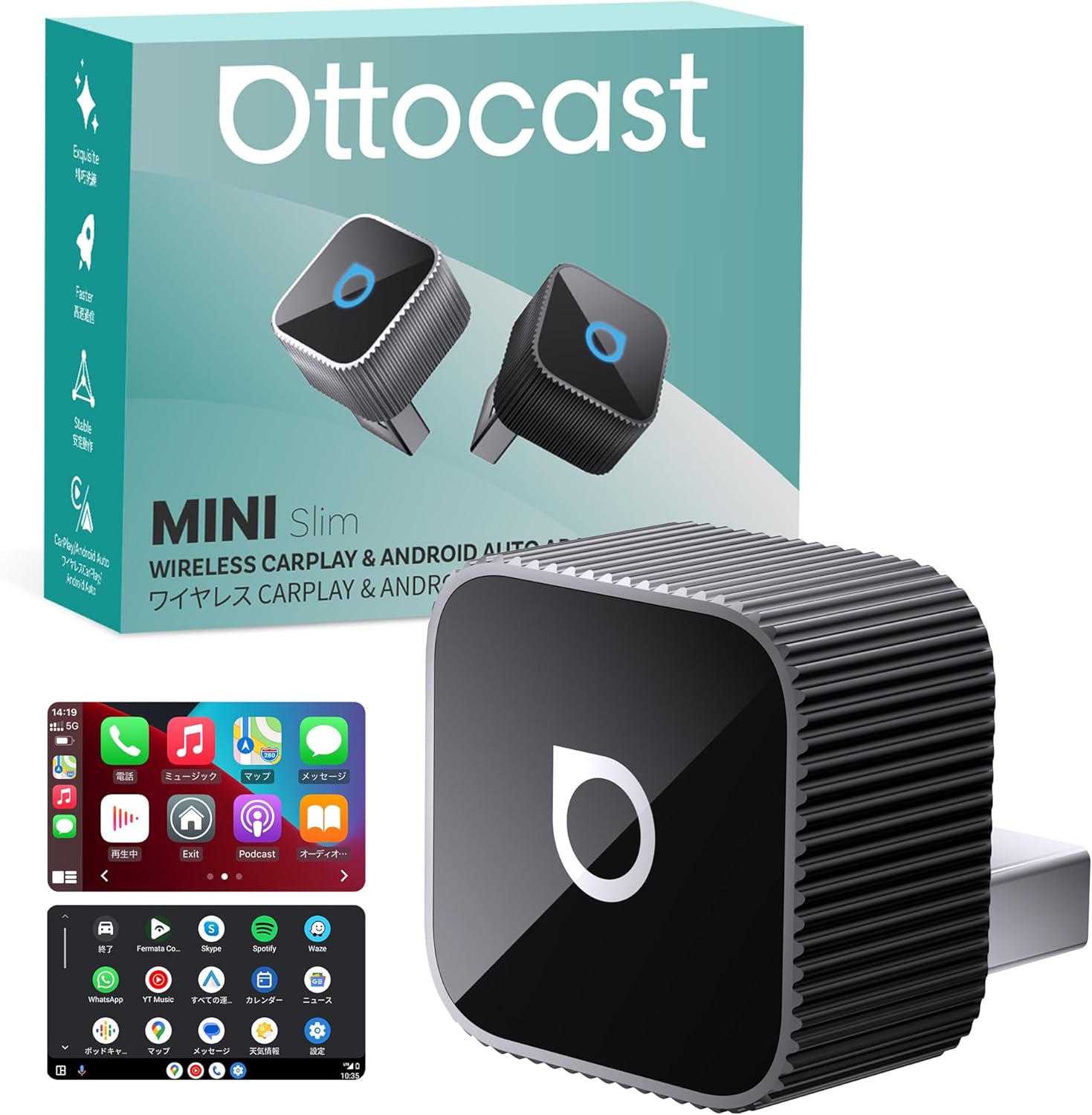
Image 1.1: OTTOCAST MINI Slim adapter, packaging, and a car display demonstrating wireless CarPlay.
2. Product Overview
2.1 Key Features
- Wireless Conversion: Transforms wired CarPlay and Android Auto into wireless connections.
- Compact Design: Ultra-small dimensions (20.7 x 20.7 x 23.5 mm) and lightweight (30g) for discreet integration.
- Stable Connectivity: Equipped with Dual WiFi (2.4GHz + 5GHz) and Bluetooth 5.0 for reliable and fast communication.
- Automatic Reconnection: Features smart memory to automatically reconnect within 5 seconds after initial pairing, supporting up to two smartphones.
- Voice Control Support: Compatible with voice assistants like Siri and Google Assistant for hands-free operation.
- App Integration: Supports various applications including navigation (Google Maps, Apple Maps, NAVITIME), music streaming (Spotify, LINE MUSIC, Amazon Music), and messaging (LINE).
- Efficient Heat Dissipation: Constructed with an aluminum alloy body for high thermal conductivity, ensuring stable performance over extended use.
- Safety Certifications: TELEC certified (220-JP7656) and includes multiple protection systems against overvoltage, overcurrent, short circuit, and overheating.
2.2 Package Contents
Please ensure all items are present upon unboxing:
- OTTOCAST MINI Slim Main Unit
- USB Type-A to Type-C Conversion Adapter
- User Manual

Image 2.1: Visual representation of the OTTOCAST MINI Slim package contents and safety certifications.
3. Setup Instructions
Follow these simple steps to set up your OTTOCAST MINI Slim adapter:
- Connect the Adapter: Plug the OTTOCAST MINI Slim into your car's USB port. Ensure it is securely inserted.
- Wait for Display: After plugging in, wait for the connection user interface to appear on your car's display.
- Pair with Smartphone: On your smartphone, enable both Wi-Fi and Bluetooth. Search for Bluetooth devices and select "CAR2-OOOO" (the specific name may vary slightly) to pair.
Once paired, the system will automatically connect in subsequent uses, typically within 5 seconds of starting your vehicle, provided your smartphone's Wi-Fi and Bluetooth are enabled.

Image 3.1: Step-by-step guide for initial setup and pairing.

Image 3.2: Illustration of the automatic connection process upon vehicle startup.
4. Operating Instructions
The OTTOCAST MINI Slim allows you to control your CarPlay or Android Auto interface using various methods, maintaining the original functionality of your vehicle's system.
4.1 Control Methods
- Touch Screen Operation: Interact directly with the car's display using touch gestures, similar to your smartphone.
- Steering Wheel Controls: Utilize your vehicle's built-in steering wheel buttons for functions like music playback, call management, and volume adjustment.
- Voice Control: Activate Siri (for CarPlay) or Google Assistant (for Android Auto) by saying "Hey Siri" or "OK Google" to perform tasks hands-free, such as getting directions, making calls, or playing music.
- Knob Control: If your vehicle is equipped with a control knob, you can use it to navigate the interface without diverting your gaze from the road.

Image 4.1: Demonstrating touch, steering wheel, voice, and knob controls.
4.2 Supported Applications
Enjoy a wide range of applications wirelessly on your car's large screen:
- Navigation: Google Maps, Apple Maps, NAVITIME
- Music: Spotify, LINE MUSIC, Amazon Music
- Communication: Phone calls, Messages, LINE
- Other: Radiko, Audible, and other CarPlay/Android Auto compatible apps.

Image 4.2: Examples of supported applications on the car's display.
5. Compatibility
The OTTOCAST MINI Slim is designed for broad compatibility, but certain requirements must be met.
5.1 Smartphone Requirements
- iOS Devices: iOS 10 or later.
- Android Devices: Android OS 11 or later, including some Samsung and Google smartphones.
5.2 Vehicle Requirements
The adapter is compatible with over 98% of vehicles equipped with factory-wired CarPlay or Android Auto. Please note the following:
- Your vehicle must have a factory-installed wired CarPlay or Android Auto system. Wireless-only CarPlay/Android Auto systems are not compatible.
- Your vehicle must have a communication-enabled USB port (Type-A or Type-C).
- Your vehicle's audio display must be touch panel compatible.
- Incompatible Vehicles: BMW and MINI vehicles are not supported.
Supported car brands include, but are not limited to: Audi, Benz, Porsche, VW, Kia, Honda, Nissan, Ford, Lexus, Toyota, Volvo, Cadillac, Chevrolet, Citroen, and Peugeot.

Image 5.1: Overview of compatible car brands and smartphone OS versions.
5.3 Compatibility Check
Before purchase, it is highly recommended to verify your vehicle and smartphone compatibility. You can use the following resources:
- Visit the official compatibility checker: https://check.adaptermanual.com/AMZ/
- Check for CarPlay or Android Auto icons in your car's UI to confirm wired system presence.
- Consult your car dealer for confirmation.

Image 5.2: Scan this QR code to access the online compatibility checker.

Image 5.3: Visual guide to compatibility requirements.

Image 5.4: How to identify wired CarPlay/Android Auto in your vehicle's interface.
6. Maintenance
To ensure the longevity and optimal performance of your OTTOCAST MINI Slim adapter, follow these general maintenance guidelines:
- Keep Dry: Avoid exposing the device to moisture or liquids.
- Clean Gently: Use a soft, dry cloth to clean the device. Do not use harsh chemicals or abrasive materials.
- Avoid Extreme Temperatures: Do not expose the device to extremely high or low temperatures, as this can affect its internal components.
- Proper Storage: When not in use for extended periods, store the device in a cool, dry place.
7. Troubleshooting
If you encounter issues with your OTTOCAST MINI Slim, refer to the following common problems and solutions:
- Connection Issues (Initial Setup):
Ensure the adapter is fully inserted into the USB port. Verify that your smartphone's Wi-Fi and Bluetooth are both enabled and that you are attempting to pair with the correct device name ("CAR2-OOOO"). Restarting your car's infotainment system or the adapter itself may resolve temporary glitches. - Frequent Disconnections or Lag:
The MINI Slim is designed for stable communication using Dual WiFi and Bluetooth 5.0. If you experience frequent disconnections or significant lag, ensure there are no other devices causing wireless interference in the vehicle. Try restarting both the adapter and your smartphone. Ensure your car's USB port provides stable power. - Audio Skipping or Interruption:
This can sometimes occur due to wireless interference or a weak signal. Ensure your phone is close to the adapter and there are no physical obstructions. If the issue persists, check for firmware updates (see FOTA Update section below). - Adapter Not Recognized by Car:
Confirm your vehicle has a factory-wired CarPlay or Android Auto system and a communication-enabled USB port. Some USB ports are for charging only. Refer to your car's manual or consult your dealer. - FOTA (Firmware Over-The-Air) Update:
Regularly check for and install firmware updates to ensure optimal performance and compatibility. To update, connect your iPhone to the adapter's Wi-Fi and enter "192.168.1.101" in your browser. For Android devices, refer to the detailed instructions in the user manual.

Image 7.1: FOTA update interface for maintaining optimal device performance.
8. Specifications
| Model Number | CP88 |
| Dimensions | 20.7 x 20.7 x 23.5 mm |
| Weight | 30 g |
| Material | Aluminum Alloy |
| Connectivity | USB (Wired to car), Dual WiFi (2.4GHz + 5GHz), Bluetooth 5.0 (Wireless to phone) |
| Wireless Features | Wireless CarPlay, Wireless Android Auto |
| Controller Type | Touch, Voice, Knob, Touch Panel, Steering Wheel Control |
| Compatible Devices | Car Navigation Systems, Smartphones (iOS 10+, Android 11+) |
| Color | Black |
| UPC | 725414685550 |
| Certifications | TELEC (220-JP7656) |
9. Warranty and Support
OTTOCAST is committed to providing high-quality products and excellent customer service. The OTTOCAST MINI Slim comes with comprehensive support and warranty coverage.
9.1 Warranty Information
Your OTTOCAST MINI Slim adapter is covered by a one-year warranty from the date of purchase. This warranty covers manufacturing defects and malfunctions under normal use.
9.2 Customer Support
If you have any questions regarding the use, setup, or troubleshooting of your device, please do not hesitate to contact our customer support team. We are dedicated to assisting you and ensuring a satisfactory user experience.
In the event of a product malfunction covered under warranty, we offer free exchanges. Please contact our support team for assistance with warranty claims or any other inquiries.

Image 9.1: OTTOCAST's commitment to product quality and customer satisfaction.


