
Devoko MT-0558
Devoko Corner Makeup Vanity with LED Mirror and Stool (Model MT-0558) - Instruction Manual
Introduction
Thank you for choosing the Devoko Corner Makeup Vanity. This manual provides essential information for the safe assembly, operation, and maintenance of your new vanity. Please read it thoroughly before use and retain it for future reference.
This vanity features a large LED mirror with adjustable brightness and three light modes (natural, warm, cool), ample storage including 5 drawers, multiple compartments, and open shelves, and an integrated power strip with USB ports and AC outlets. A matching stool is also included.
Important Safety Information
Warning:
- This product requires assembly. Follow the detailed assembly instructions carefully to prevent injuries.
- This vanity contains electrical components for the LED lighting and power strip. Follow appropriate safety precautions when using and maintaining the electrical features to prevent injury or product damage.
- Ensure all electrical connections are secure and comply with local electrical codes.
- Do not overload the power outlets.
- Keep liquids away from electrical components.
Setup and Assembly
The Devoko Corner Makeup Vanity is designed for straightforward assembly. Please ensure you have received all packages before beginning. The vanity ships in two separate packages.
Package Contents:
Verify that all components listed in the included assembly instructions are present and undamaged. Each component is clearly numbered to assist with identification.
Assembly Steps:
- Unpack all components and lay them out on a clean, soft surface to prevent scratches.
- Refer to the detailed, step-by-step assembly guide provided in the package.
- Assemble the main frame of the vanity, ensuring all screws and fasteners are tightened securely.
- Install the drawers into their respective slots.
- Attach the mirror unit to the main vanity structure.
- Connect the LED lighting and power strip according to the electrical connection instructions.
- Assemble the accompanying stool.
- Once assembled, place the vanity in its desired corner location.

Image: Fully assembled Devoko Corner Makeup Vanity with LED mirror and stool, showcasing its design and components.
Operating Instructions
LED Mirror Operation:
- Power On/Off: Touch the power button on the mirror surface to turn the LED light on or off.
- Change Light Mode: Briefly touch the mode button on the mirror surface to cycle through the three light modes: Natural Light, Warm Light, and Cool Light.
- Adjust Brightness: Press and hold the power button to adjust the brightness intensity of the selected light mode. Release when the desired brightness is achieved.
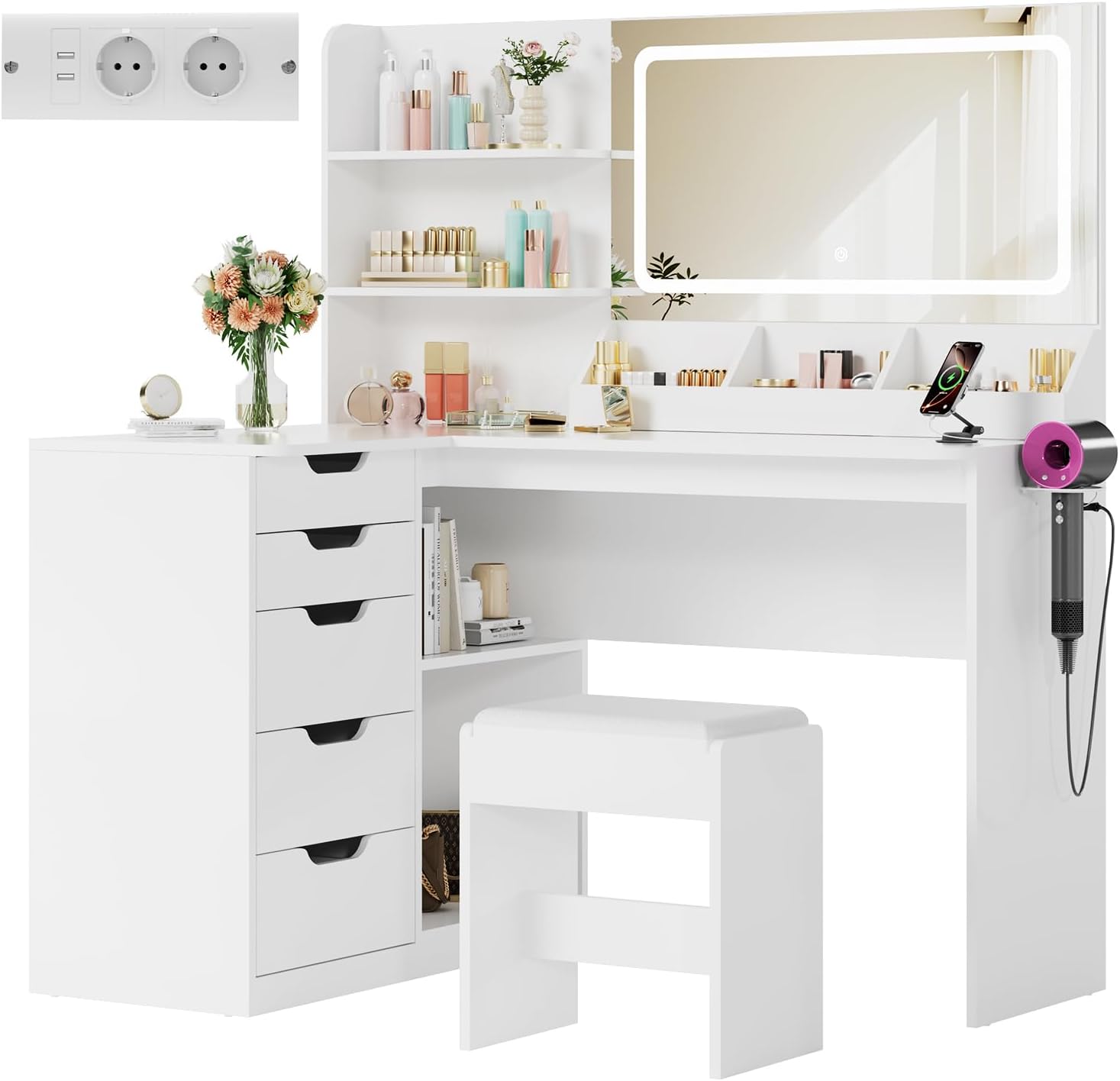
Image: Illustration of the three LED light modes (Cool White, Warm White, Warm Yellow) and the adjustable brightness control for the mirror.
Integrated Power Strip:
- The vanity includes an integrated power strip with 2 USB ports (5V/2.1A) and 2 AC power outlets (250V/13A).
- Use the USB ports to charge compatible electronic devices.
- Use the AC outlets to power hair dryers, curling irons, or other small appliances.
- Ensure devices are compatible with the provided voltage and current ratings.

Image: Close-up view of the integrated power strip, showing two USB ports and two AC power outlets, with a 4.6-foot power cable.
Storage Features:
- Utilize the 5 drawers for organized storage of makeup, accessories, and personal items.
- The 3 surface compartments are ideal for frequently used items.
- The 2 under-table compartments provide space for larger items like bags.
- The 2 long open shelves (38.5x13 cm) offer additional display and storage options.

Image: Detailed view of the vanity's storage features, including open shelves, desktop compartments, five drawers with guides, and two under-desk compartments.
Maintenance
- Cleaning: Wipe the vanity surfaces with a soft, damp cloth. Avoid abrasive cleaners or harsh chemicals that could damage the finish.
- Mirror Care: Clean the mirror with a glass cleaner and a lint-free cloth. Do not spray cleaner directly onto the mirror to prevent liquid from seeping into the electrical components.
- Electrical Components: Regularly check the power cord and connections for any signs of damage. If damage is found, discontinue use and contact customer support.
- General Care: Avoid placing hot items directly on the surface. Protect the vanity from excessive moisture and direct sunlight.
Troubleshooting
| Problem | Possible Cause | Solution |
|---|---|---|
| LED light does not turn on. | Power cord not plugged in; loose connection; power outage; faulty LED. | Ensure the power cord is securely plugged into a working outlet. Check all electrical connections. Verify power to the outlet. If problem persists, contact customer support. |
| Light brightness or mode cannot be adjusted. | Incorrect operation; sensor issue. | Refer to "Operating Instructions" for correct touch control usage. Ensure your finger is clean and dry when touching the sensor. |
| Power outlets/USB ports are not working. | Power cord not plugged in; device not compatible; circuit overload. | Check power cord connection. Ensure your device is compatible with 5V/2.1A (USB) or 250V/13A (AC). Avoid overloading the outlets. |
| Vanity feels unstable or wobbly. | Loose assembly screws; uneven floor. | Re-tighten all assembly screws. Ensure the vanity is placed on a level surface. Use shims if necessary. |
Specifications
| Feature | Detail |
|---|---|
| Model Number | MT-0558 |
| Color | White |
| Overall Dimensions (W x D x H) | 120 x 80 x 136 cm (47.2 x 31.5 x 53.5 inches) |
| Mirror Dimensions | 77.5 x 44 cm (30.5 x 17.3 inches) |
| Material | Engineered Wood |
| Product Weight | 53.1 kg (117.1 lbs) |
| Number of Drawers | 5 |
| LED Light Modes | Natural, Warm, Cool (Adjustable Brightness) |
| Power Outlets | 2 x AC 250V/13A |
| USB Ports | 2 x USB 5V/2.1A |
| Stool Seat Height | 44 cm (17.3 inches) |
| Assembly Required | Yes |
| Care Instructions | Wipe with a damp cloth |

Image: Detailed diagram showing the dimensions of the vanity, mirror, drawers, and stool.
Warranty Information
Devoko products are covered by a standard manufacturer's warranty against defects in materials and workmanship. Please refer to the warranty card included in your package for specific terms, conditions, and duration. Keep your proof of purchase for warranty claims.
For warranty service, please contact Devoko customer support with your model number and purchase details.
Customer Support
If you have any questions, require assistance with assembly, or encounter any issues with your Devoko Corner Makeup Vanity, please contact our customer support team.
- Online Support: Visit the official Devoko website for FAQs and support resources.
- Email: [Insert Customer Support Email Here]
- Phone: [Insert Customer Support Phone Number Here]
Please have your model number (MT-0558) and purchase date ready when contacting support.
Related documentsMT-0558

Ask a question about this manual
Ask about setup, troubleshooting, compatibility, parts, safety, or missing instructions. Manuals+ will review the question and use this page’s manual context to help answer it.