1. Introduction
Thank you for choosing the AKLOT B-CORE546 Fully-Expandable Electric Drum Set. This manual provides essential information for setting up, operating, maintaining, and troubleshooting your new electronic drum kit. Please read it thoroughly to ensure optimal performance and longevity of your instrument.

Figure 1.1: The AKLOT B-CORE546 Electric Drum Set, showcasing its advanced and fully-expandable design.
2. What's in the Box
Your AKLOT B-CORE546 Electric Drum Set package includes the following components:
- 12" Wooden Snare (dual zone)
- 3x10" Dual-Zone Mesh Toms
- 10" Tower-Style Mesh Bass Drum
- 12" Independent Hi-Hat
- 12" Three-Zone Ride Cymbal
- 2x12" Dual-Zone Crash Cymbals
- Sound Module
- All-Independent Adjustable Stand System
- Pair of Drum Sticks
- Structured Lesson Book by professional drummer GO

Figure 2.1: All components of the AKLOT B-CORE546 Electric Drum Set, including drums, cymbals, module, and accessories.
3. Setup
Proper assembly is crucial for the stability and performance of your drum set. Follow these steps carefully:
3.1 Assembling the Stand System
The AKLOT B-CORE546 features a fully independent, double-braced chrome stand system. Each drum and cymbal mounts like an acoustic kit, providing a familiar layout and natural feel. Ball-joint mounts allow smooth adjustment of height, distance, and angle.
- Unpack all stand components and lay them out.
- Assemble the main frame using the provided drum key. Keep all clamps slightly loose during initial assembly to allow for adjustments.
- Attach the 120° double-braced tripod legs and ensure anti-slip rubber feet are securely in place for stability.
Video 3.1: Official AKLOT Electric Drum Set assembly guide. This video demonstrates the setup process for a similar AKLOT electric drum set, providing visual guidance for assembling the stand and mounting components.
3.2 Mounting Drum Pads
Mount the 12" wooden snare and 3x10" dual-zone mesh toms onto the stand system. Each pad features triple-layer mesh drumheads with adjustable tension for a natural rebound.
- Securely attach the snare and tom pads to their respective arms on the stand.
- Adjust the height and angle of each pad to your preferred playing position.
- Once positioned, tighten all clamps firmly.

Figure 3.1: The 12" independent wooden shell mesh snare drum, offering natural rebound and precise dynamic response.
3.3 Installing Cymbals
Attach the 12" independent hi-hat, 12" triple-zone ride cymbal, and 2x12" dual-zone crash cymbals.
- Mount the hi-hat, ride, and crash cymbals onto their dedicated stands.
- Adjust cymbal heights and angles for comfortable reach and playability.
- Ensure all cymbal mounts are tightened to prevent movement during play.
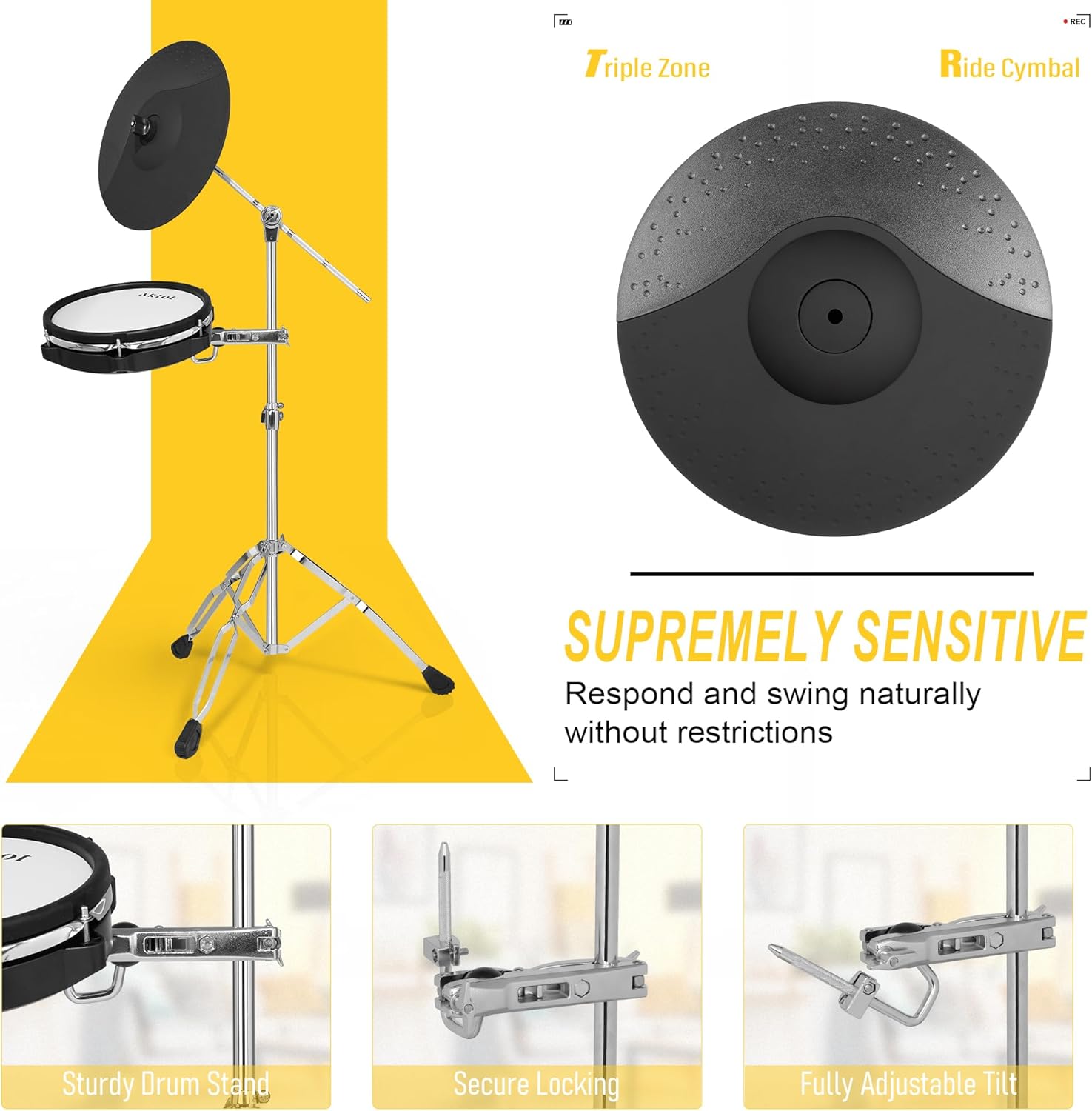
Figure 3.2: The 12" triple-zone ride cymbal, providing lifelike response and expressive playability across its edge, bow, and bell zones.
3.4 Setting up the Bass Drum and Pedals
Position the 10" mesh kick pad and connect the bass drum pedal.
- Place the 10" mesh kick pad in front of the drum set.
- Attach the sturdy metal pedal to the kick pad.
- Ensure the four anti-slip rubber feet on the kick pad are stable.

Figure 3.3: The 10" mesh kick pad with a high-density rubber beater and sturdy metal pedal, designed for precise feedback and dynamic control.
3.5 Connecting the Sound Module and Wiring
Mount the drum module and connect all pads and cymbals using the provided wiring harness.
- Mount the drum module to the main stand in an easily accessible position.
- Connect each drum pad and cymbal to the corresponding input on the drum module using the labeled cables.
- Plug in the power adapter to the module and a power outlet.
Video 3.2: Official AKLOT Electric Drum Set with Kick-Tower assembly guide. This video provides visual instructions for setting up the drum module and connecting all the components.
4. Operating Instructions
Your AKLOT B-CORE546 Electric Drum Set is designed for expressive playability and versatile sound options.
4.1 Drum Module Functions
The drum module features 475 meticulously sampled authentic drum, cymbal, and percussion sounds with dynamic velocity sensitivity. Choose from 25 professional preset drum kits or create and save 25 fully customizable user kits.
- Kit Selection: Use the 'KIT' buttons to navigate through 25 preset kits or your 25 user kits.
- Voice/Sound Editing: Advanced editing tools allow precise control over pitch, pan, velocity curves, trigger sensitivity, cross-talk, and reverb for each sound.
- Metronome: Utilize the sophisticated programmable metronome to improve timing and accuracy. Adjust tempo and rhythm patterns.
- Built-in Songs: Play along with 50 training tracks to workshop your grooves and pocket.
- Recording: The module supports recording and saving your performances.

Figure 4.1: The AKLOT drum module, featuring a clear display and intuitive controls for kit selection, sound editing, and practice functions.
4.2 Pad and Cymbal Features
All drum pads and cymbals are designed for genuine drum feel and ultimate precision.
- Velocity Sensitivity: All pads and cymbals respond dynamically to your strike force, from delicate ghost notes to powerful rimshots.
- Snare Drum: The 12" wooden snare delivers natural rebound and precise dynamic response.
- Hi-Hat: The 12" independent hi-hat features a three-stage trigger system (open, closed, half-open) for realistic feel.
- Cymbals: The 12" triple-zone ride and 2x12" dual-zone crash cymbals provide lifelike response. All cymbals support choking techniques.
- Mesh Drumheads: Triple-layer mesh drumheads with adjustable tension mimic the response of an acoustic drum.

Figure 4.2: Triple-layer mesh drumheads with dual-zone triggering, providing a natural rebound and customizable tension.
4.3 Connectivity and Practice
Expand your skills and musical experience with smart connectivity features.
- Wireless Playback: Jam along with your favorite songs wirelessly by streaming directly from your phone or tablet through the drum module.
- USB-MIDI Output: Connect seamlessly to drum learning apps like Melodics and Drumeo or music production software such as GarageBand and Ableton Live.
- Coach Mode: The built-in coach mode and scoring system offer three intelligent training modes to improve timing, accuracy, and speed.
- Headphone Use: Connect headphones to the module for silent practice, ensuring you don't disturb others.

Figure 4.3: The drum module's connectivity panel, highlighting USB-MIDI, AUX IN, and headphone ports for versatile use.
Video 4.1: AKLOT B-CORE546 Electric Drum Set Sound Demo. This video demonstrates the various sounds and dynamic responses of the B-CORE546 drum set.
5. Maintenance
To ensure the longevity and optimal performance of your AKLOT B-CORE546 Electric Drum Set, follow these maintenance guidelines:
- Cleaning: Use a soft, dry cloth to wipe down the drum pads, cymbals, module, and stand regularly. Avoid abrasive cleaners or solvents that could damage the surfaces.
- Mesh Head Tension: Periodically check and adjust the tension of the mesh drumheads using the provided drum key. This helps maintain consistent rebound and feel.
- Cable Management: Keep all cables neatly organized and secured to the stand to prevent tangling or damage. Avoid sharp bends or excessive pulling on the cables.
- Storage: When not in use for extended periods, store the drum set in a dry, temperature-controlled environment away from direct sunlight or extreme humidity.
6. Troubleshooting
If you encounter any issues with your AKLOT B-CORE546 Electric Drum Set, refer to the following common troubleshooting tips:
- No Sound: Ensure the power adapter is securely connected and the module is turned on. Check headphone or audio output connections and volume levels. Verify all drum and cymbal cables are correctly plugged into the module.
- Inconsistent Triggering: Check cable connections for any looseness. Adjust trigger sensitivity settings in the drum module (refer to the module's detailed manual for specific instructions). Ensure mesh heads are properly tensioned.
- Crosstalk: If striking one pad triggers another, adjust the crosstalk settings in the drum module. Ensure pads are not mounted too close together.
- Pedal Issues: For bass drum or hi-hat pedals, ensure they are correctly assembled and connected. Check for any obstructions preventing full movement.
- Module Display Not Working: Power cycle the module. If the issue persists, contact customer support.
7. Specifications
| Brand | AKLOT |
| Model Name | B-CORE546 |
| Item Model Number | B-CORE546 |
| Product Dimensions | 29.53 x 12.99 x 28.35 inches |
| Item Weight | 83.8 pounds |
| Body Material | Mesh |
| Finish Type | Polished |
| Hand Orientation | Ambidextrous |
| Included Components | 12" Wooden Snare (dual zone); 3x10" Tom (dual zone); 10'' Tower-Style Mesh Bass Drum; 12" Independent Hi-Hat; 2x12" Crashes (dual zone, choke); 12" Ride (triple zone, choke); Sound Module; All-Independent Adjustable Stand System |
| Material Type | All-Independent Adjustable Stand System, Iron, Mesh Drum Pads, Triple Zone Silicon Cymbal |
8. Warranty & Support
AKLOT is committed to providing a seamless musical experience. Your product is backed by our responsive customer service team.
- Customer Service: Whatever issue you encounter, we’re here to provide you with care and support.
- Returns: This product is eligible for 30-day easy returns.
For further assistance, please refer to the contact information provided with your purchase or visit the AKLOT official store.


