
1. Product Overview
The Riflewell 6.5 Cu ft Home Safe Box is designed to secure your valuables with advanced features including a digital keypad, dual alarm system, and robust construction. This manual provides essential information for proper setup, operation, and maintenance of your safe.

Image: The Riflewell 6.5 Cu ft Home Safe Box, featuring two separate compartments, each with its own digital keypad and key access. The safe is shown with its doors open, revealing organized storage for various valuables like cash, gold bars, and jewelry.
2. Product Features
- Large Capacity: External dimensions of 13.77"D x 13.77"W x 29.5"H, offering ample storage for documents, laptops, pistols, cash, and jewelry. Features a double-door design for separate access.
- Advanced Digital Keypad: Equipped with 3D glowing digital buttons for quick and error-free unlocking. Includes a unique embedded 'Indicator Light' design.
- Emergency Power Jack: Universal USB Type-C emergency power jack ensures access even if batteries are depleted.
- Metal Storage Box & Deposit Slot: Includes an internal metal storage box for smaller items and a front deposit slot for easy cash/coin insertion without opening the main door.
- Internal LED Lights: Two internal LED lights illuminate the safe's interior for visibility in low-light conditions.
- Anti-Theft Construction: Micro-slit design with laser cutting precision to prevent prying. Constructed from reinforced low carbon alloy steel with a thickened door and five solid live bolts.
- Dual Alarm System: Activates a 70-decibel alarm after three consecutive incorrect password entries or violent vibrations.
- Mute Function: Allows for silent operation, suitable for situations requiring discretion.
- Soft Interior Lining: Flannel lining protects valuables from scratches and damage.
- Removable and Adjustable Shelf: Customize interior space to fit various items.

Image: A detailed diagram highlighting key features of the safe, such as the soft interior lining, drop slot, internal metal storage box, LED lights, double door mechanism, and five solid locking bolts.
3. Package Contents
Upon unpacking, please verify that all the following items are included:
- 1 x Riflewell 6.5 Cu ft Home Safe Box
- 4 x Emergency Keys
- 6 x Expansion Screws (for mounting)
- 1 x USB Type-C Cable (for emergency power)
- 4 x Non-slip Foot Pads
- 1 x User Manual (this document)

Image: An illustration showing the safe's dimensions and the included accessories: circular foot pads, a Type-C cable, expansion bolts, emergency keys, and the instruction manual.
4. Setup Instructions
4.1 Initial Opening and Battery Installation
- Open with Emergency Key: For the first use, insert an emergency key into the keyhole on the digital keypad. Turn the key counter-clockwise to its limit, then rotate the knob clockwise to open the safe door.
- Install Batteries: Locate the battery compartment inside the safe door. Open the cover and install four (4) AA alkaline batteries, ensuring correct polarity. Close the battery cover.
Video: Demonstrates how to open the safe for the first time using the emergency key and how to install the 4 AA batteries into the internal battery compartment (0:26 - 0:40).
4.2 Setting User Passwords
- Set First User Password: With the safe door open, short press the red 'SETTING BUTTON' located inside the door. The keypad will beep. Input your desired 3-8 digit user code, then press '#' to confirm.
- Set Second User Password (Optional): Press '0' twice on the keypad, then short press the 'SETTING BUTTON'. Input your desired 3-8 digit second user code, then press '#' to confirm.
Video: Illustrates the process of setting the first user password (0:40 - 0:54) and then setting a second user password (0:54 - 1:10).
4.3 Mounting the Safe
The safe can be mounted to a wall or floor for added security. It features four pre-drilled holes on the back and two on the bottom. Use the provided expansion screws to secure the safe.
Video: Shows the pre-drilled holes for mounting the safe to a wall or floor using expansion screws (2:11 - 2:20).
5. Operating Instructions
5.1 Opening the Safe
The safe offers three methods for opening:
- Using a Password: Input your set 3-8 digit password on the digital keypad, then press '#'. Rotate the knob clockwise to open the door.
- Using an Emergency Key: Insert an emergency key into the keyhole, turn it counter-clockwise, then rotate the knob clockwise to open.
- Using USB Emergency Power + Password: If batteries are dead, connect the provided USB Type-C cable to the emergency power jack. Input your password, then press '#'. Rotate the knob clockwise to open.
Video: Demonstrates the three ways to open the safe: using the emergency key (1:40 - 1:45), using a password (1:45 - 1:51), and using the USB emergency power with a password (1:51 - 2:00).
5.2 Using the Deposit Slot
The safe features a convenient front deposit slot, allowing you to insert money or coins without needing to open the main safe door.

Image: A hand is shown inserting banknotes into the top deposit slot of the safe, illustrating its use.
5.3 Adjusting Shelves
The interior shelf is removable and adjustable to accommodate items of various sizes. Simply remove the shelf supports, reposition them to your desired height, and place the shelf back.
Video: Shows how to remove and adjust the internal shelf within the safe (2:00 - 2:11).
6. Security Features
6.1 Dual Alarm System
The safe is equipped with a dual alarm system for enhanced security:
- Wrong Password Alarm: If three consecutive incorrect passwords are entered, the system will lock the keypad and trigger an audible alarm for 50 seconds. Inputting the correct password will stop the alarm.
- Vibration Alarm: In standby mode, short press '#' to activate the vibration alarm mode. If the safe is shaken or hit violently, an alarm will sound for 50 seconds. Inputting the correct password will stop the alarm.
Video: Demonstrates the alarm function when three consecutive incorrect passwords are entered (1:10 - 1:29) and how to activate and trigger the vibration alarm (1:29 - 1:40).
6.2 Anti-Theft Construction
The safe is built with robust materials and design features to deter unauthorized access:
- Reinforced Steel: Made from low carbon alloy steel.
- Pry-Resistant Door: Features a thickened door and micro-slit laser-cut design to eliminate warping points and strengthen anti-prying capabilities.
- Solid Live Bolts: Equipped with five solid live bolts for secure locking.
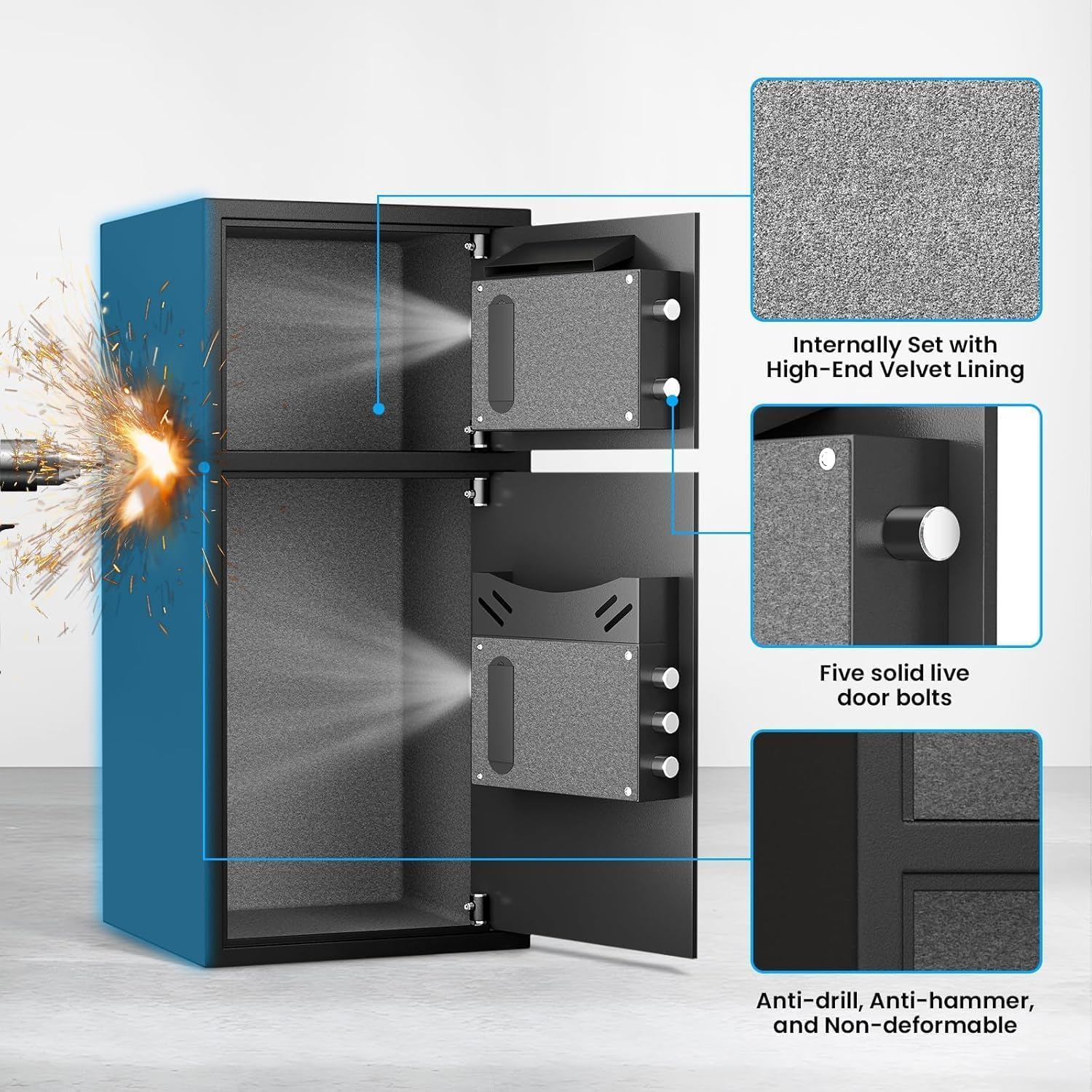
Image: A close-up view of the safe's interior, highlighting the high-end velvet lining and the five solid live door bolts that secure the door.
7. Maintenance
- Battery Replacement: Replace the four AA alkaline batteries annually or when the low battery indicator appears to ensure continuous electronic keypad functionality.
- Cleaning: Wipe the exterior and interior surfaces with a soft, dry cloth. Avoid using abrasive cleaners or solvents.
- Key Storage: Always store emergency keys in a secure location outside the safe.
8. Troubleshooting
| Problem | Possible Cause | Solution |
|---|---|---|
| Safe does not open with password. | Incorrect password entered, dead batteries, or keypad malfunction. | Verify password. Replace batteries. Use emergency key or USB emergency power. |
| Keypad is unresponsive. | Dead batteries or keypad locked due to multiple incorrect entries. | Replace batteries. Wait for alarm to clear if triggered. Use emergency key or USB emergency power. |
| Alarm sounds unexpectedly. | Incorrect password entries or vibration alarm triggered. | Input correct password to stop the alarm. Check if vibration alarm was accidentally activated. |
| Door does not close properly. | Obstruction in the door frame or locking mechanism. | Check for any items blocking the door. Ensure locking bolts retract fully before closing. |
9. Specifications
| Feature | Detail |
|---|---|
| Brand | Riflewell |
| Model Number | KL-75DD |
| Product Dimensions (External) | 14.18"D x 15.75"W x 33.46"H |
| Capacity | 6.5 Cu ft (as per product title, though specifications list 7 Cu ft, using title for consistency) |
| Lock Type | Electronic Combination Lock |
| Color | Black |
| Material | Low Carbon Steel |
| Special Features | Alarm System, Deposit Slot, LED Light, Soft Lining |
| Mounting Type | Floor Mount / Wall Mount |
| Item Weight | 39.6 Pounds |
10. Warranty and Support
Riflewell offers comprehensive customer support for your safe:
- Lifetime Warranty: The product is covered by a lifetime warranty.
- 24-Hour Online Customer Service: For any issues or inquiries, customer service is available 24/7.
- 90-Day Unconditional Returns: Returns are accepted within 90 days of purchase without conditions.
- Lifetime Key Matching Service: In case of lost keys, a key matching service is available for the lifetime of the product.
If you encounter any problems with your safe, please contact Riflewell customer service directly for assistance.