
1. Introduction
This manual provides essential information for the safe and effective use of your MZHOU DC 8-32V to 5V 5A 25W Buck Converter. Please read these instructions carefully before installation and operation to ensure optimal performance and safety.
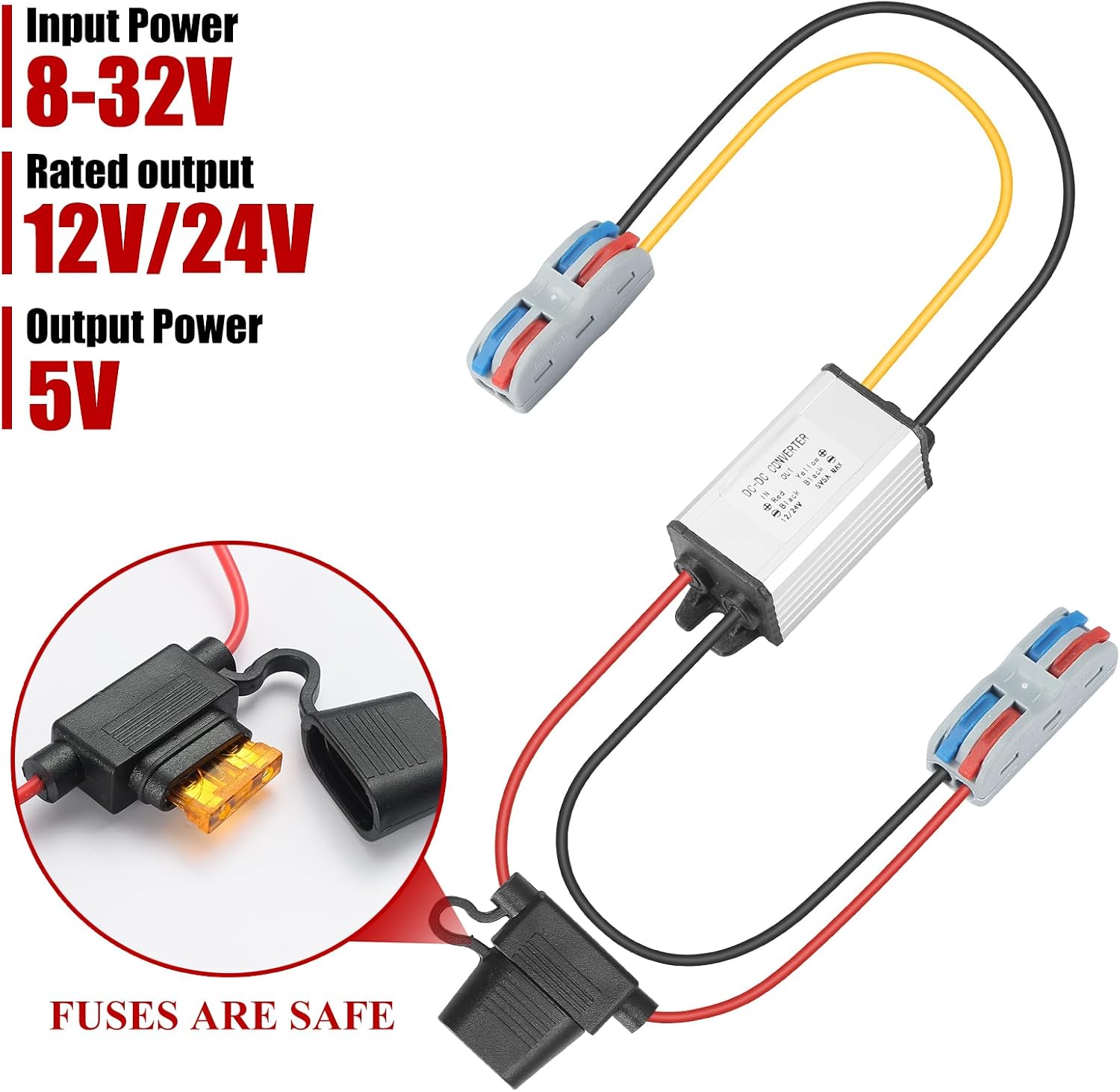
Image: The MZHOU DC-DC Buck Converter, illustrating its input power range of 8-32V, rated output of 12V/24V, and output power of 5V. The image also highlights the integrated fuse for safety.
2. Specifications
| Input Voltage Range | DC 8-32V |
| Rated Input Voltage | DC 12V/24V |
| Output Voltage | DC 5V |
| Output Current | 5A (max) |
| Output Power | 25W |
| Conversion Efficiency | Up to 95% |
| Waterproof Rating | IP67 |
| Operating Temperature | -20°C to 65°C |
| Storage Temperature | -40°C to 85°C |
| Operating Humidity | 10% to 90% RH |
| Residual Ripple | 300 mVP-P |
| Safety Protections | Short-circuit, Over-temperature, Over-current, Integrated Fuse |
| Compliance | CE |

Image: Detailed dimensions of the DC-DC converter, showing front and side views with measurements in centimeters.
3. Safety Instructions
Adherence to these safety guidelines is crucial for preventing damage to the converter and connected devices, and for ensuring user safety.
- The load connected to the output of the power regulator must not exceed the maximum specified load power. Exceeding this limit will damage the power regulator.
- If the ambient temperature is excessively high, the power output should be reduced accordingly. Operating at lower temperatures ensures reliable long-term performance.
- Do not use the device near heat sources such as open flames or radiators.
- Never connect the input cable to a 220V household mains supply. This device is designed for DC input only.
- Do not attempt to disassemble or service the unit unless you are a qualified professional.
- Ensure the input voltage remains within the converter's specified fluctuation range (DC 8-32V).
- The output power capacity of the converter must be greater than the power required by the connected devices.
- Ensure correct wiring: positive and negative wires must not be reversed. Incorrect wiring can cause permanent damage to the product.

Image: A diagram showing the input (DC 12V/24V) and output (DC 5V) wiring connections, along with critical safety notices regarding reverse polarity, overloading, and high ambient temperatures.
4. Setup and Installation
Follow these steps for proper installation of the DC-DC converter.
4.1 Wiring Connections
- Input: Connect the Red wire to the positive (+) terminal of your DC power source (8-32V). Connect the Black wire to the negative (-) terminal.
- Output: Connect the Yellow wire to the positive (+) terminal of your 5V device. Connect the Black wire to the negative (-) terminal.
Important: Ensure all wiring is correct before applying power. Incorrect wiring can permanently damage the converter and connected devices.
4.2 Connecting Wires with Lever Nut Terminals
The 5V voltage regulator is equipped with lever nut terminals for quick and secure connections. Follow these steps:
- Step 1: Prepare the Wire. Isolate approximately 10mm of the wire's insulation.
- Step 2: Open the Terminal. Pull off the boost key (lever) on the terminal to open the clamping mechanism.
- Step 3: Insert the Wire. Insert the stripped end of the wire completely into the terminal opening.
- Step 4: Secure the Connection. Press the boost key (lever) firmly down until it clicks into place, securing the wire.

Image: A visual guide demonstrating the four steps to connect wires easily and quickly using the provided lever nut terminals, emphasizing safety and durability.

Image: A technical diagram illustrating the electrical connection scheme with red, yellow, and black wires connected to a central control unit, representing the converter's wiring.
5. Operating Instructions
Once properly installed, the MZHOU DC-DC Buck Converter operates automatically to provide a stable 5V output from a varying DC input.
- Ensure your input power source is within the 8-32V DC range.
- Connect your 5V devices to the output terminals, ensuring the total current draw does not exceed 5A (25W).
- The converter is designed for continuous operation within its specified temperature and load limits.
- The IP67 waterproof rating ensures protection against dust and temporary immersion in water, making it suitable for various environments.

Image: The DC-DC converter shown partially submerged in water, highlighting its IP67 waterproof performance, indicating its suitability for challenging environments.
6. Maintenance
The MZHOU DC-DC Buck Converter is designed for low maintenance. However, periodic checks can help ensure its longevity and reliable operation.
- Visual Inspection: Periodically check the converter and its wiring for any signs of physical damage, corrosion, or loose connections.
- Cleaning: Keep the unit free from dust and debris. Use a soft, dry cloth for cleaning. Do not use liquid cleaners or solvents.
- Environmental Conditions: Ensure the operating environment remains within the specified temperature and humidity ranges. Avoid prolonged exposure to extreme conditions.
- Load Management: Regularly verify that the total load connected to the output does not exceed the converter's maximum capacity (25W, 5A).
7. Troubleshooting
If you encounter issues with your converter, refer to the following troubleshooting guide:
| Problem | Possible Cause | Solution |
|---|---|---|
| No output voltage | No input power; Incorrect wiring; Blown fuse; Overload protection activated. | Check input power source; Verify wiring connections (Red to +, Black to - for input; Yellow to +, Black to - for output); Inspect and replace fuse if necessary; Reduce connected load. |
| Output voltage is unstable or incorrect | Input voltage fluctuation; Overload; Poor connections. | Ensure stable input voltage within 8-32V range; Reduce connected load; Check all wiring connections for tightness. |
| Converter is overheating | Excessive load; High ambient temperature; Insufficient ventilation. | Reduce connected load; Ensure adequate airflow around the converter; If ambient temperature is above 40°C, reduce power usage. |
| Connected device not functioning | Converter output issue; Device fault; Incorrect device voltage/current requirements. | Verify converter output with a multimeter; Test the device with another known good 5V power source; Ensure device requirements match converter output (5V, max 5A). |
8. Warranty and Support
8.1 Warranty Information
This MZHOU product comes with a 30-day warranty against manufacturer defects. This warranty covers defects in materials and workmanship under normal use. It does not cover damage resulting from misuse, accident, modification, unauthorized repair, or improper installation.
8.2 Customer Support
For technical assistance, warranty claims, or any questions regarding your MZHOU DC-DC Buck Converter, please contact your retailer or the MZHOU customer support team through the contact information provided at the point of purchase.
