
Introduction
Welcome to the MERACH T12 Incline Treadmill user manual. This guide provides essential information for the safe and effective operation, maintenance, and setup of your new fitness equipment. The MERACH T12 is designed for home use, offering a quiet and durable performance with adjustable incline and speed settings to enhance your workout experience.
Important Safety Information
Please read all instructions carefully before using the treadmill. Keep this manual for future reference. Failure to follow these safety guidelines may result in injury or damage to the product.
- Always ensure the safety key is properly attached to both the console and your clothing before starting a workout.
- Keep children and pets away from the treadmill during operation.
- Place the treadmill on a flat, stable surface with adequate clearance around it.
- Do not use the treadmill if it is damaged or malfunctioning. Contact customer support immediately.
- Consult a physician before starting any new exercise program.
- Maximum user weight capacity: 300 lbs.
What's in the Box
Upon unpacking, ensure all the following components are present:
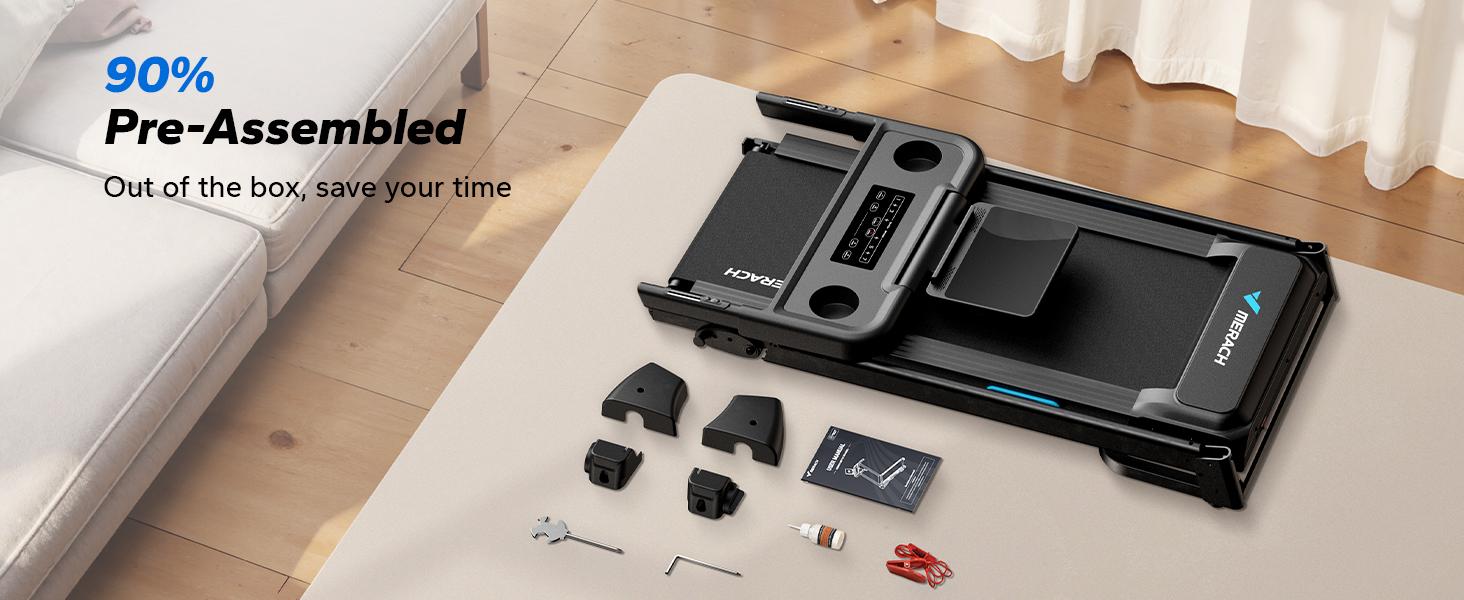
- MERACH T12 Treadmill (90% Pre-Assembled)
- Power Cord
- Safety Key
- Tool Kit
- User Manual (this document)

Setup
The MERACH T12 treadmill arrives 90% pre-assembled, simplifying the setup process. Follow these steps to prepare your treadmill for use:
- Unfolding the Treadmill: Carefully lift the running deck until it locks into the upright position. Ensure the hydraulic lift mechanism engages securely.
- Connecting Power: Plug the power cord into the treadmill's power port and then into a grounded electrical outlet.
- Attaching Safety Key: Insert the safety key into its designated slot on the console. The treadmill will not operate without the safety key in place.
- Adjusting Manual Incline: The treadmill features 3 manual incline levels (0%, 3%, 6%). To adjust, power off the treadmill, lift the rear of the running deck, and secure the support bar into the desired incline position.
Operating Instructions
Familiarize yourself with the control console and various functions to optimize your workout.
Control Console Overview
The smart LED console displays key workout metrics:
- Time: Duration of your workout.
- Distance: Miles covered during your session.
- kCal: Estimated calories burned.
- BMI: Body Mass Index (requires manual input via app).
- Speed: Current speed in MPH (0.5 - 7.5 MPH).
- Pulse: Your heart rate, measured via handlebar sensors.

Starting a Workout
- Step onto the treadmill, placing your feet on the side rails.
- Ensure the safety key is in place.
- Press the 'START' button on the console. The belt will begin moving at a low speed after a 3-second countdown.
Adjusting Speed and Incline
- Speed: Use the '+' and '-' buttons on the console or handlebars to adjust speed incrementally. Quick speed buttons (1, 3, 5, 7) allow for rapid changes. The speed range is 0.5 to 7.5 MPH.
- Incline: This model features 3 manual incline levels (0%, 3%, 6%). To change the incline, you must stop the treadmill, dismount, and manually adjust the support bar at the rear of the running deck.

Workout Programs
The treadmill includes 12 preset programs (P1-P12) designed to simulate various outdoor training scenarios and optimize calorie burning. Press the 'PROG.' button to cycle through available programs.
Heart Rate Monitoring
Grip the heart rate sensors on the handlebars with both hands to display your pulse on the console. For accurate readings, ensure your hands are clean and firmly placed on the sensors.
Stopping a Workout
Press the 'STOP' button on the console. The belt will gradually slow down and come to a complete stop. Alternatively, pulling the safety key will immediately stop the treadmill.
MERACH Interactive App
Enhance your fitness journey by connecting your MERACH T12 treadmill to the exclusive MERACH app. The app offers a variety of interactive features:
- Scenic Routes: Explore virtual outdoor environments as you exercise.
- Multiplayer Games: Challenge friends and other users in engaging fitness games.
- Coach-Led Classes: Access professional training sessions guided by certified coaches.
- Real-time Data Tracking: Monitor your progress with detailed workout statistics.
Video Demonstration: MERACH Treadmill with Incline
Folding and Storage
The MERACH T12 treadmill features a hydraulic lift system for easy folding and space-saving storage.
- Folding: Ensure the treadmill is stopped and powered off. Gently lift the running deck from the rear until the hydraulic arm engages and locks it into the upright position.
- Moving: Utilize the built-in transport wheels located at the front base of the treadmill to easily move it to your desired storage location.
- Unfolding: To unfold, gently kick the release mechanism at the base of the hydraulic arm with your foot. The running deck will slowly lower itself to the floor.
Folded Dimensions: 49.2" (Height) × 25.6" (Width) × 27.6" (Depth).
Specifications
| Feature | Detail |
|---|---|
| Brand | MERACH |
| Model Name | MR-T12 |
| Motor Horsepower | 2.5 HP |
| Speed Range | 0.5 - 7.5 MPH |
| Incline Levels | 3 Manual Levels (0%, 3%, 6%) |
| Running Belt Dimensions | 42.5" x 16.5" |
| Maximum Weight Recommendation | 300 Pounds |
| Product Dimensions (Unfolded) | 52.4"D x 27.6"W x 49.2"H |
| Folded Size | 49.2"H x 25.6"W x 27.6"D |
| Item Weight | 92.6 Pounds |
| Material | Alloy Steel |
| Display Type | LED |
| Special Features | Adjustable Height, Compact Design, Foldable, Heart Rate Monitor, Heavy Duty |
| Metrics Measured | BMI, Calories Burned, Distance, Heart Rate, Speed |
Maintenance
Regular maintenance ensures the longevity and optimal performance of your treadmill.
- Cleaning: Wipe down the console and running deck with a damp cloth after each use. Avoid abrasive cleaners.
- Belt Lubrication: Periodically check the running belt for dryness. Lubricate the belt as instructed in the detailed maintenance section of the full user manual (if applicable) or as recommended by MERACH customer support.
- Belt Tension: Ensure the running belt is properly tensioned. Refer to the full user manual for instructions on adjusting belt tension.
- Motor Area: Keep the motor area clean and free of dust and debris to prevent overheating.
Troubleshooting
If you encounter any issues with your MERACH T12 treadmill, please refer to the following common troubleshooting tips:
- Treadmill Not Starting: Ensure the power cord is securely plugged in, the power switch is ON, and the safety key is correctly inserted into the console.
- Belt Slipping: The running belt may need tensioning. Refer to the maintenance section or contact customer support for guidance.
- Unusual Noises: Check for any loose parts or foreign objects under the running deck. If the noise persists, discontinue use and contact support.
- Inaccurate Heart Rate Reading: Ensure your hands are firmly gripping both heart rate sensors on the handlebars.
For more detailed troubleshooting or persistent issues, please contact MERACH customer support.
Warranty and Support
MERACH stands behind the quality of its products. The MERACH T12 Incline Treadmill comes with a 1-year warranty.
For any questions, technical assistance, or warranty claims, please contact MERACH customer support. Our dedicated team offers lifetime customer support, including step-by-step video guides, one-to-one assistance, and quick replacement solutions.
Contact information can typically be found on the MERACH official website or within your product packaging.


