
Woleix WD12-250912
Woleix 12L Silent Dehumidifier User Manual
Model: WD12-250912
Brand: Woleix
1. Introduction
Thank you for choosing the Woleix 12L Silent Dehumidifier. This appliance is designed to efficiently remove excess moisture from your indoor environment, creating a healthier and more comfortable living space. It features advanced dehumidification technology, ultra-quiet operation, and user-friendly controls. Please read this manual thoroughly before operation to ensure proper use, maintenance, and safety.
2. Safety Instructions
- Always place the dehumidifier on a flat, stable surface.
- Ensure adequate clearance (at least 20 cm) around the unit for proper airflow.
- Do not block air inlets or outlets.
- Do not operate the unit near flammable gases or combustible materials.
- Unplug the unit before cleaning or performing any maintenance.
- Keep out of reach of children and pets.
- Do not use the unit if the power cord or plug is damaged.
- Empty the water tank regularly to prevent overflow.
3. Product Overview
The Woleix 12L Dehumidifier is designed for effective and quiet humidity control. Key features include a powerful compressor, intuitive control panel, and flexible drainage options.

Figure 3.1: Front view of the Woleix 12L Silent Dehumidifier, highlighting its compact design and 12L/day capacity.
Components:
- Air Inlet/Outlet
- Control Panel with LED Display
- Removable Water Tank (1.5L capacity)
- Continuous Drainage Outlet
- Washable Air Filter
- Retractable Handle
- 360° Swivel Wheels

Figure 3.2: The dehumidifier shown with its dimensions (19 x 28 x 40.5 cm), illustrating its compact size for easy placement.
4. Setup
- Unpacking: Carefully remove the dehumidifier from its packaging. Retain packaging for future storage or transport.
- Placement: Place the unit upright on a level floor in the desired room. Ensure there is at least 20 cm of space around the unit for optimal air circulation. The 360° swivel wheels and retractable handle facilitate easy movement.
- Power Connection: Plug the power cord into a grounded electrical outlet.
- Initial Use: Allow the unit to stand upright for at least 2 hours before first use if it has been transported horizontally.

Figure 4.1: Demonstrates the ease of moving the dehumidifier using its retractable handle and 360° swivel wheels.
5. Operating Instructions
The dehumidifier features an intuitive control panel for easy operation.

Figure 5.1: Detailed view of the control panel, showing buttons for power, mode, timer, humidity settings, and fan speed.
- Power On/Off: Press the 'POWER' button to turn the unit on or off.
- Setting Humidity Level: Use the 'SET' buttons (up/down arrows) to adjust the desired humidity level (range 30-80% RH). The unit will operate until this level is reached.
- Fan Speed: Press the 'SPEED' button to cycle through available fan speeds (e.g., Low, High).
- Timer Function: Press the 'TIMER' button to set an auto-on or auto-off time (1-24 hours).
- Ion/Lock Function: The 'ION/LOCK' button can activate the ionizer for air purification or lock the control panel to prevent accidental changes.
6. Modes of Operation
The dehumidifier offers multiple operating modes to suit various needs:
- Automatic Mode (One-Time Mode): This mode automatically deactivates when the set humidity level is reached, preventing unnecessary cycles and saving energy. It's ideal for maintaining stable humidity.
- Comfort Mode: Operates at a low noise level (approx. 35 dB) for minimal disturbance, ensuring a comfortable environment.
- Continuous Mode: The unit operates at maximum dehumidification capacity continuously, suitable for highly humid conditions.
- Drying Mode (for clothes): Designed to accelerate the drying of laundry by circulating dry air, preventing odors and ensuring clothes are fresh.
- Sleep Mode: Runs at a low fan speed with the light display automatically turned off, providing quiet operation for peaceful sleep.
Video 6.1: Demonstrates various operating modes including Auto Mode, Drying Mode, and Sleep Mode, showcasing the dehumidifier's versatility.
7. Drainage Options
The Woleix dehumidifier offers two convenient drainage methods:
- Manual Drainage (1.5L Water Tank): The unit collects water in a visible 1.5-liter tank. It automatically stops operation when the tank is full to prevent overflow. Simply remove the tank and empty the collected water.
- Continuous Drainage: For uninterrupted operation, connect the included 1-meter drainage hose to the continuous drainage outlet. This allows water to drain directly into a floor drain or larger container, eliminating the need for manual emptying.

Figure 7.1: Illustrates the dual drainage system, featuring the removable water tank and the continuous drainage hose connection.
8. Maintenance
Regular maintenance ensures optimal performance and longevity of your dehumidifier.
- Cleaning the Air Filter: The removable filter should be cleaned regularly (e.g., every two weeks or as needed) to maintain efficiency. Remove the filter, rinse it under running water, and allow it to air dry completely before reinserting.
- Emptying the Water Tank: When the 'Tank Full' indicator lights up, carefully remove the water tank and dispose of the collected water. Reinsert the tank securely.
- General Cleaning: Wipe the exterior of the unit with a soft, damp cloth. Do not use harsh chemicals or abrasive cleaners.
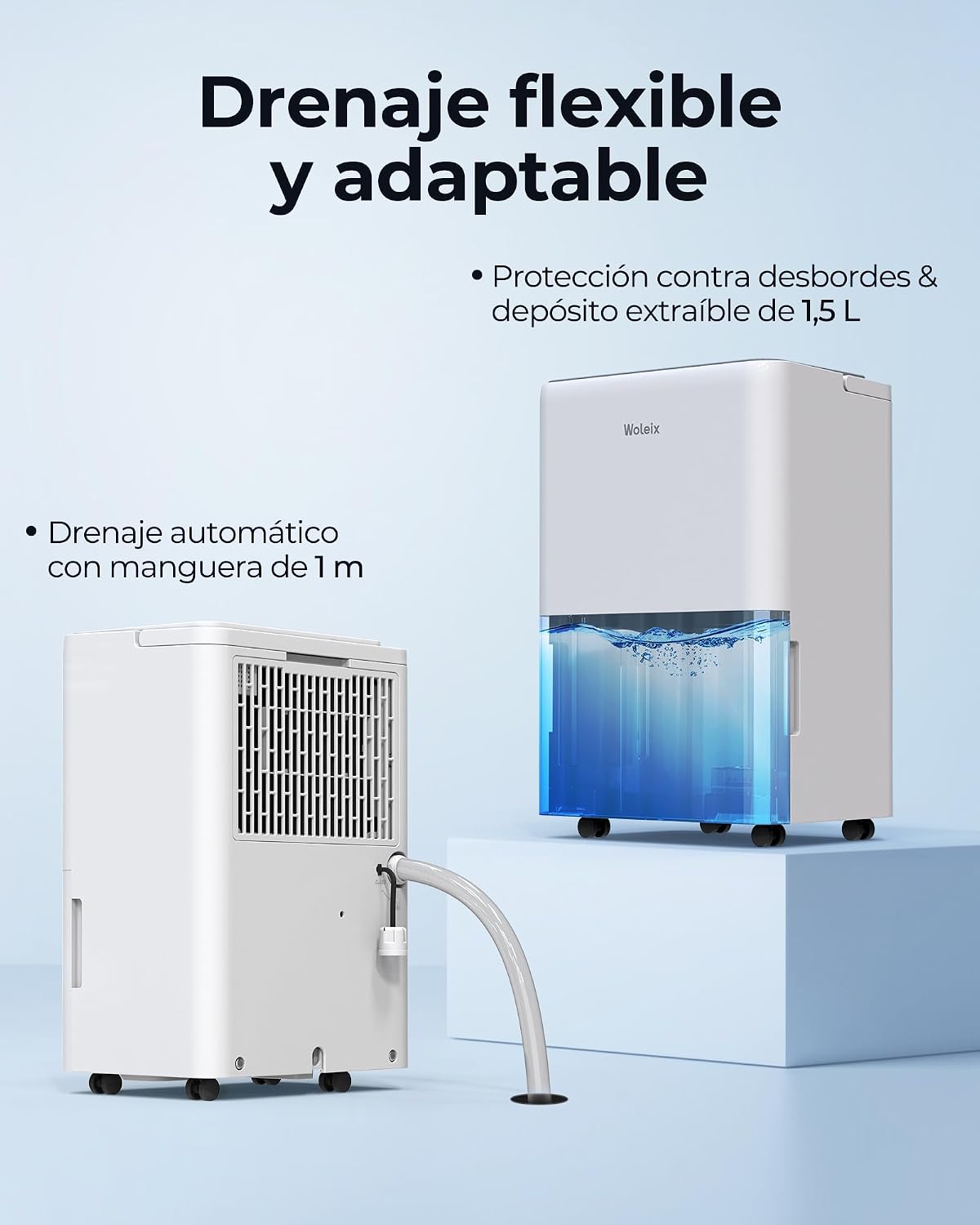
Figure 8.1: Shows the process of removing and cleaning the washable air filter, crucial for maintaining air quality and unit efficiency.
9. Troubleshooting
If you encounter issues with your dehumidifier, refer to the following common problems and solutions:
- Unit does not turn on: Check if the power cord is securely plugged in and if the power outlet is functioning. Ensure the water tank is correctly inserted and not full.
- No water collected: Verify that the desired humidity level is set lower than the current room humidity. Check if the air filter is clean and not blocked. Ensure room temperature is above 5°C.
- Unit is noisy: Ensure the unit is placed on a flat, stable surface. Check for any obstructions in the air inlets or outlets.
- Error Codes: If an error code appears on the display, consult the full product manual or contact customer support for specific guidance.
10. Specifications
| Feature | Specification |
|---|---|
| Brand | Woleix |
| Model Number | WD12-250912 |
| Dehumidification Capacity | 12 L/day |
| Coverage Area | 25m² / 122m³ |
| Power | 190 watts |
| Noise Level | 35 dB (in Comfort Mode) |
| Water Tank Volume | 1.5 Liters |
| Dimensions (L x W x H) | 19 x 28 x 40.5 cm |
| Weight | 9.7 kg |
| Special Features | 10-year warranty, 365-day exchange, Lifetime spare parts, 24H Timer, 1m drainage hose, Washable filter, Retractable handle, 360° swivel wheels, Automatic Mode, One-Time Mode, Comfort Mode, Continuous Mode |
11. Warranty and Support
Woleix offers comprehensive support for your dehumidifier:
- 10-Year Warranty: Enjoy a full 10-year warranty on your dehumidifier.
- 365-Day Exchange: In case of any defect within the first 365 days, you will receive a new dehumidifier directly, without complicated repairs.
- Lifetime Spare Parts: Original spare parts are available for the lifetime of the product.
- Specialized Technical Advice: Access to specialized technical support for any questions or assistance needed.
Ask a question about this manual
Ask about setup, troubleshooting, compatibility, parts, safety, or missing instructions. Manuals+ will review the question and use this page’s manual context to help answer it.