
1. Safety Information
Before operating your Ruitoo M4 Max Electric Scooter, please read this manual thoroughly. Adhere to all local laws and regulations regarding electric scooter usage. Always wear a helmet and appropriate safety gear. Ensure the scooter is in good working condition before each ride.
- Always wear a helmet and protective gear.
- Do not ride in wet conditions or on slippery surfaces.
- Maintain a safe speed and distance from other vehicles and pedestrians.
- Regularly check brakes, tires, and all connections.
- Do not perform stunts or ride off-road unless the scooter is designed for it and you have appropriate experience.
- The maximum weight limit for this scooter is 264 pounds (120 kg).
2. Setup and Assembly
2.1 Unboxing and Initial Assembly
Your Ruitoo M4 Max Electric Scooter comes partially assembled. Carefully remove all components from the packaging. The included tool kit contains everything necessary for final assembly.
Video: This video demonstrates the unboxing process and step-by-step assembly of the Ruitoo M4 Max Electric Scooter, including handlebar attachment and initial checks.
2.2 Attaching Accessories
The scooter includes a seat, front bag, and rear box for enhanced utility. Follow the instructions below to attach them securely.
- Seat Installation: Insert the seat post into the designated slot at the rear of the scooter frame. Adjust the height and tighten the quick-release clamp.
- Front Bag Attachment: Secure the front bag to the handlebar stem using the provided straps. Ensure it does not obstruct steering or visibility.
- Rear Box Installation: Mount the rear box onto the rear rack using the included hardware. Ensure it is firmly attached before use.

Image: The Ruitoo M4 Max Electric Scooter shown with the front bag attached to the handlebar stem and the rear storage box mounted on the back, illustrating storage options.
2.3 Initial Battery Charge
Before first use, fully charge the scooter's battery. Connect the charger to the charging port and then to a power outlet. The charging indicator on the charger will change color (e.g., red to green) when fully charged. A full charge typically takes approximately 6 hours.
3. Operating Instructions
3.1 Powering On and Off
To power on the scooter, press and hold the power button on the display for a few seconds. To power off, press and hold the power button again until the display turns off.
3.2 Understanding the LCD Display
The high-definition LCD display provides real-time information about your ride:
- Current Speed: Displays your instantaneous speed.
- Speed Gear: Indicates the selected riding mode (e.g., 1, 2, 3).
- Total/Trip Distance: Shows total mileage or current trip distance.
- Battery Level: Illustrates the remaining battery charge.
- Light Status: Indicates if the headlights and taillights are active.

Image: A detailed view of the scooter's LCD display, highlighting the various indicators for speed, battery level, and riding mode.
3.3 Riding Modes and Speed Control
The scooter features multiple speed gears. Use the mode button on the handlebar to cycle through different riding modes, adjusting the maximum speed and power output to suit your riding environment and preference.
3.4 Braking System
The Ruitoo M4 Max is equipped with a dual braking system, featuring front and rear disc brakes with ABS for responsive and controlled stopping power. Apply both brake levers simultaneously for optimal braking performance.
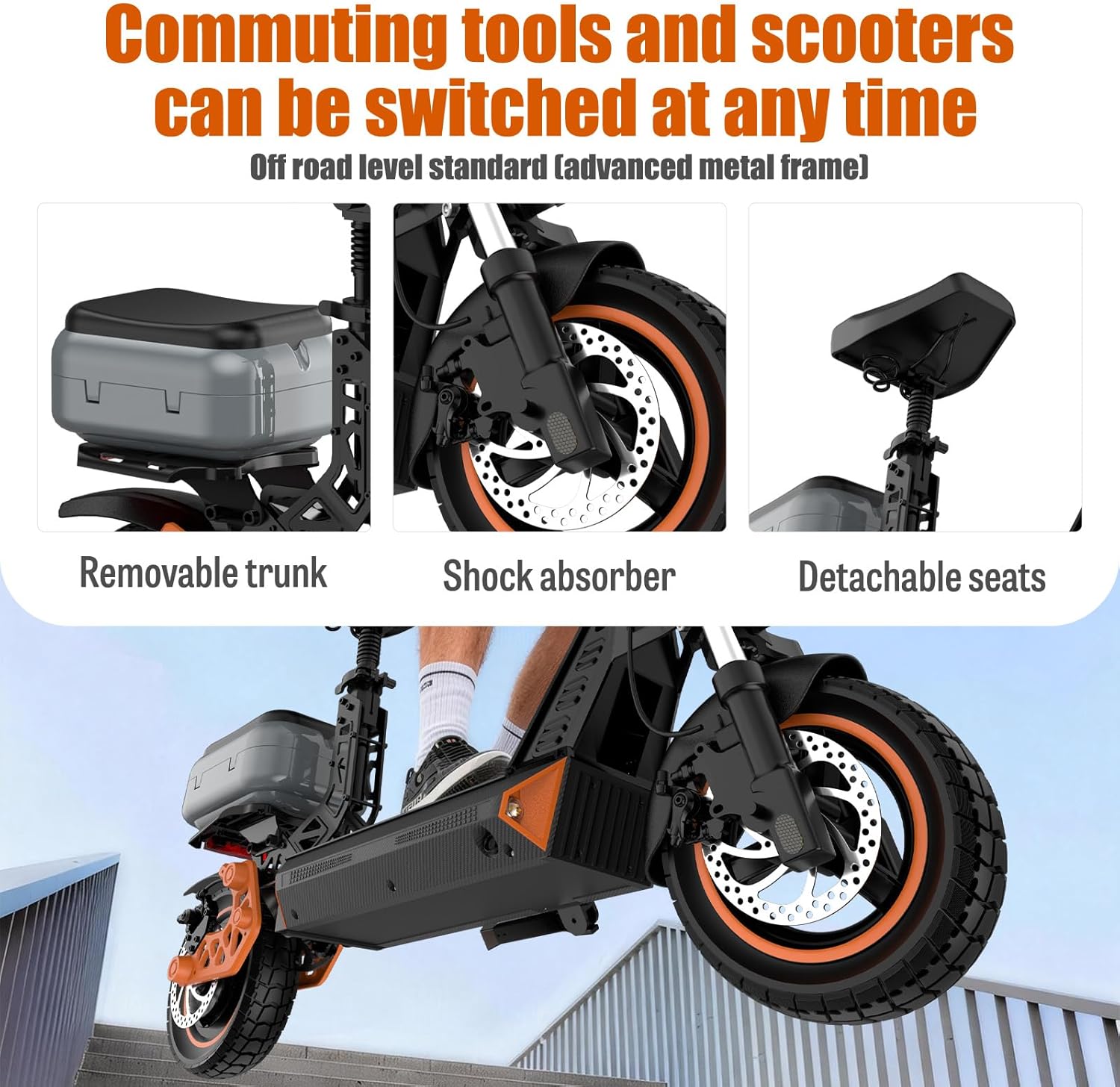
Image: The Ruitoo M4 Max Electric Scooter illuminated by its night lighting system, showcasing the ultra-bright headlights, turn signals, and reflectors for improved visibility.
3.5 Removing the Speed Limit
The scooter may come with a factory-set speed limit. To remove this limit and access the scooter's full speed capabilities, follow these steps:
- Ensure the scooter is powered on.
- Hold down the left brake lever.
- While holding the brake, press the power button four times in quick succession.
- The display will show "SINGLE" flashing, indicating the speed limit has been removed.
Video: This video provides a visual guide on how to remove the speed limit on the Ruitoo M4 Max Electric Scooter, demonstrating the button sequence and display feedback.

Image: A visual guide detailing the steps to remove the speed limit, showing the brake lever being held and the power button being pressed, with corresponding display changes.
4. Maintenance
4.1 Battery Care
- Charge the battery fully after each use.
- Avoid completely draining the battery.
- If storing the scooter for an extended period, charge the battery to 50-70% and recharge every 30-60 days.
- Store the scooter and battery in a cool, dry place away from direct sunlight and extreme temperatures.

Image: An internal view of the scooter's battery compartment, showing the arrangement of the 48V/18.2AH lithium battery cells.
4.2 Tire Care
The 10-inch puncture-resistant off-road tires require regular inspection.
- Check tire pressure before each ride and inflate to the recommended PSI.
- Inspect tires for wear, cuts, or embedded objects.
- Replace worn tires promptly to maintain optimal grip and safety.
4.3 General Cleaning
Clean the scooter regularly with a damp cloth. Avoid using high-pressure water jets or harsh chemicals, which can damage electronic components.
4.4 Brake Inspection
Periodically check the brake levers and disc brakes for proper function. Ensure brake pads are not excessively worn and that the braking response is smooth and effective.
4.5 Suspension Check
Inspect the dual suspension system for any signs of damage or excessive play. Ensure all bolts and connections are secure.
5. Troubleshooting
This section addresses common issues you might encounter with your Ruitoo M4 Max Electric Scooter.
| Problem | Possible Cause | Solution |
|---|---|---|
| Scooter does not power on | Low battery; Loose battery connection; Faulty power button | Charge the battery; Check battery connections; Contact support if issue persists. |
| Reduced range or speed | Low tire pressure; Overloaded scooter; Battery degradation; Riding uphill frequently | Inflate tires to correct pressure; Ensure rider weight is within limits; Consult support for battery issues. |
| Brakes feel weak or inconsistent | Worn brake pads; Loose brake cable; Air in hydraulic system (if applicable) | Inspect and replace brake pads; Adjust brake cable tension; Seek professional service. |
| Unusual noises during operation | Loose components; Debris in wheels/motor; Worn bearings | Inspect all parts for tightness; Clean wheels and motor area; Contact support for internal issues. |
If you encounter a problem not listed here or if the suggested solutions do not resolve the issue, please contact Ruitoo customer support for assistance.
6. Specifications
The following table outlines the key specifications for the Ruitoo M4 Max Electric Scooter:
| Feature | Detail |
|---|---|
| Brand | Ruitoo |
| Model Name | M4 Max |
| Motor Power | Up to 1000W (Peak Power: 1600W) |
| Maximum Speed | Up to 31 MPH (50 km/h) |
| Maximum Range | Up to 35 miles (55 km) |
| Battery | 48V/18.2AH Lithium Battery (UL2272 Certified) |
| Charging Time | Approximately 6 hours |
| Tires | 10-inch Puncture-Resistant Off-Road Pneumatic Tires |
| Suspension | Dual Suspension (Front and Rear) |
| Brakes | Dual Disc Brakes with ABS |
| Climbing Ability | Up to 30° slopes |
| Weight Limit | 264 pounds (120 kg) |
| Item Weight | 69 pounds (31.3 kg) |
| Product Dimensions (L x W x H) | 48.8" x 9" x 48.4" (124cm x 23cm x 123cm) |
| Included Components | E-Scooter, Seat, Front Bag, Rear Box, Charger, Keys, Tool Kit, Manual |

Image: The Ruitoo M4 Max Electric Scooter, highlighting its 1600W peak power motor and 35-mile optimal range capability.
7. Warranty Information
The Ruitoo M4 Max Electric Scooter comes with a 12-month warranty from the date of purchase. This warranty covers manufacturing defects and material faults under normal use. It does not cover damage caused by misuse, accidents, unauthorized modifications, or normal wear and tear.
Please retain your proof of purchase for warranty claims.
8. Customer Support
For any questions, concerns, or technical assistance regarding your Ruitoo M4 Max Electric Scooter, please contact our customer support team.
- Contact Method: You can reach us directly through Amazon's messaging system or via the after-sales service email provided in your product packaging.
- Online Resources: Visit the Ruitoo Store on Amazon for additional product information and FAQs.
