
Introduction
Thank you for choosing the Ymiko Reptile Fogger Smart Spray System. This automatic terrarium humidifier is designed to create an optimal environment for your reptiles, amphibians, and indoor plants by mimicking a natural rainforest. This manual provides essential information for the safe and efficient operation of your device.
The system features 360-degree adjustable nozzles for comprehensive humidity distribution and a smart timing function for customizable spray durations and intervals. Its self-priming pump eliminates the need for a direct tap connection, allowing for flexible water source options.
Package Contents
Before proceeding with installation, please ensure all components are present:
- 1 x Host Unit (Control Panel)
- 1 x Double-sided Adhesive Tape
- 1 x User Manual (this document)
- 1 x USB Power Cable
- 2 x Spray Nozzles
- 1 x Filter
- 1 x Hose Cutter
- 5 x Cable Ties
- 1 x Elbow Connector
- 1 x Tee Joint
- 2 x Plugs
- 5 x Hose Fixing Accessories
- Approx. 5 meters (16.40 ft) of Hose

Image: All components included in the Ymiko Reptile Fogger Smart Spray System package.
Setup Instructions
Follow these steps for easy installation of your Ymiko Reptile Fogger:
-
Prepare the Water Source:
Place the filter end of the hose into a large water container (e.g., a bucket or bottle). The built-in self-priming pump allows the system to draw water from any suitable container, eliminating the need for a direct tap connection.

Image: The main unit connected to a water container via the inlet hose with the pump submerged.
-
Connect Hoses and Nozzles:
Cut the provided hose to the desired lengths using the hose cutter. Connect the hose from the water source to the "Inlet" port on the main unit. Connect the other end of the hose to the "Outlet" port. Attach the spray nozzles to the hose using the provided connectors (elbow, tee joints) and position them within your terrarium.

Image: Pipe installation diagram illustrating the connection of the main unit to a water source and nozzles within a terrarium. Ensure the water depth is lower than the nozzle height to prevent siphon effect.
-
Secure Components:
Use the hose fixing accessories and cable ties to secure the hoses and nozzles in place within your terrarium. Ensure the nozzles are positioned to provide optimal coverage.

Image: The Ymiko Intelligent Spray System with its dual nozzles installed, providing mist to plants in a terrarium.
-
Power Connection:
Connect the USB power cable to the electrical jack on the main unit and plug it into a suitable USB power adapter (not included) or port.
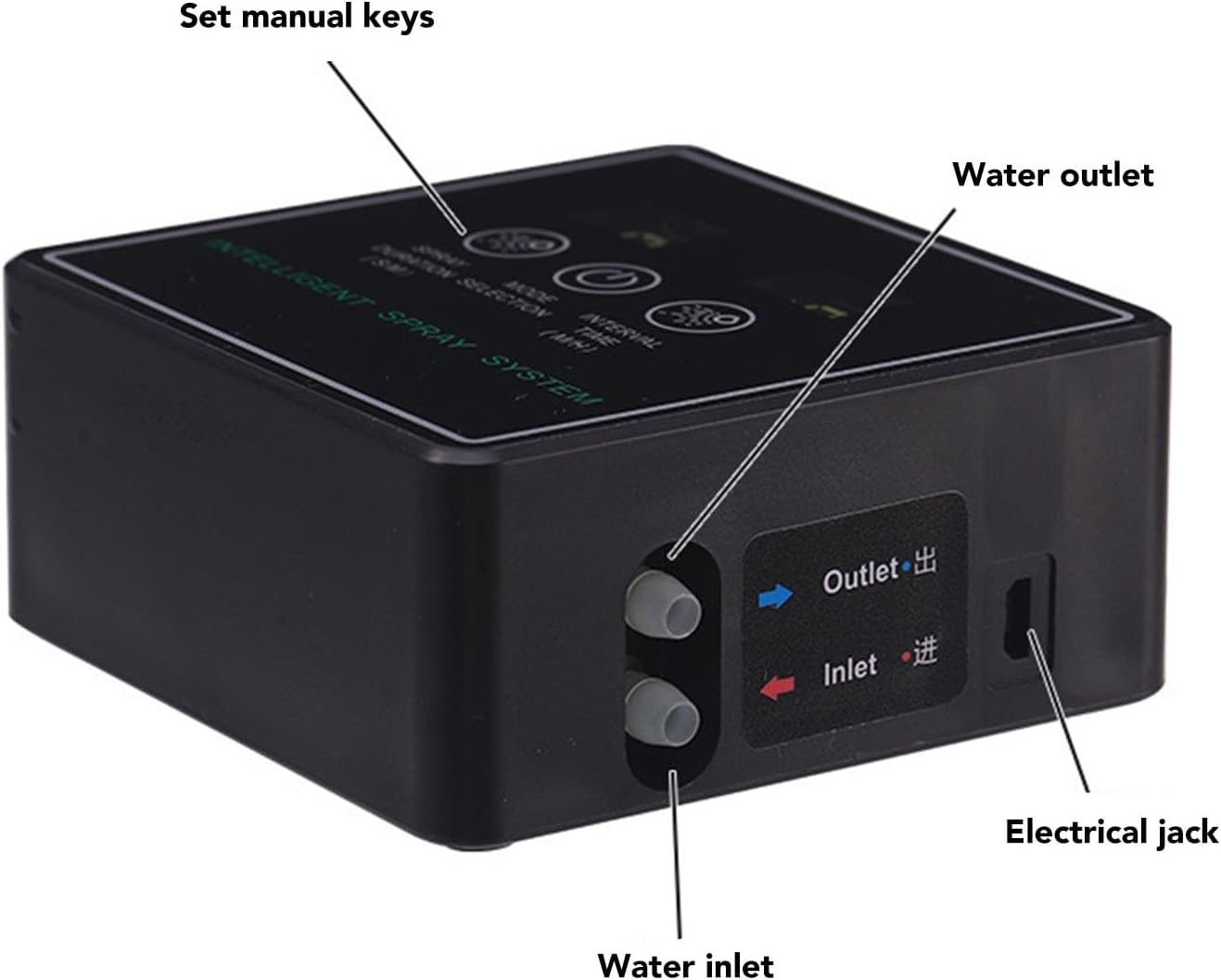
Image: Detailed view of the Ymiko Reptile Fogger's side panel, highlighting the water inlet, water outlet, and electrical jack connections.
Operating Instructions
The Ymiko Reptile Fogger offers both automatic and constant spray modes. The control panel features three main buttons: "Spray Duration (S/M)", "Mode Selection", and "Interval Time (M/H)".

Image: The touch screen control panel of the Ymiko Intelligent Spray System, showing buttons for Spray Duration, Mode Selection, and Interval Duration.
Automatic Spray Mode Setup:
- Enter Automatic Mode: Press and hold the [Mode Selection] button. The display numbers will illuminate, indicating entry into automatic mode. Press and hold again to switch to constant mode.
- Set Spray Duration: Press the [Spray Duration] button to set the desired spray duration. Each press increases the time by 1 second. After 60 seconds, the unit changes to minutes. You can set up to 99 minutes.
- Set Interval Time: Press the [Interval Time] button to set the desired interval between sprays. Each press increases the time by 1 minute. After 60 minutes, the unit changes to hours. You can set up to 99 hours.
- Adjusting Settings: While setting the spray duration or interval time, the [Mode Selection] button can be used to decrease the time. Press and hold to decrease continuously.
- Unit Indicators: "S" represents seconds, "M" represents minutes, and "H" represents hours. The indicator light will be on to show the currently selected time unit.
- Save Settings: After completing your settings, wait for 5 seconds. The settings will be automatically saved.
Automatic Memory Function:
The control circuit board includes an automatic memory function. Your set parameters will be remembered even after power loss, ensuring consistent operation.
Maintenance
- Water Quality: Use pure water to prevent mineral buildup and white water stains on glass and leaf surfaces.
- Filter Cleaning: Regularly check and clean the water filter to ensure optimal pump performance and prevent blockages.
- Nozzle Cleaning: If spray output decreases or becomes uneven, clean the nozzles to remove any mineral deposits or debris.
- Hose Inspection: Periodically inspect hoses for kinks, leaks, or damage. Replace if necessary.
- Unit Cleaning: Wipe the main unit with a soft, damp cloth. Do not immerse the unit in water.
Troubleshooting
This section provides solutions to common issues. If you encounter a problem not listed here, please refer to the support section.
- No Spray/Weak Spray:
- Check if the water container has sufficient water.
- Ensure the filter is clean and not blocked.
- Verify that hoses are properly connected and not kinked.
- Clean the spray nozzles for any blockages.
- Confirm the power supply is connected and functioning.
- Incorrect Timing:
- Re-check your spray duration and interval time settings as per the "Operating Instructions" section.
- Ensure settings were saved by waiting 5 seconds after adjustment.
- Water Leakage:
- Ensure all hose connections are secure and tight.
- Inspect hoses and connectors for cracks or damage.
Specifications
| Model Number | Ymikog9527eu3qv |
| Brand | Ymiko |
| Product Type | Reptile Fogger Smart Spray System |
| Special Feature | Automatic Synchronization |
| Specific Uses | Home, Terrarium, Amphibian, Reptile |
| Spray Duration Range | 1 second - 99 minutes |
| Spray Interval Range | 1 second - 99 hours |
| Hose Length | Approx. 5 meters (16.40 ft) |
| Noise Level | ≤65dB (at 30cm) |
| Working Pressure | 4-8 bar |
| Power Supply | USB Cable |
Warranty Information
This Ymiko product comes with a 90-day warranty from the date of purchase. Please retain your proof of purchase for warranty claims. The warranty covers manufacturing defects under normal use. It does not cover damage caused by misuse, accidents, unauthorized modifications, or improper installation.
Customer Support
For further assistance, technical support, or warranty inquiries, please visit the official Ymiko store on Amazon or contact your retailer. You can find more information and contact options at the Ymiko Brand Store.