
Introduction
Thank you for choosing the XINFUTE ELPGS03 RF 3D Glasses. These glasses are designed to provide an immersive 3D viewing experience with compatible Epson projectors. This manual provides essential information for the proper setup, operation, and maintenance of your 3D glasses.
Package Contents
Please verify that all items listed below are included in your package:
- 1 x XINFUTE ELPGS03 RF 3D Glasses
- 1 x USB Charging Cable
- 1 x User's Guide (this document)

Image: Contents of the XINFUTE ELPGS03 package, showing the 3D glasses, a USB charging cable, and a printed user guide.
Setup
1. Charging the Glasses
Before initial use, fully charge the 3D glasses. Connect the supplied USB charging cable to the charging port on the glasses and to a standard USB power source (e.g., computer USB port, USB wall adapter). The charging indicator light will typically show the charging status and turn off or change color when fully charged.
2. Pairing with an Epson Projector
The ELPGS03 glasses use RF (Radio Frequency) technology for communication with compatible Epson projectors. Follow these general steps to pair the glasses:
- Ensure your Epson projector is powered on and displaying 3D content.
- Turn on the ELPGS03 3D glasses by pressing the power button.
- The glasses should automatically attempt to pair with the projector. Look for an indicator light on the glasses to confirm pairing status (e.g., blinking during pairing, solid when connected).
- If pairing does not occur automatically, consult your Epson projector's manual for specific instructions on pairing RF 3D glasses.
Compatible Epson Projector Models:
- 3D Projectors: 3020, 3020e, 5020, 5020U, 6020UB, 6510
- Wireless 3D Glasses Compatible Projectors: EB-W16, EH-TW550, EH-TW570, EH-TW5200, EH-TW5210, EH-TW5300, EH-TW5350, EH-TW5910, EH-TW6100, EH-TW6100W, EH-TW8100, EH-TW9100, EH-TW9100W
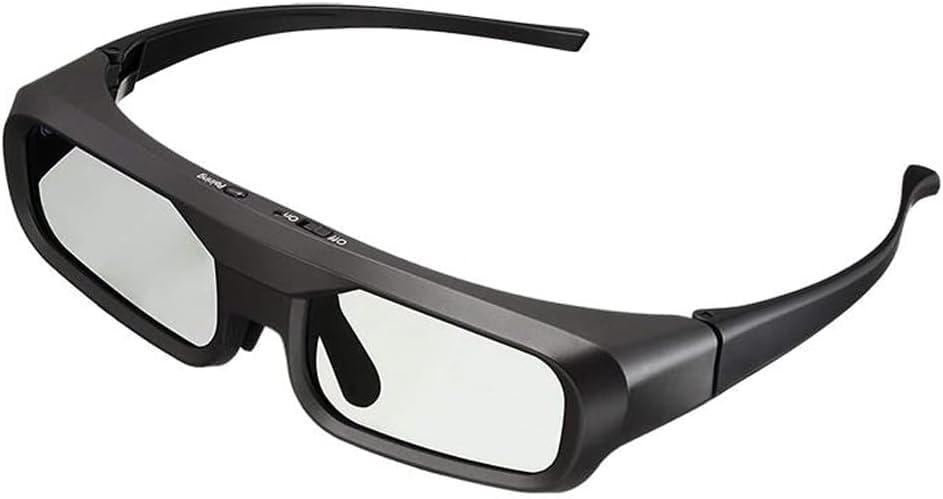
Image: A pair of XINFUTE ELPGS03 RF 3D Glasses, shown from a side angle, ready for use.
Operating Instructions
1. Power On/Off
- To power on, press and hold the power button located on the glasses until the indicator light illuminates.
- To power off, press and hold the power button again until the indicator light turns off. The glasses may also power off automatically after a period of inactivity to conserve battery.
2. Wearing the Glasses
Place the 3D glasses comfortably over your eyes. If you wear prescription glasses, the ELPGS03 glasses are designed to fit over most standard frames. Adjust for a clear and comfortable viewing experience.
3. Viewing 3D Content
Once paired with your projector and 3D content is being displayed, the glasses will automatically synchronize to create the 3D effect. Ensure you are within the effective range of 5 meters from the projector for optimal performance.
Maintenance
1. Cleaning
- Use a soft, dry, lint-free cloth to clean the lenses. Avoid using abrasive materials or chemical cleaners, which can damage the lens coating.
- For the frame, a slightly damp cloth can be used, then wipe dry immediately.
2. Storage
Store the glasses in a cool, dry place away from direct sunlight and extreme temperatures. Keep them in a protective case (if available) to prevent scratches and damage.
3. Battery Care
The ELPGS03 glasses use a Lithium-Ion battery. To prolong battery life:
- Avoid fully discharging the battery frequently.
- Charge the glasses regularly, even if not in frequent use.
- Do not expose the battery to high temperatures.
Troubleshooting
If you encounter issues with your ELPGS03 3D Glasses, refer to the following common solutions:
- Glasses not turning on: Ensure the battery is charged. Connect the USB charging cable and allow it to charge for at least 30 minutes before attempting to power on again.
- No 3D effect or flickering:
- Verify that the projector is outputting 3D content and is in 3D mode.
- Confirm the glasses are properly paired with the projector. Try re-pairing if necessary.
- Ensure you are within the effective range (5 meters) of the projector.
- Check for any obstructions between the glasses and the projector that might interfere with the RF signal.
- Ensure the glasses are fully charged.
- Uncomfortable viewing: Adjust the position of the glasses on your face. If wearing prescription glasses, ensure a comfortable fit.
If problems persist, please refer to the Support section for further assistance.
Specifications
| Model Name | ELPGS03 |
| Brand | XINFUTE |
| Connectivity Technology | Radio Frequency (RF), Infrared (IR) |
| Compatible Devices | Epson Projectors (Specific models listed in Setup section) |
| Maximum Range | 5 Meters |
| Battery Type | Lithium-Ion |
| Item Weight | 0.1 Kilograms |
| Special Feature | Ergonomic design |
Warranty Information
The XINFUTE ELPGS03 RF 3D Glasses come with a 1 Year Manufacturer Warranty. This warranty covers defects in materials and workmanship under normal use. Please retain your proof of purchase for warranty claims. The warranty does not cover damage caused by misuse, accidents, unauthorized modifications, or normal wear and tear.
Support
For technical assistance, troubleshooting beyond this manual, or warranty inquiries, please contact XINFUTE customer support. Refer to the contact information provided with your purchase or visit the official XINFUTE website for support details.
You can also visit the XINFUTE Store on Amazon for more product information.