
1. Introduction
The AEKE K1 Smart Home Gym is an AI-powered fitness mirror designed to provide a comprehensive and personalized workout experience. It features advanced AI for real-time form correction, motion analysis, and tailored fitness plans. With a 43-inch 4K touchscreen and integrated sound, it transforms any space into a smart fitness zone.
The system offers a wide variety of workouts, including strength training, cardio, yoga, and Pilates, with no subscription fees for lifetime access to content and updates. Its compact, auto-foldable design ensures easy storage and portability, making it ideal for home use.
2. What's in the Box
Your AEKE K1 Smart Fitness Mirror package includes the following components:
- 1x AEKE K1 Smart Home Gym (main unit with 43" 4K touchscreen)
- 1x Smart Grips
- 1x Ankle Straps
- 1x Smart Adjustable Barbell
- 1x Barbell Unloader
- 1x Heart Rate Armband
- 1x Smart 8 Electrode Scale
- 1x Camera Cover
- 1x Power Cord
3. Setup Instructions
3.1 Unboxing and Placement
The AEKE K1 is designed for zero installation. Carefully unbox the main unit and accessories. The mirror is equipped with wheels for easy movement. Position the mirror in your desired workout area, ensuring sufficient space around it for exercises.

Figure 1: The AEKE K1 Smart Fitness Mirror in its compact, auto-foldable state, highlighting its effortless setup and portability.
3.2 Power Connection
Connect the provided power cord to the port located at the back of the mirror unit and plug it into a standard electrical outlet.
3.3 Footboard Extension
The footboard extends automatically with the push of a button. Locate the control button on the side of the mirror. Press it to extend the footboard. The extension process is slow for safety reasons. To retract, press the button again.
Video 1: Demonstrates the unboxing and automatic footboard extension of the AEKE K1 Smart Fitness Mirror. This video shows the ease of setup and the mirror's compact design.
4. Operating Instructions
4.1 Initial Setup and AI Assessment
Upon first use, the AEKE K1 will guide you through an initial AI assessment. This assessment evaluates your strength, posture, flexibility, and movement patterns using its 17-point skeletal tracking system. This data is used to create personalized fitness plans tailored to your needs.
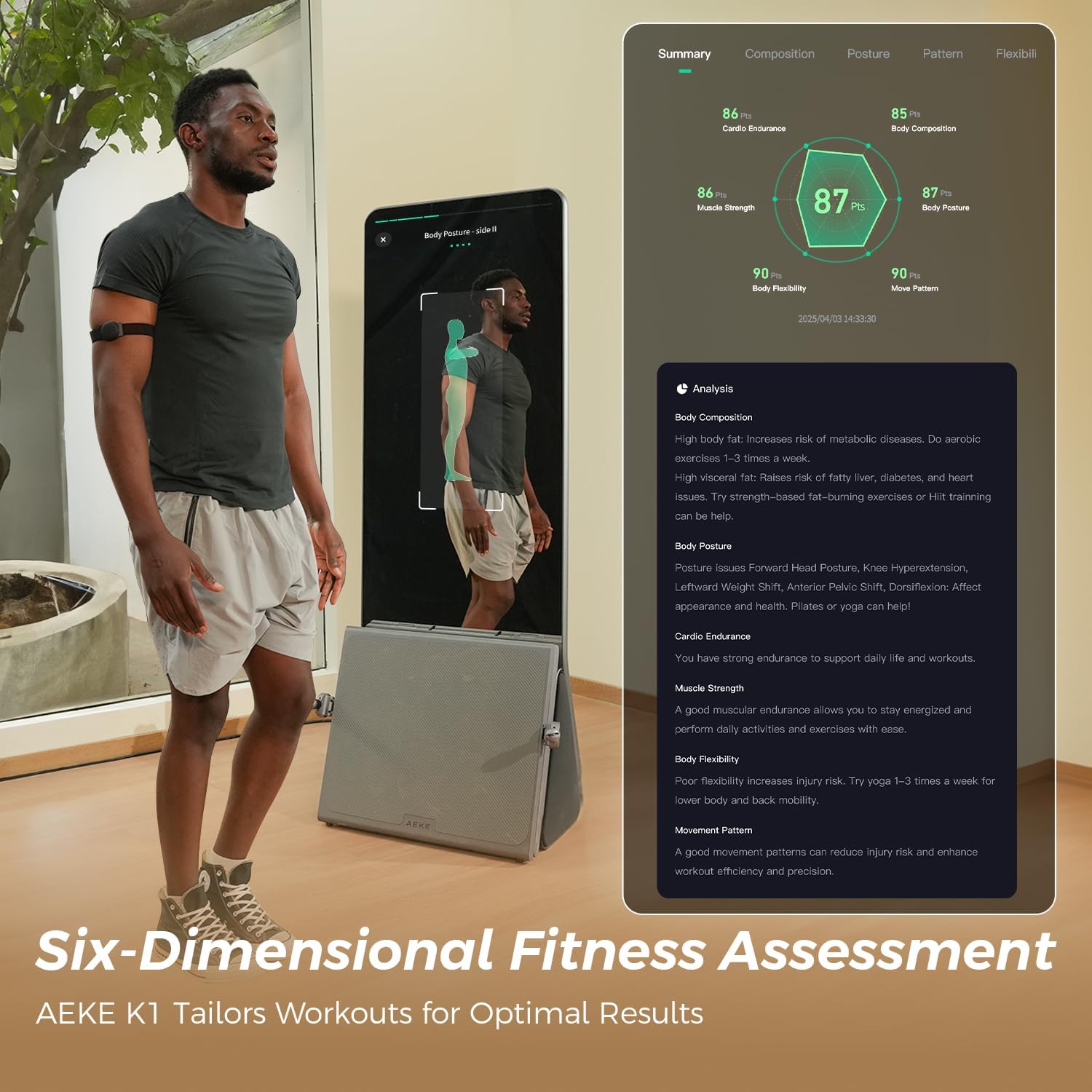
Figure 2: The AEKE K1's Six-Dimensional Fitness Assessment provides a detailed analysis of your body composition, posture, cardio endurance, muscle strength, body flexibility, and movement patterns.
4.2 Real-Time Feedback and Form Correction
During workouts, the AI coach provides real-time feedback and form correction. The 17-point skeletal tracking system analyzes your movements and offers instant guidance to ensure effective and safe exercise execution. This helps prevent injuries and optimizes your training.

Figure 3: The AEKE K1 provides real-time feedback during exercises, ensuring proper form and enhancing workout efficiency.
4.3 Workout Programs and Courses
Access over 140 professional courses and 280+ movements. You can select workouts based on fitness goals (weight loss, health boost, muscle gain), target muscle groups (chest, back, legs, arms, glutes, core), and duration. The AI can also generate a custom workout plan for you.
Video 2: A review of the AEKE K1 Smart Fitness Mirror, discussing its features and how it can potentially replace a gym membership. This video highlights the variety of workouts and AI coaching available.
4.4 Adaptive Resistance
The AEKE K1 features a digital servo motor that delivers smooth, adaptive resistance. It offers five strength modes and intelligently adjusts the recommended resistance in real-time based on your fatigue and strength levels, ensuring optimal challenge without overexertion.
4.5 Immersive Experience
The 43-inch 4K touchscreen and 2.1 Surround Sound create an immersive workout environment. You can connect headphones for focused sessions or sync your music playlist for a personalized vibe. The mirror aspect allows you to monitor your form directly.
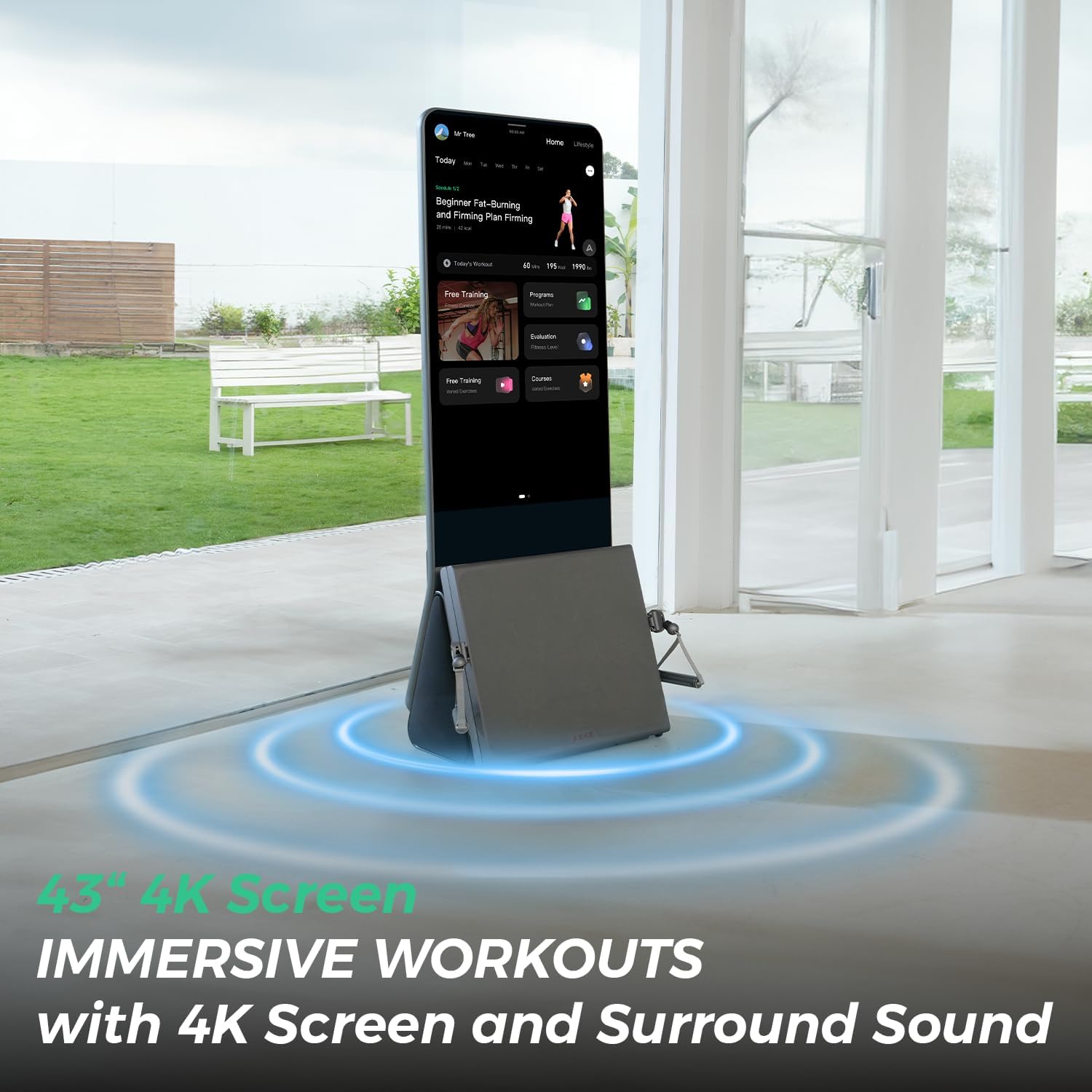
Figure 4: The AEKE K1 offers immersive workouts with its 4K screen and surround sound, enhancing the user's fitness experience.
5. Key Features
- AI-Powered Precision: Advanced AI delivers personalized fitness plans, real-time form correction, and motion analysis via 17-point skeletal tracking.
- Continuous Fitness Growth: Intelligent Motion Analysis Engine tracks workouts, provides detailed Performance Reports and Movement Completion Reports, and offers precise recommendations.
- Full-Body Fitness with Variety: 280+ movements and 140+ professional courses targeting all muscle groups, including motion-sensing games for engaging workouts.
- Tailored Adaptive Resistance: Five strength modes and a digital servo motor provide smooth, adaptive resistance that adjusts to your fitness level in real-time.
- Compact & Portable Design: Folds down to 0.3 sq meters, is fully portable, and auto-foldable for easy storage and movement.
- Lifetime Access: One-time payment for lifetime access to all workouts, classes, and AI coaching, with regular updates for new features.
- Immersive 4K Touch Screen & Sound: A 43-inch 4K touch screen and 2.1 Surround Sound for a full-sensory workout experience.
6. Maintenance
6.1 Cleaning the Mirror
Use a soft, lint-free cloth and a non-abrasive glass cleaner to wipe down the mirror surface. Avoid spraying cleaner directly onto the screen; instead, apply it to the cloth first.
6.2 Cleaning Accessories
Wipe down smart grips, barbell, and other accessories with a damp cloth after each use to remove sweat and grime. Ensure all accessories are dry before storing.
6.3 General Care
Keep the AEKE K1 in a dry environment. Avoid exposing it to extreme temperatures or direct sunlight for prolonged periods. Regularly check cables and connections for any signs of wear or damage.
7. Troubleshooting
7.1 Power Issues
If the mirror does not power on, ensure the power cord is securely plugged into both the unit and the wall outlet. Check if the outlet is functional by plugging in another device.
7.2 Connectivity Problems
If accessories (Smart Grips, Heart Rate Armband) are not connecting, ensure they are charged and within range. Restart the mirror and attempt to reconnect the accessories via the settings menu.
7.3 Form Correction Inaccuracies
Ensure you are standing at the recommended distance from the mirror (5-6.5 ft) for optimal skeletal tracking. Check that the camera lens is clean and unobstructed. Recalibrate the AI assessment if issues persist.
8. Specifications
- Item Package Dimensions L x W x H: 72.83 x 29.53 x 23.62 inches
- Package Weight: 97 Kilograms
- Brand Name: AEKE
- Model Name: AEKE K1
- Color: Grey
- Material: Metal
- Tension Level: 5 (strength modes)
- Handle Type: Gripped handle
- Display: 43" 4K Touch Screen
- Audio: 2.1 Surround Sound
- AI Tracking: 17-point skeletal tracking
9. Warranty and Support
9.1 Warranty Information
The AEKE K1 Smart Fitness Mirror comes with a 1-year warranty for damage to parts and a 2-year warranty for complete machine damage. Please retain your proof of purchase for warranty claims.
9.2 Customer Support
For any questions, technical assistance, or warranty claims, please contact AEKE customer support. Refer to the contact information provided in your product packaging or visit the official AEKE website.