
1. Introduction
Thank you for purchasing the JSAUX HB0705 7-in-1 Docking Station with RGB Cooling Fan. This product is designed to enhance your handheld gaming experience by providing expanded connectivity and efficient cooling. This manual will guide you through the setup, operation, and maintenance of your docking station.
Please read this manual carefully before use and retain it for future reference.
2. Package Contents
Ensure all items are present in your package:
- JSAUX HB0705 7-in-1 Docking Station
- Magnetic RGB Cooling Fan
- Silicone Pad
- User Manual (this document)
3. Key Features
- 7-in-1 Connectivity: Includes HDMI 2.1 (4K@120Hz), Gigabit Ethernet, USB-C PD Charging (100W), USB-C 3.0, and two USB-A 3.0 ports.
- Magnetic RGB Cooling Fan: Custom-designed for ROG Ally (X) for efficient cooling, detachable for convenience.
- Advanced Video Output: Supports 4K@120Hz or 1080p@240Hz via HDMI 2.1 with VRR, ALLM, HDR, and QFT for an enhanced visual experience.
- Dynamic RGB Lighting: Dock base offers 5 RGB lighting modes (Monochromatic, Breathing, Chasing, Gradient, Stacking). Fan features a 7-color gradient mode.
- Modular Design: Can be used fully assembled or detached as a standalone stand.
- DIY Custom Card Slot: Personalize your dock with a custom front card (3.00 x 1.13 x 0.01 inches / 76.3 x 28.7 x 0.3 mm).

Image: Overview of the JSAUX HB0705 Docking Station with labeled ports, including USB-C, USB-A, Gigabit Ethernet, HDMI, and PD input.
4. Setup Guide
4.1 Assembling the Docking Station
- Place the main docking station unit on a stable, flat surface.
- If using the cooling fan, align the magnetic fan unit with the designated area on the dock base and attach it securely.
- For enhanced stability and angle support, attach the included silicone pad to the dock base as preferred.
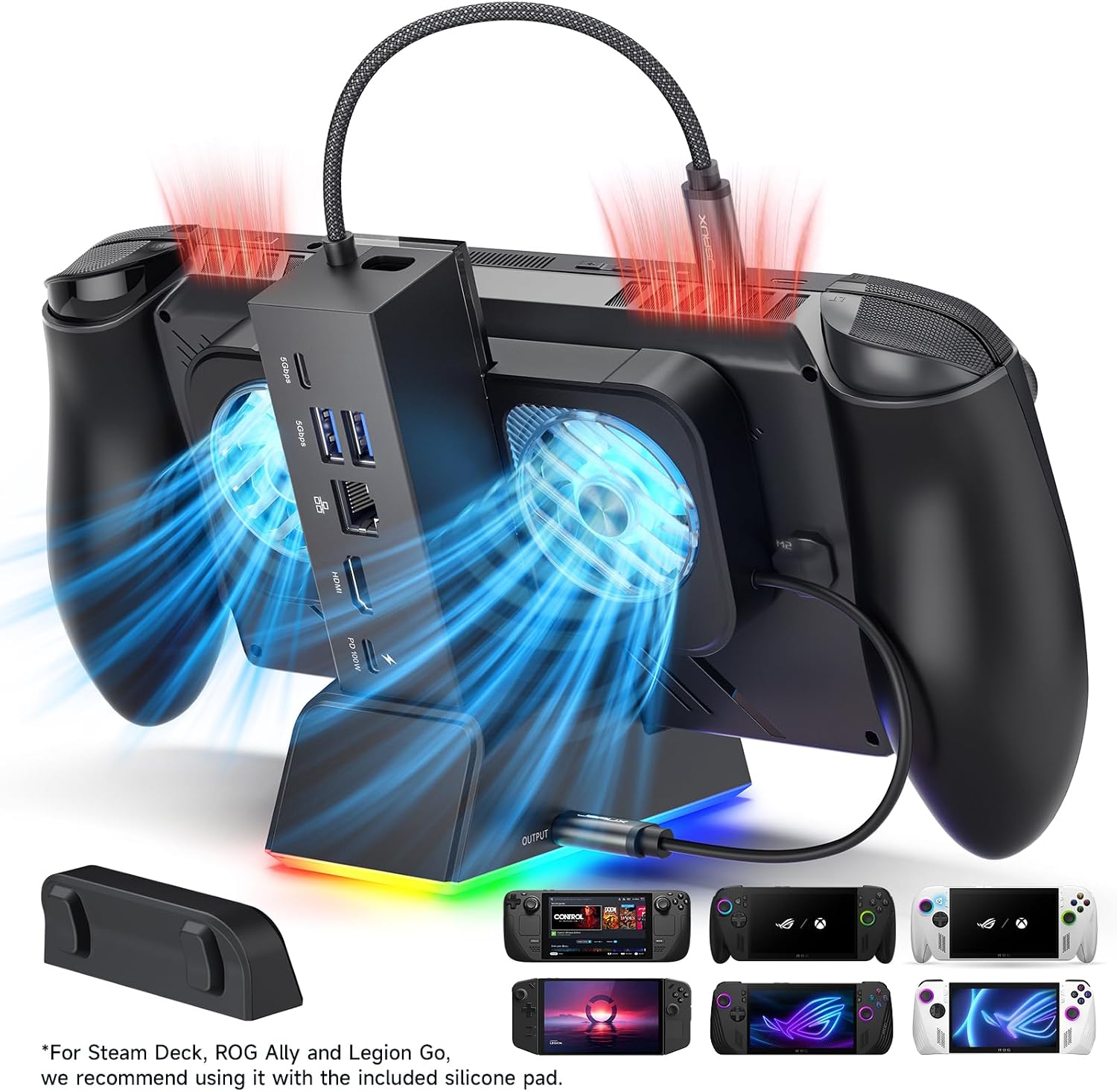
Image: The JSAUX HB0705 Docking Station with a handheld gaming device, showcasing the cooling fan's airflow and RGB lighting.
4.2 Connecting to Power
- Connect a 100W Power Delivery (PD) charger (not included) to the USB-C PD input port on the docking station. This is essential for optimal performance, especially for 30W Turbo Mode on compatible handhelds.
4.3 Connecting Your Handheld Device
- Place your compatible handheld device (e.g., ROG Ally X, Steam Deck, Legion Go) onto the docking station.
- Connect the integrated USB-C cable from the docking station to your handheld device's USB-C port.
4.4 Connecting Peripherals
- HDMI Output: Connect an HDMI cable from the dock's HDMI 2.1 port to your display (TV, monitor).
- Gigabit Ethernet: For a stable wired internet connection, connect an Ethernet cable to the Gigabit Ethernet port.
- USB Devices: Connect your keyboard, mouse, external storage, or other USB accessories to the USB-A 3.0 and USB-C 3.0 ports.
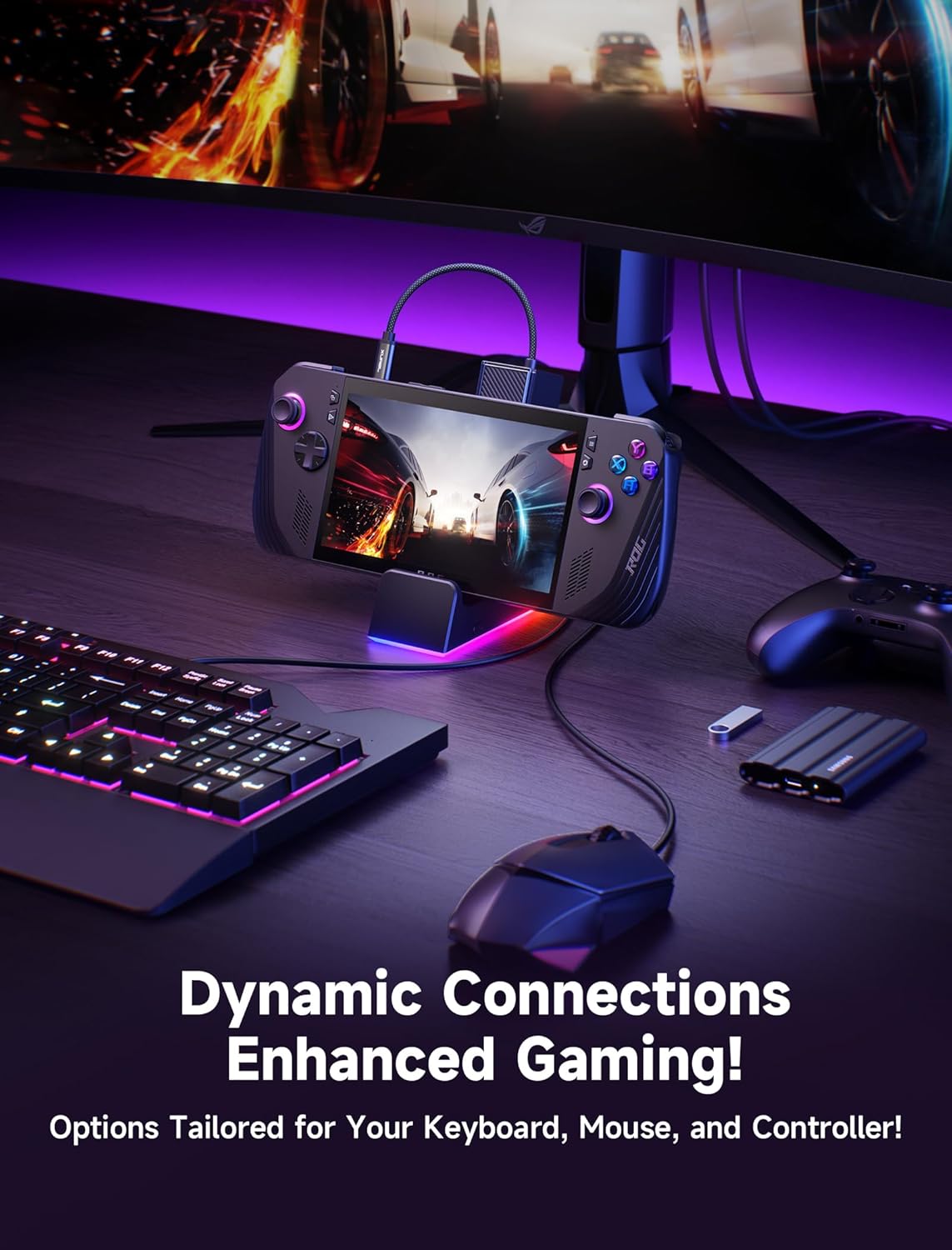
Image: A handheld device docked with the JSAUX HB0705, connected to a monitor, keyboard, and mouse, illustrating enhanced gaming connections.
5. Operating Instructions
5.1 Powering On/Off
- The docking station powers on automatically when connected to a power source and a handheld device.
- To power off, disconnect the power adapter or the handheld device.
5.2 Video Output (HDMI 2.1)
- Once connected to a display via HDMI, your handheld device's screen should automatically extend or mirror to the external display.
- The dock supports resolutions up to 4K@120Hz or 1080p@240Hz. Ensure your display and HDMI cable support these specifications.
- Features like VRR (Variable Refresh Rate), ALLM (Auto Low Latency Mode), HDR (High Dynamic Range), and QFT (Quick Frame Transport) are supported for compatible displays and content.

Image: A handheld device docked, displaying a game on a large monitor, highlighting the immersive gaming experience with advanced HDMI features.
5.3 RGB Lighting Control
- The dock base features a button to control RGB lighting.
- Long Press: Press and hold the button to turn the RGB lighting ON or OFF.
- Tap: Tap the button to cycle through the 5 available RGB lighting modes: Monochromatic, Breathing, Chasing, Gradient, and Stacking.
- The cooling fan has a fixed 7-color gradient mode that operates when the fan is active.

Image: The JSAUX HB0705 Docking Station illustrating the five RGB lighting modes available on the dock base.
5.4 Cooling Fan Operation
- The magnetic RGB cooling fan automatically activates when the dock is powered and a device is connected.
- The fan is designed to align with the air intake of ROG Ally (X) for optimal cooling.
- Note: Cooling efficiency may vary for other handheld devices due to differences in air intake placement.

Image: A graph demonstrating the cooling performance of the JSAUX HB0705 Docking Station over time, showing temperature reduction.
5.5 Turbo Mode Support
- The docking station fully supports 30W Turbo Mode on ROG Ally and ROG Ally X.
- Important: 30W Turbo Mode requires a 100W PD charger to be connected to the dock's USB-C PD input port. It will not function without adequate power input.
6. Maintenance
- Cleaning: Use a soft, dry cloth to wipe the surface of the docking station. Do not use liquid cleaners or abrasive materials.
- Fan Cleaning: Periodically check the cooling fan for dust accumulation. Use a soft brush or compressed air to gently clean the fan blades and vents.
- Storage: When not in use for extended periods, store the docking station in a cool, dry place away from direct sunlight and extreme temperatures.
- Cable Care: Avoid bending or crimping cables excessively to prevent damage.
7. Troubleshooting
| Problem | Possible Cause | Solution |
|---|---|---|
| No display on external monitor. | Loose HDMI connection, incorrect input selected on monitor, handheld device not outputting video. | Ensure HDMI cable is securely connected. Select the correct HDMI input on your monitor. Check display settings on your handheld device. Restart both the handheld and the monitor. |
| Handheld device not charging or charging slowly. | Insufficient power supply, non-PD charger, faulty cable. | Ensure a 100W Power Delivery (PD) charger is connected to the dock. Use a high-quality USB-C cable. |
| 30W Turbo Mode not activating on ROG Ally/Ally X. | Power supply is less than 100W. | Connect a 100W PD charger to the dock's USB-C PD input port. |
| Cooling fan not operating or ineffective. | Fan not properly attached, dust obstruction, device not ROG Ally (X). | Ensure the magnetic fan is securely attached. Clean any dust from the fan and vents. Note that cooling efficiency may be reduced for non-ROG Ally (X) devices. |
| USB devices not recognized. | Loose connection, driver issues on handheld, device power requirements. | Reconnect the USB device. Ensure your handheld device's operating system has the necessary drivers. Some high-power USB devices may require direct connection or an external power source. |
| Ethernet connection unstable or not working. | Loose cable, router issue, network settings. | Ensure the Ethernet cable is securely connected to both the dock and your router/modem. Check your network settings on the handheld device. Restart your router. |
8. Specifications
| Feature | Detail |
|---|---|
| Model | HB0705 |
| Ports | 1x HDMI 2.1, 1x Gigabit Ethernet, 1x USB-C PD (100W input), 1x USB-C 3.0 (5Gbps), 2x USB-A 3.0 (5Gbps), 1x RGB-powered USB-C (for fan) |
| HDMI Output | 4K@120Hz or 1080p@240Hz, supports VRR, ALLM, HDR, QFT |
| Ethernet Speed | 1000Mbps (Gigabit) |
| USB Data Transfer | 5Gbps (USB 3.0) |
| PD Charging Input | Up to 100W |
| Cooling Fan Speed | 8000 RPM (High Speed) |
| Dimensions (L x W x H) | 5.71" x 5.63" x 5.43" (14.5cm x 14.3cm x 13.8cm) |
9. Compatibility
The JSAUX HB0705 Docking Station is compatible with the following handheld gaming devices:
- ROG Ally X
- ROG Ally
- Steam Deck
- Legion Go
- Legion Go S
Note: While compatible with various devices, the magnetic RGB cooling fan is custom-designed for the ROG Ally (X). Cooling efficiency may vary for other models due to differences in air intake placement.

Image: Visual representation of various handheld gaming devices compatible with the JSAUX HB0705 Docking Station, including ROG Ally, Steam Deck, and Legion Go.
10. Warranty and Support
JSAUX products come with a standard manufacturer's warranty. For detailed warranty information, please refer to the warranty card included with your product or visit the official JSAUX website.
For technical support, troubleshooting assistance, or any inquiries regarding your JSAUX HB0705 Docking Station, please contact JSAUX customer service through their official website or the contact information provided in your product packaging.
Online Resources:
- JSAUX Official Website: www.jsaux.com
11. Product Overview Video
Video: An official overview of the JSAUX 6-in-1 Docking Station, demonstrating its features and connectivity. Note: This video refers to a 6-in-1 model, but the core functionality and design principles are similar to the 7-in-1 HB0705.