
1. Introduction
This manual provides detailed instructions for the installation, operation, and maintenance of the JRAHK 36V-60V 2000W Dual Drive Sine Wave Controller. This controller is designed for electric bicycles and scooters, offering enhanced power delivery and a smooth riding experience. Please read this manual thoroughly before installation and use to ensure proper function and safety.
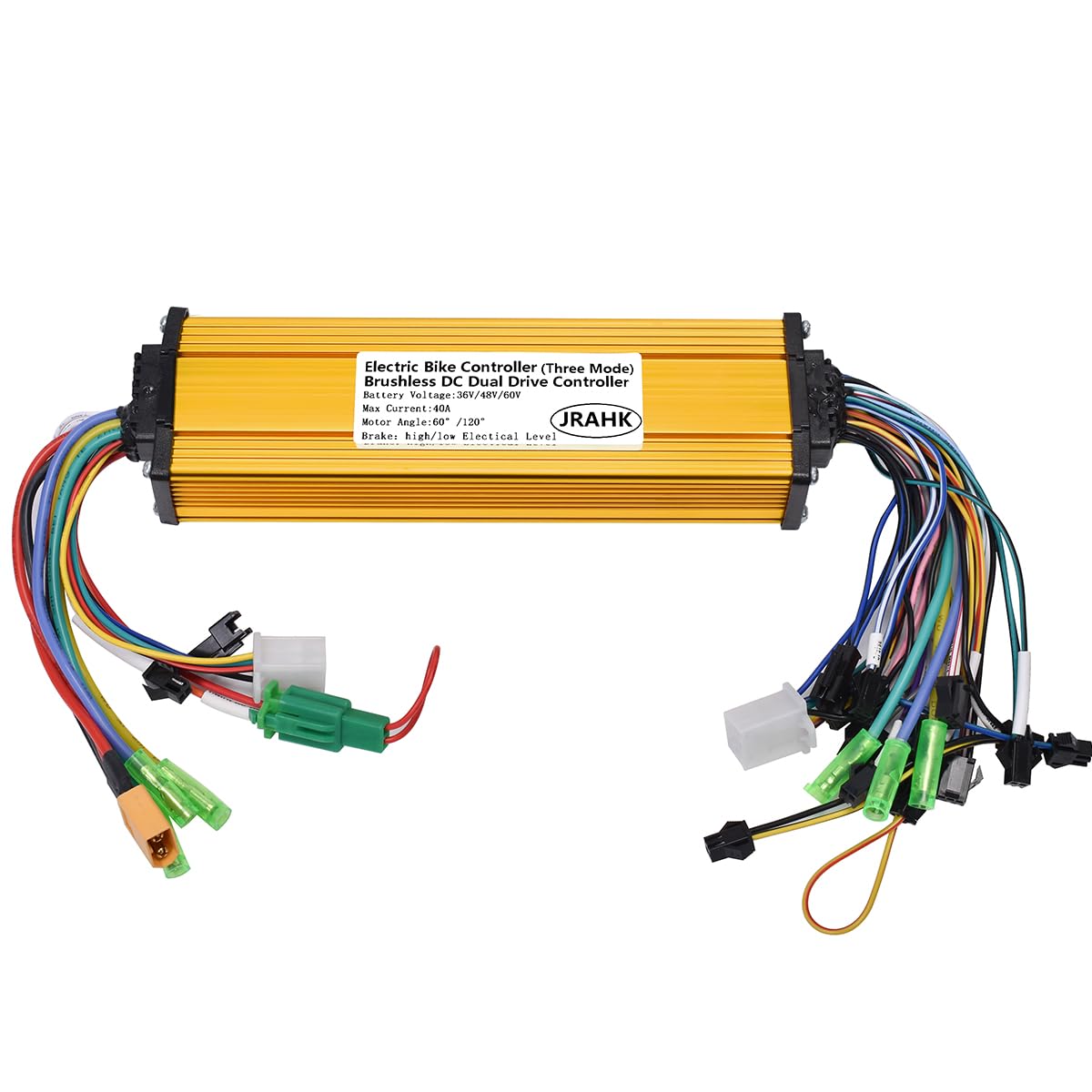
Image 1.1: Overview of the JRAHK Dual Drive Sine Wave Controller with various wiring harnesses.
2. Product Features
- Dual Drive & High Power Output: Features dual-drive technology with a robust 36A-40A current output. Supports motors from 350W to 2000W, providing strong hill-climbing capability and rapid acceleration for E-bikes or scooters.
- Pure Sine Wave Technology: Incorporates an advanced sine wave control algorithm for exceptionally smooth and quiet starts. This technology minimizes jerky movements and reduces motor noise, enhancing the overall riding experience.
- Wide Voltage Compatibility & 3 Modes: Compatible with 36V, 48V, 52V, and 60V battery systems. Users can switch between three operational modes:
- Sine Wave Mode: For optimal smoothness and quiet operation.
- Square Wave Mode: For broader compatibility with various motor types.
- Sensorless No-Hall Mode: An emergency mode for continued operation if Hall sensors fail.
- Robust Aluminum Alloy Construction: Constructed with a high-quality aluminum alloy shell that functions as an efficient heat sink. This design ensures rapid heat dissipation, stable performance under high loads, and protection of internal components from overheating.
- Easy Installation & Universal Fit: Designed as a standard replacement part for most brushless DC motors. Includes clear wiring labels and diagrams to facilitate installation.

Image 2.1: Visual representation of the controller's key features including three-mode operation, dual drive, voltage compatibility, current range, and motor power support.
3. Specifications
| Attribute | Value |
|---|---|
| Model Number | CON009-6G-GD |
| Voltage Compatibility | 36V, 48V, 52V, 60V |
| Max Current | 36A-40A |
| Motor Power Support | 350W - 2000W |
| Product Dimensions | 4.9"W x 2"H (approx. 181mm x 55mm x 32mm) |
| Material | Aluminum Alloy |
| Controller Type | Brushless DC Dual Drive Sine Wave Controller |
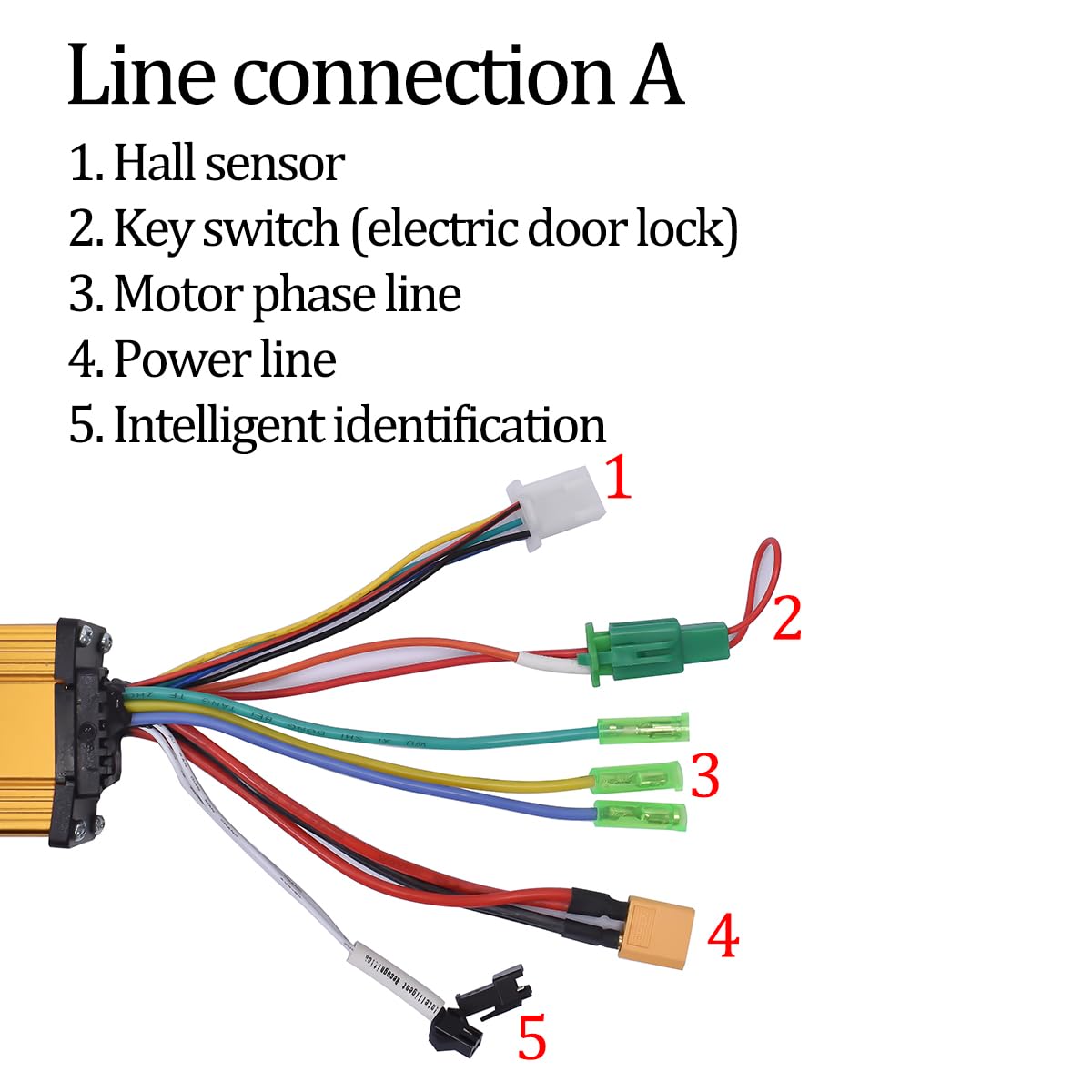
Image 3.1: Physical dimensions of the JRAHK controller, showing length (181mm), width (55mm), and height (32mm).
4. Package Contents
The package includes:
- 1 x JRAHK E-bike Controller (Model: CON009-6G-GD)
5. Setup & Installation
Before beginning installation, ensure your electric bicycle or scooter's power is completely off and the battery is disconnected. Refer to the wiring diagrams below for correct connections.
5.1 Wiring Connections - Group A
This group of wires typically handles essential power and sensor inputs.

Image 5.1: Detailed view of wiring connections for Group A on the JRAHK controller.
- Hall Sensor: Connect to the motor's Hall sensor wires. This provides feedback on motor position for smooth operation.
- Key Switch (Electric Door Lock): Connect to your e-bike's ignition or key switch. This controls the main power to the controller.
- Motor Phase Line: Connect to one of the motor's phase wires (typically green, blue, yellow). Ensure correct phase matching.
- Power Line: Main power input from the battery. Ensure correct polarity (positive and negative).
- Intelligent Identification: These wires are used for initial motor learning. Connect them together briefly during the learning process, then disconnect.
5.2 Wiring Connections - Group B
This group handles control signals and additional functionalities.

Image 5.2: Detailed view of wiring connections for Group B on the JRAHK controller.
- Motor Phase Line: Connect to the remaining motor phase wires.
- Throttle: Connect to the throttle input for speed control.
- Electric Three-Speed: Connect for multi-speed functionality (if applicable).
- PAS (Pedal Assist System): Connect to the PAS sensor for pedal-assisted riding.
- Low-Level Brake: Connect to the brake lever with low-level signal output.
- High-Level Brake: Connect to the brake lever with high-level signal output.
- Phase Line Instrument: Connect to a display or instrument that reads motor phase signals.
- One-Line Instrument: Connect to a display or instrument that uses a single-line communication protocol.
- Shift Three-Speed: Connect for gear shifting functionality (if applicable).
- Single Drive/Dual Drive: Connect to switch between single and dual motor drive modes.
- Intelligent Learning Line: Used for motor learning. Connect briefly during setup.
- Hall Sensor: Additional Hall sensor connection point.
- Hall Instrument: Connect to a display or instrument that reads Hall sensor signals.
- Cruise: Connect for cruise control functionality.
- Reverse: Connect for reverse functionality (if applicable).
Important: Always double-check all connections before applying power. Incorrect wiring can damage the controller or motor.
6. Operating Modes
The JRAHK controller supports three distinct operating modes, selectable based on your preference and motor compatibility:
- Sine Wave Mode: This is the default and recommended mode for the smoothest and quietest operation. It provides a more refined power delivery, similar to automotive acceleration, and significantly reduces motor noise.
- Square Wave Mode: Offers broader compatibility with various brushless DC motors. While it may not be as smooth or quiet as sine wave mode, it ensures functionality with a wider range of setups.
- Sensorless No-Hall Mode: This mode acts as an emergency fallback. If your motor's Hall sensors malfunction or become disconnected, the controller can still operate the motor without sensor feedback. Performance may be slightly reduced, but it allows you to continue riding.
Refer to your e-bike's display or control interface for instructions on how to switch between these modes, if supported.
7. Maintenance
To ensure the longevity and optimal performance of your JRAHK controller, follow these general maintenance guidelines:
- Keep Clean: Regularly clean the exterior of the controller to prevent dust and debris buildup, which can hinder heat dissipation. Use a dry, soft cloth.
- Avoid Moisture: While the aluminum casing offers some protection, avoid exposing the controller to excessive moisture or direct water spray.
- Check Connections: Periodically inspect all wiring connections to ensure they are secure and free from corrosion. Loose connections can lead to intermittent operation or damage.
- Temperature Management: Ensure the controller is mounted in a location with adequate airflow to assist in heat dissipation, especially during prolonged high-power usage.
- Avoid Physical Damage: Protect the controller from impacts or physical damage.
8. Troubleshooting
If you encounter issues with your JRAHK controller, consider the following basic troubleshooting steps:
- No Power:
- Check battery connection and charge level.
- Verify the key switch (electric door lock) connection and functionality.
- Inspect the main power line for secure connection and damage.
- Motor Not Running/Intermittent Operation:
- Ensure all motor phase lines are correctly connected.
- Check Hall sensor connections. If suspected faulty, try Sensorless No-Hall Mode if your motor supports it.
- Verify throttle connection and functionality.
- Check brake lever connections; a faulty brake sensor can prevent motor operation.
- Unusual Noise/Vibration:
- Confirm motor phase line connections are correct and not swapped.
- Ensure Hall sensor wires are correctly matched.
- If using Square Wave mode, some motor types may exhibit more noise than in Sine Wave mode.
- Overheating:
- Ensure the controller is mounted in a well-ventilated area.
- Verify the motor is not overloaded or experiencing excessive resistance.
If these steps do not resolve the issue, it is recommended to consult a qualified technician or contact JRAHK customer support.
9. Warranty & Support
JRAHK products are designed for reliability and performance. For specific warranty information, please refer to the documentation provided at the time of purchase or visit the official JRAHK store on Amazon:
Visit the JRAHK Store on Amazon
For technical support or inquiries, please contact JRAHK customer service through the Amazon platform or their official website.