
1. Product Overview
The VOCOO Digital Thermometer Hygrometer Model 6215W provides accurate indoor temperature and humidity readings on a large 14.7cm LCD display. It features a comfort level indicator, a clock with date display, and records maximum and minimum values. The device supports 12/24 hour time format and Celsius/Fahrenheit temperature units, with an adjustable backlight for enhanced visibility.
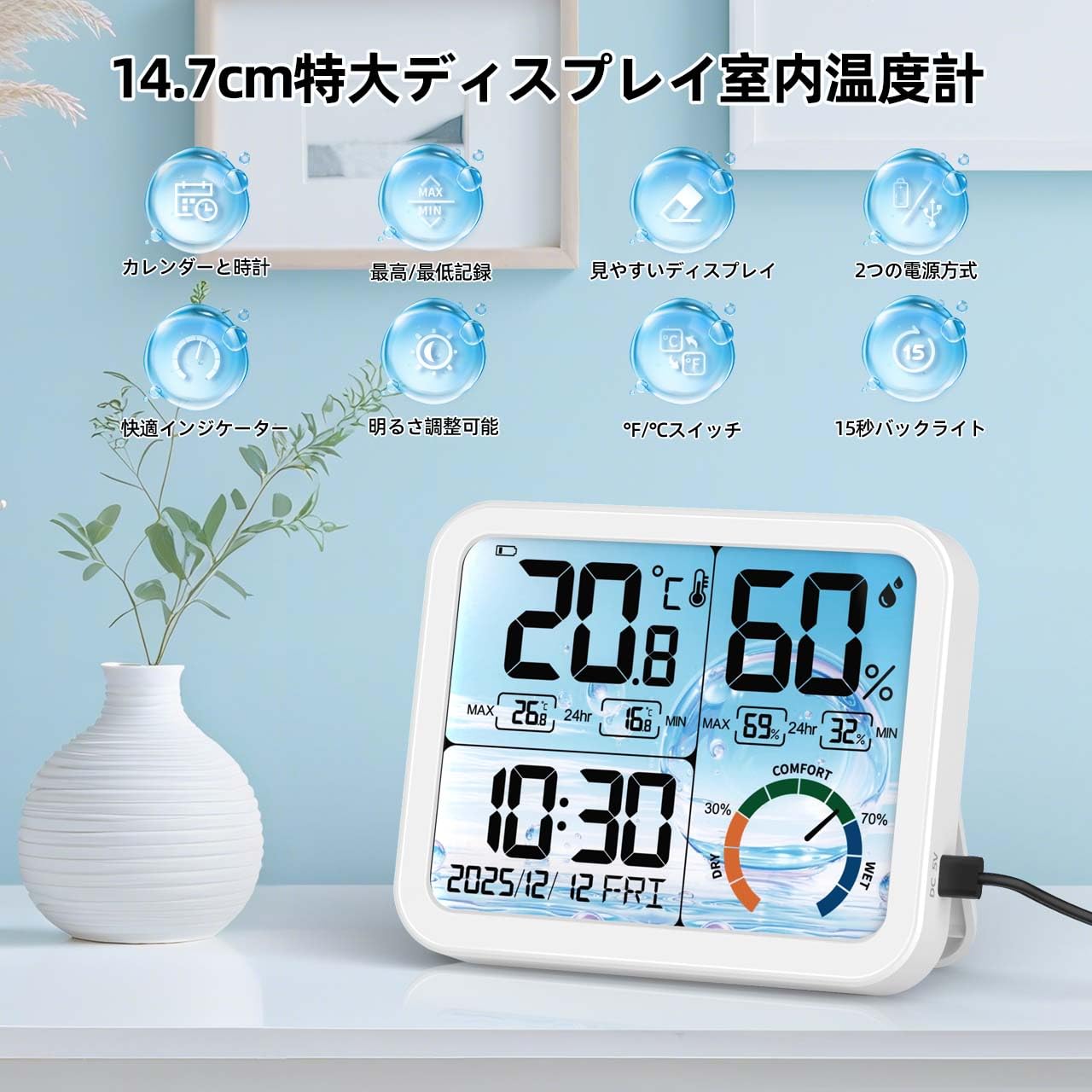
Image 1.1: Front view of the VOCOO Digital Thermometer Hygrometer displaying various functions.
2. Package Contents
- VOCOO Digital Thermometer Hygrometer (Model 6215W)
- User Manual
- USB Power Cable (if applicable)
- Batteries (if included)
3. Device Layout and Buttons
Familiarize yourself with the device's components and control buttons.

Image 3.1: Rear view of the device highlighting the battery compartment, stand, hanging hole, USB charging port, and control buttons.
- °C/°F Button: Switches between Celsius and Fahrenheit temperature units.
- "+" Button: Increases values during setting, used for calibration.
- "-" Button: Decreases values during setting, used for calibration.
- 12H/24H Button (Gear Icon): Adjusts date and time, switches between 12-hour and 24-hour time formats.
- Battery Compartment: Holds 3 AAA batteries.
- USB Charging Port: For external power supply.
- Hanging Hole: For wall mounting.
- Stand: For desktop placement.
4. Setup
4.1 Powering On the Device
- Open the battery compartment cover on the back of the device.
- Insert 3 AAA batteries, ensuring correct polarity (+/-).
- Alternatively, connect the device to a USB power source using the provided USB cable.
- The display will light up, and the device will begin measuring temperature and humidity.
4.2 Initial Time and Date Setting
- Press and hold the 12H/24H (Gear Icon) button on the back of the device for approximately 3 seconds to enter time setting mode.
- The year will start flashing. Use the "+" or "-" buttons to adjust the year (2023-2099).
- Press the 12H/24H button again to confirm and move to the month setting.
- Repeat the process for month, day, hour, and minute.
- After setting the minutes, press the 12H/24H button to exit setting mode.
- To switch between 12-hour and 24-hour display, briefly press the 12H/24H button outside of setting mode.
4.3 Temperature Unit Selection
Briefly press the °C/°F button on the back of the device to switch between Celsius (°C) and Fahrenheit (°F) temperature units.
4.4 Placement
Place the device on a flat surface using its integrated stand or mount it on a wall using the hanging hole. Ensure it is placed in a location where accurate ambient temperature and humidity measurements are desired, away from direct sunlight, heat sources, or drafts.

Image 4.1: Examples of suitable placement locations for the device.
5. Operating Instructions
5.1 Temperature and Humidity Display
The large LCD display shows the current temperature and humidity. Readings are updated approximately every 30 seconds. If the temperature falls outside the measurable range (-9.9°C to 70°C), "LL" (Low) or "HH" (High) will be displayed.
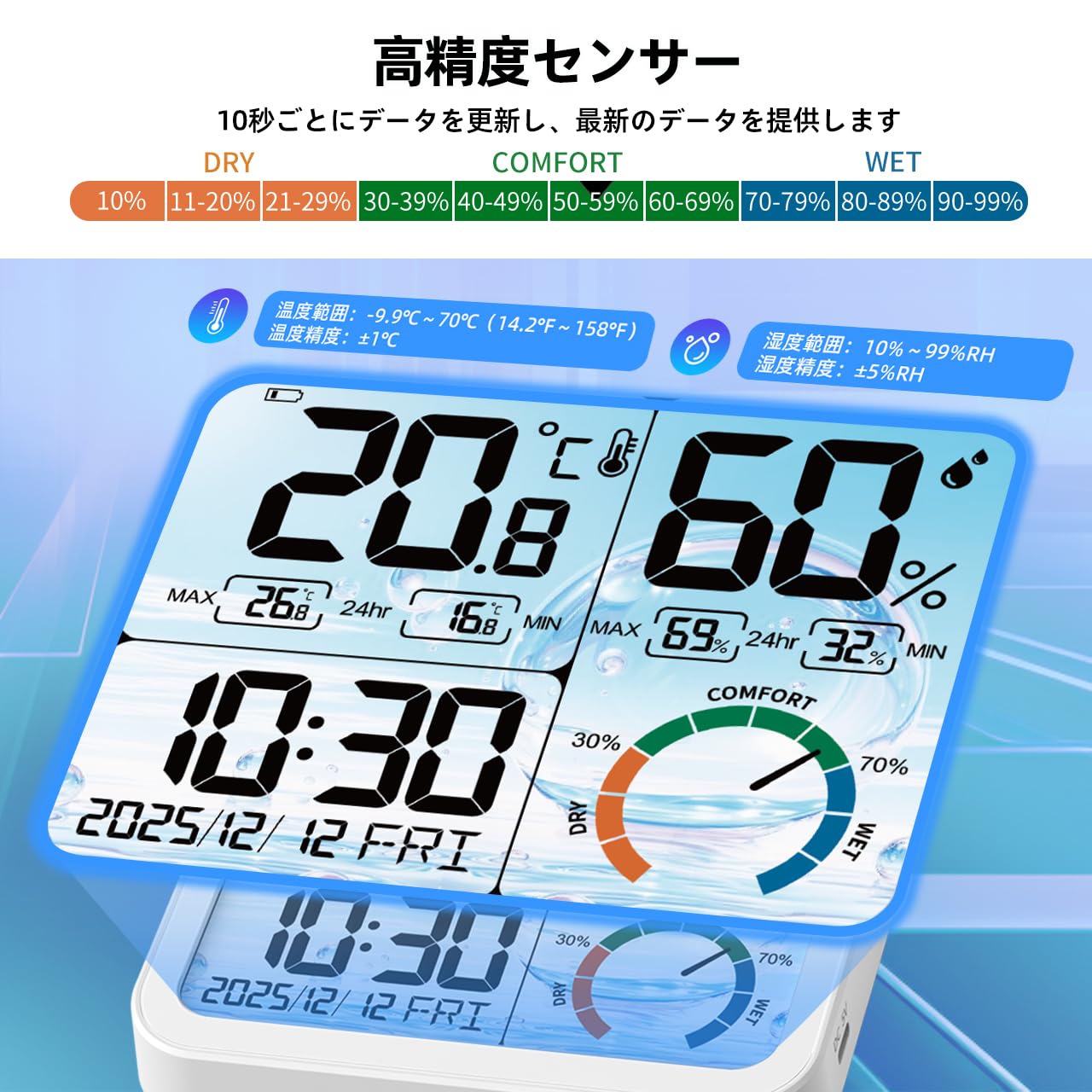
Image 5.1: Detailed view of the display and sensor specifications.
5.2 Comfort Level Indicator
The device features a color-coded icon to indicate the current comfort level based on humidity:
- DRY: 0-29% RH (Red/Yellow/Green-Yellow icon)
- COMFORT: 30-69% RH (Green/Aqua/Blue icon)
- WET: 70-99% RH (Blue/Dark Blue/Purple icon)

Image 5.2: Visual representation of the comfort level indicator.
5.3 MAX/MIN Record
The device automatically records the maximum and minimum temperature and humidity values over a 24-hour period. These records are updated daily after 0:00 (midnight).

Image 5.3: MAX/MIN temperature and humidity records with daily trend graphs.
5.4 Backlight Function
The device features an adjustable backlight. When powered via USB, there are 4 brightness levels (None, Dim, Medium, Bright). When running on battery power, the backlight automatically turns off after 15 seconds to conserve energy. To activate the backlight in battery mode, gently touch the top of the device.

Image 5.4: Demonstration of the 4-level backlight adjustment when connected to power.

Image 5.5: Backlight in battery mode, showing 15-second auto-off and power saving features.
6. Calibration Function
The device includes a high-precision calibration function to adjust temperature and humidity readings if necessary, ensuring consistency with other measuring instruments or to correct for environmental changes and aging.
- To enter calibration mode, press and hold both the "+" and "-" buttons simultaneously for approximately 3 seconds.
- The temperature value will start flashing. Use the "+" or "-" buttons to adjust the temperature within a range of ±5°C.
- Press the °C/°F button to confirm the temperature adjustment and move to humidity calibration.
- The humidity value will start flashing. Use the "+" or "-" buttons to adjust the humidity within a range of ±10% RH.
- Press the °C/°F button again to save the calibration settings and exit calibration mode.
7. Maintenance
- Cleaning: Wipe the device with a soft, dry cloth. Do not use abrasive cleaners or immerse the device in water.
- Battery Replacement: When the low battery icon appears on the display, replace the 3 AAA batteries in the battery compartment. Ensure correct polarity.
- Storage: If storing the device for an extended period, remove the batteries to prevent leakage. Store in a cool, dry place.
8. Troubleshooting
| Problem | Possible Cause | Solution |
|---|---|---|
| No display or dim display | Low batteries or no power connection. | Replace batteries or connect to a USB power source. |
| Incorrect time/date | Time/date not set correctly. | Refer to "4.2 Initial Time and Date Setting" to adjust. |
| Temperature/Humidity reading "LL" or "HH" | Temperature/humidity is outside the measurable range. | Move the device to an environment within the specified operating range. |
| Inaccurate readings | Device needs calibration or is placed in an unsuitable location. | Refer to "6. Calibration Function" or relocate the device away from direct heat/cold sources or drafts. |
9. Specifications
- Model: 6215W
- Display Type: 14.7cm Large LCD
- Temperature Measurement Range: -9.9°C to 70°C (14.2°F to 158°F)
- Temperature Accuracy: ±1°C (for 0°C to 40°C range)
- Humidity Measurement Range: 10% RH to 99% RH
- Humidity Accuracy: ±5% RH
- Data Update Interval: Approximately 30 seconds
- Backlight: 4 levels (USB powered), 15-second auto-off (battery powered)
- Time Display: 12H/24H selectable
- Date Range: 2023-2099
- Day of Week Languages: English, German, Italian, Spanish, French, Danish, Swedish
- Power Source: 3 x AAA Batteries (not included) or USB Power
- Dimensions: Approximately 14 cm (Length) x 11.5 cm (Height) x 2.3 cm (Depth)
- Weight: 380 g
- Material: Plastic
Image 9.1: Device dimensions.
10. Official Product Videos
Watch these official videos for visual guidance on using your VOCOO Digital Thermometer Hygrometer.
Video 10.1: Product overview and key features demonstration (0:44).
Video 10.2: Demonstration of setting up time and date (0:28).
Video 10.3: Guide to using the backlight and comfort indicator (0:50).
11. Warranty and Support
For warranty information or technical support, please contact VOCOO customer service. Refer to the product packaging or the official VOCOO website for contact details.
- Manufacturer: VOCOO
- Seller: VOCOO JP (via Amazon.co.jp)
- First Available Date: August 4, 2025
Please retain your purchase receipt for warranty claims.