1. Introduction
The Acclope BT60 Pro Car Battery Tester is a versatile diagnostic tool designed for accurately assessing the health and performance of various 6V, 12V, and 24V automotive batteries. This manual provides detailed instructions for safe and effective use of the device, covering setup, operation, maintenance, and troubleshooting.
2. Safety Information
Always observe the following safety precautions when using the BT60 Pro Battery Tester:
- Wear appropriate personal protective equipment, including eye protection and gloves.
- Ensure the vehicle is in a well-ventilated area to prevent accumulation of explosive gases.
- Avoid sparks or open flames near the battery.
- Connect the clamps correctly: red to positive (+), black to negative (-). The device features reverse connection protection to prevent damage.
- Do not touch moving engine parts or hot surfaces during testing.
- Keep the device dry and clean.
3. What's in the Box
- 1x Acclope BT60 Pro Battery Tester
- 1x User Manual
4. Product Overview
The Acclope BT60 Pro is a compact and durable battery analyzer with a 3.2-inch LED screen and intuitive button controls. It is designed for ease of use and provides comprehensive diagnostic data.
Key Features:
- Supports 6V, 12V, and 24V batteries.
- Compatible with various battery types: AGM, GEL, SLA, EFB, VRLA, and Lithium.
- Tests batteries from 2Ah to 120Ah.
- Provides SOH (State of Health), SOC (State of Charge), voltage, resistance, and ripple analysis.
- Includes Cranking Test, Charging Test, and Waveform Diagnostics.
- Cloud printing feature for easy report management via QR code.
- Multi-language support (12 languages).
- Features reverse connection protection.

Figure 1: Front view of the Acclope BT60 Pro Car Battery Tester, showing the screen and control buttons.

Figure 2: The main menu of the BT60 Pro, displaying options for Motorcycle, Car, Truck, Waveform, Charging Test, and Start the Test.
5. Setup
The BT60 Pro is designed for plug-and-play operation, drawing power directly from the battery under test. No external power source or batteries are required.
Connecting the Tester:
- Ensure the vehicle engine is off and all accessories (headlights, radio, etc.) are turned off.
- Connect the red clamp to the positive (+) terminal of the battery.
- Connect the black clamp to the negative (-) terminal of the battery.
- The tester will power on automatically.
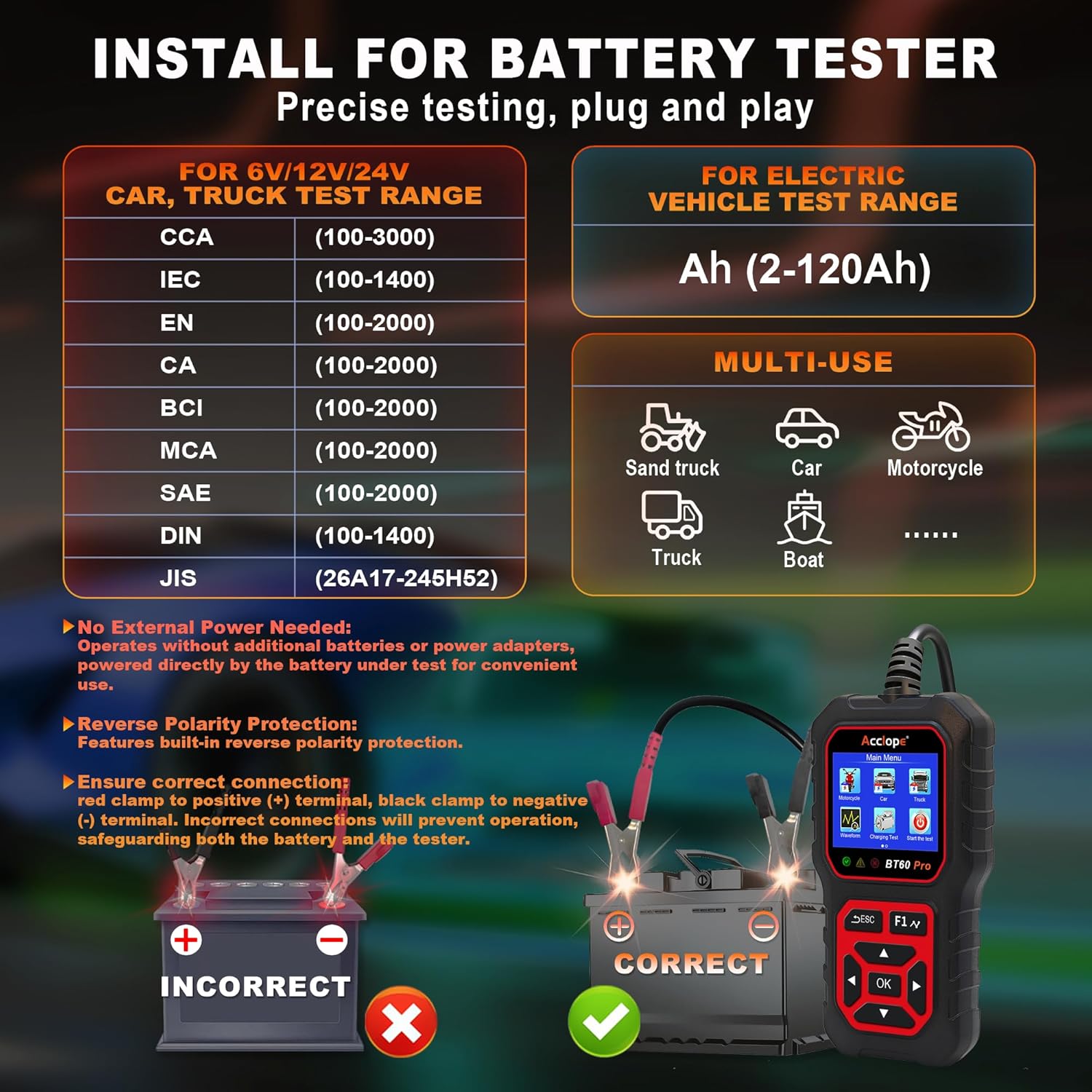
Figure 3: Illustration showing the correct connection of the tester clamps to a car battery. Red clamp to positive, black clamp to negative.
6. Operating Instructions
Navigate the menu using the directional arrows and the 'OK' button. The 'ESC' button returns to the previous screen.
6.1. Battery Test:
- From the Main Menu, select the appropriate vehicle type (Motorcycle, Car, or Truck).
- Select the battery type (e.g., Regular Flooded, AGM Flat Plate, GEL, Lithium).
- Select the testing standard (e.g., CCA, IEC, EN).
- Set the battery rating (e.g., 500 CCA).
- The tester will perform the test and display the results, including SOH, SOC, Voltage, and Resistance.

Figure 4: Example of a battery test result screen, showing SOH, SOC, Voltage, and CCA.
6.2. Cranking Test:
This test evaluates the engine's starting performance.
- From the Main Menu, select "Start the test" or "Cranking Test".
- Follow the on-screen prompts to turn off the engine if it's running.
- Start the engine when prompted.
- The tester will display cranking time, voltage, and a "Cranking Normal" or other status.
Video 1: Demonstration of the Acclope BT60 Pro performing a cranking test on a vehicle.
6.3. Charging Test:
This test assesses the alternator's functionality and charging system performance.
- From the Main Menu, select "Charging Test".
- Follow the on-screen instructions, which may include increasing engine RPM to 2500 for 10 seconds.
- The tester will display loaded voltage, unloaded voltage, ripple, and charging status (e.g., "Charging Normal", "Charging Low").

Figure 5: Display of a charging test, showing loaded/unloaded voltage and ripple.
6.4. Waveform Analysis:
The BT60 Pro provides real-time waveform analysis for visual insights into battery performance during cranking and charging.
- From the Main Menu, select "Waveform".
- Choose between "Real-time Waveform" or "Cranking Waveform".
- Observe the graphical representation of voltage fluctuations.

Figure 6: The real-time waveform display on the BT60 Pro, showing voltage over time.
7. Maintenance
- Keep the tester clean and dry. Wipe with a soft, damp cloth if necessary.
- Store the device in a cool, dry place away from direct sunlight and extreme temperatures.
- Regularly inspect the clamps and cables for any signs of damage. Replace if worn or broken.
8. Troubleshooting
| Problem | Possible Cause | Solution |
|---|---|---|
| Tester does not power on. | Incorrect clamp connection or battery voltage too low. | Ensure clamps are securely connected (red to +, black to -). Check if the battery has sufficient voltage (min. 6V). |
| Inaccurate test results. | Incorrect battery type or CCA/Ah rating entered. Poor clamp connection. | Verify the selected battery type and rating match the battery specifications. Ensure clamps have good contact with battery terminals. |
| "Charging Low" or "Charging High" message during charging test. | Alternator or charging system issue. | Consult a qualified mechanic for further diagnosis of the vehicle's charging system. |
9. Specifications
- Brand: Acclope
- Model: BT60 Pro
- Power Source: Corded Electric (powered by tested battery)
- Color: Black-Red
- Item Weight: 0.28 Kilograms (9.9 ounces)
- Product Dimensions: 6 x 3.5 x 1.5 inches
- Min. Operating Voltage: 6 Volts
- Maximum Operating Voltage: 36 Volts
- Measurement Type: Ammeter, LCR Meter, Multimeter, Ohmmeter, Voltmeter
- Upper Temperature Rating: 80 Degrees Celsius
- Supported Battery Types: AGM, GEL, SLA, EFB, VRLA, Lithium
- CCA Range: 100-3000 CCA
- Ah Range: 2Ah-120Ah
- Certifications: CE, FCC, RoHS, UKCA
10. Cloud Printing for Report Management
The BT60 Pro features a convenient cloud printing function, eliminating the need for physical printers or dedicated apps. After completing a test, you can easily access and manage detailed test reports on your smartphone.
How to Use Cloud Printing:
- After a test is complete, navigate to the "Cloud Print" option in the Main Menu.
- A QR code will be displayed on the tester's screen.
- Use your smartphone's camera or a QR code scanner app to scan the code.
- Your smartphone will open a web page displaying the detailed test report. You can then save, share, or print this report from your phone.

Figure 7: The cloud printing interface, showing a QR code for accessing test reports on a smartphone.
Example Cloud Report Link: https://obd2tool.acclope.com/tj?t=/1333/0245/0005/01198/100/100/00/06/09/01/01/b0
11. Multi-Language Support
The BT60 Pro supports 12 languages to ensure accessibility for users worldwide. You can change the language setting through the "Tool Setup" menu.
Supported Languages:
- English
- French
- German
- Spanish
- Russian
- Dutch
- Finnish
- Polish
- Portuguese
- Italian
- Turkish
- Korean

Figure 8: The language selection menu, showing various supported languages.
12. Warranty and Support
For warranty information and technical support, please refer to the official Acclope website or contact their customer service directly. Details can typically be found in the included user manual or on the product packaging.
Note: Protection plans are available for purchase separately through Amazon.