Introduction
This manual provides detailed instructions for the installation, operation, and maintenance of your Nippon NDROID 9SE Car MediaPlayer. This device features a 9-inch 2.5D Gorilla Glass display, Android V13 operating system, Bluetooth, Wi-Fi, AHD Rear Camera support, Wireless CarPlay, and Android Auto functionality via Mirror Link. Please read this manual thoroughly before using the product to ensure proper operation and to prevent damage.

Image: Front view of the Nippon NDROID 9SE Car MediaPlayer unit alongside its product packaging. This illustrates the device's sleek design and the branding.
Safety Information
- Do not attempt to disassemble or modify the unit. This may cause damage and void the warranty.
- Ensure all wiring connections are secure and correctly insulated to prevent short circuits.
- Operate the device only when it is safe to do so, avoiding distractions while driving.
- Keep the unit away from extreme temperatures, direct sunlight, and moisture.
- Consult a professional for installation if you are unsure about any steps.
Package Contents
Verify that all items are present in the package:
- Nippon NDROID 9SE Car MediaPlayer Unit
- USB Cable (2 Units)
- GPS Antenna
- Power Harness
- RCA Cables
- AHD Rear Camera Input Cable

Image: Various cables and accessories included with the Nippon NDROID 9SE Car MediaPlayer, such as USB cables, GPS antenna, and RCA cables, essential for installation and connectivity.
Setup
1. Installation Overview
The NDROID 9SE is designed for universal fitment in most double-DIN car openings. Professional installation is recommended. Ensure the vehicle's power is disconnected before beginning installation.
2. Wiring Connections
Carefully connect all necessary cables to the rear of the head unit. Refer to the wiring diagram provided with your vehicle or consult a professional. Key connections include:
- Power Harness: Connect to the vehicle's power, ground, and accessory wires.
- USB Cables: For external storage or wired Android Auto/CarPlay (if applicable).
- GPS Antenna: Mount in a location with a clear view of the sky for optimal signal reception.
- AHD Rear Camera Input: Connect your AHD rear camera for parking assistance.
- Audio Output (RCA): For connecting to external amplifiers.
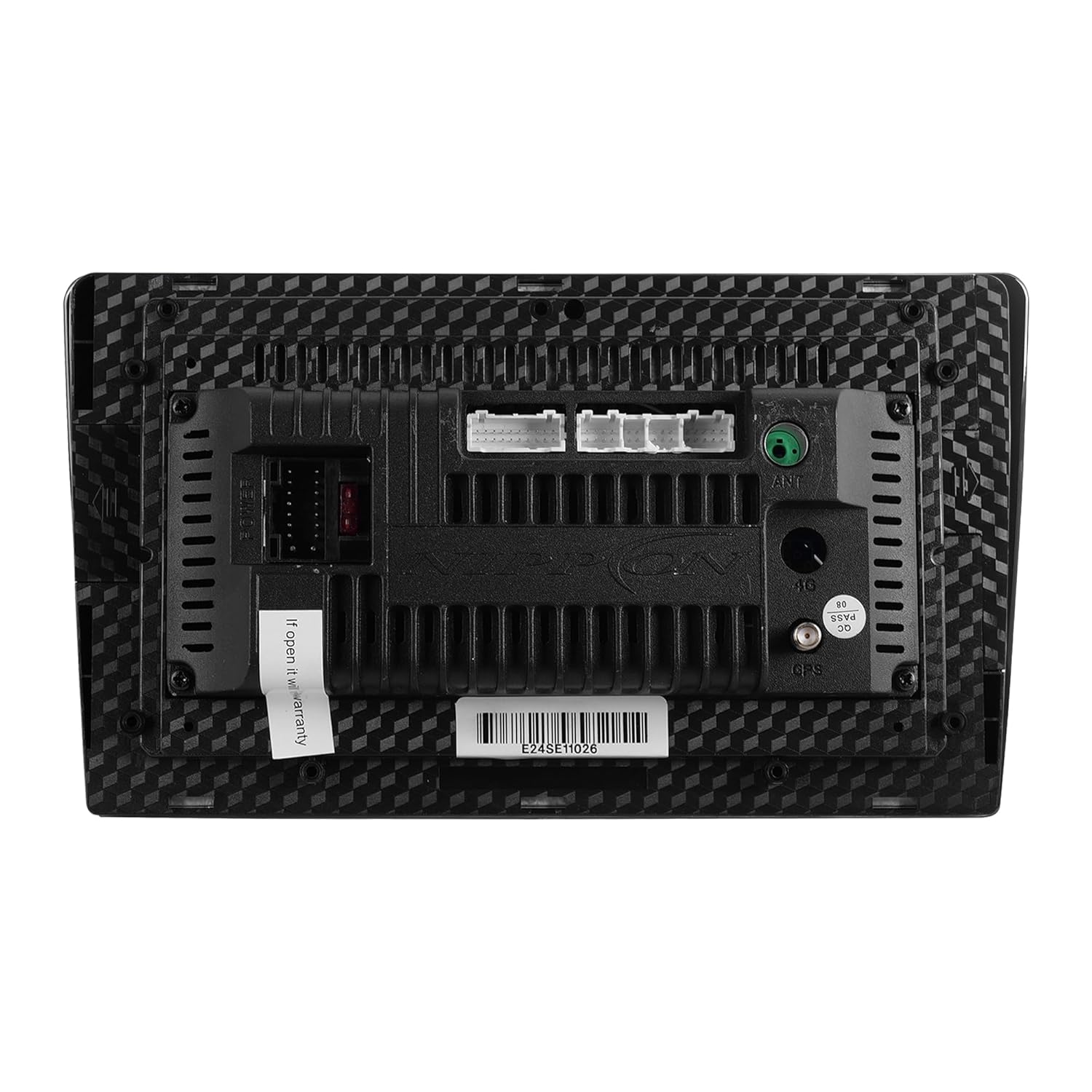
Image: The rear panel of the Nippon NDROID 9SE Car MediaPlayer, displaying various input and output ports for power, USB, GPS antenna, and audio/video connections.

Image: A detailed close-up of the rear connectivity ports on the Nippon NDROID 9SE Car MediaPlayer, highlighting the GPS antenna input and other essential connectors for system integration.
3. Initial Power On
After all connections are made, reconnect the vehicle's power. The unit should power on automatically or by pressing the power button. Follow the on-screen prompts for initial setup, including language selection and time zone.
Operating Instructions
1. Basic Interface Navigation
The unit operates on Android V13. Navigate the interface using the 9-inch capacitive touchscreen. Swipe left/right to access different home screens, tap icons to open applications, and use the back/home buttons as you would on an Android smartphone.
2. Bluetooth Pairing
- Go to the "Settings" menu and select "Bluetooth".
- Enable Bluetooth on the Car MediaPlayer and make it discoverable.
- On your mobile device, search for available Bluetooth devices and select "NDROID 9SE".
- Confirm the pairing code on both devices.
- Once paired, you can make hands-free calls and stream audio.
3. Wi-Fi Connection
- Access "Settings" and then "Wi-Fi".
- Turn on Wi-Fi and select your desired network from the list.
- Enter the password if prompted and connect.
- Wi-Fi is required for online features, app downloads, and Wireless CarPlay/Android Auto.
4. Wireless CarPlay and Android Auto
The unit supports Wireless CarPlay and Android Auto via Mirror Link functionality. Ensure your phone's Wi-Fi and Bluetooth are enabled.
- For CarPlay: On your iPhone, go to Settings > General > CarPlay and select "NDROID 9SE".
- For Android Auto: Ensure the Android Auto app is installed on your Android phone. Connect via Bluetooth first, then follow the on-screen prompts for Wi-Fi connection.
5. AHD Rear Camera Functionality
When the vehicle is shifted into reverse, the display will automatically switch to the AHD rear camera view, providing assistance for parking and maneuvering.
6. Media Playback
The NDROID 9SE supports various media formats. You can play audio and video files from USB drives, stream via Bluetooth, or use installed media applications.
Maintenance
1. Cleaning the Unit
Use a soft, dry cloth to clean the display and exterior. For stubborn marks, slightly dampen the cloth with water. Avoid using harsh chemicals or abrasive cleaners, as they can damage the screen and finish.
2. Software Updates
Periodically check for software updates through the unit's settings menu (if available) or the official Nippon website. Keeping the software updated ensures optimal performance and access to new features.
Troubleshooting
| Problem | Possible Cause | Solution |
|---|---|---|
| Unit does not power on. | Incorrect wiring, blown fuse, vehicle power issue. | Check power, ground, and accessory wire connections. Inspect vehicle fuses. Ensure vehicle battery is charged. |
| No sound output. | Volume too low, mute activated, speaker wiring issues, incorrect audio source. | Increase volume. Check if mute is active. Verify speaker connections. Select correct audio source. |
| Bluetooth not connecting. | Bluetooth off on unit or phone, device not discoverable, pairing error. | Ensure Bluetooth is enabled on both devices. Make unit discoverable. Delete previous pairings and try again. |
| GPS signal weak or lost. | GPS antenna improperly installed or obstructed. | Ensure GPS antenna is mounted in a clear, unobstructed location (e.g., dashboard). Check antenna connection. |
| Rear camera not displaying. | Camera not connected, reverse trigger wire not connected, faulty camera. | Verify AHD camera input connection. Ensure reverse trigger wire is correctly connected to the vehicle's reverse light circuit. Test camera functionality. |
Specifications
- Model: NDROID 9SE (B0FR2VC2B1)
- Display: 9 Inch 2.5D Capacitive Touch, HD 720*1280 IPS Screen
- Operating System: Android V13
- Processor: TS7 Solution
- Memory/Storage: 2GB RAM / 32GB Internal Storage
- Connectivity: Bluetooth, Wi-Fi
- Special Features: Wireless CarPlay, Android Auto (via Mirror Link), Touchscreen, AHD Rear Camera Support
- Audio Output Mode: Stereo, Surround
- Media Format Support: 4K (Video Playback)
- Product Dimensions: 4D x 22W x 13H Centimeters (approx. 40 x 220 x 130 Millimeters)
- Item Weight: 1 Kilogram
Warranty and Support
Your Nippon NDROID 9SE Car MediaPlayer comes with a 1 Year Warranty from the date of purchase. This warranty covers manufacturing defects and malfunctions under normal use. Please retain your purchase receipt as proof of warranty.
For technical support, warranty claims, or service inquiries, please contact Nippon customer service. Refer to the contact information provided with your product packaging or visit the official Nippon website for assistance.
Note: Opening or attempting to repair the unit by unauthorized personnel will void the warranty.


