Introduction
This manual provides essential information for setting up, operating, maintaining, and troubleshooting your Samsung Galaxy A07 4G smartphone (Model SM-A075/DS). Please read this manual thoroughly to ensure proper use and to maximize the device's features.
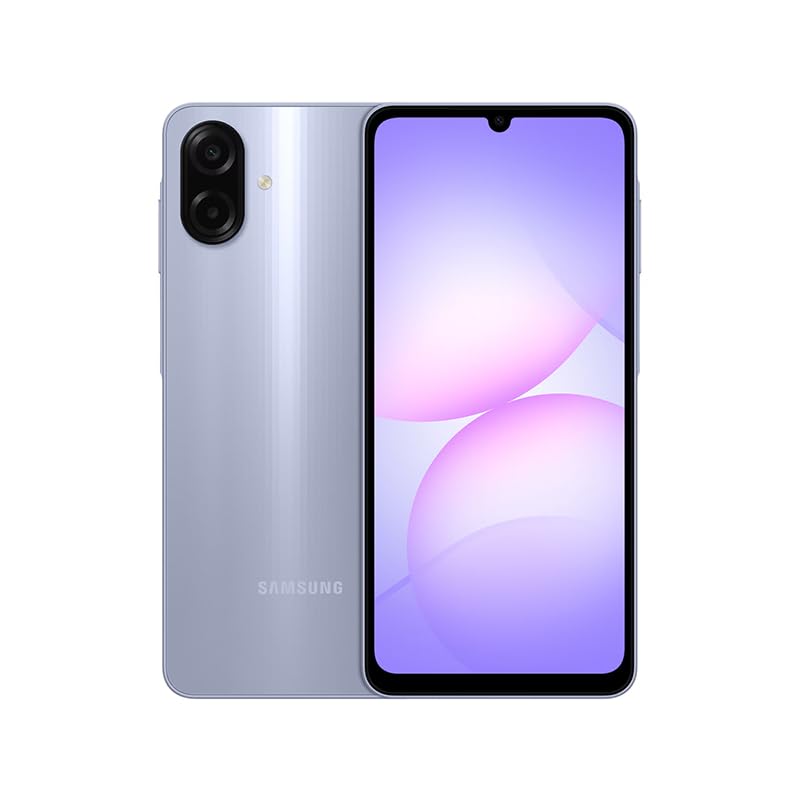
Figure 1: Samsung Galaxy A07 4G Front View
1. Setup
1.1 Unboxing and Initial Inspection
Carefully remove all items from the packaging. Verify that all components are present. The box should contain the Samsung Galaxy A07 4G smartphone and a USB Cable. A charger is not included.

Figure 2: Device in packaging
1.2 Inserting SIM Card(s) and MicroSD Card
- Locate the SIM tray on the side of the device.
- Use the provided SIM ejector tool (if included, otherwise a small paperclip) to open the SIM tray.
- Carefully place your SIM card(s) and/or MicroSD card into the designated slots on the tray. This device supports Dual SIM and MicroSD up to 1TB.
- Gently push the SIM tray back into the device until it is flush.

Figure 3: Side view with SIM tray location
1.3 Initial Power On and Configuration
- Press and hold the Power button (located on the side) until the Samsung logo appears.
- Follow the on-screen prompts to complete the initial setup, including language selection, Wi-Fi connection, Google account setup, and security settings.
2. Operating Instructions
2.1 Display and Navigation
The Samsung Galaxy A07 features a 6.7-inch PLS LCD display with a 90 Hz refresh rate for smooth visuals.
- Touch Gestures: Tap to select, swipe to scroll, pinch to zoom.
- Home Screen: Customize with widgets and app shortcuts.
- Notifications Panel: Swipe down from the top of the screen to access quick settings and notifications.
2.2 Camera Usage
The device is equipped with a 50 MP Pro-Grade main camera and an 8 MP front camera.
- Open the Camera application from your home screen or app drawer.
- Select your desired mode (Photo, Video, Portrait, etc.).
- Tap the shutter button to capture an image or start/stop video recording.
- Use the zoom controls on the screen to adjust magnification.
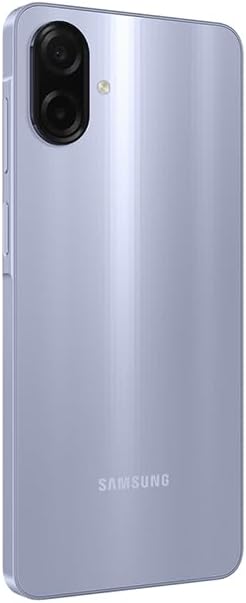
Figure 4: Rear Camera System
2.3 Connectivity
- Wi-Fi: Connect to wireless networks via Settings > Connections > Wi-Fi. Supports 802.11a/b/g/n/ac 2.4GHz+5GHz.
- Bluetooth: Pair with other Bluetooth devices via Settings > Connections > Bluetooth.
- Mobile Data: Ensure your SIM card is active for 4G LTE connectivity. Compatible with T-Mobile, Mint, Tello, and Global GSM networks.
- GPS: Location services are supported via GPS, Glonass, Beidou, Galileo, QZSS.
3. Maintenance
3.1 Software Updates
Regularly check for and install software updates to ensure optimal performance, security, and access to new features. Your device is designed to receive 6 major OS upgrades and 6 years of security updates.
- Go to Settings > Software update > Download and install.
3.2 Cleaning Your Device
To clean your device, use a soft, lint-free cloth. Avoid abrasive materials or harsh chemicals. The device has an IP54 rating, providing protection against dust and water splashes.
- Wipe the screen and back panel gently.
- Do not submerge the device in water.
3.3 Battery Care
The device is equipped with a 5000 mAh battery. To prolong battery life:
- Avoid extreme temperatures.
- Use the provided USB cable for charging.
- Do not let the battery completely drain frequently.
4. Troubleshooting
4.1 Device Not Powering On
- Ensure the battery is charged. Connect the device to a charger for at least 10 minutes.
- Press and hold the Power button for 10-15 seconds to perform a forced restart.
4.2 Network Connectivity Issues
- Check if your SIM card is properly inserted.
- Verify that mobile data is enabled in Settings > Connections > Data usage.
- Restart the device.
- Ensure your device is compatible with your carrier's network (T-Mobile, Mint, Tello, Global GSM).
4.3 Apps Crashing or Freezing
- Close and reopen the app.
- Clear the app's cache (Settings > Apps > [App Name] > Storage > Clear cache).
- Ensure your device's software is up to date.
5. Specifications
| Feature | Detail |
|---|---|
| Model Name | Samsung Galaxy A07 4G (SM-A075/DS) |
| Display | 6.7 inches PLS LCD, 720 x 1600 (HD+), 90 Hz Refresh Rate |
| Processor | Octa-core (2x2.2 GHz Cortex-A76 & 6x2.0 GHz Cortex-A55) |
| RAM | 4 GB |
| Storage | 64 GB (expandable via MicroSD up to 1TB) |
| Rear Camera | 50 MP (wide, PDAF), 2 MP (depth) |
| Front Camera | 8 MP (wide) |
| Battery | 5000 mAh |
| Operating System | Android |
| Connectivity | 4G LTE, Wi-Fi 802.11a/b/g/n/ac (2.4GHz+5GHz), Bluetooth, GPS, Glonass, Beidou, Galileo, QZSS |
| Ports | USB Type-C, 3.5mm Stereo Earjack |
| Dimensions | Approx. 2 x 2 x 2 inches (Product Dimensions), 7.6 mm thickness |
| Weight | 9.2 ounces |
| Durability | IP54 Dust and Water Protection |
| Included in Box | USB Cable (Charger NOT Included) |
6. Warranty & Support
6.1 Warranty Information
This Samsung Galaxy A07 4G (Model SM-A075/DS) is a Latin American Version and comes with a 1-Year Warranty valid in South, Central, Latin America, and the Caribbean. Please ensure your device model is SM-A075/DS for local warranty coverage in Latin America.
For warranty claims or service, please contact Samsung customer support in your region. Proof of purchase may be required.
6.2 Customer Support
For further assistance, technical support, or to find service centers, please visit the official Samsung support website for your region or refer to the contact information provided in your product packaging.


