
1. Introduction
Thank you for choosing the Bewinner Portable HiFi MP3 Player. This device is designed to deliver high-resolution, lossless audio playback with the convenience of Bluetooth connectivity. Featuring a 2.4-inch HD display and intuitive controls, it supports a wide range of audio formats and offers versatile connection options, including DAC input. This manual provides essential information for setting up, operating, and maintaining your new music player.

2. Package Contents
Please check the package for the following items:
- 1 x Bewinner HiFi Music Player
- 1 x USB Type-C Cable
- 1 x User Manual
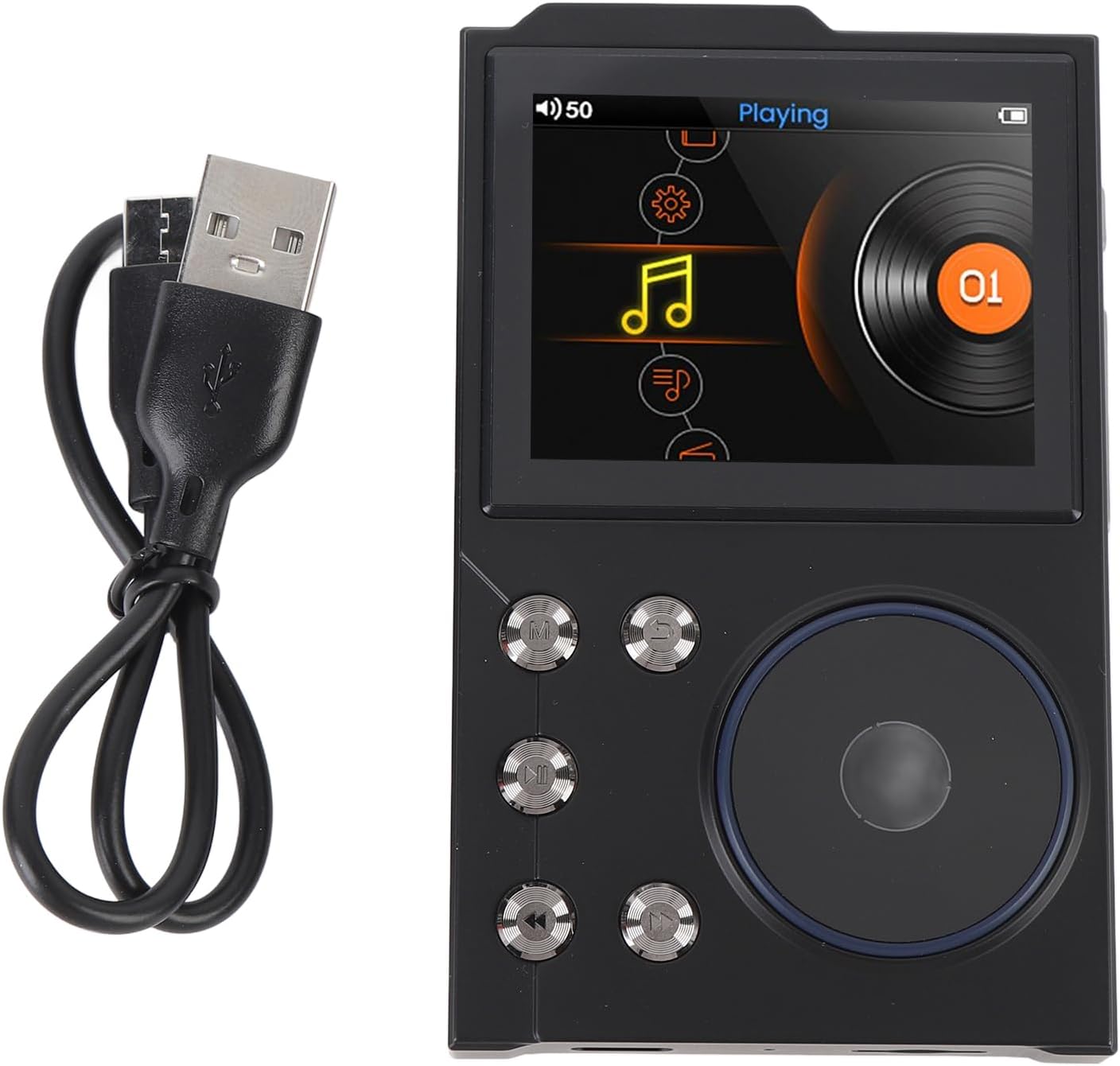
3. Product Overview
The Bewinner MP3 Player features a compact design with a 2.4-inch HD display and a combination of physical buttons and a scroll wheel for easy navigation.
3.1 Front View and Controls
The front panel includes the display, navigation buttons, and a retro scroll wheel for intuitive control.


3.2 Side and Back Views
The device features a Type-C USB port for charging and data transfer, a headphone output, and a line-out port for versatile audio connections.


4. Setup
4.1 Charging the Device
Before first use, fully charge the player. Connect the provided USB Type-C cable to the device's charging port and the other end to a USB power adapter (not included) or a computer's USB port. The battery indicator on the screen will show charging status.
4.2 Powering On/Off
- To Power On: Press and hold the power button until the screen lights up.
- To Power Off: Press and hold the power button until the power-off prompt appears, then confirm.
4.3 Initial Setup
Upon first power-on, you may be prompted to select your preferred language and other basic settings. Follow the on-screen instructions using the scroll wheel and buttons to navigate.
4.4 Transferring Music
Connect the player to your computer using the USB Type-C cable. The device will appear as a removable disk. You can then drag and drop your music files directly into the player's internal 16GB storage or onto an inserted microSD card (up to 256GB, not included).
5. Operating Instructions
5.1 Basic Navigation
Use the scroll wheel to browse through menus and lists. Press the center button of the scroll wheel to select an item. Use the dedicated back button to return to the previous screen.
5.2 Playing Music
Navigate to the 'Music' section, select a song, album, or artist, and press the play button. The player supports a wide range of lossless and compressed audio formats, including FLAC, APE, DFF, MP3, WAV, WMA, M4A, MP2, AAC, ALAC, OGG, AIFF, and native DSD (up to 128 bits / 5.6 MHz).
5.3 Bluetooth Connection
To connect to Bluetooth headphones or speakers:
- Go to 'Settings' and select 'Bluetooth'.
- Turn Bluetooth 'On'.
- Put your Bluetooth device into pairing mode.
- Select your device from the list of available devices on the player's screen to pair.
The player supports bidirectional lossless transfer using the APTX protocol, allowing it to stream music to wireless devices or function as a wireless receiver.

5.4 Equalizer Settings
Customize your audio experience by adjusting the equalizer settings. Navigate to the 'Equalizer' option in the music playback menu. You can choose from preset modes like Rock, Pop, Jazz, Classical, Techno, Soft, or create a custom profile.

5.5 Using as DAC (Digital-to-Analog Converter)
The Bewinner MP3 Player can serve as a digital source when connected to a USB amplifier with DAC input. Additionally, it can function as an external decoder amplifier when linked to a mobile phone or computer, enhancing their audio output quality.
6. Maintenance
- Cleaning: Use a soft, dry cloth to clean the device. Avoid using harsh chemicals or abrasive materials.
- Storage: Store the player in a cool, dry place away from direct sunlight and extreme temperatures.
- Battery Care: To prolong battery life, avoid fully discharging the device frequently. Charge it regularly, even if not in use for extended periods.
- Water Exposure: This device is not waterproof. Avoid exposure to water or high humidity.
7. Troubleshooting
| Problem | Possible Cause | Solution |
|---|---|---|
| Device does not power on. | Low battery. | Charge the device for at least 30 minutes. |
| No sound from headphones. | Volume too low; headphones not properly connected; incorrect output selected. | Increase volume; ensure headphones are fully plugged in; check audio output settings. |
| Cannot transfer files to the device. | USB connection issue; device not recognized by computer. | Ensure the USB cable is securely connected; try a different USB port or cable; restart both devices. |
| Bluetooth connection fails. | Device not in pairing mode; too far from the player; interference. | Ensure both devices are in pairing mode; move closer to the player; restart Bluetooth on both devices. |
| Screen is unresponsive. | Software glitch. | Press and hold the power button for 10-15 seconds to force a restart. |
8. Specifications
| Product Type | HiFi Music Player |
| Material | Zinc Alloy |
| Battery | 750mAh Lithium Polymer (integrated) |
| Dimensions (L x W x H) | Approx. 97 x 60.4 x 13.9 mm (3.8 x 2.4 x 0.5 inches) |
| Display | 2.4-inch HD Screen |
| Bluetooth Version | 5.3 |
| Signal-to-Noise Ratio (SNR) | 93dB ± 2dB |
| Internal Memory | 16GB |
| Expandable Memory | Up to 256GB via SD card or USB OTG (card/cable not included) |
| Charging Port | Type-C USB2.0 |
| Playback Time | Up to 10 hours (high-resolution music) |
| Supported Audio Formats | FLAC, APE, DFF, MP3, WAV, WMA, M4A, MP2, AAC, ALAC, OGG, AIFF, DSD (up to 128 bits / 5.6 MHz) |

9. Warranty and Support
9.1 Manufacturer's Warranty
This Bewinner product comes with a 2-year manufacturer's warranty from the date of purchase. This warranty covers defects in materials and workmanship under normal use. It does not cover damage caused by misuse, accidents, unauthorized modifications, or normal wear and tear.
9.2 Customer Support
For technical assistance, warranty claims, or any questions regarding your Bewinner Portable HiFi MP3 Player, please refer to the official Bewinner website or contact your retailer. Please have your model number (Bewinner0su7cfnvgt) and proof of purchase ready when seeking support.