1. Introduction
Thank you for choosing the Ducard Cordless Water Flosser Model 11M. This device is designed to provide a thorough and efficient cleaning experience for your teeth and gums, promoting better oral health. Please read this manual carefully before use to ensure proper operation and maintenance.
The Ducard Water Flosser features an innovative U-shaped nozzle for 360° deep cleaning, 5 adjustable modes, and a large 350ml water tank, making it suitable for various oral care needs, including braces and implants.
2. Package Contents
Upon opening your Ducard Cordless Water Flosser package, you should find the following items:
- 1x Cordless Water Flosser unit
- 2x U-Shaped Nozzles
- 2x Standard Nozzles
- 1x Orthodontic Nozzle
- 1x Periodontal Nozzle
- 1x Tongue Scraper Nozzle
- 1x USB-C Charging Cable (Adapter not included)
- 1x User Manual

Figure 2.1: Package Contents of the Ducard Cordless Water Flosser.
3. Product Features
- U-Shaped Flossing Nozzle: Delivers a 360° deep clean, simultaneously cleaning inner and outer tooth surfaces in one pass.
- Large Water Tank: 350ml capacity provides up to 120 seconds of continuous flossing.
- 5 Adjustable Modes: Soft, Normal, Strong, Pulse, and Child modes for customized cleaning.
- 7 Jet Tips: Includes U-shaped, Standard, Orthodontic, Periodontal, and Tongue Scraper nozzles.
- IPX7 Waterproof: Safe for use in the shower.
- Rechargeable & Portable: Long-lasting battery (up to 30 days on a single charge) and compact design for travel.

Figure 3.1: U-Shaped Flossing Nozzle in action.
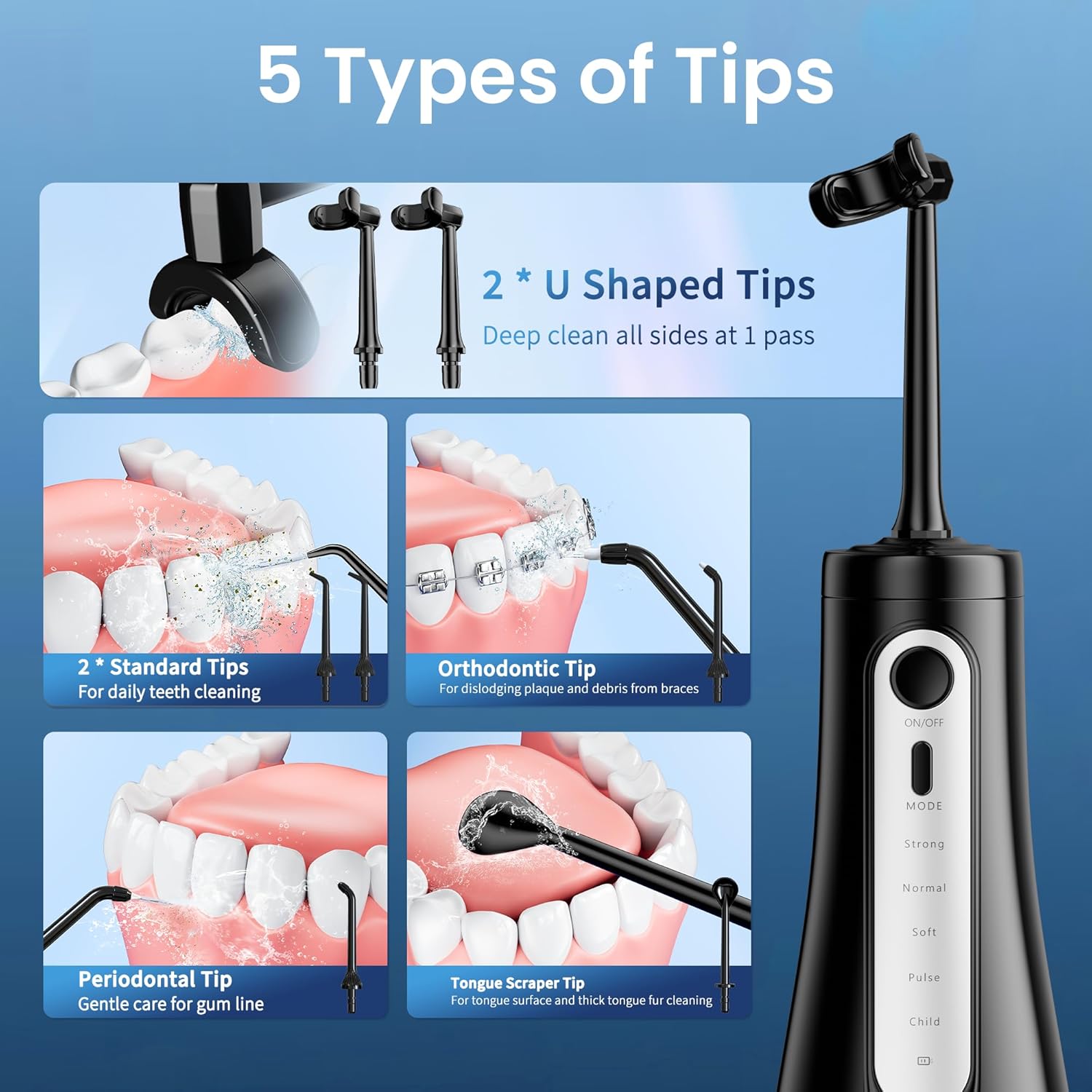
Figure 3.2: Overview of the 5 types of jet tips.
4. Setup and First Use
- Charge the Device: Before first use, fully charge the water flosser. Connect the USB-C charging cable to the device and a compatible 5V USB adapter (not included). The charging indicator will show progress. A full charge takes approximately 4 hours and provides up to 30 days of use. Ensure the charging port cover is tightly closed before use after charging.
- Attach Nozzle: Select the desired nozzle (e.g., U-shaped, Standard) and insert it into the hole on the top of the water flosser until it clicks into place.
- Fill Water Tank: Open the water tank cover. Fill the 350ml water tank with lukewarm water. You can either open the top cover or detach the tank for filling. Close the cover securely.
- Select Mode: Press the "MODE" button to cycle through the 5 cleaning modes: Soft, Normal, Strong, Pulse, and Child. Choose the mode appropriate for your needs.
- Position Nozzle: Lean over a sink and place the nozzle tip into your mouth, directing it towards your teeth and gumline.
- Start Flossing: Press the "ON/OFF" button to begin flossing. Keep your mouth slightly open to allow water to flow into the sink.

Figure 4.1: Water Tank Refill Methods.

Figure 4.2: Charging the Water Flosser.

Figure 4.3: Quick Start Guide for Operation.
5. Operating Instructions
5.1. General Usage
- Ensure the water tank is filled and a nozzle is securely attached.
- Select your preferred mode using the "MODE" button.
- Place the nozzle tip in your mouth before turning the device on to avoid splashing.
- Direct the water stream at a 90-degree angle to your gumline.
- Move the nozzle slowly along your gumline, pausing briefly between teeth.
- Floss both the inner and outer surfaces of your teeth.
- The device will automatically shut off after 2 minutes of continuous use.
5.2. Understanding the Modes
The Ducard Water Flosser offers 5 distinct modes to cater to various oral care needs:
- Soft Mode: Gentle pressure for sensitive gums, first-time users, or children.
- Normal Mode: Standard pressure for daily comprehensive cleaning.
- Strong Mode: Powerful pressure for deep cleaning, effective for removing stubborn plaque and cleaning around braces.
- Pulse Mode: Pulsating water stream for gum massage and improved blood circulation.
- Child Mode: Very gentle pressure specifically designed for children's delicate gums and teeth.

Figure 5.1: Water Flosser Modes Explained.
5.3. Using Different Nozzles
- U-Shaped Nozzle: Ideal for a quick, comprehensive clean of both inner and outer tooth surfaces.
- Standard Nozzle: For general daily cleaning, targeting plaque and food debris between teeth and below the gumline.
- Orthodontic Nozzle: Designed to clean around braces, wires, and other dental work.
- Periodontal Nozzle: Features a soft rubber tip for gentle cleaning and therapeutic rinsing below the gumline, especially for sensitive or inflamed gums.
- Tongue Scraper Nozzle: Use to clean the tongue surface for fresher breath.

Figure 5.2: Specialized Nozzle Types.
6. Maintenance and Cleaning
Regular cleaning and maintenance will ensure the longevity and optimal performance of your Ducard Water Flosser.
- After Each Use:
- Turn off the device and empty any remaining water from the tank.
- Rinse the water tank with clean water.
- Remove the nozzle and rinse it under running water.
- Wipe the main unit with a soft, damp cloth.
- Deep Cleaning (Weekly/Bi-weekly):
- To prevent mineral deposits, fill the tank with a mixture of 1 part white vinegar and 2 parts warm water.
- Run the solution through the device until the tank is empty.
- Rinse the tank and run a full tank of clean water through the device to flush out any vinegar residue.
- Nozzle Replacement: It is recommended to replace nozzles every 3-6 months, or sooner if they show signs of wear.
- Storage: Store the device in a cool, dry place away from direct sunlight. Ensure the water tank is empty and dry before storage.
7. Troubleshooting
| Problem | Possible Cause | Solution |
|---|---|---|
| Device does not turn on. | Low battery or not charged. | Charge the device fully. |
| Weak water pressure. | Low battery, insufficient water in tank, or clogged nozzle. | Recharge the device, refill the water tank, or clean/replace the nozzle. |
| Water leaks from the device. | Nozzle not properly inserted, or water tank not securely closed. | Ensure nozzle clicks into place. Check that the water tank cover is tightly sealed. |
| Device stops working during use. | Automatic 2-minute shut-off, or low battery. | Restart the device if needed, or recharge the battery. |
8. Specifications
- Model Number: 11M
- Water Tank Capacity: 350ml / 12oz
- Flossing Modes: 5 (Soft, Normal, Strong, Pulse, Child)
- Nozzle Types: U-Shaped, Standard, Orthodontic, Periodontal, Tongue Scraper
- Waterproof Rating: IPX7
- Battery Life: Up to 30 days on a single charge (approx. 4 hours charging time)
- Power Source: Rechargeable (USB-C cable)
- Dimensions: 9.45 x 3.62 x 3.62 inches
- Weight: 14.39 ounces
9. Important Safety Information
- Do not immerse the charging cable or adapter in water.
- Keep out of reach of children.
- Do not use if the device or charging cable is damaged.
- Consult your dentist before use if you have had oral surgery or have severe periodontal disease.
- Statements regarding dietary supplements have not been evaluated by the FDA and are not intended to diagnose, treat, cure, or prevent any disease or health condition.
10. Official Product Video
Video Description: This video demonstrates the key features and benefits of the Ducard Water Flosser, including the U-shaped nozzle for 360° deep cleaning and its effectiveness in removing plaque and stains. It highlights the ease of use and the comprehensive cleaning provided by the device.
11. Warranty and Support
Ducard products are manufactured with quality and customer satisfaction in mind. For any questions, concerns, or support needs regarding your Ducard Cordless Water Flosser Model 11M, please refer to the contact information provided in the packaging or visit the official Ducard website.
Please retain your proof of purchase for warranty claims. Specific warranty terms and conditions may apply and are typically detailed on the product packaging or the manufacturer's official support channels.
You can visit the Ducard Store on Amazon for more information and support.


