1. Introduction
This manual provides essential information for the safe and efficient operation of your EF ECOFLOW DELTA 3 Ultra Plus Portable Power Station. Please read this manual thoroughly before using the product to ensure proper functionality and to prevent damage.
The DELTA 3 Ultra Plus is a versatile portable power station designed for various applications, including home backup, outdoor activities, and professional use. It features a high-capacity LiFePO4 battery, robust power output, and multiple charging options.
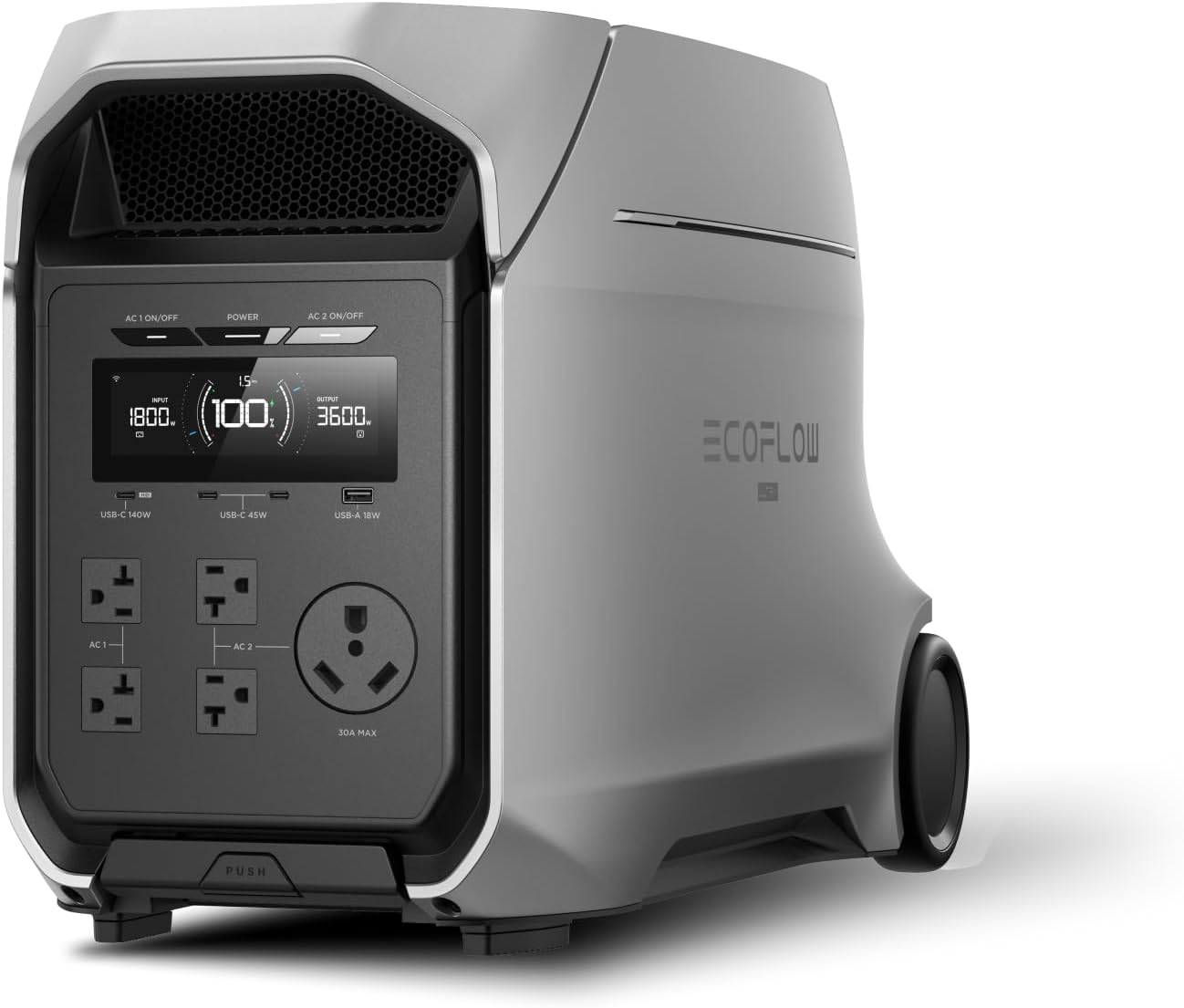
Image 1: Front view of the EF ECOFLOW DELTA 3 Ultra Plus Portable Power Station, showcasing its display and various output ports.
2. Setup
2.1 Unboxing and Initial Inspection
Carefully remove all components from the packaging. Verify that all included items are present:
- DELTA 3 Ultra Plus Portable Power Station
- AC Charging Cable
- Car Charging Cable
- Solar Charging Cable
- User Manual
Inspect the unit for any visible damage. If any damage is found or components are missing, contact customer support immediately.
2.2 Initial Charging
Before first use, fully charge the DELTA 3 Ultra Plus. Connect the AC charging cable to a standard wall outlet. The unit supports X-Stream fast charging, reaching 80% capacity in under an hour.

Image 2: The DELTA 3 Ultra Plus connected to a wall outlet for charging.
2.3 Connecting to the EcoFlow App
Download the EcoFlow app from your device's app store. Follow the in-app instructions to pair your DELTA 3 Ultra Plus. The app allows for remote monitoring, control, and access to smart features like Storm Guard and output priority settings.
2.4 Expanding Capacity
The DELTA 3 Ultra Plus is designed for expandable capacity, ranging from 3kWh to 11kWh. This is achieved by connecting additional DELTA 3 Max Extra Batteries or DELTA Pro 3 Extra Batteries (with an expansion adapter, sold separately). Refer to the accessory manuals for detailed connection instructions.
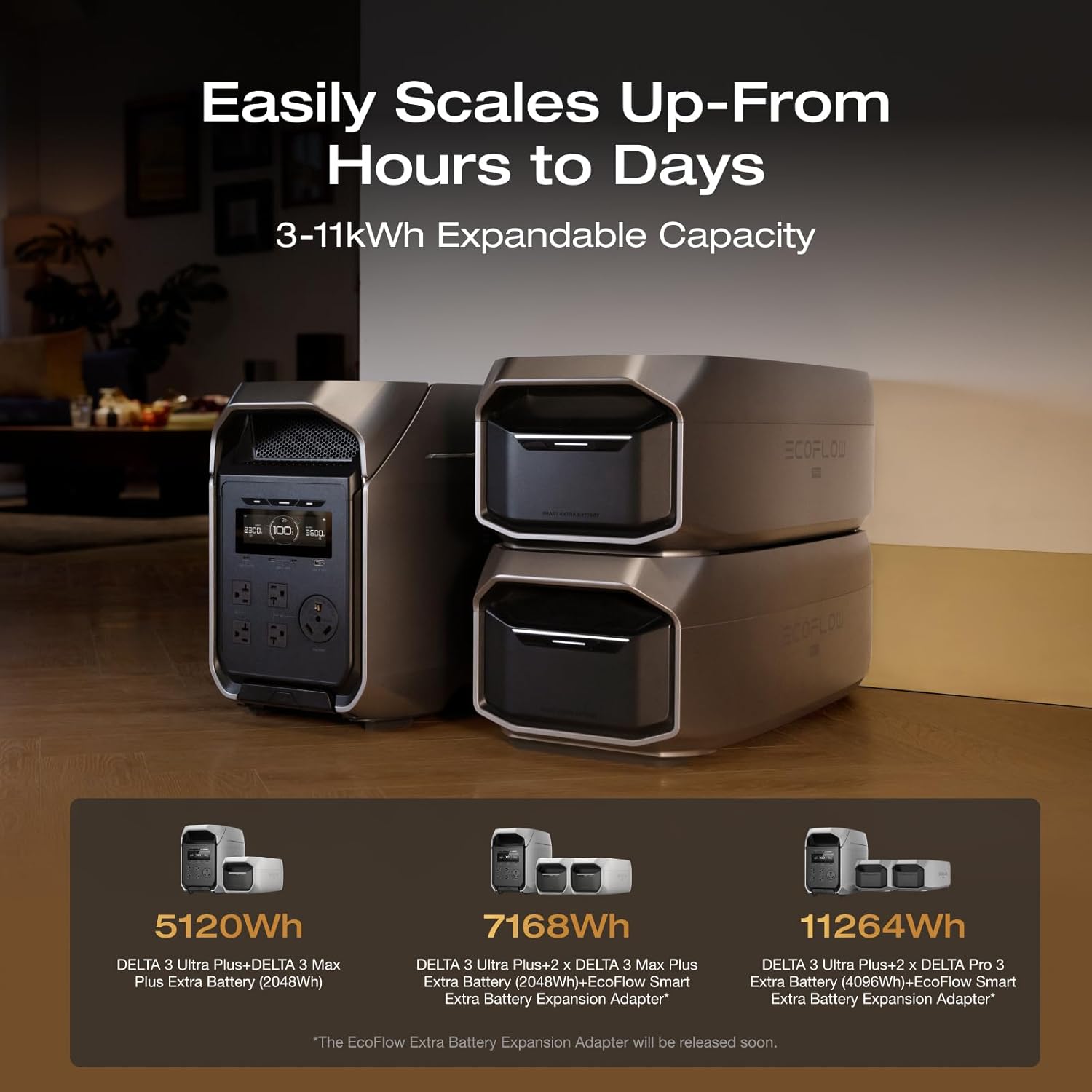
Image 3: Illustration of the DELTA 3 Ultra Plus with various extra battery configurations, showing expandable capacity options.
2.5 Home Connection Options
For home integration, the DELTA 3 Ultra Plus offers two connection methods:
- Manual Transfer Switch: Allows switching between grid power and the DELTA 3 Ultra Plus for reliable backup.
- Inlet Box: Connects directly to your home's AC input for powering appliances.
Consult a qualified electrician for professional installation of home integration solutions.

Image 4: The DELTA 3 Ultra Plus connected to a home electrical system via an inlet box.
3. Operating Instructions
3.1 Powering Devices
The DELTA 3 Ultra Plus provides a continuous output of 3600W, with a surge capability of 7200W, suitable for a wide range of appliances and tools. It features multiple output ports:
- 4 x AC Outlets (120V, 20A)
- 1 x TT-30 RV Port (120V, 30A)
- 3 x USB-C Ports (140W Max, 45W Max)
- 1 x USB-A Port (18W Max)
- 1 x Cigarette Lighter Port (12V, 10A)
- 1 x Anderson Port (12V, 30A)
Ensure the total wattage of connected devices does not exceed the unit's output capacity.
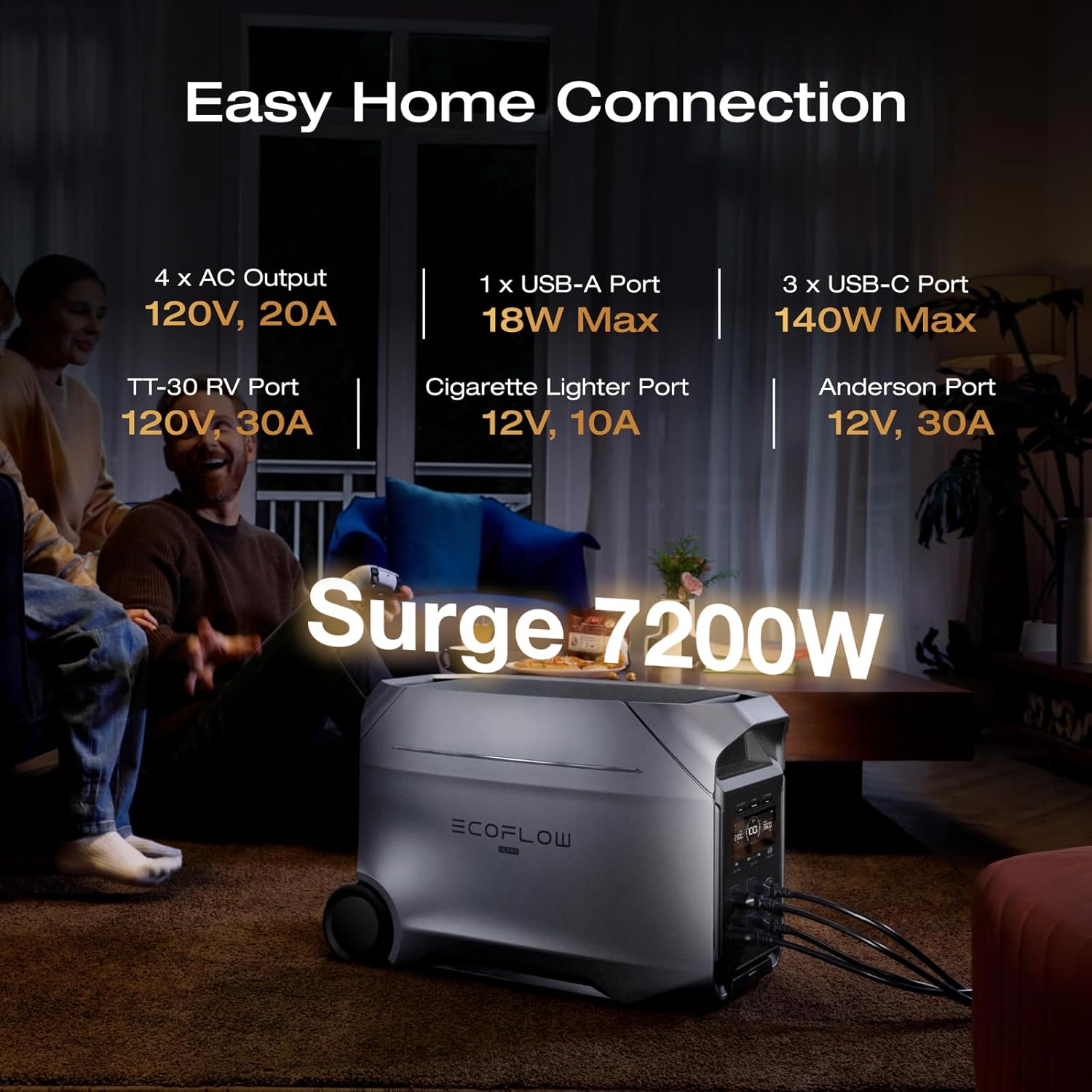
Image 5: Close-up of the DELTA 3 Ultra Plus display and various AC, USB, and DC output ports.
3.2 Uninterruptible Power Supply (UPS) Function
The DELTA 3 Ultra Plus features a UPS function that automatically switches to battery power in less than 10 milliseconds during a power outage. This protects sensitive electronics from sudden interruptions. No manual setup is required for this feature.
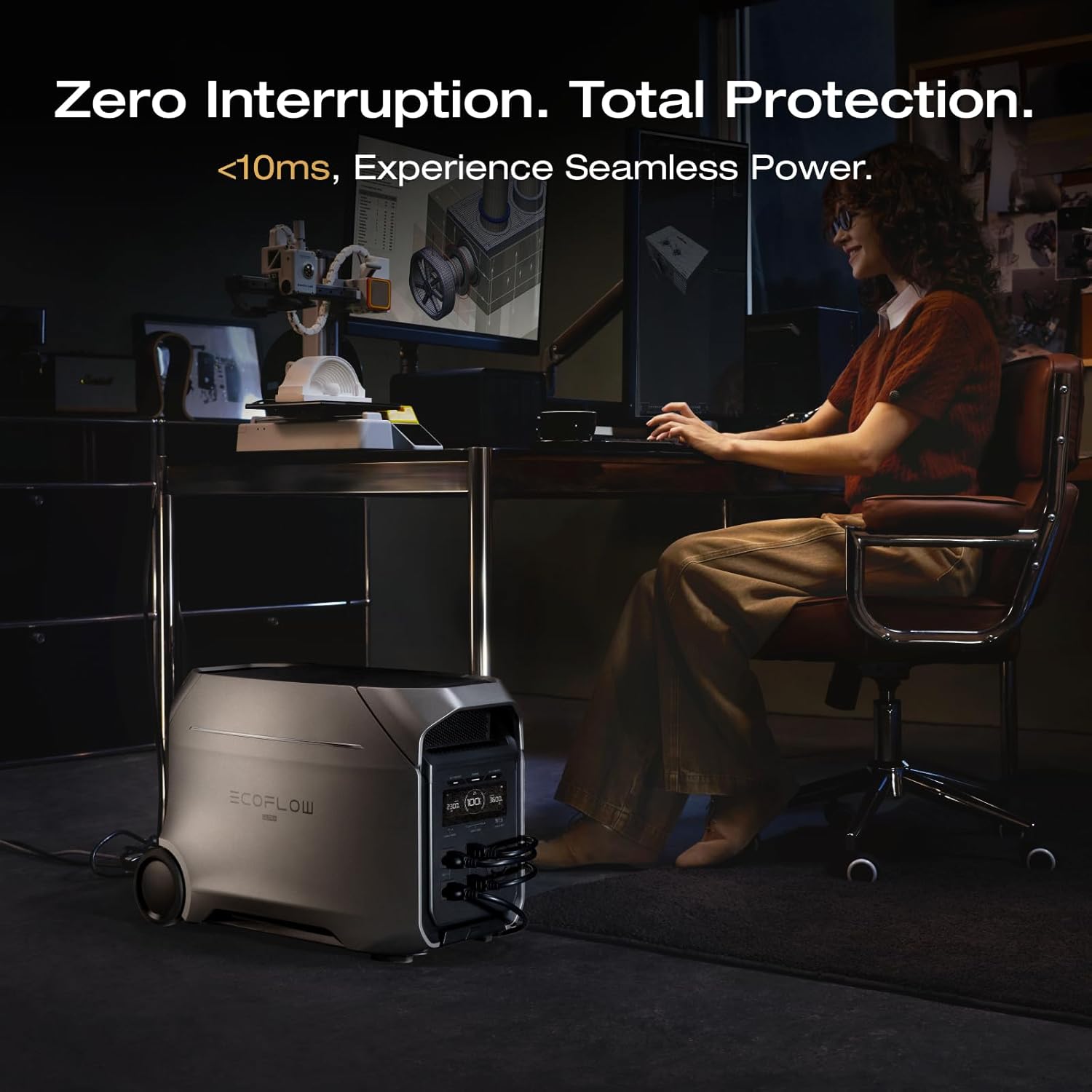
Image 6: The DELTA 3 Ultra Plus providing seamless power to a workstation, demonstrating its UPS capability.
3.3 Charging Methods
The DELTA 3 Ultra Plus supports six charging methods:
- Wall Charging: Up to 1800W input, 0-80% in 89 minutes.
- Generator Charging: Up to 3200W input, 0-80% in 53 minutes (with EcoFlow Smart Generator).
- Solar Charging: Up to 1600W input, 0-80% in 101 minutes.
- Alternator Charging: Up to 1000W input, 0-80% in 142 minutes (with EcoFlow Alternator Charger Plus 1000).
- Solar + Generator Dual Charging: Up to 3960W input, 0-80% in 48 minutes.
- Solar + Alternator Dual Charging: Up to 2600W input, 0-80% in 60 minutes.

Image 7: Visual representation of the six different charging methods available for the DELTA 3 Ultra Plus.
3.4 Quiet Operation
The unit operates at an ultra-quiet 25dB under loads below 600W, thanks to advanced X-Quiet 3.0 cooling technology. This makes it suitable for indoor use without significant noise disturbance.

Image 8: The DELTA 3 Ultra Plus operating quietly in a bedroom while a person sleeps.
3.5 Smart Features via EcoFlow App
Utilize the EcoFlow app to manage your power station effectively:
- Smart Output Priority: Prioritize power to essential devices during outages.
- Scheduling: Set charging times to take advantage of off-peak electricity rates.
- Storm Guard: Monitors weather alerts and automatically charges the unit to full capacity before a storm.
- Real-time Monitoring: Track energy usage, battery status, and charging rates.
4. Maintenance
4.1 Battery Care
The DELTA 3 Ultra Plus uses an advanced LiFePO4 battery with an EV-grade CTC structure, designed for approximately 10 years of daily use. To maximize battery lifespan:
- Avoid extreme temperatures during storage and operation.
- Store the unit with a charge level between 30% and 80% if not used for extended periods.
- Recharge the unit at least once every three months to prevent deep discharge.
4.2 Smart Battery Management System (BMS)
The integrated 24/7 smart BMS protects the battery against extreme heat, cold, and heavy loads, ensuring dependable performance and extended battery life. It continuously monitors State of Charge (SOC), State of Health (SOH), and temperature.

Image 9: Diagram showing the internal components and functionality of the Smart Battery Management System (BMS).
4.3 Environmental Resistance
The DELTA 3 Ultra Plus is built to withstand various environmental conditions, including freezing cold, scorching heat, humid environments (95% humidity tolerance), and coastal air (5% salt spray resistance). However, avoid direct exposure to water or extreme weather conditions when possible.

Image 10: The DELTA 3 Ultra Plus shown in a snowy environment, highlighting its extreme environment resistance.
4.4 Cleaning and Storage
Wipe the unit with a dry, soft cloth. Do not use abrasive cleaners or solvents. Store the unit in a cool, dry place away from direct sunlight and heat sources.
5. Troubleshooting
If you encounter issues with your DELTA 3 Ultra Plus, refer to the following common problems and solutions:
| Problem | Possible Cause | Solution |
|---|---|---|
| Unit does not power on | Low battery, power button not pressed correctly | Charge the unit. Press and hold the power button for 3 seconds. |
| No AC output | AC output not enabled, overload, low battery | Ensure AC output is enabled. Reduce load. Charge the unit. |
| Slow charging | Charging mode set to 'Slow', environmental factors | Adjust charging speed in the EcoFlow app or on the unit. Ensure optimal temperature. |
| Error message on display | Internal fault, specific issue | Note the error code and refer to the EcoFlow app or contact customer support. |
For more detailed troubleshooting or persistent issues, consult the EcoFlow app's help section or contact customer support.
6. Specifications
| Feature | Detail |
|---|---|
| Brand | EF ECOFLOW |
| Model Name | DELTA 3 Ultra Plus |
| Item Model Number | EF-DL-H02-3UP |
| Battery Capacity | 3072Wh (Expandable to 11kWh) |
| Battery Type | LiFePO4 |
| AC Output | 3600W (7200W Surge) |
| Total Power Outlets | Multiple (AC, USB-C, USB-A, RV, Anderson, Cigarette Lighter) |
| Charging Input (AC) | 1800W Max (X-Stream Fast Charging) |
| Charging Input (Solar) | 1600W Max |
| UPS Switching Time | <10ms |
| Noise Level | 25dB (under 600W load) |
| Item Weight | 74 Pounds |
| Product Dimensions | 24.1"L x 12.9"W x 15.6"H |
| Material | Metal (Likely Steel Or Aluminum), Plastic, Rubber |
| UPC | 842783192059 |
7. Official Product Videos
7.1 DELTA 3 Ultra Plus Overview
Video 1: An official overview of the DELTA 3 Ultra Plus, demonstrating its features and applications in various settings, including home backup and outdoor use.
8. Warranty and Support
8.1 Warranty Information
The EF ECOFLOW DELTA 3 Ultra Plus comes with a 5-year warranty, ensuring peace of mind regarding product quality and performance. For specific terms and conditions of the warranty, please refer to the official EcoFlow website or the warranty card included with your product.
8.2 Customer Support
For technical assistance, troubleshooting, or any inquiries regarding your DELTA 3 Ultra Plus, please contact EF ECOFLOW customer support. You can find contact information on the official EcoFlow website or in your product packaging.
Online Resources: Visit the EF ECOFLOW Store for FAQs, product updates, and additional support materials.


