
1. Introduction
This manual provides essential instructions for the safe and efficient operation, setup, and maintenance of your HCALORY HBH2 12V Portable Diesel Air Heater. Please read this manual thoroughly before using the product to ensure proper function and safety.
2. Safety Information
WARNING: Improper installation, adjustment, alteration, service, or maintenance can cause property damage, injury, or death. Read the installation, operating, and maintenance instructions thoroughly before installing or servicing this equipment.
- Carbon Monoxide Hazard: Diesel heaters produce exhaust gases containing carbon monoxide, which is odorless and colorless. Always ensure adequate ventilation and never operate the heater in enclosed spaces without proper exhaust venting to the outside. Consider using a carbon monoxide detector.
- Fire Hazard: Use only diesel fuel. Do not use gasoline, kerosene, or other volatile fuels. Keep flammable materials away from the heater. Ensure proper clearance around the heater and exhaust components.
- Electrical Safety: Connect the heater to a power source that matches the specified voltage (12V/24V DC or 110V-120V AC). Ensure all electrical connections are secure and protected from moisture.
- Placement: Place the heater on a stable, non-flammable surface. Ensure the intake and exhaust vents are clear of obstructions.
- Children and Pets: Keep children and pets away from the operating heater.

Image: Multi-Layer Protection features including Short Circuit, Reverse Connection, Overvoltage, and Overheating Protection.
3. Package Contents
Verify that all components are present upon unpacking:
- HCALORY HBH2 Diesel Air Heater Unit
- Power Adapter (for AC operation)
- Remote Control
- LCD Control Panel
- Necessary connection cables and hoses (e.g., exhaust pipe, intake pipe, air outlet pipe, fuel line)
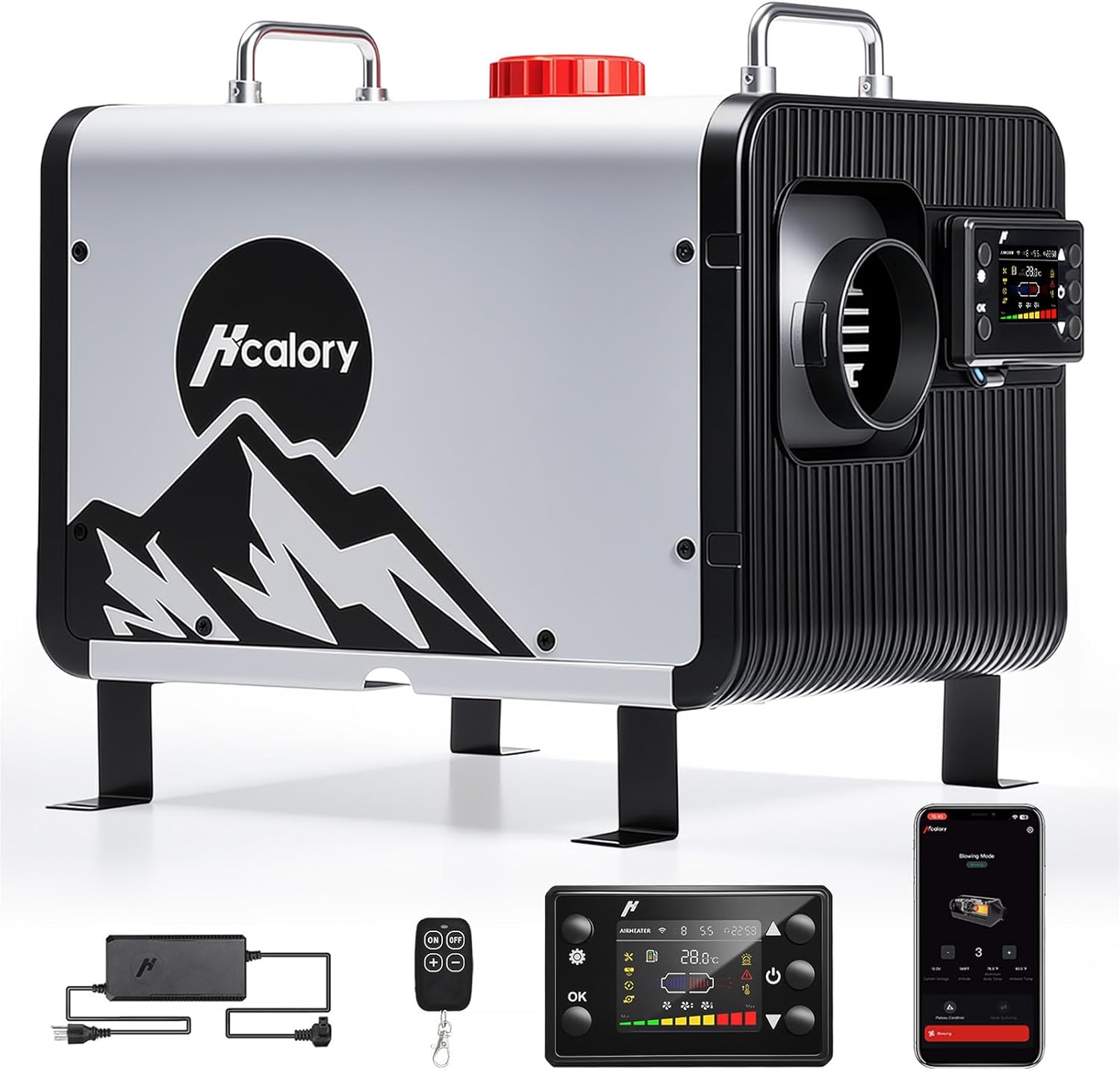
Image: The HCALORY HBH2 Portable Diesel Air Heater shown with its main unit, power adapter, remote control, and LCD control panel.
4. Product Features
- High Efficiency Heating: Aluminum body design for enhanced heat transfer, providing up to a 28% boost in heating efficiency. Capable of heating spaces up to 269 sq.ft. and reaching 122°F (50°C) in approximately 3 minutes.
- Smart APP Control: Full control via a smartphone application, allowing adjustments for temperature, timers, power levels, altitude mode, auto functions, and fan settings.
- Smart Dual-Altitude Mode: Features optimized settings for altitudes up to 8,200 ft and 16,400 ft. The system automatically adjusts the air-fuel ratio for consistent performance in varying atmospheric pressures.
- Indoor Climate Control: Includes a 5 ft extension cable for the control panel, enabling indoor mounting. The heater intelligently cycles on and off based on actual indoor temperature, optimizing fuel consumption.
- Portable Design: Features a clean white aesthetic with a foldable stainless steel handle for easy transport and storage.
- Versatile Power Options: Compatible with 12V/24V DC and 110V-120V AC power sources.

Image: Illustration of the heater's high-efficiency combustion system, highlighting a 28% improvement in heating efficiency.

Image: The Smart Dual-Altitude Mode feature, illustrating its capability to optimize performance at varying high altitudes.

Image: The heater providing warmth to a cabin, with its control panel extended indoors for convenient climate management.
5. Setup
Follow these general steps for initial setup:
- Placement: Position the heater on a flat, stable, and non-combustible surface. Ensure adequate clearance from walls, furniture, and other flammable materials.
- Fuel Connection: Connect the fuel line from the heater to the fuel tank. Ensure all connections are tight to prevent leaks. Fill the fuel tank with clean diesel fuel.
- Exhaust and Intake: Connect the exhaust pipe and route it safely to the outside, away from any windows or air intakes. Connect the intake pipe. Ensure both pipes are securely fastened and free from obstructions.
- Air Outlet: Attach the hot air outlet pipe and direct it towards the area to be heated.
- Power Connection: Connect the heater to the appropriate power source (12V/24V DC or 110V-120V AC via the provided adapter).
- Control Panel: Mount the LCD control panel in a convenient location, using the extension cable if desired for indoor access.
6. Operating Instructions
The HCALORY HBH2 heater offers multiple control methods:
6.1. LCD Control Panel
Use the buttons on the LCD control panel to power on/off, adjust temperature, fan speed, and access other settings. Refer to the on-screen menu for navigation.
6.2. Remote Control
The remote control allows basic functions such as power on/off and temperature adjustment from a distance of up to 98 feet.
6.3. Smart App Control
For advanced control and monitoring, download the dedicated HCALORY app to your smartphone. The app allows control from up to 32 feet away.
- Temperature Setting: Precisely set your desired temperature.
- Multiple Timing Groups: Schedule heater operation with various timing groups for automatic turn on/off.
- Altitude Mode: Select or allow the system to automatically detect and adjust for high-altitude operation.
- Auto Start-Stop: Enable automatic operation based on set temperature thresholds.
- Gear Setting: Adjust the heating power level (e.g., H1-H10).

Image: Overview of the three control methods: smartphone app, remote, and integrated LCD panel.

Image: The Auto Start-Stop function maintaining a comfortable temperature in an RV.
7. Maintenance
Regular maintenance ensures optimal performance and longevity of your heater:
- Clean Air Filter: Periodically check and clean the air intake filter to prevent dust and debris from entering the system.
- Fuel System Check: Inspect fuel lines for any signs of leaks or damage. Ensure the fuel filter is clean.
- Exhaust System: Verify that the exhaust pipe is clear of obstructions and securely connected.
- General Cleaning: Keep the exterior of the heater clean and free from dirt.
- Storage: When storing the heater for extended periods, drain the fuel tank and ensure all components are clean and dry.
8. Troubleshooting
If you encounter issues, refer to the following common problems and solutions:
| Problem | Possible Cause | Solution |
|---|---|---|
| Heater does not start | No power, low fuel, clogged fuel line, air in fuel system | Check power connection, refill fuel tank, inspect fuel line, prime fuel pump |
| No heat output | Ignition failure, low fan speed, incorrect temperature setting | Check ignition system, increase fan speed, adjust temperature setting |
| Unusual noise or smell | Loose components, exhaust leak, improper combustion | Inspect for loose parts, check exhaust connections, ensure proper ventilation, contact support if persistent |
| Error code displayed | System malfunction | Refer to the specific error code in the full product manual (if available) or contact customer support. |
9. Specifications
| Feature | Detail |
|---|---|
| Brand | HCALORY |
| Model | HBH2 |
| Item Weight | 21 pounds |
| Package Dimensions | 17 x 16 x 11 inches |
| Manufacturer Part Number | HBH2 |
| Exterior Finish | Painted |
10. Warranty and Support
For warranty information, please refer to the documentation included with your product or contact HCALORY customer support directly. If you require technical assistance or have questions not covered in this manual, please reach out to the seller or manufacturer's support channels.