
1. Introduction
The Proster T50 6-in-1 Stud Finder Wall Scanner is a versatile tool designed for accurately detecting studs, metal objects, and live AC wires behind various wall surfaces. This device helps prevent damage during drilling, hanging, or renovation projects by identifying hidden elements. It features a backlit LCD, audio alerts, and multiple scanning modes for enhanced precision and safety.
2. Product Overview
2.1 Key Features
- 6-in-1 Multifunction: Includes wood depth adjustment, metal detection (up to 60mm), live wire warning (up to 51mm), and stud edge/center detection.
- Precision Micro-Sensor Chip: Delivers reliable detection of studs, metal pipes, live AC wires, and wood joists.
- Intuitive LCD Display & Audio Alerts: Backlit screen shows real-time signal strength, object center/edges, and depth with color-coded LEDs. Audio beeps intensify near targets.
- Pro-Grade Safety: Detects live AC wires to prevent electrical hazards.
- Ergonomic Design: Lightweight with a comfortable grip.
2.2 Package Contents

Figure 1: Proster T50 Stud Finder kit contents, including the device, a 9V battery, a storage bag, and the user manual.
- 1x Proster T50 Wall Detector
- 1x Storage Bag
- 1x 9V Battery
- 1x User Manual
2.3 Controls and Display
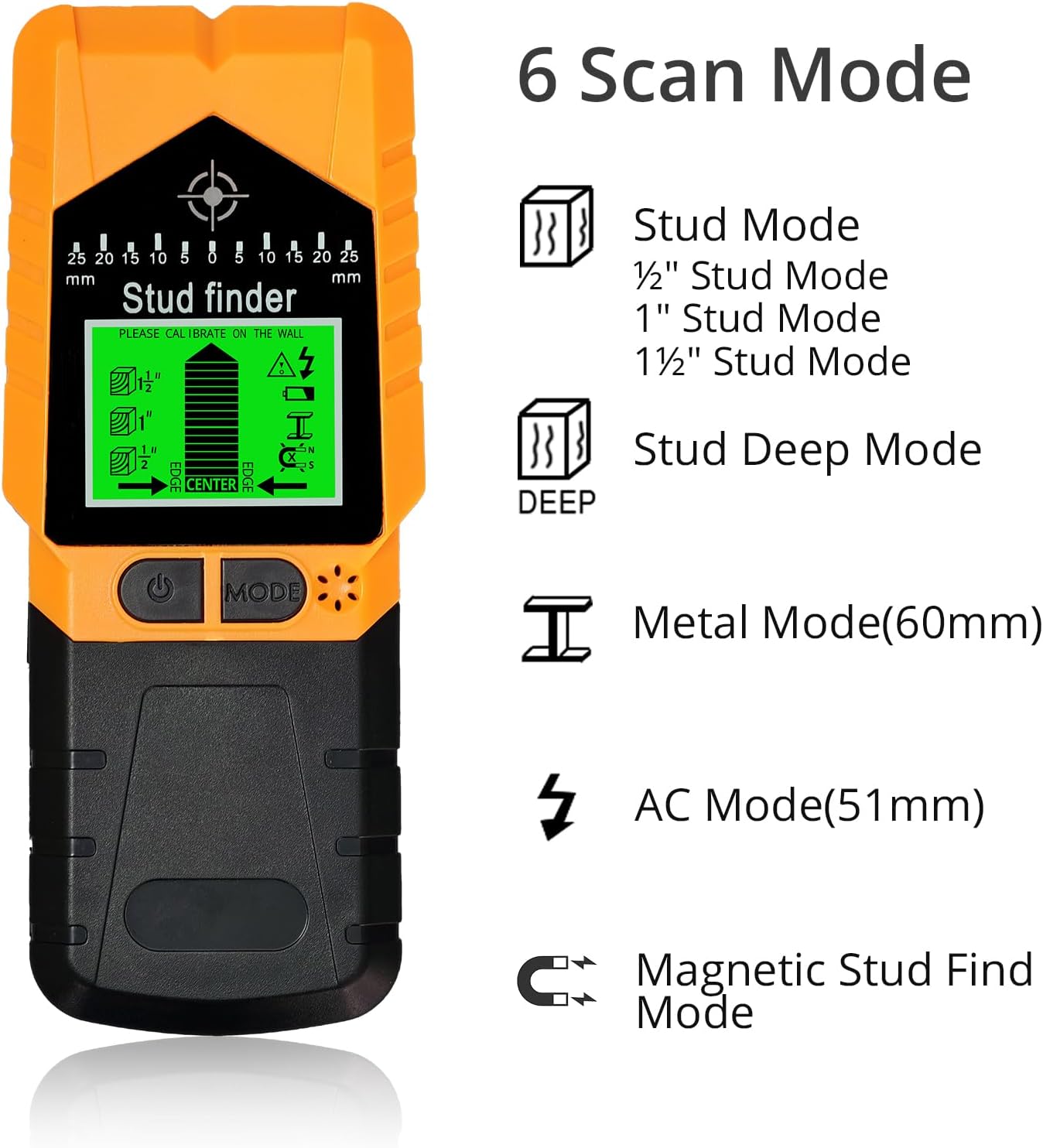
Figure 2: The Proster T50 Stud Finder's front view, highlighting its LCD display, power button, mode button, and speaker, along with an illustration of its six scanning modes.
The device features a clear backlit LCD screen that displays the selected mode, signal strength, object center, and depth. It has a power button, a mode selection button, and a side scan button for operation and calibration. An integrated speaker provides audio alerts.
3. Setup
3.1 Battery Installation
- Locate the battery compartment on the back of the device.
- Open the compartment cover.
- Insert the included 9V battery, ensuring correct polarity.
- Close the battery compartment cover securely.
3.2 Calibration
Proper calibration is essential for accurate readings. Calibrate the device before each scan, especially when moving to a new scanning area or changing modes.
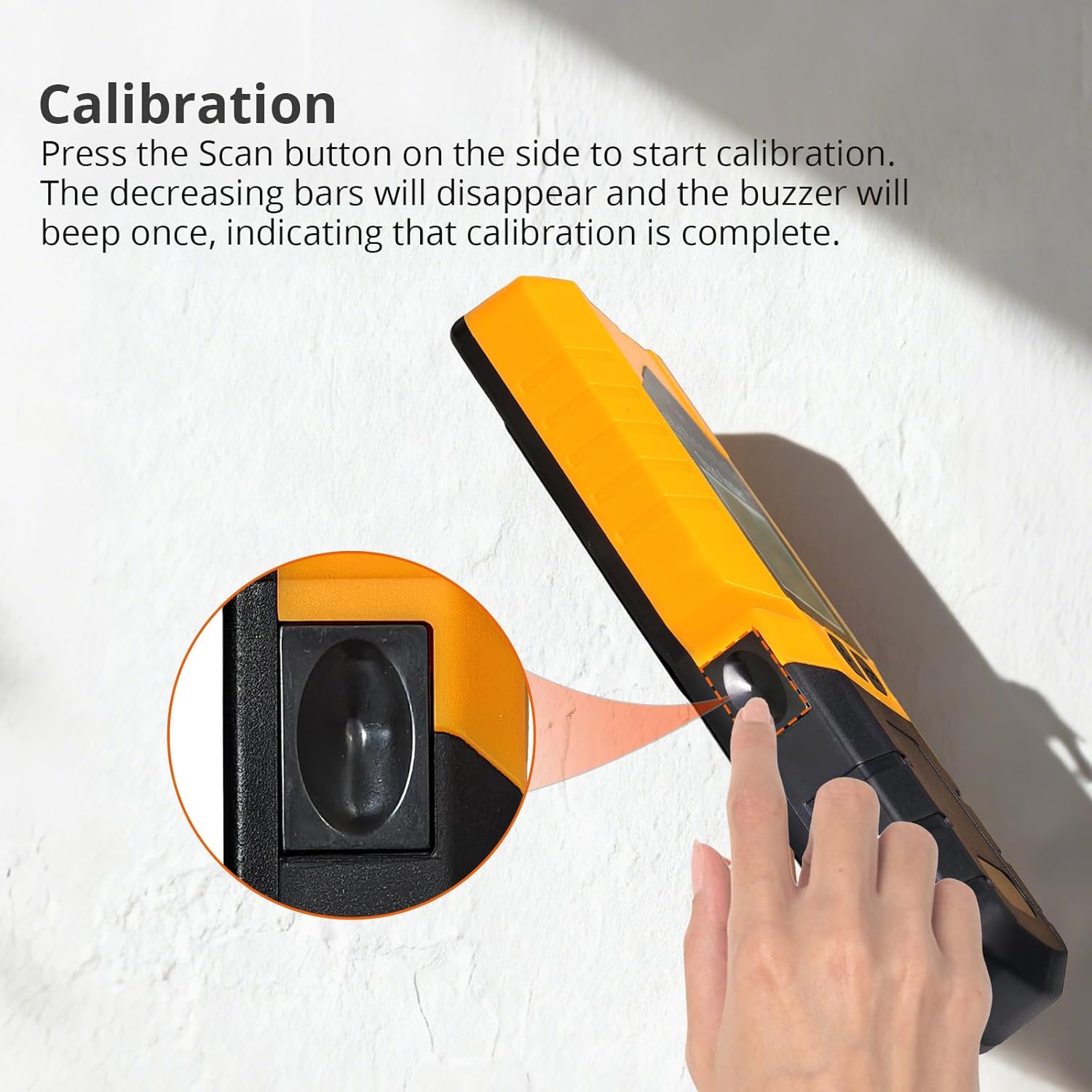
Figure 3: Pressing the side scan button to begin the calibration process.
- Place the device flat against the wall where you intend to scan, ensuring there are no known studs, metal, or live wires in that specific spot.
- Press and hold the side scan button.
- The decreasing bars on the LCD will disappear, and the device will beep once, indicating that calibration is complete.
- Keep the side scan button pressed throughout the scanning process.
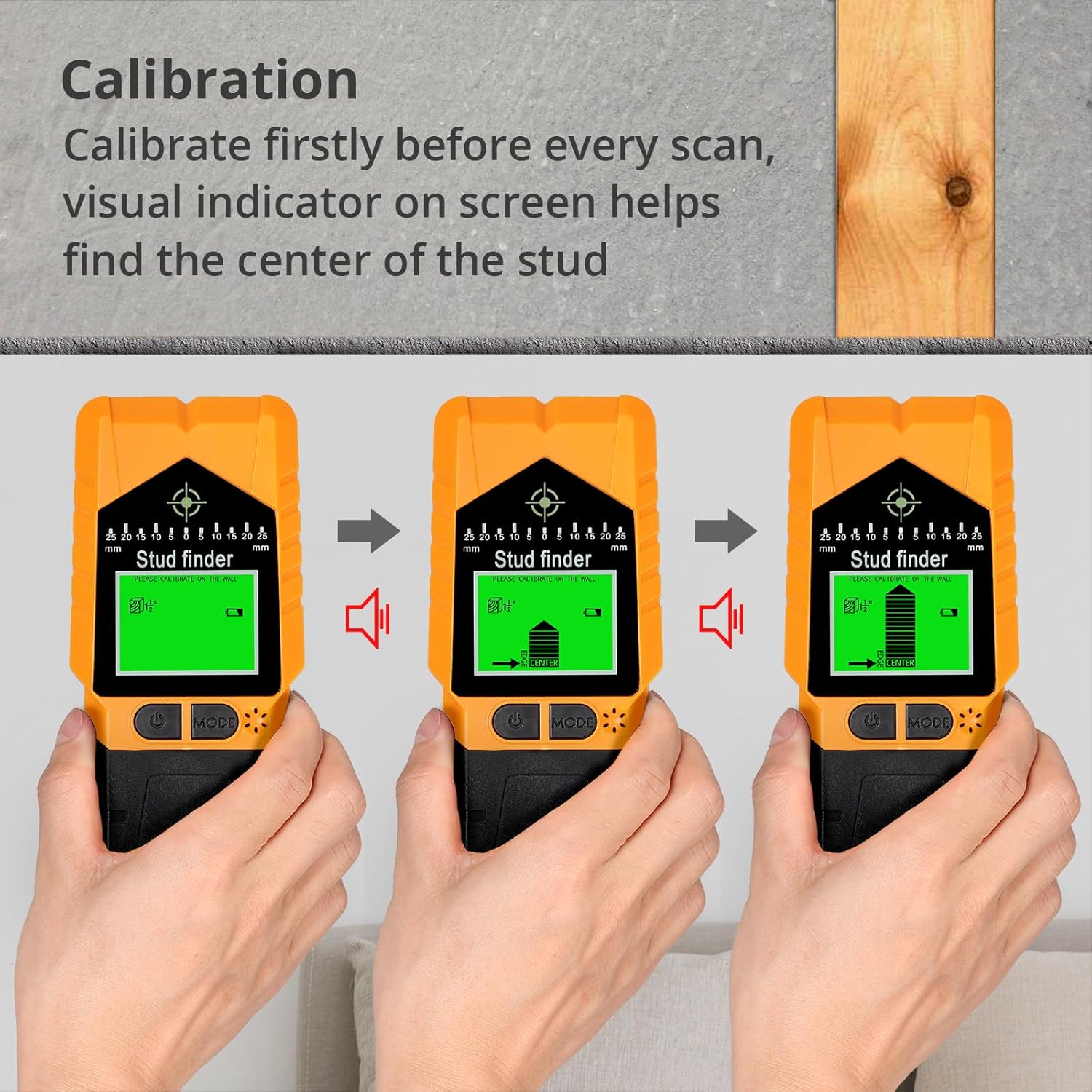
Figure 4: Visual indicators on the screen during calibration and when approaching the center of a stud.
4. Operating Instructions
4.1 General Scanning Principles
For best results, hold the stud finder flat against the wall, ensuring full contact. Move the device slowly and steadily across the surface. Avoid lifting the device or changing pressure during a scan. Keep your other hand away from the scanning area to prevent interference.

Figure 5: Step-by-step guide for scanning: calibrate, move slowly, and identify the target.
4.2 Scanning Modes
Press the 'MODE' button to cycle through the available scanning modes. The selected mode will be displayed on the LCD screen.

Figure 6: Overview of the Proster T50's precision scanning modes and their maximum detection depths.
- Stud Scan Modes (1/2", 1", 1 1/2"): Detects wood studs up to 12mm (1/2"), 25mm (1"), and 38mm (1 1/2") deep. These modes are ideal for locating wooden framing elements behind drywall.
- Deep Stud Mode: For deeper wood stud detection.
- Metal Mode: Detects non-magnetic metal (e.g., copper pipes) up to 60mm deep and magnetic metal (e.g., rebar) up to 60mm deep.
- AC Mode: Detects live unshielded AC wires up to 51mm (2 inches) deep. This mode is active in all other scanning modes as a safety feature.
- Magnetic Stud Find Mode: Specifically designed to find small metallic objects like nails or screws, often indicating the presence of a stud.
4.3 Interpreting Display and Audio Alerts
The LCD screen provides visual cues:
- Signal Bars: Increase as the device approaches a target.
- Center Indicator: Appears when the device is directly over the center of a stud or object.
- Depth Indicator: Shows the approximate depth of the detected object.
- AC Warning Icon: A lightning bolt symbol appears when live AC wires are detected.
Audio alerts:
- A beep sound indicates detection. The frequency and intensity of the beeps increase as the device gets closer to the target.
- A distinct warning sound will activate when live AC wires are detected.
Video 1: An official product video demonstrating the Proster T50 6-in-1 Stud Finder Wall Scanner in use, showcasing its various detection capabilities and display feedback.

Figure 7: The device indicating live wire detection, emphasizing safety during operation.
5. Maintenance
- Cleaning: Wipe the device with a soft, damp cloth. Do not use abrasive cleaners or solvents.
- Storage: Store the stud finder in its provided storage bag in a dry, dust-free environment when not in use.
- Battery: Remove the 9V battery if the device will not be used for an extended period to prevent leakage.
6. Troubleshooting
| Problem | Possible Cause | Solution |
|---|---|---|
| Inconsistent readings or false positives. | Improper calibration, moisture in wall, nearby electrical interference, or incorrect scanning technique. | Ensure proper calibration before each scan. Scan slowly and maintain firm contact. Avoid scanning over damp areas. Re-calibrate in a different spot if issues persist. |
| Device does not power on. | Dead or incorrectly installed battery. | Replace the 9V battery with a new one. Check battery polarity. |
| No detection in a known area. | Incorrect mode selected, object too deep, or calibration error. | Verify the correct scanning mode is selected for the target material. Ensure the object is within the device's detection depth. Re-calibrate the device. |
| AC wire warning constantly active. | High electrical interference in the area. | Move to a different area to calibrate. Be aware of potential live wires in the vicinity. |
7. Specifications
- Brand: Proster
- Model: T50
- Color: Orange
- Material: Plastic
- Power Source: Battery Powered (1x 9V battery, included)
- Item Weight: 0.26 Kilograms (9.2 ounces)
- Product Dimensions: 7.28"L x 3.15"W x 0.91"H
- Wood Detection Depth: 1/2" (12mm), 1" (25mm), 1 1/2" (38mm)
- Metal Detection Depth: Up to 60mm (2.3 inches)
- Live AC Wire Detection Depth: Up to 51mm (2 inches)
- Operating Temperature: 0-40°C
8. Warranty and Support
For warranty information or technical support, please refer to the contact details provided with your purchase or visit the official Proster website. Keep your purchase receipt as proof of purchase for any warranty claims.