
Product Overview
The GUESS GW0945L4 is an analog women's watch featuring a blue rectangle dial and a rose gold-tone case. It is designed with a navy blue bio-based nylon overlay and a textured navy blue silicone strap, offering a sporty yet chic aesthetic. This model includes a multi-function dial for enhanced utility.

Figure 1: Front view of the GUESS GW0945L4 watch, showcasing the blue dial and silicone strap.
Setup
Setting the Time
To set the time on your GUESS GW0945L4 watch, follow these steps:
- Pull out the crown: Locate the crown on the right side of the watch case. Gently pull it out to the outermost position.
- Rotate the crown: Turn the crown clockwise or counter-clockwise to move the hour and minute hands to the correct time.
- Push in the crown: Once the correct time is set, push the crown back into its original position against the watch case. This will start the watch movement.
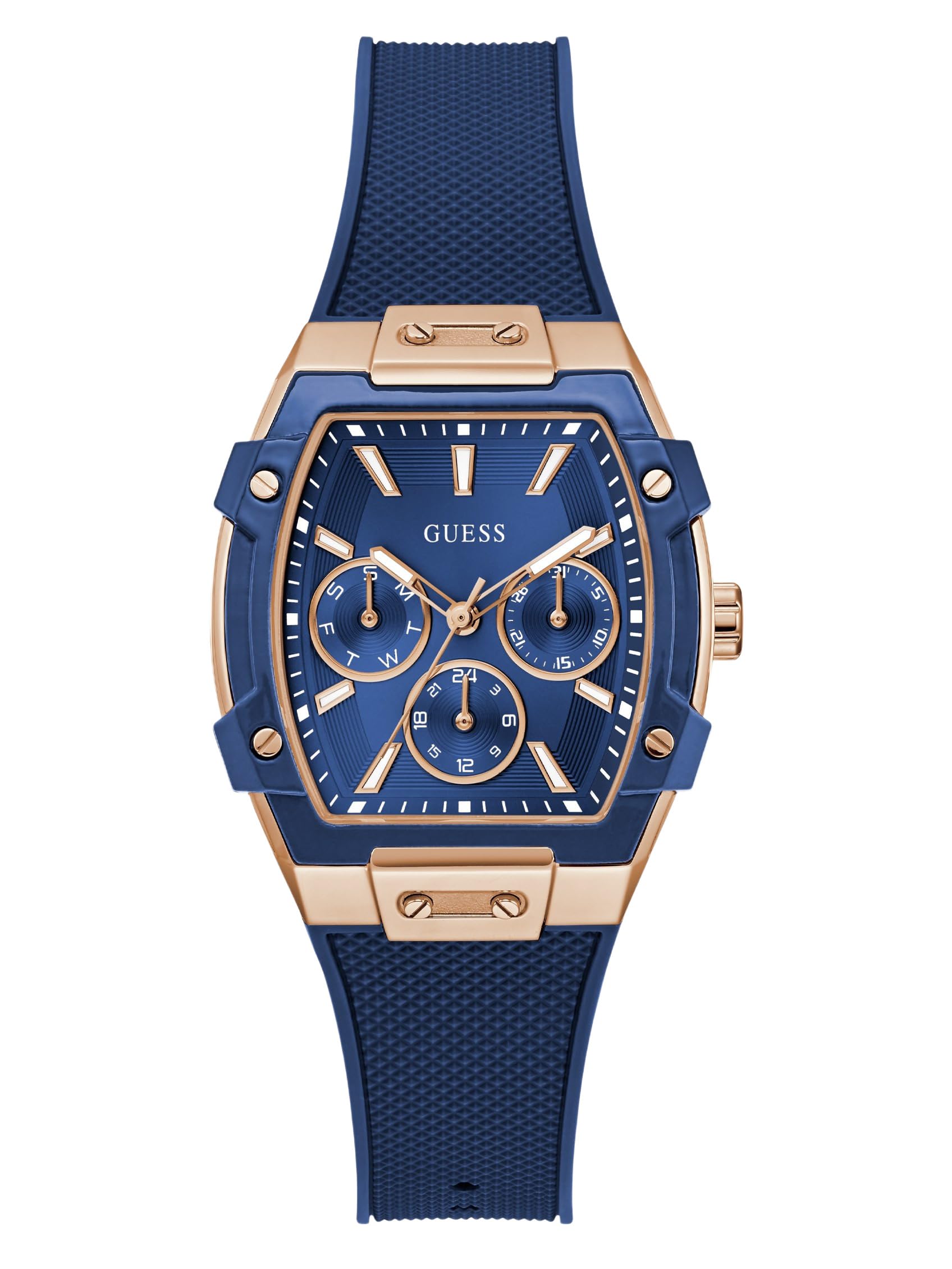
Figure 2: Side view of the watch, highlighting the crown for time adjustment.
Adjusting the Strap
The silicone strap features a buckle closure for easy adjustment. To adjust the fit:
- Open the buckle: Unfasten the buckle.
- Select a hole: Place the watch on your wrist and choose the strap hole that provides a comfortable and secure fit.
- Fasten the buckle: Insert the buckle pin into the selected hole and secure the strap. Ensure the watch is not too tight or too loose.
Operating Your Watch
Basic Timekeeping
Your GUESS GW0945L4 watch is an analog timepiece powered by a Quartz movement. Once the time is set, the watch will continuously display the current hour, minute, and second (if applicable) via its hands.
Multi-Function Dial
This watch features a multi-function dial, which typically includes sub-dials for displaying additional information such as the day of the week, date, or 24-hour time. Refer to the specific markings on your watch's dial for the functions of each sub-dial. Adjustment for these functions is usually done by pulling the crown to a specific position and rotating it, or by using additional pushers on the watch case if present.
Maintenance
Cleaning Your Watch
To maintain the appearance of your watch:
- Wipe the case and strap with a soft, damp cloth.
- Avoid using harsh chemicals, solvents, or abrasive cleaners, as these can damage the watch's finish or strap material.
- For silicone straps, a mild soap solution can be used, followed by rinsing with clean water and thorough drying.
Water Resistance
Your watch has a water resistance depth of 30 meters (3 ATM). This means it is suitable for everyday use and can withstand splashes or brief immersion in water. It is not suitable for swimming, showering, or diving. Always ensure the crown is fully pushed in before any contact with water.
Battery Replacement
The watch is powered by a product-specific battery. When the battery needs replacement, it is recommended to take your watch to an authorized service center or a professional watchmaker. Attempting to replace the battery yourself may void the warranty and could damage the watch's internal components or compromise its water resistance.
Troubleshooting
If you encounter issues with your watch, consider the following common solutions:
- Watch not running: Ensure the crown is fully pushed in. If it still doesn't run, the battery may need replacement.
- Incorrect time: Re-set the time as described in the "Setting the Time" section.
- Condensation under crystal: This may indicate a loss of water resistance. Avoid further contact with water and seek professional service immediately.
- Strap discomfort: Adjust the strap to a different hole for a more comfortable fit. If irritation occurs, clean the strap thoroughly.
For issues not resolved by these steps, please contact customer support.
Specifications
| Model Name | GW0945L4 |
| Brand | GUESS |
| Display Type | Analog |
| Movement Type | Quartz |
| Case Shape | Rectangular |
| Case Diameter | 35 mm |
| Case Thickness | 11.1 mm |
| Band Material | Silicone |
| Band Colour | Blue |
| Band Width | 21 mm |
| Dial Colour | Blue |
| Crystal Material | Crystal |
| Water Resistance Depth | 30 Metres (3 ATM) |
| Closure Type | Buckle |
| Item Weight | 58.5 Grams |
| Batteries Required | 1 Product Specific battery |
Warranty Information
Your GUESS GW0945L4 watch comes with a 1 Year Manufacturer Warranty against manufacturing defects. This warranty covers defects in materials and workmanship under normal use. It does not cover damage resulting from accidents, improper use, unauthorized repairs, or normal wear and tear. Please retain your proof of purchase for warranty claims.
Customer Support
For further assistance, service, or warranty claims, please contact the authorized importer and manufacturer:
Timex Group India LimitedPlot No. 10, Industrial Area- Katha,
Bhatoli Kalan, Baddi,
Himachal Pradesh – 173205, India
Please visit the official GUESS website or your local authorized dealer for additional support resources.

