
1. Introduction
Thank you for purchasing the GOBOULT Bassbox Q10 Bluetooth Speaker. This manual provides essential information for setting up, operating, and maintaining your speaker. Please read it carefully before use to ensure optimal performance and longevity of your device.
The Bassbox Q10 is a portable Bluetooth speaker designed to deliver powerful audio with deep bass and clear sound. It features Bluetooth 5.4 connectivity, multiple input options (AUX, TF Card, USB), and an IPX7 waterproof rating, making it suitable for various environments.
2. Package Contents
Ensure all items are present in the package:
- GOBOULT Bassbox Q10 Speaker
- USB Type-C Charging Cable
- User Manual (this document)
- Warranty Card
3. Product Overview
Familiarize yourself with the speaker's components and controls.

Image: GOBOULT Bassbox Q10 Speaker highlighting its 10W Bass Boosted Sound, Dual Passive Radiator, Portability with Lanyard, Bluetooth 5.4, IPX7 Waterproof rating, and Multi-Compatibility (BT/AUX/TF Card/USB).
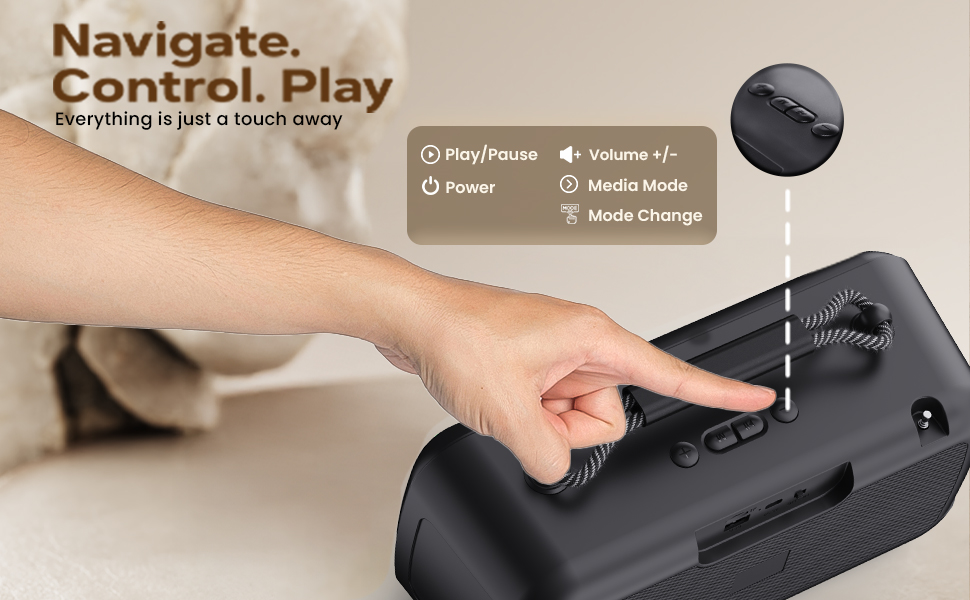
Image: Close-up view of the GOBOULT Bassbox Q10 speaker, illustrating the 10W BoomX Audio with a premium full-range bass driver and dual passive radiators for enhanced sound output.

Image: Detailed view of the GOBOULT Bassbox Q10 speaker's control panel, indicating buttons for Play/Pause, Volume +/-, Power, and Mode Change for easy navigation.
4. Setup and Charging
4.1 Initial Charging
Before first use, fully charge your Bassbox Q10 speaker. Connect the provided USB Type-C charging cable to the speaker's charging port and the other end to a compatible USB power adapter (not included).
- The charging indicator light will illuminate during charging.
- A full charge typically takes approximately 3-4 hours.
- Once fully charged, the indicator light may change or turn off.
The speaker offers up to 18 hours of playtime on a single charge, depending on volume levels and usage.

Image: The GOBOULT Bassbox Q10 speaker connected via its Type-C port for fast charging, illustrating its extended battery life for all-day entertainment.
4.2 Powering On/Off
- To Power On: Press and hold the Power button for a few seconds until you hear an audible prompt or see the indicator light illuminate.
- To Power Off: Press and hold the Power button again for a few seconds until you hear an audible prompt or the indicator light turns off.
5. Operating Instructions
5.1 Bluetooth Pairing
- Ensure the speaker is powered on and in Bluetooth pairing mode. The Bluetooth indicator light will typically flash.
- On your device (smartphone, tablet, laptop), enable Bluetooth and search for available devices.
- Select "GOBOULT Bassbox Q10" from the list of devices.
- Once paired, the speaker will provide an audible confirmation, and the Bluetooth indicator light will become solid.
- The speaker will automatically connect to the last paired device when powered on, if within range (up to 10 meters).

Image: The GOBOULT Bassbox Q10 speaker demonstrating its enhanced Bluetooth 5.4 connectivity, offering instant pairing and a stable, reliable connection with no delays.
5.2 Multi-Connectivity Options
The Bassbox Q10 supports various input sources:
- Bluetooth: Wireless connection as described above.
- AUX Input: Connect an audio device using a 3.5mm AUX cable (not included) to the AUX port. The speaker will automatically switch to AUX mode.
- TF Card: Insert a TF (MicroSD) card with MP3 audio files into the TF card slot. The speaker will automatically play music from the card.
- USB Playback: Insert a USB flash drive with MP3 audio files into the USB port. The speaker will automatically play music from the drive.
Use the 'M' (Mode) button on the speaker to switch between different input modes (Bluetooth, AUX, TF Card, USB).

Image: The GOBOULT Bassbox Q10 speaker's connectivity panel, showing ports for USB, TF Card, and Type-C Fast Charging, alongside Bluetooth capability, allowing users to connect it all.

Image: The GOBOULT Bassbox Q10 speaker wirelessly connected to various devices such as a smartphone, tablet, and TV/PC, demonstrating its 'Sync & Play' feature for pure sound without limits.
5.3 Control Functions
The speaker features intuitive controls:
- Power Button: Press and hold to power on/off.
- Play/Pause Button: Press once to play or pause audio.
- Volume +/- Buttons: Press to adjust volume.
- Mode Button (M): Press to cycle through input modes (Bluetooth, AUX, TF Card, USB).
5.4 IPX7 Waterproof Rating
The Bassbox Q10 is IPX7 waterproof, meaning it can withstand immersion in water up to 1 meter for 30 minutes. This makes it suitable for use near pools, beaches, or in rainy conditions. Ensure all port covers are securely closed before exposing the speaker to water.
Note: While waterproof, prolonged submersion or exposure to saltwater is not recommended and may affect device longevity.
6. Maintenance
6.1 Cleaning
- Wipe the speaker with a soft, damp cloth.
- Do not use abrasive cleaners, alcohol, or chemical solvents.
- Ensure the speaker is dry before charging or using it near water.
6.2 Storage
- Store the speaker in a cool, dry place away from direct sunlight and extreme temperatures.
- If storing for an extended period, charge the battery to approximately 50% every few months to maintain battery health.
6.3 Battery Care
- Avoid fully discharging the battery frequently.
- Use only the provided Type-C cable for charging.
- Do not expose the battery to high temperatures or puncture it.
7. Troubleshooting
| Problem | Possible Solution |
|---|---|
| Speaker does not power on |
|
| Cannot pair via Bluetooth |
|
| No sound |
|
| Charging issues |
|
8. Specifications
| Feature | Detail |
|---|---|
| Brand | GOBOULT |
| Model Name | Bassbox Q10 |
| Speaker Maximum Output Power | 10 Watts |
| Connectivity Technology | Auxiliary, Bluetooth, USB |
| Bluetooth Version | 5.4 |
| Bluetooth Range | 10 Metres |
| Audio Output Mode | Surround |
| Speaker Type | Portable Bluetooth Speaker |
| Product Features | Bass Boost, Built-In Powerbank, Dustproof, Hi Res Audio, Lightweight |
| Water Resistance Level | IPX7 (Water Resistant) |
| Control Method | Touch |
| Battery Average Life | 18 Hours |
| Power Source | Battery Powered (1 Lithium Polymer battery included) |
| Item Dimensions (D x W x H) | 12.2D x 13.2W x 10.7H Centimeters |
| Item Weight | 1.1 Kilograms |
| Country of Origin | India |
9. Warranty and Support
9.1 Warranty Information
The GOBOULT Bassbox Q10 Bluetooth Speaker comes with a 1-Year Manufacturer's Warranty from the date of purchase. This warranty covers manufacturing defects and ensures hassle-free service and customer support.
Please retain your purchase receipt and the warranty card for any warranty claims.
9.2 Customer Support
For any queries, technical assistance, or warranty claims, please contact GOBOULT customer support.
- Manufacturer: GOBOULT, B-67 Wazirpur Industrial Area, New Delhi 110052, India
- Packer/Importer: Exotic Mile Pvt. Ltd., B67 Wazirpur Industrial Area, New Delhi 110052, India
Refer to the contact details provided on your warranty card or the official GOBOULT website for the most up-to-date support information.


