Product Overview
This Inefala Android 15 Car Stereo is designed as an upgraded replacement dash kit for Honda Acura MDX models from 2007 to 2013. It features a 9-inch touch screen with 1024 x 600 resolution, supporting 1080P video playback. The system includes a 2.5D high-definition touch screen with 26 customizable desktop themes. It integrates Digital Signal Processing (DSP) for an enhanced audio experience with adjustable settings like movie, pop, rock, and jazz modes.

Image: Inefala Android 15 Car Stereo seamlessly integrated into a Honda Acura MDX dashboard, showcasing its large display.
Setup and Installation
Compatibility
This unit is compatible with Honda Acura MDX models manufactured between 2007 and 2013. Before installation, verify that the red and white audio connectors of the power cord are connected to the RCA harness. Please check the power cable port on the detail page to ensure compatibility with your vehicle.
Pre-Installation Check
Before proceeding with the full installation, perform a quick test:
- Connect the red and yellow wires of the car stereo together to the positive pole of a 12V battery. Connect the black wire to the negative pole.
- After approximately 2 seconds, check if the car stereo screen lights up. If it does, the device is functioning normally. If the screen does not light up, recheck the connection procedure.
Wiring and Port Details
Refer to the following diagrams for correct wiring and port identification. Ensure all connections are secure.

Image: Detailed diagram showing the various ports on the car stereo and the corresponding wiring harness connections.
Backup Camera Wiring
The waterproof AHD camera is included to provide a clear rear view when reversing. The reversing input must be plugged in even if the camera is not used, as it can affect WiFi and Bluetooth signals. Follow these steps to connect the backup camera:
- Connect Cable 1 and Cable 5 to the positive pole of the car reversing light cable.
- Connect Cable 2 to the negative pole of the car reversing light cable.
- Connect Cable 3 and Cable 4 to the reverse trigger wire of the power cable (labeled "Reverse/Back"). If this wire is not needed, pull it out.

Image: Step-by-step wiring diagram for the AHD backup camera, showing connections to the car's reversing lights and the stereo unit.
Installation Notes
- Double-check that the power cable port matches your car's port.
- If the harness does not fit or accessories are missing/damaged, contact customer service for assistance.

Image: Comparison showing the original Honda Acura MDX dashboard and the dashboard after the Inefala car stereo installation.
Operating Instructions
Wireless CarPlay & Android Auto
The car stereo supports both wireless and wired CarPlay and Android Auto. This allows for voice control and access to your smartphone's functions, including music, navigation, calls, and messages, via Bluetooth or the phone's original USB cable. Note: Some Samsung and Huawei phones may have compatibility limitations with Android Auto and Mirror Link.

Image: Display of the car stereo showing the Wireless CarPlay and Android Auto interfaces, including apps like YouTube, Spotify, Phone, Messages, TikTok, and Waze.
Mirror Link Functionality
Synchronize your mobile phone's content, such as videos and navigation, to the car stereo's larger screen using the phone's original USB cable. iOS phones support one-way control, while Android phones support two-way control.

Image: Visual representation of Mirror Link, DSP, Split Screen, and USB DVR capabilities of the car stereo.
GPS Navigation and WiFi Connectivity
The unit offers free offline maps (e.g., Waze) and supports online maps for navigation. With WiFi connectivity, you can download various applications like YouTube and TikTok to enhance your in-car entertainment experience.

Image: Screenshots demonstrating the WiFi connection interface and GPS navigation display on the car stereo.
Digital Signal Processing (DSP)
The integrated DSP allows for adjustable sound settings, including various presets like movie, pop, rock, and jazz, to customize your listening experience.

Image: Display showing the DSP equalizer settings, split-screen functionality, and various UI themes available on the car stereo.
FM/RDS Radio and Bluetooth
The built-in Bluetooth 4.2 module enables music playback, hands-free calls, and phonebook download. The FM/RDS radio allows you to listen to music, real-time weather forecasts, traffic updates, and news. You can save up to 18 favorite radio stations.

Image: Screenshots of the FM/RDS radio interface and Bluetooth music playback screen on the car stereo.
Steering Wheel Control
The car stereo supports steering wheel controls, allowing for quick adjustments and interaction with the radio without taking your hands off the wheel. If your vehicle does not have a CANBUS box, activation of steering wheel controls requires key learning in settings. If it has a CANBUS box, connect the 20-pin white port in the power cable to the Canbus itself, and the remaining 8-pin white port to the corresponding port on the back of the radio. Match the car model in CANBUS Matching Path: Settings > Factory Setup (Password 000000) > Can Settings.
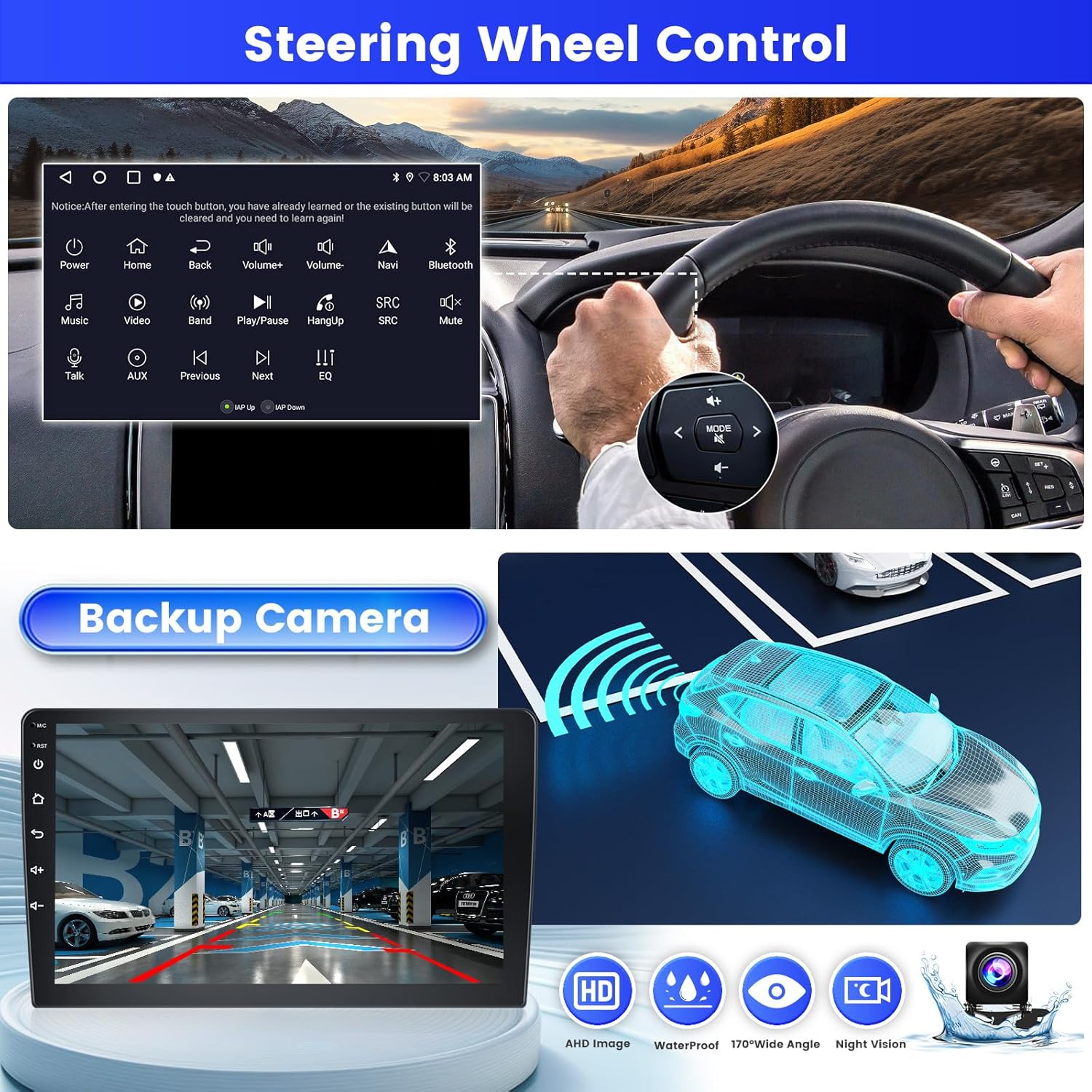
Image: Illustration of steering wheel controls interacting with the car stereo, alongside a view of the backup camera display.
User Interface Themes and Split Screen
The device offers 26 multi-pole desktop themes, allowing you to customize the look of your interface. The split-screen function enables you to display and operate multiple applications simultaneously, such as navigation and FM radio.

Image: A gallery of 26 different user interface themes that can be selected on the car stereo.
Voice Control
Utilize Siri or Google Voice Assistant for hands-free control of various functions, including playing music, opening navigation, making calls, and more.

Image: A driver using voice commands (Siri/Google) to control the car stereo, with examples of commands like 'Play Michael Jackson's Love Yourself' and 'Open Navigation'.
Interface and Functionality Demonstration
Video: This video demonstrates various functions of the Android head unit, including music playback, radio tuning, video playback, accessing settings, Bluetooth connectivity, GPS navigation, file management, Play Store access, and theme selection. It provides a visual guide to the user interface and core features.
Maintenance
To ensure optimal performance and longevity of your Inefala car stereo, follow these maintenance guidelines:
- Screen Cleaning: Use a soft, lint-free cloth to gently wipe the touch screen. Avoid abrasive materials or harsh chemical cleaners that could damage the display.
- Software Updates: Periodically check for available software updates through the device settings or the manufacturer's website. Keeping the software updated ensures access to the latest features and performance improvements.
- Environmental Conditions: Avoid exposing the unit to extreme temperatures, direct sunlight for prolonged periods, or excessive moisture.
- Connection Integrity: Regularly check all cable connections to ensure they are secure and free from damage. Loose connections can lead to intermittent functionality.
Troubleshooting
If you encounter issues with your car stereo, refer to the following common troubleshooting steps:
- No Power: Ensure all power cables are correctly connected and the vehicle's fuse for the stereo is intact. Perform the pre-installation power test again.
- No Sound: Check speaker connections. Verify volume levels on both the stereo and any connected devices (e.g., phone via Bluetooth). Ensure DSP settings are not muting audio.
- Touch Screen Unresponsive: Try restarting the unit. If the issue persists, ensure the screen is clean and free from debris.
- Bluetooth/WiFi Connection Issues: Ensure Bluetooth and WiFi are enabled on both the stereo and your device. Try forgetting and re-pairing Bluetooth devices. For WiFi, ensure the password is correct and the signal is strong.
- CarPlay/Android Auto Not Connecting: Verify your phone's compatibility. Ensure the Zlink app is running and your phone is connected via Bluetooth or USB as required.
- GPS Signal Loss: Ensure the GPS antenna is properly installed and has a clear line of sight to the sky.
- Steering Wheel Controls Not Working: Re-learn the steering wheel controls in the settings menu. If using a CANBUS box, verify its connection and settings.
For persistent issues, consult the support section or contact customer service.
Specifications
| Item Weight | 3.5 pounds |
| Product Dimensions | 12.01 x 5.31 x 3.54 inches |
| Display Size | 9 Inches |
| Screen Resolution | 1024*600 |
| Operating System | Android 15 |
| Memory/Storage | 2GB RAM + 64GB ROM |
| Connectivity Technology | Bluetooth 4.2, USB, Wi-Fi, Wireless |
| Special Features | 1080P Video Playback, DSP, 26 Desktop Themes, Hands-free Bluetooth, Touchscreen, FM/RDS Radio, Support Reverse Input, Steering Wheel Learning, Wireless/Wired CarPlay & Android Auto & Mirror Link, Siri/Google Voice Assistant, GPS Navigation, WiFi/Hotspot Connection |
| Audio Output Mode | Stereo |
| Mounting Type | Dashboard Mount |
Package Contents
The product package includes the following items:
- 1 x Inefala Android Radio for Honda Acura MDX
- 1 x Power Cable
- 1 x Voice-frequency Adapter
- 2 x RCA Harness
- 1 x GPS Antenna
- 1 x AHD Backup Camera
- 1 x Rear Camera Input Cable
- 2 x External Microphone
- 2 x USB Cable
- 1 x Installation Tool & Accessories

Image: Visual representation of all components included in the package, along with the dimensions of the main unit.
Warranty
This Inefala car stereo comes with a 1-Year Warranty from the date of purchase. Please retain your proof of purchase for warranty claims.
Support
For any questions, issues, or technical support, please contact Inefala Direct customer service. You can reach them by:
- Clicking on "Inefala Direct" on the product page.
- Selecting "Ask a question" to send a message.
- Providing relevant pictures or videos to help expedite the resolution process.
Customer support is available to assist you with installation, operation, and any other product-related inquiries.

Image: Guide illustrating how to access customer support via the Amazon product page, including steps to ask a question and provide visual aids.


