
1. Introduction
Thank you for choosing the INQMEGA 4G LTE Cellular Solar Camera. This manual provides essential information for the proper installation, operation, and maintenance of your security camera. Please read this manual thoroughly before using the product to ensure optimal performance and safety.
This camera is designed for outdoor security, offering advanced features such as 50X optical zoom, 6MP HD resolution, color night vision, and a robust metal housing. It operates independently using 4G LTE cellular connectivity and solar power, making it ideal for locations without Wi-Fi or consistent power supply.
2. Product Overview
2.1 Package Contents
Verify that all items are present in the package:
- Camera *1
- Solar Panel *1
- Bracket *1
- Power Cable *1
- Extension Cord *1
- User Manual *1
- Screws and Wall Plugs

Figure 2.1: Package Contents. This image displays the camera, solar panel, mounting bracket, power cable, extension cord, user manual, and mounting screws.
2.2 Camera Components
Familiarize yourself with the main components of your camera:
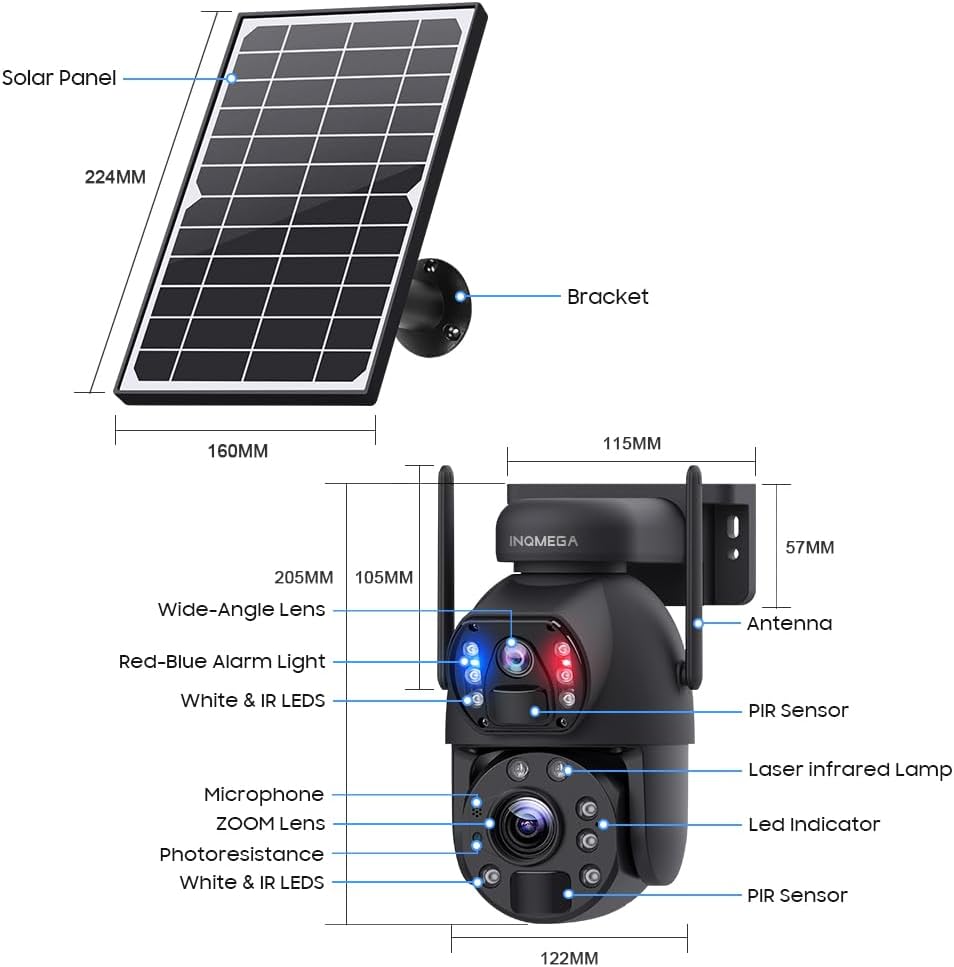
Figure 2.2: Camera Components. This diagram labels the wide-angle lens, zoom lens, red-blue alarm light, white & IR LEDs, microphone, PIR sensors, laser infrared lamp, LED indicator, antenna, solar panel, and bracket.
- Wide-Angle Lens: Provides a broad field of view.
- ZOOM Lens: Features 50X true optical zoom for detailed distant viewing.
- Red-Blue Alarm Light: Visual deterrent for intruders.
- White & IR LEDs: Enable various night vision modes.
- Microphone: For audio recording.
- PIR Sensors: Passive Infrared sensors for human detection.
- Antenna: For 4G LTE cellular connectivity.
- Metal Housing: Durable and vandal-proof construction.

Figure 2.3: Vandal-Proof Metal Housing. This image highlights the robust metal construction of the camera, designed for durability and protection against vandalism.
3. Setup
3.1 SIM Card Installation
The camera operates using 4G LTE cellular networks. An included SIM card supports Verizon, AT&T, and T-Mobile. Insert the SIM card into the designated slot on the camera. Ensure the camera is powered off before inserting or removing the SIM card.
3.2 Solar Panel Connection
Connect the 6W solar panel to the camera using the provided power cable and extension cord. The solar panel charges the built-in 12,000mAh battery, providing continuous power. Position the solar panel in an area that receives maximum direct sunlight throughout the day for optimal charging efficiency.
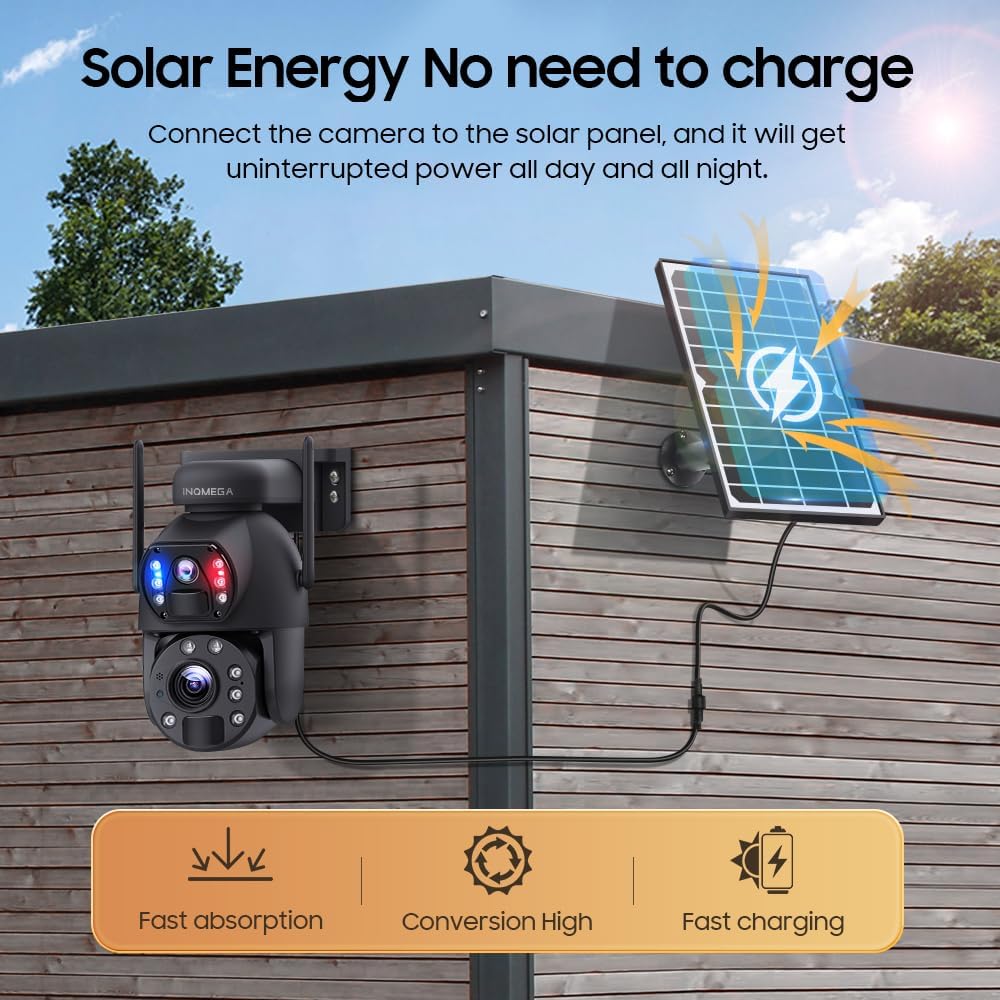
Figure 3.1: Solar Energy Connection. This image illustrates how the camera connects to the solar panel for continuous power, highlighting fast absorption, high conversion, and fast charging.
3.3 App Installation and Pairing
Download the UBOX app on your smartphone. Follow the in-app instructions to pair your camera. This app allows you to control camera functions, view live feeds, and manage settings.
3.4 Mounting the Camera
The camera and solar panel can be installed separately to achieve the best view for the camera and optimal sunlight exposure for the solar panel. Use the provided bracket and screws for secure wall mounting. Ensure the mounting surface is stable and can support the weight of the camera and solar panel.
4. Operation
4.1 Dual-Lens and Zoom Control
The camera features a dual-lens system, providing both a wide-angle view and a PTZ (Pan-Tilt-Zoom) lens with 50X true optical zoom. You can switch between these views and control the 355° pan and 90° tilt functions directly through the UBOX app.

Figure 4.1: Dual-Lens, Dual View. This image shows the UBOX app interface displaying simultaneous feeds from both the wide-angle and PTZ zoom lenses.
4.2 Night Vision Modes
The camera offers multiple night vision modes for clear visibility up to 150ft in low-light conditions:
- Infrared Night Vision: Uses IR lights for black and white video in complete darkness.
- Full-Color Night Vision: Utilizes white LEDs to provide color video at night.
- Smart Night Vision: Automatically switches between infrared and full-color modes based on detected motion or specific settings.
4.3 Storage Methods
The camera supports two primary storage methods for recorded video and audio:
- TF Card (MicroSD Card): Supports up to 128GB (not included). Insert the TF card into the designated slot.
- Cloud Storage: Subscription-based cloud storage is available for secure backup of your recordings.

Figure 4.2: Multiple Storage Methods. This image displays options for storing video footage via TF card or cloud service, alongside a smartphone showing recorded activity.
4.4 Motion Detection and Alerts
The camera features PIR human detection with an effective range of up to 12 meters. When motion is detected, the camera can trigger audio and motion alerts, sending notifications to your smartphone via the UBOX app.
5. Maintenance
5.1 Battery and Solar Panel Care
- Ensure the solar panel is kept clean and free from dust, dirt, or debris to maintain optimal charging efficiency.
- Periodically check the solar panel's position to ensure it receives maximum sunlight, especially after seasonal changes.
- The built-in 12,000mAh battery is designed for long-term use. Avoid fully discharging the battery frequently to prolong its lifespan.
5.2 Cleaning
- Gently wipe the camera lenses with a soft, clean, lint-free cloth to remove any smudges or dirt that may affect image quality.
- Clean the camera body with a damp cloth. Do not use harsh chemicals or abrasive cleaners.
6. Troubleshooting
- Camera Not Connecting to 4G: Ensure the SIM card is correctly inserted and activated. Check cellular signal strength in the camera's location.
- App Timeouts/Freezing: Ensure your UBOX app is updated to the latest version. Check your smartphone's internet connection. Restart the app or the camera if issues persist.
- Motion Detection Not Working: Verify PIR sensor settings in the app. Ensure there are no obstructions blocking the sensor's view.
- Poor Night Vision: Clean the camera lenses and IR/white LEDs. Ensure there are no strong light sources directly interfering with the camera's night vision.
- Battery Not Charging: Ensure the solar panel is clean and positioned for maximum direct sunlight. Check the connection cable between the solar panel and the camera.
- Cannot Delete Videos from SD Card: The UBOX app may require formatting the entire SD card to delete content. Back up important videos before formatting.
- No Wi-Fi Backup Option: This camera is designed for 4G LTE cellular connectivity and does not support Wi-Fi as a backup.
7. Specifications
| Feature | Specification |
|---|---|
| Model Name | SOLAR CAMERA |
| Model Number | ST-598-6M-50X-4G-US-9.11 |
| Video Capture Resolution | 6MP |
| Optical Zoom | 50X |
| Battery Capacity | 12,000mAh |
| Solar Panel Power | 6W |
| Connectivity Technology | Wireless (Cellular 4G LTE) |
| Indoor/Outdoor Usage | Outdoor |
| Night Vision Range | Up to 150 Feet |
| Night Vision Type | Infrared, Full-Color, Smart Night Color |
| PIR Human Detection | Max 12M |
| Storage Options | TF Card (Max 128GB), Cloud Storage |
| Control Method | UBOX App |
| Material | Metal Housing |
| Water Resistance Level | Waterproof |
8. Warranty and Support
For warranty information and technical support, please refer to the documentation provided at the time of purchase or contact INQMEGA customer service directly. Keep your purchase receipt as proof of purchase.
Manufacturer: INQMEGA