
1. Introduction
The BANTI Electric Standing Desk is designed to enhance your workspace with its height-adjustable, ergonomic features. This desk allows for seamless transitions between sitting and standing positions, aiming to reduce neck, shoulder, and back discomfort for improved comfort and productivity.
2. Product Features
- Smooth Electric Height Adjustment: The desk features a reliable motor for quiet height transitions from 27 inches to 46 inches, operating at under 50 dB.
- Versatile Storage Solution: Includes spacious dual drawers and a storage shelf for organizing office essentials.
- Robust & Durable Construction: Built with an industrial-grade alloy steel frame and a sturdy tabletop, supporting up to two monitors with stability.
- Smart Memory & Safety Features: Equipped with four programmable height presets and anti-collision technology that reverses 2 cm upon detecting obstacles.
- Easy Setup & Reliable Support: Comes with detailed instructions, assembly tools, and an installation video for quick setup.
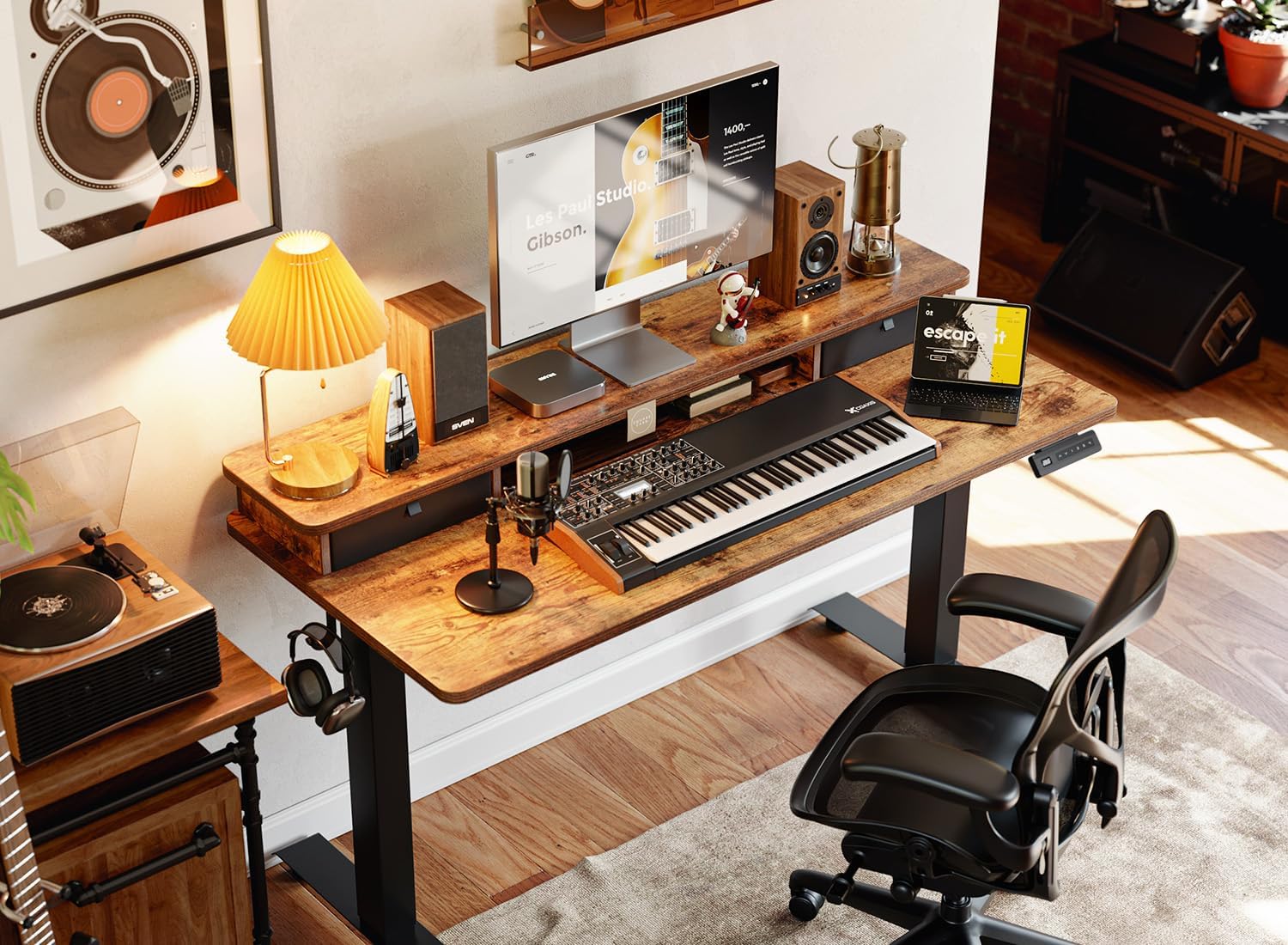
Figure 2.1: BANTI Electric Standing Desk in a typical office environment, showcasing its design and functionality.

Figure 2.2: Detail of the dual drawers, providing convenient storage for office supplies.

Figure 2.3: The convenient control panel with LED display, up/down buttons, and four memory presets for height adjustment.

Figure 2.4: The desk's height adjustment range, illustrating its versatility for both sitting and standing positions.
3. Setup
The BANTI Electric Standing Desk is designed for straightforward assembly. It includes all necessary tools and detailed instructions to guide you through the process. An installation video is also available to assist with quick setup.
3.1 Unpacking
- Carefully open the packaging and remove all components.
- Verify that all parts listed in the packing list are present and undamaged.
3.2 Assembly Steps
Follow the step-by-step instructions provided in the included manual. Ensure all screws and fasteners are securely tightened to ensure stability.
- Attach the desk legs to the tabletop.
- Install the motor and control panel.
- Connect all cables as per the diagram.
- Attach the dual drawers and storage shelf.
- Optionally, install the headphone hook.
3.3 Initial Power-Up
Once assembled, plug the desk into a standard power outlet. The LED display on the control panel should illuminate, indicating power is connected.
4. Operating Instructions
4.1 Adjusting Height
Use the up (^) and down (v) arrow buttons on the control panel to manually adjust the desk height. The current height will be displayed on the LED screen.
4.2 Memory Presets
The desk features four programmable height presets (1, 2, 3, 4) for quick adjustments to your preferred sitting and standing heights.
- Adjust the desk to your desired height using the up/down arrows.
- Press the S button. The LED display will show "S-".
- Press one of the preset buttons (1, 2, 3, or 4) within 5 seconds. The current height will be saved to that preset.
- To recall a saved height, simply press the corresponding preset button (1, 2, 3, or 4). The desk will automatically move to the saved position.
4.3 Anti-Collision Technology
The desk is equipped with an auto-sensing anti-collision system. If the desk encounters an obstacle during height adjustment, it will automatically reverse its movement by approximately 2 cm to prevent damage to the desk or objects.

Figure 4.1: The anti-collision feature ensures safety by reversing desk movement when an obstacle is detected.
5. Maintenance
- Cleaning: Wipe the desk surface with a soft, damp cloth. Avoid harsh chemicals or abrasive cleaners.
- Inspection: Periodically check all screws and connections to ensure they are tight.
- Cable Management: Ensure cables are neatly managed and not obstructing the desk's movement. The desk includes features for cable routing.
6. Troubleshooting
- Desk Not Moving: Check if the power cord is securely plugged into both the desk and the wall outlet. Ensure no objects are obstructing the desk's movement.
- Error Codes: Refer to the detailed troubleshooting section in the full product manual for specific error code interpretations and solutions.
- Uneven Movement: Ensure the desk is placed on a level surface. If the issue persists, contact customer support.
7. Specifications
| Feature | Detail |
|---|---|
| Brand | BANTI |
| Model Number | VCUB-SDE-SS |
| Product Dimensions | 24"D x 48"W x 27"H |
| Minimum Height | 27.36 Inches |
| Maximum Height | 46.06 Inches |
| Color | Rustic Brown |
| Top Material Type | Wood |
| Base Material | Alloy Steel |
| Item Weight | 58 Pounds |
| Number of Drawers | 2 |
| Number of Shelves | 1 |
| Number of Height Positions | 4 (Programmable Presets) |
| Special Features | Adjustable Height, Electric, Ergonomic, Monitor Stand, Anti-Collision Technology, Headphone Hook |

Figure 7.1: Detailed product dimensions for the BANTI Electric Standing Desk.
8. Warranty and Support
This product is backed by a standard return policy, allowing for returns or replacements within 30 days of purchase. For any technical assistance or inquiries, BANTI offers dedicated technical support to ensure a hassle-free experience.
For further details regarding warranty coverage or to contact support, please refer to the official BANTI website or your purchase documentation.


