
1. Introduction
This manual provides detailed instructions for the installation, operation, and maintenance of the POWLSOJX UDM-GS 1000W Micro Grid-Tie Inverter. This device is designed to convert DC power from photovoltaic (PV) modules or batteries into AC power for grid connection, supporting both PV-only and PV+battery storage systems. It features multiple connection modes, APP control, and robust construction for reliable performance.
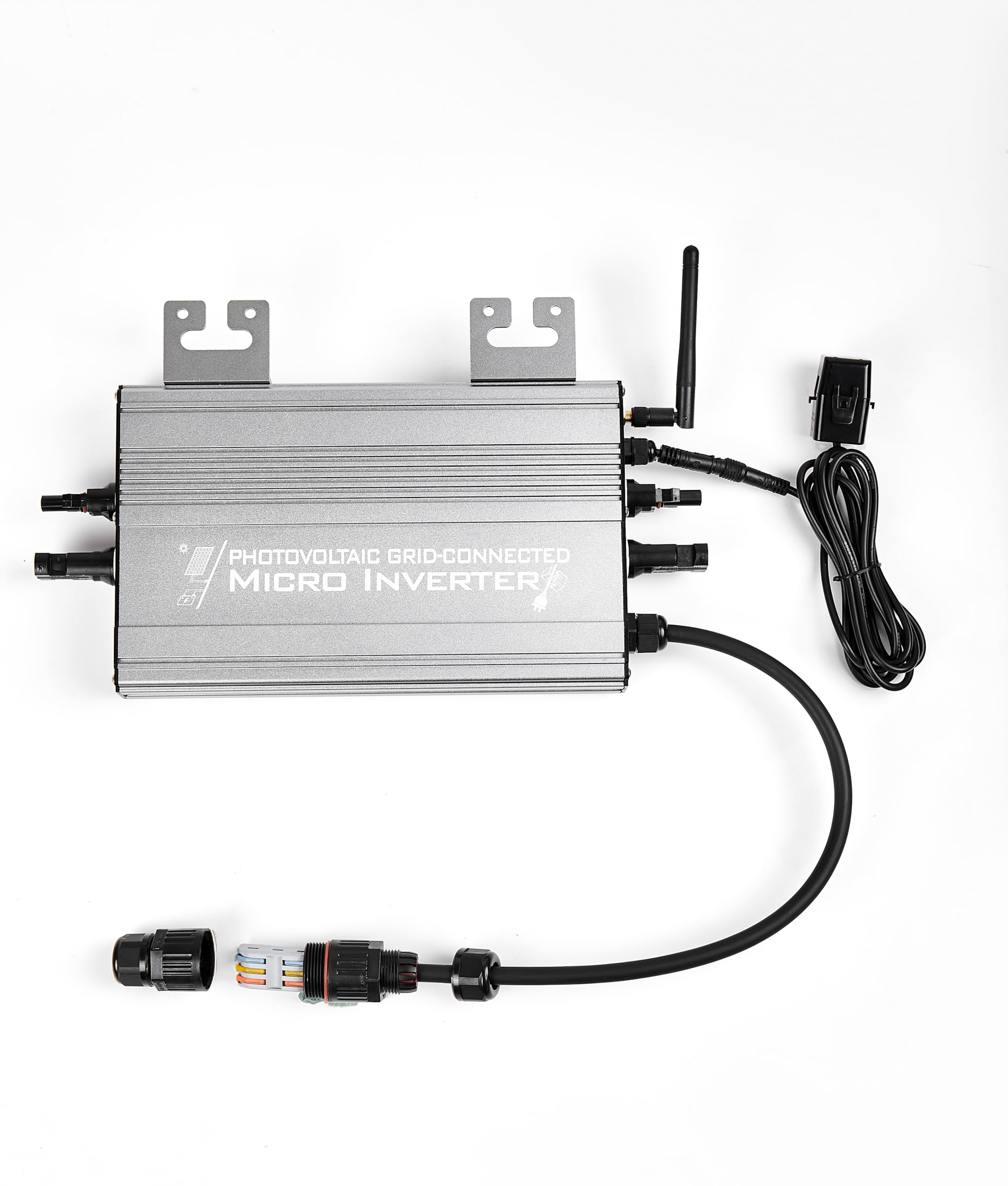
Figure 1: POWLSOJX UDM-GS 1000W Micro Grid-Tie Inverter
2. Safety Information
Please read all safety instructions carefully before installation and operation. Failure to follow these instructions may result in electric shock, fire, or serious injury.
- Installation must be performed by qualified personnel in accordance with local electrical codes and regulations.
- Ensure all power sources (PV, battery, AC grid) are disconnected before performing any wiring or maintenance.
- Do not attempt to repair or disassemble the inverter. Contact qualified service personnel.
- The inverter generates high voltage. Avoid contact with live parts.
- Ensure proper grounding of the inverter.
- Do not install the inverter in direct sunlight, near flammable materials, or in areas with poor ventilation.
- Wear appropriate personal protective equipment (PPE) during installation.
3. Product Features
The UDM-GS 1000W Micro Grid-Tie Inverter offers several key features for efficient and reliable solar power generation:
- Compatibility: Supports mainstream PV modules and 36V/48V batteries (24V batteries can work but are not recommended). Max PV input: 2 * 600Wp.
- Multiple Connection Modes: Six flexible modes for PV, battery, or combined PV+battery operation, including Zero Export and On-Grid functions.
- High Performance MPPT: Built-in Maximum Power Point Tracking optimizes energy harvesting from solar panels.
- Remote Monitoring: Integrated WiFi for remote monitoring and control via a mobile application.
- Durable Construction: Full aluminum alloy casing for efficient heat dissipation, lightweight design, and IP65 waterproof rating for outdoor use.
- Safety Mechanisms: Includes multiple built-in safety features for secure installation and operation.

Figure 2: Overview of Inverter Features

Figure 3: All Aluminum Alloy Casing for Enhanced Heat Dissipation

Figure 4: IP65 Waterproof Rating for Indoor and Outdoor Use
4. Package Contents
Verify that all items are present in the package before proceeding with installation:
- POWLSOJX UDM-GS 1000W Micro Grid-Tie Inverter
- WiFi Antenna
- AC Quick Connector
- Mounting Brackets and Screws
- User Manual (this document)
Note: PV modules, batteries, battery connection cables, and AC plug cables are not included and must be purchased separately.
5. Setup and Installation
5.1 Mounting the Inverter
Choose a suitable location for mounting the inverter, ensuring it is well-ventilated, protected from direct sunlight, and within reach of PV modules, batteries, and the AC grid connection point. Use the provided mounting brackets and screws to securely attach the inverter to a stable surface.
5.2 Electrical Connections
The inverter features standard DC input connectors and an AC quick connector for ease of installation.

Figure 5: Standard DC Input Connectors

Figure 6: AC Quick Connector for Easy Wiring
- DC Input Connection: Connect your PV modules (VOC < 60VDC) or 36V/48V batteries to the DC input terminals of the inverter. Ensure correct polarity. The inverter has two sets of input connectors, one for PV and one for battery, or both for PV in PV-only modes.
- AC Output Connection: Connect the AC quick connector to the inverter's AC output port. Then, connect the AC cable from the quick connector to your household grid.
- WiFi Antenna: Attach the provided WiFi antenna to the designated port on the inverter for remote monitoring capabilities.

Figure 7: General Connection Diagram
5.3 Mobile App Setup
The inverter features built-in WiFi for remote monitoring and control.
- Download the dedicated mobile application from your smartphone's app store.
- Follow the in-app instructions to connect the inverter to your local WiFi network.
- Once connected, you can monitor real-time data, power generation, and adjust settings remotely.

Figure 8: Mobile Application for Monitoring and Control
6. Operating Modes
The UDM-GS 1000W Micro Grid-Tie Inverter supports six distinct operating modes, allowing for flexible power management based on your setup and requirements. These modes can be configured via the mobile application.

Figure 9: Overview of Six Working Modes
6.1 Storage Modes (PV + Battery)
- Mode 1: Storage Zero Export Mode
Connects both batteries and PV modules. Enables the Zero Export function, meaning generated electricity is primarily used by local loads, with no power exported to the grid.
Figure 10: Storage Zero Export Mode Connection
- Mode 2: Storage On-Grid Mode
Connects both batteries and PV modules. Disables the Zero Export function, allowing excess generated power to be exported to the grid.
Figure 11: Storage On-Grid Mode Connection
6.2 PV Modes (PV Only)
- Mode 3: PV Zero Export Mode
Connects only PV modules. Enables the Zero Export function, ensuring PV power is consumed locally without grid export.
Figure 12: PV Zero Export Mode Connection
- Mode 4: PV On-Grid Mode
Connects only PV modules. Disables the Zero Export function, allowing excess PV power to be exported to the grid.
Figure 13: PV On-Grid Mode Connection
6.3 Battery Modes (Battery Only)
- Mode 5: Battery Zero Export Mode
Connects only batteries. Enables the Zero Export function, using battery power for local loads without grid export.
Figure 14: Battery Zero Export Mode Connection
- Mode 6: Battery On-Grid Mode
Connects only batteries. Disables the Zero Export function, allowing excess battery power to be exported to the grid.
Figure 15: Battery On-Grid Mode Connection
7. Maintenance
Regular maintenance ensures optimal performance and longevity of your inverter.
- Cleaning: Periodically clean the inverter's exterior with a soft, dry cloth. Do not use liquid cleaners or solvents. Ensure ventilation openings are free from dust and debris.
- Connections: Annually inspect all electrical connections (DC input, AC output, grounding) for tightness and signs of corrosion. Tighten any loose connections.
- Environment: Ensure the installation environment remains within the specified temperature and humidity ranges.
- Firmware Updates: Check the mobile application periodically for any available firmware updates for the inverter.
Warning: Always disconnect all power sources before performing any maintenance.
8. Troubleshooting
If you encounter issues with your inverter, refer to the following troubleshooting guide.
| Problem | Possible Cause | Solution |
|---|---|---|
| Inverter not powering on | No DC input from PV/battery; AC grid not connected; Loose connections. | Check PV module output/battery charge; Verify AC grid connection; Inspect all wiring for secure connections. |
| Low power output | Insufficient sunlight on PV panels; Dirty PV panels; Incorrect operating mode; PV panel degradation. | Ensure PV panels are clean and unshaded; Verify correct operating mode in app; Check PV panel health. |
| No grid export (in On-Grid mode) | Zero Export function enabled; Grid connection issue; Inverter fault. | Check app settings to ensure Zero Export is disabled; Verify grid connection; Contact support if fault persists. |
| WiFi connection issues | Weak WiFi signal; Incorrect password; Router issues. | Ensure inverter is within WiFi range; Re-enter WiFi password in app; Restart router. |
If the problem persists after attempting these solutions, please contact customer support.
9. Specifications
Detailed technical specifications for the POWLSOJX UDM-GS 1000W Micro Grid-Tie Inverter.

Figure 16: Parameter Table of Micro Inverter UDM1000-GS
| Parameter | Value |
|---|---|
| Product Model | UDM-GS |
| Input Connector | 2 Sets (Left for PV or Battery, Right only for PV) |
| Work Mode | 6 Modes (PV or Battery or Storage & On-Grid or Zero Export) |
| Input Data (DC) | |
| Max PV Power (PV Mode) | 2 * 600Wp |
| Recommended Battery (Battery Mode) | 36V or 48V Batteries (24V's can work, but not recommended) |
| Max DC Open Circuit Voltage (VDC) | 60VDC |
| Startup Voltage (VDC) | 20VDC |
| Max DC Input Current | 2 * 20A |
| MPPT Tracking Accuracy (PV Mode) | 99% |
| MPPT Tracking Range (VDC) (PV Mode) | 25-52VDC |
| Max DC Short Circuit Current | 2 * 40A |
| Inverter Backfeed Current to Panel? | No |
| Output Data (AC) | |
| Max AC Output Power (Wp) | 1000Wp |
| Nominal Voltage/Range (VAC) | 180-265VAC (208VAC, 220VAC, 240VAC) |
| Nominal Frequency (Hz) | @50Hz: 47.5Hz-52.5Hz / @60Hz: 57.5Hz-62.5Hz |
| Total Harmonic Distortion | THD < 5% (at rated power) |
| Power Factor | >0.99 (at rated power) |
| Rated Output Power (PV Mode) | 1000Wp |
| Rated Output Power (Battery Mode) | 600Wp |
| Max Output Overcurrent Protection | 10A |
| Efficiency | |
| Weighted Average Efficiency (CEC) | ≥93% |
| Night Time Rate Loss (Wp) | 0Wp |
| Protection Functions | |
| Over/Under Voltage Protection | Yes |
| Over/Under Frequency Protection | Yes |
| Anti-Islanding Protection | Yes |
| Over Current Protection | Yes |
| Overheat and Over Temperature Protection | Yes |
| Overload Protection | Yes |
| Transformer Design | High Frequency Transformers, Galvanically isolated. Equipment ground is provided by the PE in the AC cable. No additional ground is required. |
| Physical | |
| Ambient Temperature Range | -40°C to +65°C |
| Operating Temperature Range | -40°C to +65°C |
| Environment Category Of Installation | Indoor and outdoor |
| Waterproof Grade | IP65 |
| Cooling Mode | Natural Convection - No Fans |
| Communications | WiFi / Frequency: 2.4 GHz Standards: IEEE 802.11/b/g/n |
| Dimensions (W x H x D) | 240 x 188.5 x 43mm (not include connectors and cable) |
| Weight | 1.85kg |

Figure 17: Inverter Dimensions
10. Warranty and Support
The POWLSOJX UDM-GS 1000W Micro Grid-Tie Inverter comes with a 6-month manufacturer's warranty. This warranty covers defects in materials and workmanship under normal use.
For technical support, warranty claims, or any questions regarding your inverter, please contact POWLSOJX customer service through the retailer where the product was purchased or refer to the contact information provided with your product packaging.
Please have your model number (UDM-GS 1000W) and purchase date available when contacting support.