1. Introduction
This manual provides essential information for the safe installation, operation, and maintenance of your Philips 72W 7400LM LED Flood Light. This outdoor floodlight is designed to provide high brightness and wide coverage for areas such as garages, yards, and porches. It features three adjustable heads, 5000K daylight color temperature, and a durable, waterproof aluminum construction.
Please read this manual thoroughly before installation and retain it for future reference.
2. Safety Information
WARNING: Risk of electric shock. Disconnect power at the fuse or circuit breaker before installation or servicing.
CAUTION: Risk of fire. Keep combustible materials away from the lamp. Do not operate the fixture with missing or damaged parts.
- Ensure all electrical connections comply with local codes and ordinances.
- Installation should be performed by a qualified electrician if you are unsure about wiring procedures.
- Do not look directly into the LED light source when illuminated.
- This fixture is designed for outdoor use and is resistant to corrosion, rust, heavy rain, humidity, UV exposure, and extreme temperatures.
- Ensure the mounting surface is structurally sound to support the fixture.
3. Product Overview and Features
The Philips LED Flood Light is engineered for robust outdoor performance, offering superior illumination and durability.

Figure 3.1: Overview of the Philips 72W 7400LM LED Flood Light, showing its three adjustable light heads and integrated motion sensor.
- High Brightness: Produces 7400 lumens of cool white light at 5000K.
- Adjustable Heads: Three rotatable heads allow for wide and customizable coverage.
- Durable Construction: Features a robust aluminum body with unique rear heat dissipation fins for efficient thermal management.
- Weather Resistant: Tested for resistance to corrosion, rust, heavy rain, humidity, UV exposure, and extreme temperatures.
- Motion Sensor: Highly sensitive motion sensor with a 180-degree detection angle and a maximum sensing range of 69 feet.
- Multiple Lighting Modes: Includes Test mode, Sensor mode, Dusk-to-Dawn mode, and Manual Override mode.

Figure 3.2: Visual representation of the flood light's key attributes, including its durable housing, high brightness output, mains power connection, adjustable light heads, water resistance, and corrosion resistance.
4. Setup and Installation
The flood light is designed for hardwired installation and comes fully assembled with all necessary accessories.
4.1 Mounting Options
The fixture supports two primary mounting methods:
- Wall Mounting: Securely attach the fixture to a vertical wall surface.
- Eave Mounting: Install the fixture underneath an eave or overhang.

Figure 4.1: Illustration of the two available mounting configurations: directly on a wall or suspended from an eave. For optimal water resistance, ensure a tight seal between the mounting surface and the luminaire.
4.2 Wiring Instructions
- Turn off power: Before beginning installation, ensure the power supply to the installation area is turned off at the circuit breaker.
- Prepare wiring: Connect the fixture's wires to your household wiring according to local electrical codes. Typically, this involves connecting live, neutral, and ground wires.
- Secure fixture: Mount the fixture securely using the provided hardware for your chosen mounting method.
- Seal connections: For outdoor installations, ensure all wiring connections are properly sealed to prevent water ingress. A tight seal between the mounting surface and the luminaire is crucial for water resistance.
- Restore power: Once installation is complete and all connections are secure, restore power at the circuit breaker.
5. Operating Instructions
This flood light is designed for full manual control via a wall switch (model 929004696303) and offers various lighting modes.

Figure 5.1: The flood light is primarily controlled by a standard wall switch. Note that this specific model is hardwired and does not feature solar power or integrated dusk-to-dawn functionality by default, relying on the wall switch for basic ON/OFF control.
5.1 Adjusting Light Heads and Motion Sensor
- The three light heads can be rotated independently to direct illumination where needed.
- The motion sensor has a 180-degree adjustable angle. Position it to cover the desired detection area, up to 69 feet.

Figure 5.2: The motion sensor offers a 180-degree detection angle and can sense motion up to 69 feet away, allowing for broad coverage of your outdoor space.
5.2 Lighting Modes
The flood light offers four distinct lighting modes, which can be selected based on your needs:
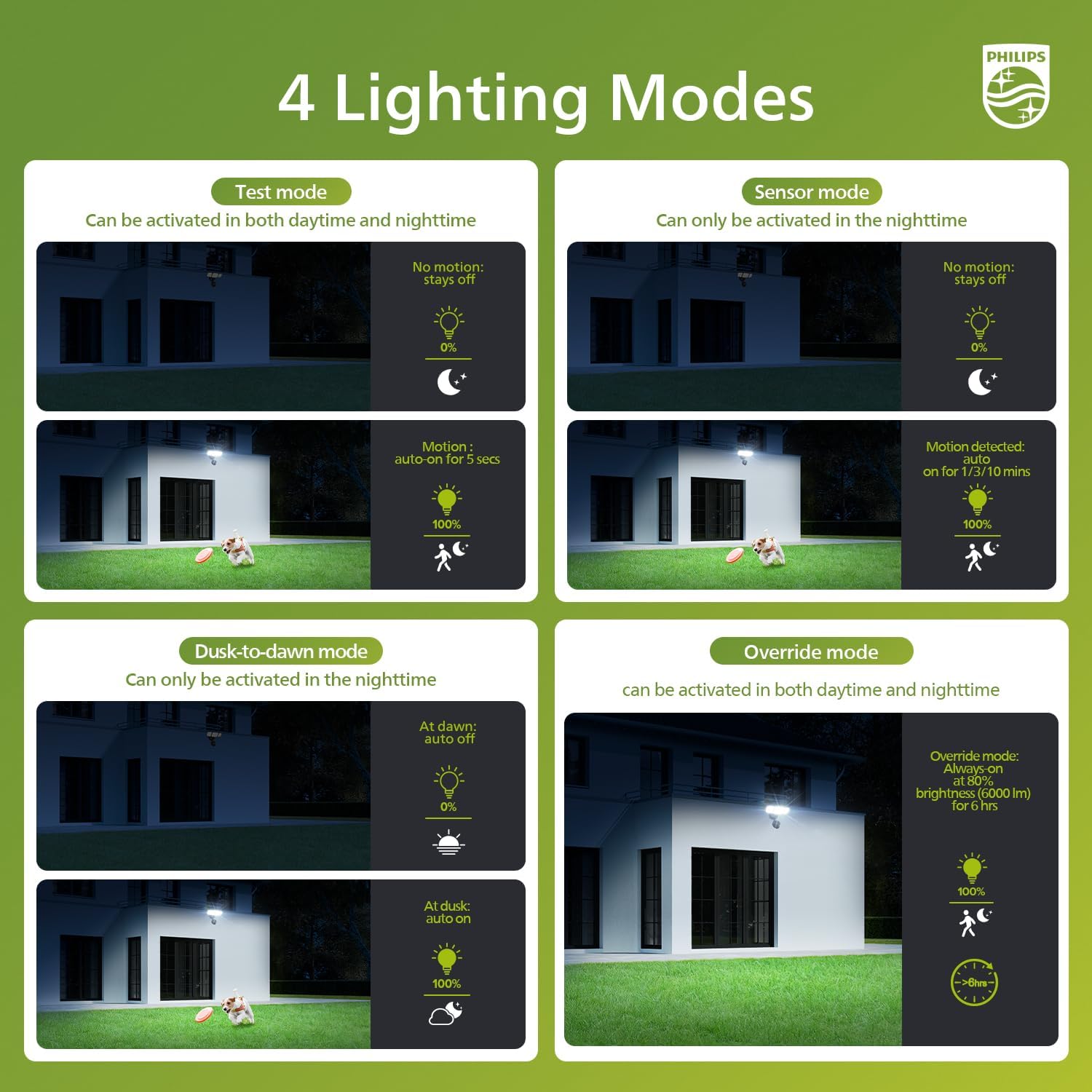
Figure 5.3: This diagram illustrates the four operational modes of the flood light: Test mode (day/night, 5s motion), Sensor mode (night only, 1-10 min motion), Dusk-to-Dawn mode (night only, auto on/off), and Override mode (day/night, 6hr constant light).
- Test Mode: Can be activated in both daytime and nighttime. When no motion is detected, the light stays off. Upon motion detection, the light turns on at 100% brightness for 5 seconds. This mode is useful for testing sensor functionality and coverage.
- Sensor Mode: Can only be activated in the nighttime. When no motion is detected, the light stays off. Upon motion detection, the light turns on at 100% brightness for 1 to 10 minutes (duration may be adjustable via a setting on the sensor, refer to sensor dial if present).
- Dusk-to-Dawn Mode: Can only be activated in the nighttime. The light automatically turns on at dusk and turns off at dawn, providing continuous illumination throughout the night.
- Override Mode: Can be activated in both daytime and nighttime. This mode provides 100% brightness (6000 lm) for 6 hours, after which it automatically dims to 80% brightness. This mode allows for extended constant illumination when needed.
5.3 Manual Override Mode Activation/Deactivation
The Manual Override Mode can be activated and deactivated using the wall switch:

Figure 5.4: Instructions for activating and deactivating the 6-hour always-on mode. To activate, switch the light OFF and ON twice within 3 seconds. The light will automatically dim to 80% after 13 minutes. To deactivate, switch the light OFF and ON once for more than 3 seconds, or it will return to sensor mode automatically after 6 hours.
- To Activate 6-hour Always-On Mode: Switch the light OFF and then ON twice within 3 seconds. The light will activate the 6-hour always-on mode. It will automatically dim to 80% brightness after approximately 13 minutes.
- To Deactivate Sensor Override Mode: Switch the light OFF and then ON once, ensuring the OFF duration is more than 3 seconds. The light will return to its previous sensor mode. Alternatively, the light will automatically return to sensor mode after 6 hours.
6. Maintenance
Regular maintenance ensures optimal performance and longevity of your flood light.
- Cleaning: Periodically clean the fixture with a soft, damp cloth. Do not use abrasive cleaners or solvents, as they may damage the finish or electrical components.
- Inspection: Annually inspect the fixture for any signs of damage, loose wiring, or corrosion. Ensure all mounting hardware remains secure.
- LEDs: The LED light source is integrated and not user-replaceable.
7. Troubleshooting
If you encounter issues with your flood light, refer to the following common problems and solutions:
- Light does not turn on:
- Check if the power supply is on at the circuit breaker.
- Verify all wiring connections are secure and correct.
- Ensure the wall switch is in the ON position.
- If in Sensor Mode, ensure it is nighttime and motion is detected.
- Light stays on continuously:
- Check if the fixture is in Manual Override Mode. Deactivate it as per Section 5.3.
- Ensure the motion sensor is not obstructed or detecting constant movement.
- If in Dusk-to-Dawn mode, this is normal operation during nighttime.
- Motion sensor not detecting:
- Adjust the motion sensor's angle to cover the desired area.
- Ensure there are no obstructions blocking the sensor's view.
- Verify the light is in Test Mode or Sensor Mode.
8. Specifications
| Feature | Specification |
|---|---|
| Brand | Philips |
| Model Number | 929004696703 |
| Wattage | 72W |
| Luminous Flux | 7400 Lumens |
| Color Temperature | 5000K Daylight |
| Material | Aluminum (Housing) |
| Light Fixture Form | Floodlight |
| Adjustable Heads | 3 |
| Motion Sensor Detection Angle | 180 degrees |
| Motion Sensor Max Range | 69 feet |
| Water Resistance | Waterproof (Resistant to heavy rain, humidity) |
| Corrosion Resistance | Yes |
9. Warranty and Support
For warranty information and customer support, please refer to the documentation included with your purchase or visit the official Philips website. Keep your proof of purchase for warranty claims.


