
1. Introduction
This manual provides detailed instructions for the assembly, operation, maintenance, and troubleshooting of your VIAGDO Floating Twin Bed Frame. This bed frame features an upholstered headboard with integrated storage, USB and Type-C charging ports, and LED lighting. Please read this manual thoroughly before assembly and use to ensure proper function and safety.
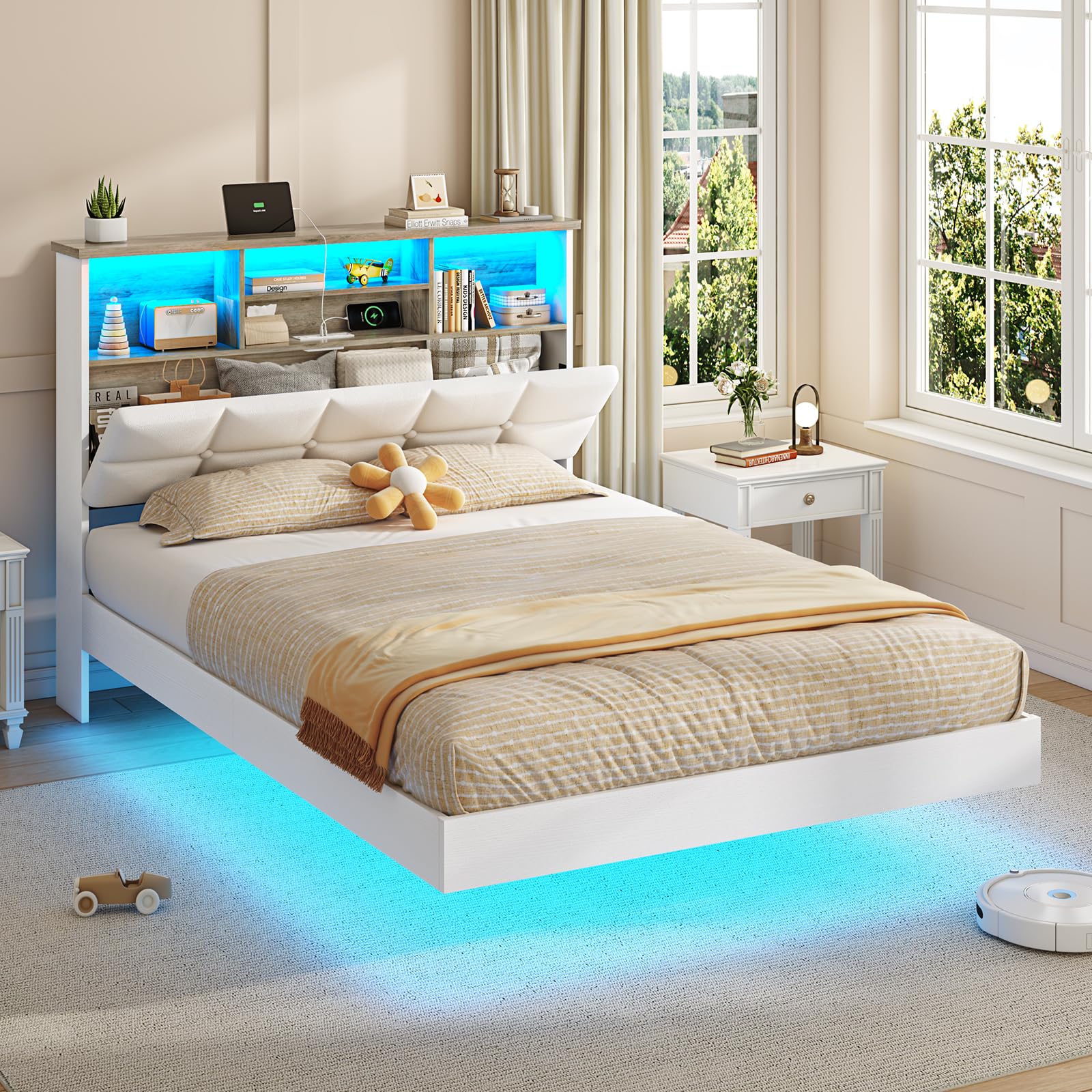
Figure 1: VIAGDO Floating Twin Bed Frame - Overall View
2. Safety Information
Adhere to the following safety guidelines during assembly and use:
- Keep all small parts and packaging materials away from children to prevent choking hazards.
- Assemble the bed frame on a soft, clean surface to avoid scratching the product.
- Ensure all connections are securely tightened before use. Periodically check and re-tighten fasteners.
- Do not exceed the maximum weight capacity of 1000 lbs.
- Avoid placing heavy objects on the headboard shelves to prevent damage or injury.
- Do not expose the electrical components (charging station, LED lights) to water or excessive moisture.
- Use only the provided power adapter for the charging station and LED lights.
3. Package Contents
Verify that all components are present before beginning assembly. If any parts are missing or damaged, contact customer support.
| Component | Quantity |
|---|---|
| Headboard (with Bookcase and Charging Station) | 1 |
| Bed Frame Side Rails | 2 |
| Footboard | 1 |
| Support Slats | Set |
| LED Light Strip | 1 |
| Remote Control for LED Lights | 1 |
| Hardware Pack (Screws, Bolts, Allen Wrench) | 1 |
| Installation Manual | 1 |
4. Setup and Assembly
Assembly typically requires two adults. Follow the detailed instructions provided in the included installation manual. The design incorporates a plug-in system for easier assembly and EVA pads for noise reduction.
4.1 General Assembly Steps
- Unpack Components: Carefully remove all parts from the packaging and lay them out on a clean, soft surface. Identify each part using the provided parts list.
- Assemble Headboard: Attach the headboard sections as per the manual, ensuring the charging station and LED light strip are correctly positioned.
- Connect Side Rails: Securely attach the side rails to the headboard and footboard using the provided hardware. Ensure all bolts are tightened.
- Install Support Slats: Place the support slats across the bed frame. The slats are designed for easy plug-in installation and include EVA pads to prevent noise.
- Install LED Strip: Adhere the LED light strip to the designated areas on the bed frame base and headboard. Connect the power cable.
- Final Check: Verify that all connections are secure and the bed frame is stable before placing a mattress on it.

Figure 2: Easy Assembly - Plug-in Slat Design

Figure 3: Noise-Free Design with EVA Pads
5. Operating Instructions
5.1 LED Lighting System
The integrated RGB LED lighting system can be controlled via the included remote control or a dedicated mobile application. The lights are located around the base and within the headboard shelves.
- Power On/Off: Use the power button on the remote or app to turn the lights on or off.
- Color Selection: Choose from over 60,000 RGB colors using the color wheel or preset buttons.
- Dynamic Modes: Select from 29 dynamic modes for various lighting effects.
- Music Sync Mode: Activate this mode to synchronize the LED lights with music, causing them to pulse and change color in rhythm with audio.
- Schedule Function: Set timers for the lights to turn on or off automatically.

Figure 4: Music Sync RGB LED Lights Operation
5.2 Integrated Charging Station
The headboard features a built-in charging station for convenient device power. It includes:
- 2 AC Outlets (125V/12A)
- 1 USB Port (5V/2A)
- 1 Type-C Fast Charging Port (5V/3A)
To use, connect the bed frame's power cord (6.5-foot length) to a standard wall outlet. Plug your devices into the appropriate ports.

Figure 5: Embedded Charging Station
5.3 Storage Features
The bed frame offers multiple storage solutions:
- Headboard Bookcase Shelf: Open shelves within the headboard provide space for books, glasses, and decorative items.
- Hidden Compartment: A discreet storage area is accessible within the upholstered headboard, suitable for private belongings or extra bedding.

Figure 6: Multifunctional Storage Headboard
6. Maintenance
To maintain the appearance and longevity of your bed frame:
- Cleaning: Wipe surfaces with a damp cloth. Avoid harsh chemicals or abrasive cleaners that may damage the finish or upholstery.
- Dusting: Regularly dust the headboard shelves and frame to prevent buildup.
- Fastener Check: Periodically inspect all bolts and screws and re-tighten them as necessary to ensure structural integrity.
- LED Lights: If LED lights malfunction, check the power connection. Do not attempt to repair the LED strip yourself; contact customer support.
7. Troubleshooting
Refer to the table below for common issues and their solutions.
| Problem | Possible Cause | Solution |
|---|---|---|
| Bed frame is wobbly or unstable. | Loose fasteners. | Check and tighten all bolts and screws. Ensure all parts are correctly aligned. |
| LED lights are not working. | Power cable disconnected; remote battery low; LED strip damaged. | Ensure the power cable is securely plugged into the wall and the bed frame. Replace remote control batteries. If still not working, contact customer support. |
| Charging station is not providing power. | Bed frame not plugged in; device cable faulty; charging station malfunction. | Verify the bed frame's main power cord is plugged into a live outlet. Try a different device cable. If the issue persists, contact customer support. |
| Squeaking noises from the bed frame. | Loose connections; missing EVA pads. | Re-tighten all fasteners. Ensure EVA pads are correctly installed on the slats and frame connections. |
8. Specifications
Detailed product specifications for the VIAGDO Floating Twin Bed Frame:
| Feature | Detail |
|---|---|
| Size | Twin |
| Product Dimensions (L x W x H) | 79.2" x 40.9" x 42.5" |
| Material | Engineered Wood, Metal |
| Color | White |
| Weight Capacity | Up to 1000 lbs |
| Charging Station | 2 AC Outlets (125V/12A), 1 USB Port (5V/2A), 1 Type-C Port (5V/3A) |
| LED Lighting | RGB, Music Sync Mode, Remote & App Control |
| Special Features | Floating Design, Hidden Storage, Upholstered Headboard, No Box Spring Needed |
| Assembly Required | Yes |
| Item Weight | 60 pounds |

Figure 7: Product Dimensions
9. Warranty and Support
Your VIAGDO Floating Twin Bed Frame is designed for durability and quality. For any questions, concerns, or assistance with assembly or product functionality, please contact the seller or manufacturer directly.
- Return Policy: This product is eligible for 90-day easy returns. Refer to your purchase platform for specific return instructions.
- Manufacturer: VIAGDO
- Seller: FORMU
For technical support or warranty claims, please reach out to the customer service contact provided at the time of purchase or visit the official VIAGDO website.