
UGREEN HP207
UGREEN Studio Plus HP207 Wireless Over-Ear Headphones User Manual
Model: HP207
Introduction
This manual provides detailed instructions for the UGREEN Studio Plus HP207 Wireless Over-Ear Headphones. Please read this manual thoroughly before using the product to ensure proper operation and to maximize your listening experience. Keep this manual for future reference.
Product Overview
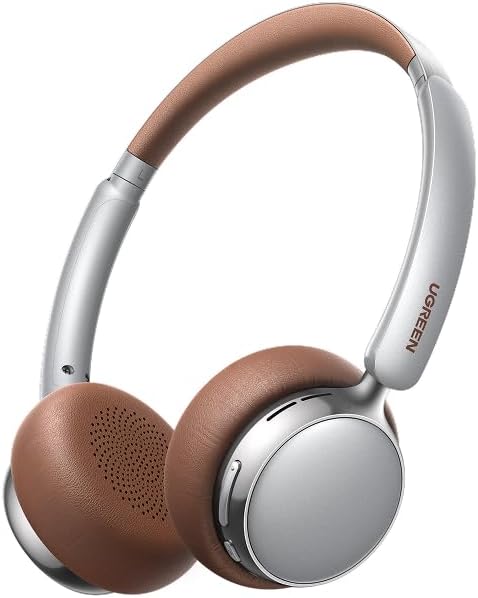
An image showing the UGREEN Studio Plus HP207 wireless over-ear headphones. The headphones feature a silver frame with brown earcups and a brown padded headband. The UGREEN logo is visible on the right earcup arm.
The UGREEN Studio Plus HP207 are wireless over-ear headphones designed for comfortable listening. They feature a sleek design with a brown and silver color scheme, offering a premium audio experience.
Setup
1. Charging the Headphones
Before first use, fully charge your UGREEN Studio Plus HP207 headphones. Connect the provided charging cable to the charging port on the headphones and to a USB power source. The indicator light will show the charging status and turn off or change color when fully charged.
2. Powering On/Off
- Power On: Press and hold the Power button for approximately 3 seconds until the indicator light illuminates.
- Power Off: Press and hold the Power button for approximately 5 seconds until the indicator light turns off.
3. Bluetooth Pairing
- Ensure the headphones are powered off.
- Press and hold the Power button for approximately 5-7 seconds until the indicator light flashes rapidly (usually blue and red), indicating pairing mode.
- On your device (smartphone, tablet, computer), enable Bluetooth and search for available devices.
- Select "UGREEN Studio Plus HP207" from the list of found devices.
- Once connected, the indicator light on the headphones will stop flashing and may turn solid blue or off, depending on the model.
- If prompted for a password, enter "0000".
Operating Instructions
Basic Controls
- Play/Pause: Press the Multi-function button (often the Power button or a dedicated play/pause button) once.
- Volume Up: Press the Volume + button.
- Volume Down: Press the Volume - button.
- Next Track: Press and hold the Volume + button (or double-press the Multi-function button, depending on model).
- Previous Track: Press and hold the Volume - button (or triple-press the Multi-function button, depending on model).
Call Management
- Answer/End Call: Press the Multi-function button once.
- Reject Call: Press and hold the Multi-function button for 2 seconds.
- Voice Assistant: Double-press the Multi-function button (or a dedicated button) to activate your device's voice assistant (Siri, Google Assistant, etc.).
Maintenance
- Cleaning: Use a soft, dry cloth to clean the headphones. Do not use harsh chemicals or abrasive materials.
- Storage: When not in use, store the headphones in a cool, dry place, away from direct sunlight and extreme temperatures.
- Avoid Water: These headphones are not waterproof. Avoid exposure to water or excessive moisture.
- Cable Care: Handle charging cables gently to prevent damage.
Troubleshooting
| Problem | Solution |
|---|---|
| Headphones do not power on. | Ensure the headphones are fully charged. Connect them to a power source and try again. |
| Cannot pair with a device. |
|
| No sound or low volume. |
|
| Intermittent connection. |
|
Specifications
- Model: HP207
- Brand: UGREEN
- Type: Wireless Over-Ear Headphones
- Connection Technology: Wireless (Bluetooth)
- Color: Brown
- Dimensions (Package): 23.2 x 22 x 4.7 cm
- Weight (Package): 310 g
- Manufacturer: Ugreen Group Limited
- Included Components: Instruction Manual (this document)
Warranty and Support
UGREEN products are designed to meet high quality standards. For warranty information, technical support, or customer service inquiries, please refer to the official UGREEN website or contact your local distributor. Please retain your proof of purchase for warranty claims.
For further assistance, visit: www.ugreen.com
Related documentsHP207


Ask a question about this manual
Ask about setup, troubleshooting, compatibility, parts, safety, or missing instructions. Manuals+ will review the question and use this page’s manual context to help answer it.