
Introduction
The Hape Mini Conductor's Orchestra Toy provides an engaging and educational musical experience, inspiring a love for music and creativity. This interactive toy allows children to explore the magic of music by controlling various instruments with a baton.
- Engaging Musical Learning Experience: This interactive conductor toy provides an engaging and educational musical journey, inspiring a love for music and creativity in a lifelike orchestral experience.
- Conductor's Creativity: By waving the baton to change the music's beat, your child can become the conductor and shape their musical journey, with 4 different conductor poses for added fun.
- Orchestra in Their Hands: This toy features 6 main orchestra instruments with professionally recorded sounds, including a trumpet, piano, violin, cello, clarinet, and drum, bringing the magic of symphonies to life.
- Versatile Music Modes: Choose from Music Mode for automatic playback and Performance Mode for a live orchestra experience, allowing users to experiment with tempo and create their own symphonies. Encourage your child to touch the instruments with the baton to play the sounds, which offers a dynamic musical experience.
- Educational Insights: The included instruction book imparts basic knowledge about symphony orchestras, helping your child learn about instruments, rhythm, and harmony.
Package Contents
- 1 main body
- 1 baton
Setup
Battery Installation
The Hape Mini Conductor's Orchestra Toy requires 3 AA batteries, which are included. Locate the battery compartment on the underside of the main unit. Use a screwdriver to open the compartment, insert the batteries according to the polarity indicators, and securely close the cover.
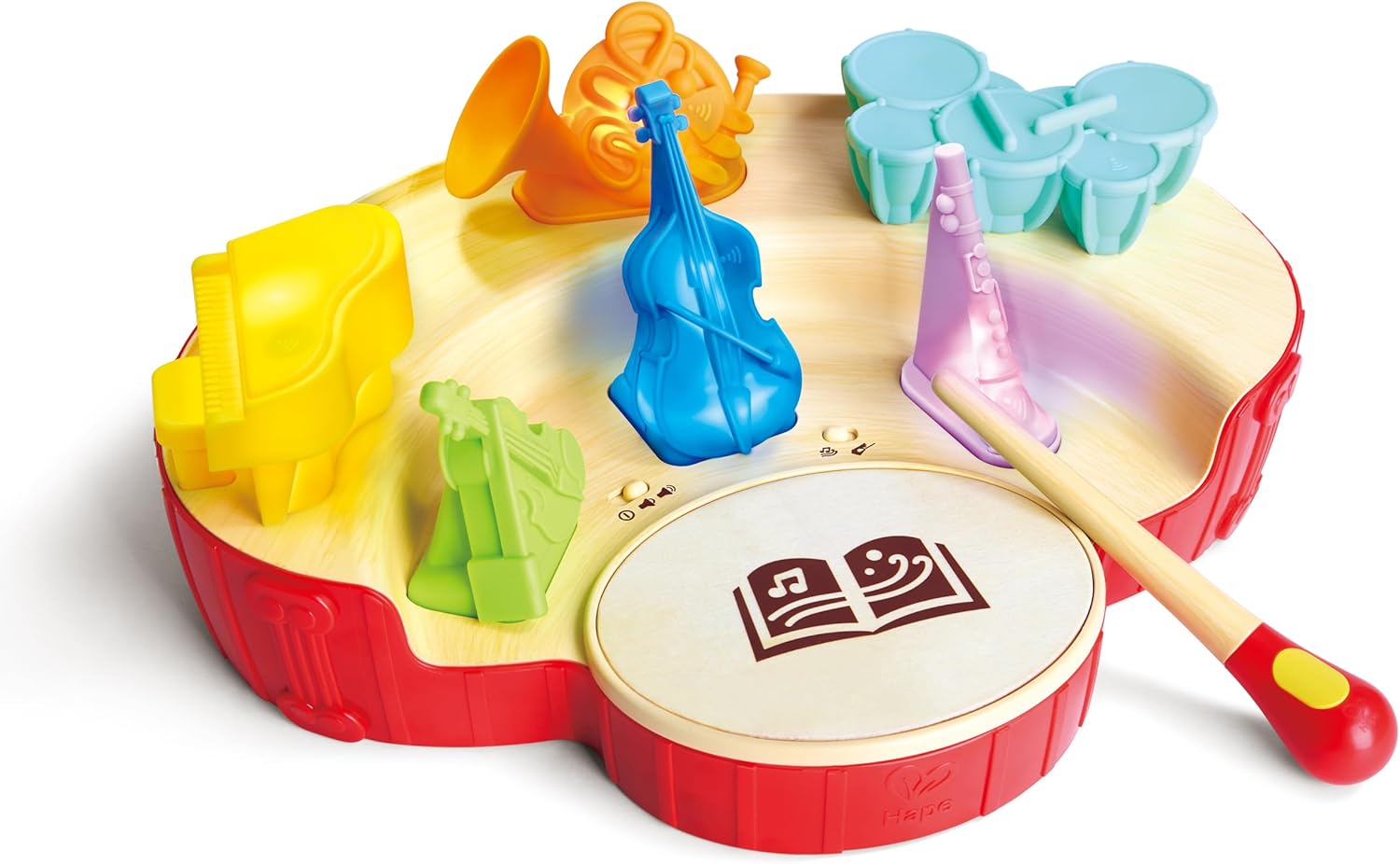
Image: The Hape Mini Conductor's Orchestra Toy, showing the main unit with colorful miniature instruments including a piano, violin, cello, trumpet, clarinet, and drums. A baton rests on the drum pad.
Operating Instructions
Power On/Off and Volume
Locate the power switch and volume control on the bottom of the main unit. Slide the switch to the 'On' position to activate the toy. Adjust the volume to your preferred level using the volume control.
Music Modes
The toy offers two primary modes:
- Music Mode: In this mode, the toy plays pre-programmed melodies automatically.
- Performance Mode: This mode allows for interactive play. Use the included baton to tap on the individual instrument pieces to hear their sounds. Waving the baton can also influence the tempo of the music.
Interacting with Instruments
Place the miniature instrument pieces into their designated slots on the main unit. Each instrument corresponds to a unique sound. Use the baton to tap on the instruments to play their sounds in Performance Mode. Experiment with different combinations and tempos to create your own symphonies.
Video: An official Hape video demonstrating the interactive features of the Mini Conductor's Orchestra Toy, showing how to place instruments and use the baton to control the music.

Image: A young child, approximately 3-5 years old, smiling and actively engaging with the Hape Mini Conductor's Orchestra Toy, holding the baton over the instrument pieces.
Maintenance
To ensure the longevity of your Hape Mini Conductor's Orchestra Toy, follow these maintenance guidelines:
- Cleaning: Wipe the toy with a soft, damp cloth. Do not immerse in water. Avoid using harsh chemicals or abrasive cleaners.
- Storage: Store the toy and its components in a dry place away from direct sunlight and extreme temperatures. Ensure all pieces are securely stored to prevent loss.
- Battery Care: Remove batteries if the toy will not be used for an extended period to prevent leakage.
Troubleshooting
- No Sound/Lights: Check if the power switch is in the 'On' position. Ensure batteries are correctly installed and not depleted. Replace batteries if necessary.
- Intermittent Sound/Lights: Verify that the instrument pieces are properly seated in their slots. Clean any dust or debris from the contact points.
- Baton Not Responding: Ensure the baton is within range and correctly oriented for interaction with the toy's sensors.
Product Specifications
| Feature | Detail |
|---|---|
| Product Dimensions | 15.74 x 11.81 x 7.08 inches |
| Item Weight | 3.09 pounds |
| Item Model Number | 23,44 |
| Manufacturer Recommended Age | 3 years and up |
| Batteries | 3 AA batteries required (included) |
| Manufacturer | Hape |
Safety Information
Recommended for ages 3 years and up. Adult supervision is advised during play. Ensure all small parts are securely attached and not a choking hazard for younger children.
Warranty and Support
For warranty information, product support, or any inquiries, please visit the official Hape website or contact Hape customer service. Keep your purchase receipt for any warranty claims.