
Introduction
Thank you for choosing the ErGear EGDMA72B Dual Monitor Stand. This manual provides essential information for the safe and correct installation, operation, and maintenance of your monitor stand. Please read these instructions carefully before assembly and retain them for future reference.
This dual monitor arm is designed to support two monitors ranging from 13 to 33 inches, with a maximum weight capacity of 19.8 lbs per arm. It is compatible with VESA mounting patterns of 75x75mm and 100x100mm.
Setup Instructions
Before beginning, ensure all parts are present and undamaged. Refer to the included parts list. Two mounting options are available: C-clamp and Grommet.
1. Check Desk Compatibility
Ensure your desk meets the following requirements for secure installation:
- Desk Thickness: For C-clamp, 0.39"-2.76" (10-70mm). For Grommet, 0.39"-2.56" (10-65mm).
- Contact Surface Width: Minimum 1.97" (50mm).
- Height: Minimum 3.94" (100mm).
- Width: Minimum 2.37" (60mm).
- The desk surface must be flat and sturdy. Avoid installing on glass or marble desks.

Image: Desk compatibility diagram, illustrating minimum contact surface width, height, and width for secure clamping.

Image: Compatible desktop types, showing wood as suitable, and marble or glass as unsuitable.
2. Choose Mounting Method
The stand offers both C-clamp and grommet mounting options. Select the method best suited for your desk.

Image: Two mounting options, C-clamp and Grommet, with indicated desk thickness ranges.
3. Attach Monitor to VESA Plate
Secure the VESA plate to the back of your monitor using the provided screws. Ensure the screws are tightened firmly but do not overtighten.
4. Assemble and Mount the Stand
Follow the specific instructions for your chosen mounting method (C-clamp or grommet) to assemble the base and attach it to your desk. Once the base is secure, slide the monitor arms onto the pole.

Image: The ErGear Dual Monitor Stand displaying its wide compatibility with monitor sizes, VESA patterns, and maximum load per arm.
Operating Instructions
The ErGear EGDMA72B monitor stand offers extensive adjustability for optimal viewing comfort.
1. Adjusting Monitor Position
Each monitor arm can be independently adjusted. Use the following movements to customize your setup:
- Height Adjustment: Up to 25 inches.
- Extension: Up to 20.6 inches per arm.
- Tilt: From +80° to -50°.
- Swivel: ±90°.
- Rotation: 360° for portrait or landscape mode.
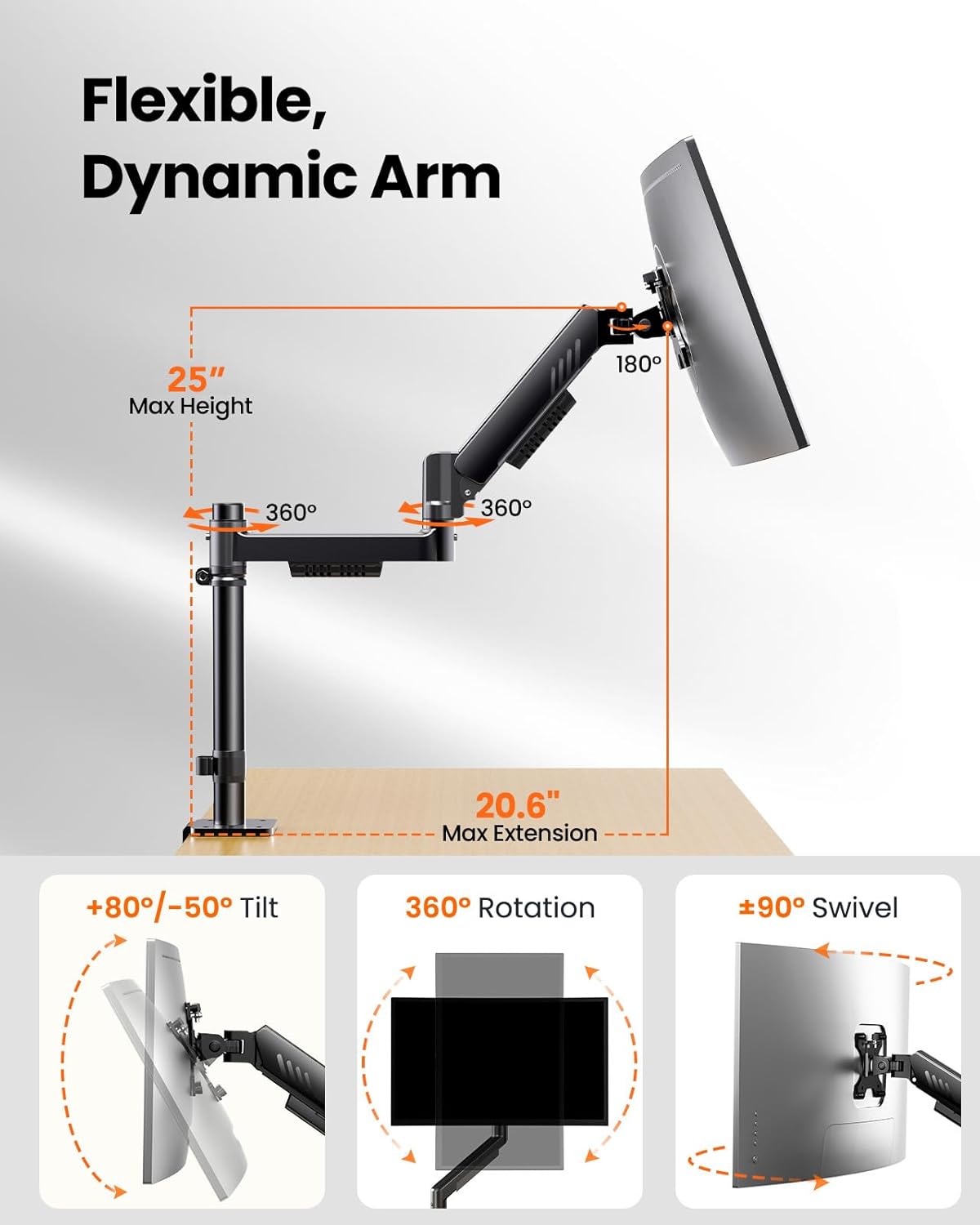
Image: Flexible arm adjustments, showing maximum height, extension, tilt, swivel, and rotation capabilities.

Image: Eye-level comfort, demonstrating flexible height adjustment for ergonomic viewing.
2. Cable Management
Utilize the integrated cable clips to route and secure your monitor cables along the arms and pole. This helps maintain a neat and organized workspace.
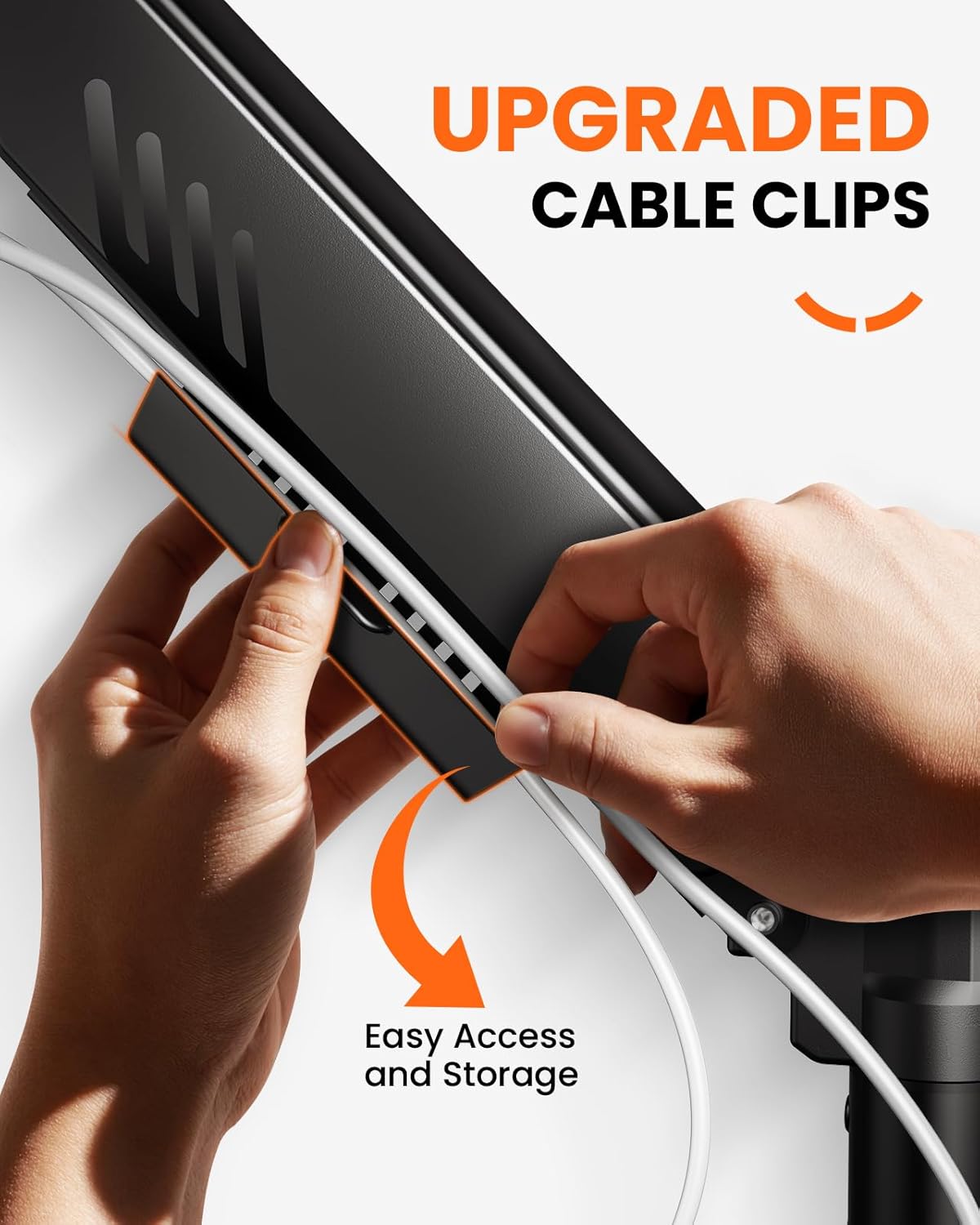
Image: Upgraded cable clips, showing how to manage cables along the monitor arm.
Maintenance
Regular maintenance ensures the longevity and safe operation of your monitor stand.
- Cleaning: Wipe the stand with a soft, damp cloth. Avoid abrasive cleaners or solvents.
- Check Tightness: Periodically check all screws and connections, especially the desk clamp/grommet and VESA plate screws, to ensure they remain tight.
- Gas Spring Tension: If monitors sag or do not hold their position, adjust the gas spring tension using the provided Allen key. Turn clockwise to increase tension for heavier monitors, and counter-clockwise to decrease tension for lighter monitors.
Troubleshooting
Here are solutions to common issues you might encounter:
- Monitor Sags or Won't Stay Up:
This indicates insufficient gas spring tension. Use the Allen key to turn the adjustment screw clockwise to increase tension. Test the arm's movement after small adjustments until the monitor holds its position. - Monitor is Difficult to Move Down:
The gas spring tension might be too high for your monitor's weight. Use the Allen key to turn the adjustment screw counter-clockwise to decrease tension. - Stand Wobbles:
Ensure the desk clamp or grommet mount is securely tightened to the desk. Check that the desk itself is stable and not prone to movement. The wider VESA plate and gap-free arm/post connection are designed to minimize wobbling. - Monitors Not Level:
Adjust the tilt and rotation mechanisms on the VESA plate to align your monitors. Ensure the VESA plates are securely attached to the monitors.
Specifications
| Model Number | EGDMA72B |
| Brand | ErGear |
| Monitor Size Compatibility | 13" - 33" |
| Weight Capacity per Arm | Up to 19.8 lbs (9 kg) |
| VESA Compatibility | 75x75mm, 100x100mm |
| Tilt Range | +80° to -50° |
| Swivel Range | ±90° |
| Rotation | 360° |
| Max Height Adjustment | 25 inches |
| Max Arm Extension | 20.6 inches |
| Mounting Options | C-clamp, Grommet |
| Material | Alloy Steel |
| Color | Black |

Image: Four screen configurations, illustrating various ways to arrange monitors with the stand.

Image: Powerfully upgraded VESA head, showing enhanced stability features.
Warranty Information
This ErGear monitor stand comes with a 2-year warranty from the date of purchase. This warranty covers manufacturing defects and material flaws under normal use. It does not cover damage caused by improper installation, misuse, accidents, or unauthorized modifications.
Please retain your proof of purchase for warranty claims.
Customer Support
If you have any questions, require assistance with installation, or need to make a warranty claim, please contact ErGear customer support through the retailer where you purchased the product or visit the official ErGear website for contact information.
For additional resources and product information, you may visit the ErGear Store on Amazon.

