Introduction
This manual provides essential information for the safe and efficient use of your Blaupunkt 40FGC5500S 40-inch Full HD Google TV. Please read it thoroughly before operating the device and retain it for future reference. This television combines Full HD LED display technology with the Google TV operating system, offering a wide range of entertainment options and smart features.
Setup
1. Unpacking and Contents
Carefully remove the television and all accessories from the packaging. Ensure all components are present:
- Blaupunkt 40FGC5500S TV Unit
- Remote Control
- Power Cable
- TV Stands (2 pieces) and Screws
- User Manual (this document)
Inspect the TV for any damage. If any damage is found, do not proceed with installation and contact customer support.

Front view of the Blaupunkt 40FGC5500S 40-inch Full HD Google TV, showcasing its display and slim bezels.

Angled front view of the Blaupunkt 40FGC5500S 40-inch Full HD Google TV, providing a perspective of its design.
2. Stand Installation
If placing the TV on a table, attach the two included stands to the bottom of the TV using the provided screws. Ensure the stands are securely fastened to prevent the TV from tipping.
3. Wall Mounting
The Blaupunkt 40FGC5500S is compatible with VESA 200x200 mm wall mounts. For wall mounting, remove the stands and follow the instructions provided with your wall mount bracket. Professional installation is recommended for safety.

Rear view of the Blaupunkt 40FGC5500S 40-inch Full HD Google TV, showing the VESA mounting pattern and connection panel.
4. Connecting Peripherals
Connect external devices such as set-top boxes, gaming consoles, or sound systems to the TV's ports. The TV features 3 HDMI ports, 2 USB ports, an Ethernet (LAN) input, and a 3.5mm audio output.

Side view of the Blaupunkt 40FGC5500S 40-inch Full HD Google TV, illustrating the accessible input ports for various devices.
5. Power On and Initial Setup
Connect the power cable to the TV and a power outlet. Press the power button on the remote control or the TV. Follow the on-screen instructions to complete the initial setup, which includes:
- Language selection
- Network connection (Wi-Fi or Ethernet)
- Google account sign-in
- Google Assistant setup
- Channel scanning (if applicable)
Operating
1. Google TV Interface
Your Blaupunkt TV runs on Google TV, providing a personalized home screen with content recommendations from your subscriptions. Navigate using the remote control's directional pad and select button.

The Google TV interface on the Blaupunkt 40FGC5500S, displaying various streaming applications and content suggestions.
2. Voice Control with Google Assistant
Press the Google Assistant button on your remote control and speak into the microphone to search for content, control smart home devices, get answers, and more.

Icon indicating the voice control feature, powered by Google Assistant.
3. Accessing Applications
The Google TV home screen provides quick access to popular streaming services like Netflix, YouTube, and Google Play. You can download additional apps from the Google Play Store.

Icon representing the smart features and application access on the TV.
4. Connectivity
- Wi-Fi 2T2R: Connect to your home wireless network for internet access.
- Bluetooth 5.0: Pair wireless headphones, speakers, or other Bluetooth-enabled devices.
- Chromecast Built-in: Cast content from your compatible smartphone, tablet, or computer directly to the TV.
5. Picture and Sound Settings
Navigate to the settings menu to adjust picture modes (e.g., Standard, Vivid, Movie), brightness, contrast, and color. The TV supports HDR for enhanced visual detail. Audio settings allow you to customize sound profiles and volume levels from the integrated 16W speakers.

Icon representing the high-quality display and picture settings.
6. Additional Features
- Electronic Program Guide (EPG): View upcoming TV programs and schedule recordings (if external recording device is connected).
- Sleep Timer: Set the TV to automatically turn off after a specified period.
- Child Lock: Restrict access to certain channels or content.
Maintenance
1. Cleaning the TV
Before cleaning, unplug the TV from the power outlet. Use a soft, dry, lint-free cloth to gently wipe the screen and cabinet. Do not use liquid cleaners, aerosols, or abrasive materials, as they may damage the TV's surface.
2. Software Updates
The TV may receive automatic software updates via the internet to improve performance and add new features. Ensure your TV is connected to the internet to receive these updates. You can also manually check for updates in the settings menu.
Troubleshooting
If you encounter issues with your TV, refer to the following common problems and solutions:
| Problem | Possible Solution |
|---|---|
| No power | Check if the power cable is securely connected to both the TV and the power outlet. Try a different outlet. |
| No picture, but sound is present | Ensure the correct input source is selected. Check cable connections to external devices. |
| No sound, but picture is present | Check volume levels and mute settings. Ensure external audio systems are properly connected and selected. |
| Remote control not working | Replace batteries. Ensure there are no obstructions between the remote and the TV's IR sensor. |
| Cannot connect to Wi-Fi | Verify your Wi-Fi password. Restart your router and the TV. Ensure the TV is within range of your Wi-Fi network. |
If the problem persists after trying these solutions, please contact customer support.
Specifications
The following table details the technical specifications of the Blaupunkt 40FGC5500S 40-inch Full HD Google TV:
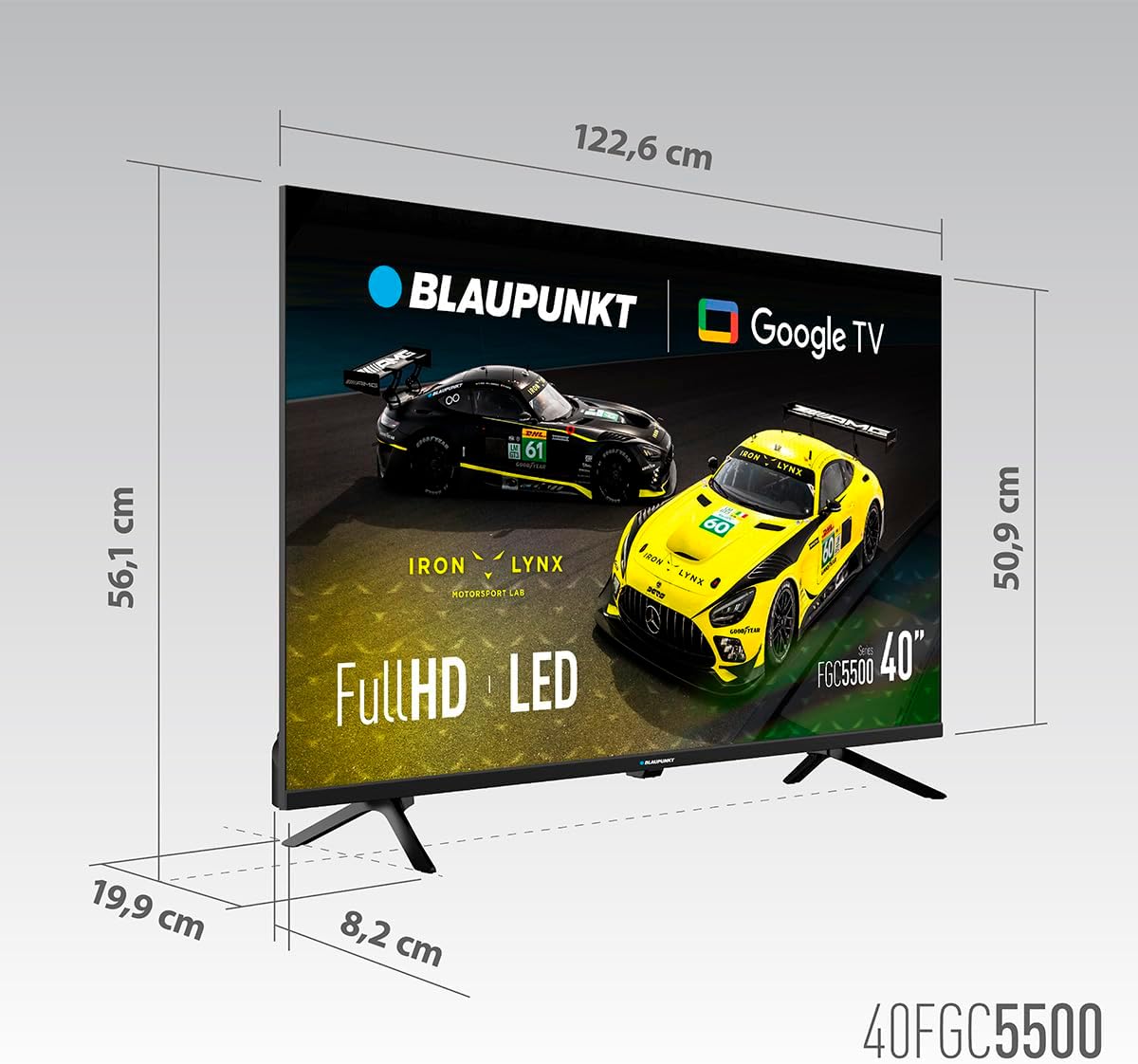
Dimensional diagram of the Blaupunkt 40FGC5500S 40-inch Full HD Google TV, showing its width, height, and depth.
| Feature | Detail |
|---|---|
| Brand | Blaupunkt |
| Model Name | 40FGC5500S |
| Screen Size | 40 inches (102 Centimeters) |
| Display Technology | LED |
| Display Type | VA |
| Resolution | 1920 x 1080 Pixels (Full HD) |
| Refresh Rate | 60 Hz |
| Operating System | Google TV |
| Connectivity | Bluetooth 5.0, Ethernet, HDMI (3 ports), USB (2 ports), Wi-Fi 2T2R, 3.5mm Audio |
| Audio Output Power | 16 Watts (total) |
| Special Features | Built-in Speaker, Chromecast, Sleep Timer, Wide Viewing Angle, HDR |
| Mounting Compatibility | VESA 200x200 mm (Wall Mount, Table Stand) |
| Product Dimensions (LxWxH) | 89.3 x 19.9 x 56.1 cm |
| Product Weight | 5.6 kg |
| Energy Efficiency Rating | F |
Warranty and Support
Warranty Information
For detailed warranty information, please refer to the warranty card included with your product or visit the official Blaupunkt website. The warranty typically covers manufacturing defects for a specified period from the date of purchase.
Customer Support
If you require technical assistance, have questions about your product, or need to report a fault, please contact Blaupunkt customer support. Contact details can usually be found on the official Blaupunkt website or in the documentation provided with your TV.


