
1. Introduction
This manual provides detailed instructions for the installation, operation, and maintenance of your WILAWELS Low Voltage Landscape Transformer. These transformers are designed to safely convert 120V AC household current to a safe 12V/14V AC low voltage, suitable for outdoor LED and halogen landscape lighting systems.
The bundle includes both a 300W (Model D12LT06) and a 400W (Model D23LT06) transformer, each equipped with a timer and a detachable photocell sensor for automated lighting control.
Key Features:
- Safe Voltage Conversion: Converts 120V AC to 12V/14V AC for outdoor lighting.
- Photocell Sensor: Detachable sensor for automatic dusk-to-dawn operation.
- Multiple Operating Modes: Includes Manual On/Off, Auto On/Off (Dusk to Dawn), Countdown (2/4/6/8 hours), Timer (set on/off times), DUSK ON TIMER OFF, and TEST mode.
- Dual-Zone Control (400W Model D23LT06): Two independently controlled output zones for personalized lighting schedules.
- ETL Certified: Ensures safety and quality standards.
2. Safety Information
Please read and understand all safety instructions before installing or operating this transformer. Failure to follow these instructions may result in electric shock, fire, or other hazards.
- Outdoor Use Only: This transformer is designed for outdoor use and must be installed in a location protected from direct water spray.
- Grounding: Ensure the transformer is properly grounded according to local electrical codes.
- Power Source: Connect only to a 120V AC, 60Hz grounded outlet.
- Load Capacity: Do not exceed 80% of the transformer's rated wattage (e.g., 240W for 300W model, 320W for 400W model) to ensure safe and stable operation.
- Wiring: Use only low-voltage landscape lighting cable suitable for direct burial or outdoor use.
- Mounting: Mount the transformer at least 1 foot (30cm) above ground level.
- Maintenance: Disconnect power before performing any maintenance or making adjustments.
3. Package Contents
- WILAWELS 300W Low Voltage Landscape Transformer (Model D12LT06)
- WILAWELS 400W Low Voltage Landscape Transformer (Model D23LT06)
- Detachable Photocell Sensor (2 units)
- User Manual
4. Product Overview
Familiarize yourself with the components of your transformer.

Image 1: WILAWELS 300W Low Voltage Landscape Transformer (Model D12LT06). This image shows the front panel with the digital display, control buttons, and indicator lights, along with the attached power cord and a separate photocell sensor.

Image 2: WILAWELS 400W Low Voltage Landscape Transformer (Model D23LT06). This image highlights the dual-zone control panel, indicating two separate output zones for independent lighting management.
Components:
- Transformer Unit: Main housing with control panel, display, and output terminals.
- Power Cord: 3.3ft ETL-certified cord for connecting to a 120V AC outlet.
- Photocell Sensor: Detachable sensor with a 6ft ETL-certified cord for detecting ambient light levels.
- Low Voltage Output Terminals: Connections for landscape lighting cables.
5. Installation
Follow these steps for proper installation of your landscape transformer.
5.1 Mounting the Transformer
- Choose a suitable outdoor location near a grounded 120V AC outlet. The location should be protected from direct water spray.
- Mount the transformer securely to a wall or post using appropriate screws (not included). Ensure the transformer is mounted at least 1 foot (30cm) above ground level.
5.2 Connecting the Photocell Sensor
- Locate the photocell sensor port on the transformer.
- Plug the photocell sensor into the designated port.
- Position the photocell sensor in an area that receives natural light, free from obstructions or artificial light sources that could interfere with its operation.

Image 3: Illustration of the photocell sensor's function, showing lights turning on at dusk and off at dawn based on ambient light detection.
5.3 Wiring Low-Voltage Lights
- Ensure the transformer is unplugged from the power outlet before making any connections.
- Connect your low-voltage landscape lighting cables to the output terminals on the transformer. For the 400W model (D23LT06), you have two independent zones.
- Distribute your lighting load evenly across the terminals/zones. The total wattage of all connected lights should not exceed 80% of the transformer's rated capacity (e.g., 240W for 300W, 320W for 400W).
- Tighten all terminal screws securely to ensure good electrical contact.
- Once all connections are made, plug the transformer's power cord into a grounded 120V AC outlet.

Image 4: Diagram illustrating the voltage conversion of the 300W transformer, from 120V AC input to 12V/14V AC output for landscape lighting.

Image 5: Diagram illustrating the voltage conversion of the 400W transformer, from 120V AC input to 12V/14V AC output for landscape lighting.
6. Operation
This section details how to set up and use the various operating modes of your transformer.
6.1 Control Panel Overview
The control panel features a digital display and several buttons for setting the time and selecting operating modes.
- MENU Button: Cycles through operating modes.
- CLOCK Button: Used to set the current time.
- Up/Down Arrows: Adjust time or settings.
- ENTER Button: Confirms selections.
- ZONE 1 / ZONE 2 Buttons (400W Model D23LT06 only): Selects the zone for independent programming.
6.2 Setting the Clock
- Press and hold the CLOCK button until the time display flashes.
- Use the Up/Down Arrows to adjust the hour, then press CLOCK again to move to minutes.
- Adjust minutes with Up/Down Arrows, then press CLOCK to set AM/PM.
- Press ENTER to save the time.
6.3 Operating Modes
Press the MENU button repeatedly to cycle through the available operating modes. For the 400W model, select ZONE 1 or ZONE 2 first before setting the mode for that specific zone.

Image 6: Visual representation of the six operating modes available on the WILAWELS 300W transformer: Manual On/Off, Auto On/Off, Timer, Countdown, Dusk On Timer Off, and Test mode.
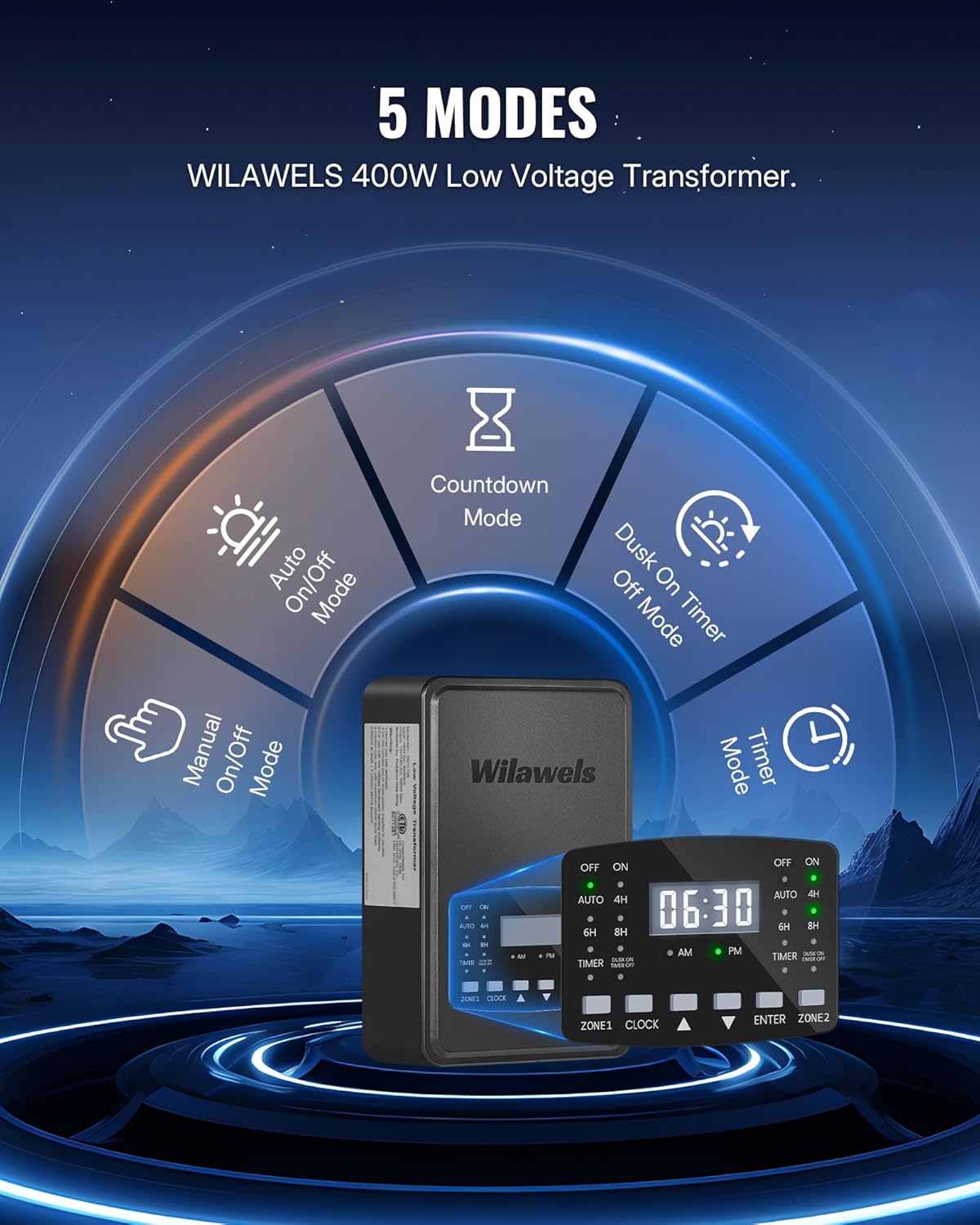
Image 7: Visual representation of the five operating modes available on the WILAWELS 400W transformer: Manual On/Off, Auto On/Off, Timer, Countdown, and Dusk On Timer Off mode.
- OFF Mode: Lights remain off.
- ON Mode: Lights remain on continuously.
- AUTO Mode (Dusk to Dawn): The photocell sensor automatically turns lights on at dusk and off at dawn. No manual intervention is required.
- COUNTDOWN Mode (2H/4H/6H/8H): Lights turn on at dusk (detected by photocell) and remain on for a set duration (2, 4, 6, or 8 hours), then turn off. Use Up/Down Arrows to select the duration.
- TIMER Mode: Allows you to set specific ON and OFF times. Press ENTER to set the ON time, use Up/Down Arrows to adjust, then press ENTER. Repeat for the OFF time.
- DUSK ON TIMER OFF Mode: Lights turn on at dusk and turn off at a specific set time. Press ENTER to set the OFF time, use Up/Down Arrows to adjust, then press ENTER.
- TEST Mode (300W Model D12LT06 only): For quick testing of your lighting system. Lights will turn on for a short period.
6.4 Dual-Zone Independent Control (400W Model D23LT06 Only)
The 400W transformer allows you to control two separate lighting zones independently.
- Press the ZONE 1 button to program the first lighting zone. The display will indicate 'ZONE 1'.
- Follow the steps in Section 6.3 to select and configure the desired operating mode for Zone 1.
- Press the ZONE 2 button to program the second lighting zone. The display will indicate 'ZONE 2'.
- Follow the steps in Section 6.3 to select and configure the desired operating mode for Zone 2.
- Ensure the total power consumption of lights connected to both zones does not exceed 80% of the transformer's rated power (320W for the 400W model).

Image 8: Illustration of the 400W transformer's dual-zone capability, showing Zone 1 set to Auto On/Off and Zone 2 set to a specific Timer mode, demonstrating independent control.
7. Maintenance
Regular maintenance ensures optimal performance and longevity of your transformer.
- Cleaning: Periodically wipe the transformer housing and photocell sensor with a soft, damp cloth to remove dirt and debris. Do not use abrasive cleaners or solvents.
- Photocell Sensor: Ensure the photocell sensor remains unobstructed by foliage or other objects to guarantee accurate dusk-to-dawn operation.
- Connections: Annually inspect all low-voltage cable connections to ensure they are secure and free from corrosion.
- Power Cord: Check the power cord for any signs of damage or fraying. Replace if necessary.
8. Troubleshooting
If you encounter issues with your transformer, refer to the following common problems and solutions.
| Problem | Possible Cause | Solution |
|---|---|---|
| Lights do not turn on. | No power to transformer. Incorrect mode selected. Loose wiring connections. Overload. | Check power outlet and circuit breaker. Verify transformer is plugged in. Select ON or AUTO mode. Tighten all low-voltage connections. Reduce total wattage of connected lights. |
| Lights stay on all the time. | Photocell sensor obstructed. ON mode selected. | Clear any obstructions from the photocell sensor. Ensure photocell is receiving natural light. Select AUTO, COUNTDOWN, or TIMER mode. |
| Lights do not turn off. | Incorrect mode selected. Photocell sensor malfunction. | Ensure AUTO, COUNTDOWN, or TIMER mode is correctly set. Check photocell sensor for damage or replace if necessary. |
| Timer/Countdown not working. | Clock not set correctly. Incorrect mode settings. | Verify the current time is set accurately (Section 6.2). Re-program the TIMER or COUNTDOWN mode settings. |
| 400W model zones not working independently. | Incorrect zone selection during programming. | Ensure you press the correct ZONE button (ZONE 1 or ZONE 2) before setting the mode for that specific zone. |
9. Specifications
| Feature | 300W Transformer (D12LT06) | 400W Transformer (D23LT06) |
|---|---|---|
| Input Voltage | 120V AC, 60Hz | 120V AC, 60Hz |
| Output Voltage | 12V/14V AC | 12V/14V AC |
| Max Wattage | 300W | 400W |
| Recommended Load | Up to 240W (80% of max) | Up to 320W (80% of max) |
| Output Zones | 1 | 2 (Independent) |
| Power Cord Length | 3.3 ft | 3.3 ft |
| Photocell Cord Length | 6 ft | 6 ft |
| Certifications | ETL Certified | ETL Certified |
| Environment | Outdoor Use Only | Outdoor Use Only |
10. Warranty and Support
For warranty information or technical support, please contact WILAWELS customer service through the retailer where the product was purchased or visit the official WILAWELS website. Please have your model number (D12LT06 or D23LT06) and purchase date available when contacting support.