1. Introduction
This manual provides detailed instructions for the safe and effective use of your BEFAMALI Rechargeable Spotlight Flashlight, Model W5225. Please read this manual thoroughly before operating the device and retain it for future reference.
2. What's in the Box
- 1x Rechargeable Spotlight
- 1x USB Charging Cable
- 1x English Manual
- 1x Spotlight Lanyard
- 4x Colored Lenses (White/Blue/Red/Yellow)

Figure 2.1: Package contents including the spotlight, charging cable, lanyard, and colored lenses.
Video 2.1: Official product video demonstrating the BEFAMALI W5225 spotlight's features, including its various light modes, colored lenses, and waterproof capabilities.
3. Product Features
- High Brightness: Upgraded P90 chip, maximum brightness can reach 99,000 lumens, beam distance up to 5,000 feet/1,500 meters.
- Fast Charging: Advanced USB-C charging technology allows full charge in approximately 3 hours.
- Extended Runtime & Power Bank: Built-in 10000mAh rechargeable battery provides 10-30 hours of outdoor lighting. Features a USB output port for charging other devices.
- Multiple Lighting Modes: 4 Main light modes (High-Mid-Strobe-SOS) and 3 Side light modes (High-Mid-Night warning light).
- Colored Lenses: Includes 4 colored lenses (white/red/yellow/blue) to switch between different light colors.
- Durability: IPX6 waterproof rating and rugged, impact-resistant material for outdoor and indoor use.
- Versatile Use: Can be used handheld or with an adjustable stand, also functions as a work light. Ideal for outdoor activities like boating, hiking, fishing, and night work.

Figure 3.1: The spotlight demonstrating its 99,000 lumen brightness and long-range illumination.

Figure 3.2: The spotlight connected to a USB-C power adapter for fast recharging.

Figure 3.3: The spotlight's USB output port being used to charge a mobile device, highlighting its power bank function.
4. Setup
4.1 Initial Charging
Before first use, fully charge the spotlight using the provided USB-C charging cable. Connect the USB-C end to the spotlight's input port and the USB-A end to a compatible USB power adapter (not included). The power display indicators will show charging progress.
4.2 Attaching the Lanyard
Thread the lanyard through the designated loop on the spotlight's handle for secure carrying.
4.3 Using the Foldable Stand
The integrated foldable stand can be deployed to position the spotlight on a flat surface, allowing for hands-free operation. Adjust the stand to achieve the desired angle.
4.4 Attaching Colored Lenses
To change the light color, twist the front bezel of the main light counter-clockwise to remove it. Place the desired colored lens (red, blue, or yellow) over the main light, then reattach the bezel by twisting clockwise until secure. The white lens is pre-installed.
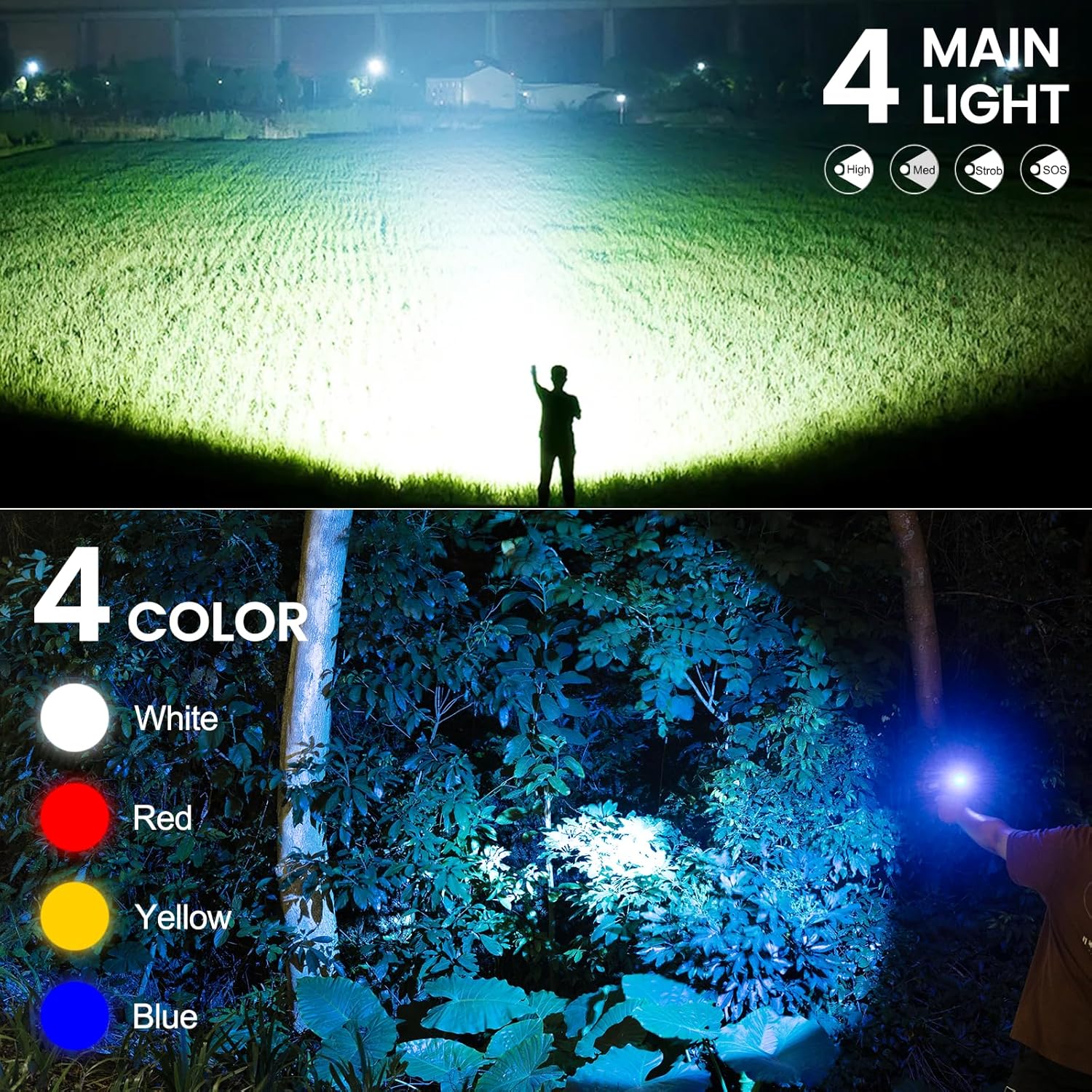
Figure 4.1: The BEFAMALI W5225 spotlight shown alongside its interchangeable red, blue, and yellow colored lenses.
5. Operation
5.1 Main Light Modes
Press the main light button (located on the handle) to cycle through the 4 main light modes:
- High: Maximum brightness for long-range illumination.
- Medium: Reduced brightness for general use and extended battery life.
- Strobe: Flashing light for signaling or disorientation.
- SOS: International Morse code signal for emergencies.

Figure 5.1: A visual representation of the BEFAMALI W5225 spotlight's four main light modes: High, Medium, Strobe, and SOS.
5.2 Side Light Modes
Press the side light button (located on the top panel) to cycle through the 3 side light modes:
- High: Bright area illumination for close-range tasks.
- Medium: Softer area illumination for general use.
- Night Warning Light (Red & Blue): Flashing red and blue lights for emergency signaling or increased visibility.

Figure 5.2: The BEFAMALI W5225 spotlight's three side light modes are shown: High, Medium, and a Red & Blue warning light.
5.3 Power Bank Function
To use the spotlight as a power bank, connect your device's charging cable to the USB output port on the spotlight. The spotlight's internal battery will then charge your connected device.

Figure 5.3: The BEFAMALI W5225 spotlight connected to a smartphone via its USB output port, demonstrating its power bank functionality.
6. Maintenance
6.1 Cleaning
Wipe the spotlight with a soft, damp cloth. Do not use abrasive cleaners or solvents. The IPX6 waterproof rating means it can withstand splashes and rain, but it should not be submerged in water.
6.2 Battery Care
To prolong battery life, avoid fully discharging the battery frequently. Recharge the spotlight regularly, especially if it has not been used for an extended period. Store in a cool, dry place.
7. Troubleshooting
7.1 Light Not Turning On
- Ensure the battery is charged. Connect to a power source using the USB-C cable.
- Check if the correct button (main light or side light) is being pressed.
7.2 Battery Not Charging
- Verify the USB-C cable is securely connected to both the spotlight and the power adapter.
- Try a different USB-C cable or power adapter to rule out faulty accessories.
- Ensure the power adapter is functioning correctly.
7.3 Dim Light Output
- The battery may be low. Recharge the spotlight fully.
- Ensure the light mode is set to 'High' for maximum brightness.
8. Specifications
| Feature | Specification |
|---|---|
| Model Number | W5225 |
| Brand | BEFAMALI |
| White Brightness | 99000 Lumens |
| Beam Distance | Up to 5,000 feet / 1,500 meters |
| Battery Capacity | 10000mAh |
| Charging Time | Approx. 3 hours (USB-C) |
| Runtime | 10-30 hours (depending on mode) |
| Water Resistance | IPX6 (Waterproof) |
| Light Source Type | LED (P90 chip) |
| Material | Plastic |
| Product Dimensions | 7.1"D x 7.48"W x 4.4"H |
| Item Weight | 1.37 pounds |
9. Warranty and Support
For warranty information or technical support, please refer to the product packaging or contact the retailer where the product was purchased. Additional protection plans may be available from third-party providers.