
1. Important Safety Information
Please read this entire manual before assembly and operation to ensure safe use and prevent injury. Keep these instructions for future reference.
- Adult Supervision Required: This product must only be used under direct adult supervision.
- Age Range: Suitable for children aged 3 to 8 years.
- Weight Limit: Do not exceed the maximum load capacity of 30 kg (66 lbs).
- Safe Operating Environment: Use on flat, dry surfaces away from roads, steep inclines, swimming pools, or other water bodies. Avoid using in crowded areas.
- Protective Gear: Always ensure the child wears appropriate safety gear, such as a helmet, when operating the tractor.
- Battery Safety: Only use the provided charger and battery. Do not modify the electrical system. Keep batteries away from children.
- Assembly: Adult assembly is required. Ensure all parts are correctly installed and secured before use.
- Braking: The tractor features an automatic brake that engages when the foot pedal is released.
- Remote Control: The 2.4G remote control allows parental override for added safety, especially for younger children.
2. Product Overview
The AIYAPLAY Electric Tractor with Removable Trailer is designed to provide an engaging and realistic driving experience for children. It features a 2-in-1 design, allowing the trailer to be attached for hauling or detached for standalone tractor play. Equipped with a 12V battery, 6 wheels for stability, LED lights, music, and a horn, this tractor offers both fun and safety.

Image: A young child smiling while driving the green AIYAPLAY electric tractor with its attached trailer on a paved path in a garden.
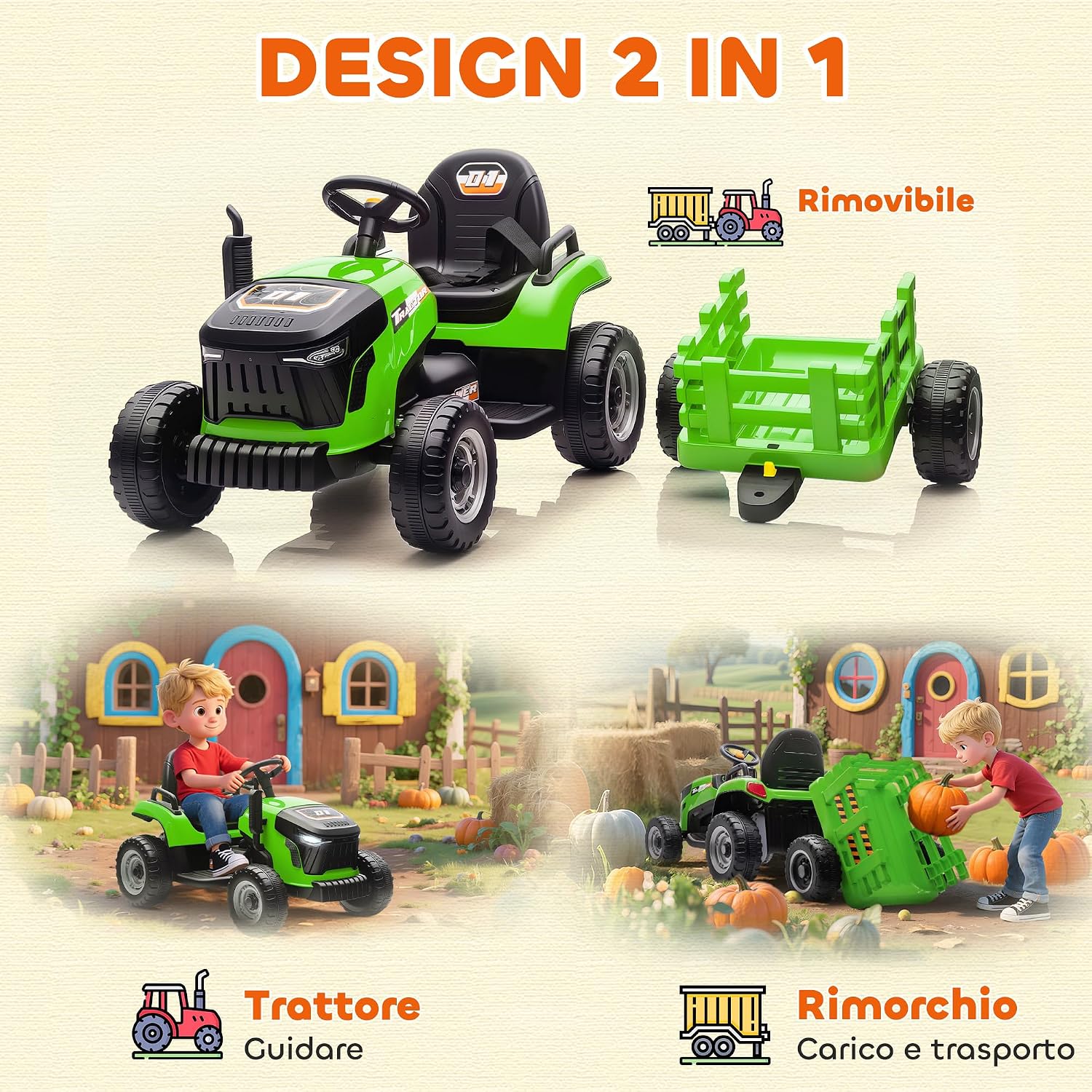
Image: An illustration demonstrating the AIYAPLAY electric tractor and its separate, removable trailer, emphasizing its versatility for driving or hauling.
3. Package Contents
Before assembly, please check that all components listed below are present and undamaged.
- Electric Tractor Body
- Removable Trailer
- Wheels (6 total)
- 2.4G Remote Control
- 12V Rechargeable Battery
- Battery Charger
- Assembly Hardware (screws, nuts, etc.)
- User Manual (this document)
4. Setup and Assembly
Adult assembly is required. Follow these steps carefully to assemble your AIYAPLAY Electric Tractor.
- Unpack Components: Carefully remove all parts from the packaging and lay them out on a clean, flat surface. Verify all components are present as per the "Package Contents" section.
- Install Wheels: Attach the six wheels to the tractor body and trailer according to the diagrams in the assembly guide (not provided in this text, but implied). Ensure they are securely fastened.
- Connect Battery: Locate the battery compartment, typically under the seat. Connect the battery terminals as indicated. Ensure a secure connection.
- Attach Steering Wheel and Seat: Install the steering wheel and seat, securing them with the provided hardware.
- Assemble Trailer: Put together the trailer components and attach it to the rear hitch of the tractor if desired. The trailer is designed to be easily detachable.
- Initial Charge: Before first use, fully charge the battery for 8-12 hours. Do not overcharge.
5. Operating Instructions
5.1. Driving the Tractor
- Power On: Press the power button to turn on the tractor. You may hear engine sounds.
- Start-up: The tractor features a "slow start" function for smooth acceleration, preventing sudden jolts.
- Acceleration: Press the foot pedal to move forward. Release the pedal to engage the automatic brake.
- Steering: Use the steering wheel to control direction.
- Speed: The tractor has multiple speed settings (3-5 km/h), adjustable via the control panel or remote control.
- Reverse: Select the reverse gear (if applicable) and press the foot pedal to move backward.

Image: A graph demonstrating the "Slow Start" function, indicating a smooth, gradual increase in speed for safer operation compared to an abrupt start.
5.2. Using the 2.4G Remote Control
The remote control allows parents to operate the tractor, providing an extra layer of safety and control, especially for younger riders. The remote has a range of approximately 15 meters and offers 3 speed levels.
- Pairing: Follow the instructions in the remote control manual (if separate) to pair it with the tractor.
- Controls: Use the joystick or directional buttons to move the tractor forward, backward, left, and right.
- Speed Adjustment: Select desired speed level (low, medium, high) using the speed button on the remote.
- Emergency Stop: The remote control typically includes an emergency stop button to immediately halt the tractor.

Image: An adult's hands holding the 2.4G remote control, with a child in the background driving the tractor, illustrating the parental control mode.
5.3. Multimedia Functions
The tractor is equipped with realistic features for an immersive experience.
- LED Lights: Turn on the functional LED headlights using the designated button.
- Horn: Press the horn button on the steering wheel for realistic sound effects.
- Music/MP3: The integrated MP3 system plays three pre-installed songs. Additional music may be played via USB input (if available, check product for specific port).
- Engine Sounds: Realistic engine start-up sounds enhance the play experience.

Image: A graphic highlighting the multimedia features of the tractor, showing icons for music, engine start sound, and horn, with musical notes floating around the tractor.
6. Battery Charging
Proper battery charging is essential for performance and longevity.
- First Charge: Charge the battery for 8-12 hours before the first use.
- Subsequent Charges: Charge for 8-12 hours after each use, or when the battery indicator shows low power. Do not charge for more than 18 hours.
- Charger Connection: Plug the charger into the charging port on the tractor, then into a standard wall outlet.
- Indicator Lights: Refer to the charger's indicator lights for charging status (e.g., red for charging, green for fully charged).
- Safety: Always charge in a dry, well-ventilated area. Do not allow children to handle the charger or battery. Disconnect the charger once charging is complete.
- Battery Life: A fully charged battery provides approximately 60 minutes of continuous use, depending on terrain and usage.
7. Maintenance
Regular maintenance ensures the longevity and safe operation of your electric tractor.
- Cleaning: Wipe the tractor with a soft, damp cloth. Do not use abrasive cleaners or solvents. Avoid spraying water directly onto electrical components.
- Storage: Store the tractor in a dry, cool place away from direct sunlight and moisture. If storing for extended periods, charge the battery fully every 3 months to maintain its health.
- Battery Care: Do not allow the battery to completely discharge. Always recharge after use.
- Inspections: Periodically check all screws, nuts, and connections to ensure they are tight. Inspect wheels for wear and tear.
- Tire Traction: The high-traction wheels are designed for various terrains. Keep them clean for optimal performance.

Image: A visual representation of the tractor's high-traction wheels, demonstrating its capability to operate on diverse surfaces including asphalt, concrete, dirt roads, brick paths, and grass.
8. Troubleshooting
If you encounter issues, refer to the following common problems and solutions.
| Problem | Possible Cause | Solution |
|---|---|---|
| Tractor does not move. | Battery is low or not connected. Power switch is off. Loose wire connection. | Charge the battery. Ensure battery connectors are secure. Turn on the power switch. Check all wire connections. |
| Tractor moves slowly. | Low battery. Overloaded. Operating on rough terrain. | Recharge the battery. Reduce load. Operate on smoother surfaces. |
| Remote control not working. | Remote batteries are dead. Remote not paired. Out of range. | Replace remote batteries. Re-pair the remote control with the tractor. Ensure you are within 15m range. |
| Lights or music not working. | Loose connection. Function button not pressed. | Check wiring to lights/speakers. Ensure corresponding buttons are pressed. |
If the problem persists after trying these solutions, please contact customer support.
9. Specifications
| Feature | Detail |
|---|---|
| Model Number | 370-389V90GN |
| Recommended Age | 36 months - 8 years |
| Maximum Load Capacity | 30 kg (66 lbs) |
| Overall Dimensions (L x W x H) | 139 cm x 58 cm x 55 cm (54.7" x 22.8" x 21.7") |
| Item Weight | 13.4 kg (29.5 lbs) |
| Battery | 12V (included) |
| Speed Range | 3-5 km/h (1.8-3.1 mph) |
| Run Time | Up to 60 minutes (on a full charge) |
| Material | Polypropylene, Metal |
| Remote Control | 2.4G, 3 speeds, approx. 15m range |
| Features | LED lights, Music, Horn, Engine sounds, Slow start, Detachable trailer |
| Assembly Required | Yes |

Image: A detailed diagram illustrating the overall dimensions (length, width, height) of the tractor and trailer, along with the recommended age range (3-8 years) and maximum weight capacity (30 kg).

Image: A front-facing view of the electric tractor, with text overlays indicating it is a 12V tractor, has a speed of 3-5 km/h, and uses a rechargeable battery.
10. Warranty and Customer Support
For warranty information or if you require assistance with your AIYAPLAY Electric Tractor, please contact the retailer or manufacturer directly. Keep your proof of purchase for any warranty claims.
Please refer to the contact information provided at the point of purchase or on the product packaging for customer service details.