
1. Introduction
Thank you for purchasing the CIO SMARTCOBY Slim 5K Qi2 Magsafe Charger. This ultra-slim magnetic wireless power bank is designed to provide convenient and efficient charging for your compatible devices. This manual provides essential information for safe and optimal use of your device. Please read it thoroughly before use and retain it for future reference.
2. Product Features
The SMARTCOBY Slim 5K (Safety Model) offers a range of features for reliable portable charging:
- Qi2 Certified Wireless Charging: Supports up to 15W magnetic wireless charging for compatible devices.
- Ultra-Slim Design: Measures only 8.7mm thick, making it highly portable.
- Lightweight: Weighs approximately 117g for easy carrying.
- Dual Charging Options: Provides 15W wireless charging and up to 20W USB-C Power Delivery (PD) fast charging.
- 5000mAh Capacity: Offers sufficient power for daily charging needs.
- Pass-Through Charging: Allows simultaneous charging of your device and the power bank.
- Temperature-Managed Safety Model: Optimized software settings to manage temperature during charging, ensuring stable performance, especially in warmer environments or during extended use.
- Camera-Friendly Design: Attaches magnetically without obstructing your phone's camera, adhering to Apple's Accessory Design Guidelines.
- Durable Construction: Features a sleek aluminum alloy body.

Image: Overview of the CIO SMARTCOBY Slim 5K power bank in silver and black, illustrating its ultra-thin profile, Qi2 certification, 15W fast output, 5000mAh capacity, MagSafe compatibility, pass-through charging support, USB-C port, and Apple case standard compliance.

Image: A hand holding the silver CIO SMARTCOBY Slim 5K, emphasizing its slimness (8.7mm) and lightweight design (117g), highlighting its portability.

Image: Diagram explaining the NovaSafety feature for power banks, comparing the Safety Model (stable charging, reduced heat) and High Performance Model (fast charging, higher heat generation). This product is the Safety Model.
3. Initial Setup
For safety during shipment, the SMARTCOBY Slim 5K is set to sleep mode upon arrival. To activate the device and enable wireless charging:
- Locate the power button on the side of the power bank.
- Press the power button once to deactivate sleep mode. The LED indicators will illuminate, indicating the device is active and ready for use.
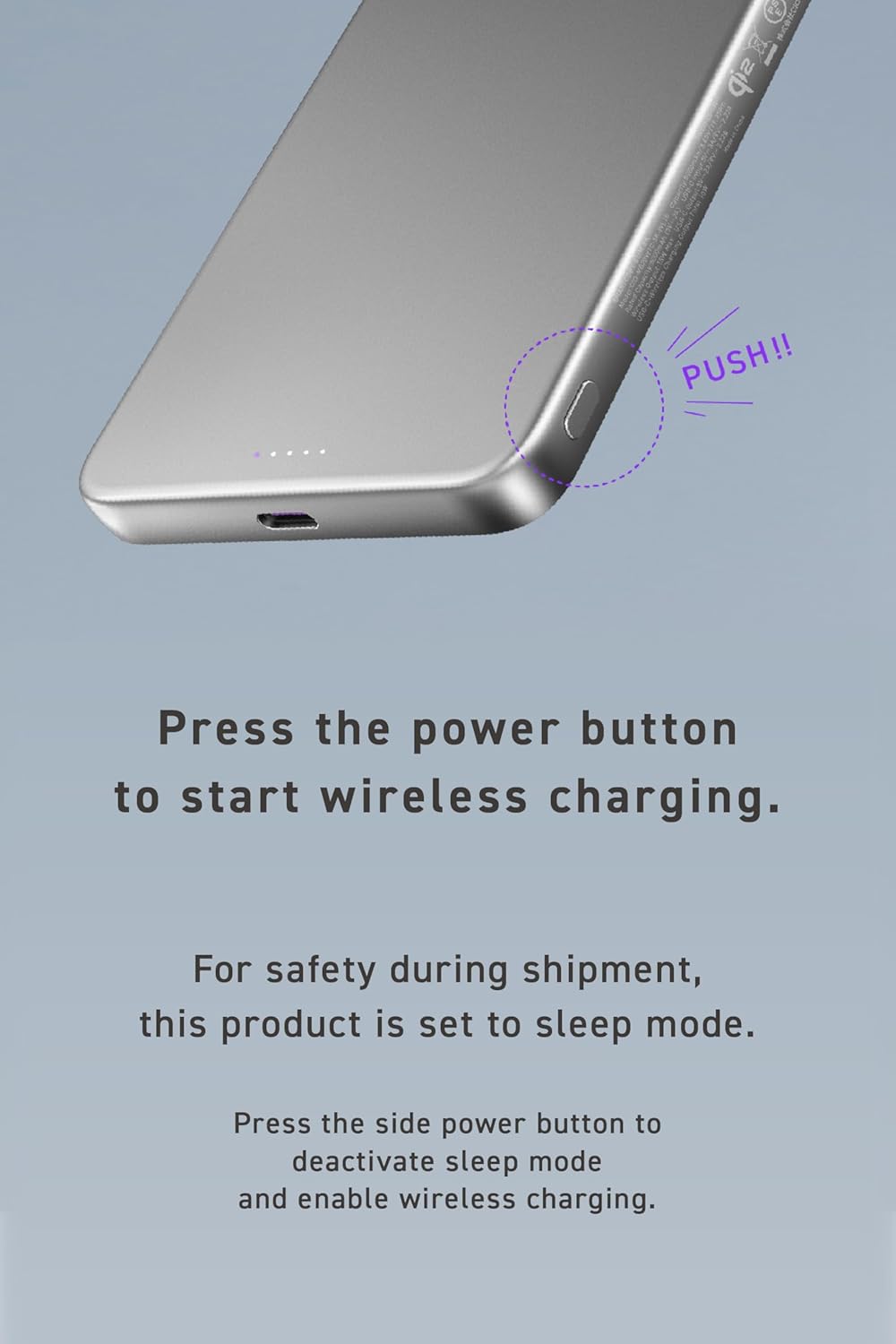
Image: A close-up view of the side of the power bank, showing the USB-C port and the small power button labeled "PUSH!!", indicating where to press to activate the device.
4. Operating Instructions
4.1. Charging the Power Bank
To recharge your SMARTCOBY Slim 5K:
- Connect the included USB-C to USB-C charging cable to the USB-C port on the power bank.
- Connect the other end of the cable to a compatible USB-C power adapter (not included). For optimal charging speed, use a 20W or higher Power Delivery (PD) adapter.
- The LED indicators will show the charging status. The power bank can be fully recharged in approximately 150 minutes with a fast charger.

Image: The silver SMARTCOBY Slim 5K power bank connected via a white USB-C cable to a wall adapter, illustrating the recharging process. A graphic indicates a battery charging time of 150 minutes.
4.2. Wireless Charging (MagSafe Compatible)
For magnetic wireless charging:
- Ensure the power bank is active (not in sleep mode).
- Align the power bank with the MagSafe area on the back of your compatible iPhone (iPhone 12-16 models) or other Qi2-compatible device. The magnets will snap into place.
- Wireless charging will begin automatically. The leftmost LED indicator on the power bank will illuminate purple to confirm Qi2 wireless charging is active.
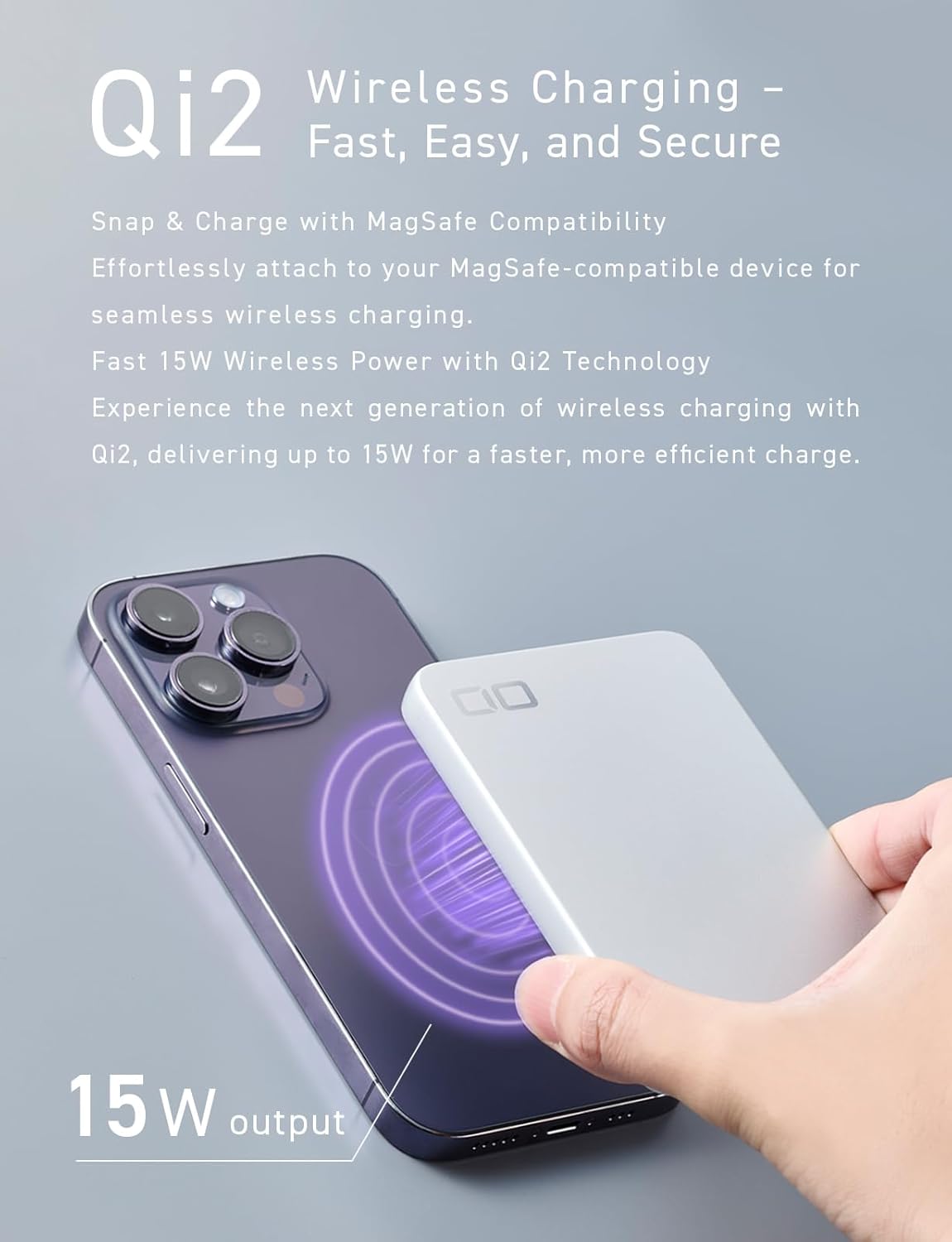
Image: The silver SMARTCOBY Slim 5K magnetically attached to the back of an iPhone, showing the wireless charging icon and indicating 15W output.

Image: A lineup of iPhones (iPhone 12 mini, iPhone 16, iPhone 16 Pro, iPhone 16 Pro Max) with the SMARTCOBY Slim 5K attached, demonstrating that the power bank does not block the camera lens.
4.3. Wired Charging (USB-C PD)
To charge devices via USB-C:
- Connect one end of a USB-C to USB-C cable (or appropriate USB-C to Lightning cable) to the USB-C port on the power bank.
- Connect the other end to your device (e.g., iPhone, Android phone, iPad).
- The power bank will automatically begin charging your device at up to 20W Power Delivery.
4.4. Pass-Through Charging
The SMARTCOBY Slim 5K supports pass-through charging, allowing you to charge both the power bank and your device simultaneously.
- Connect the power bank to a wall adapter using a USB-C cable (as described in 4.1).
- Attach your device for wireless charging or connect it via a USB-C cable (as described in 4.2 or 4.3).
- The power bank will charge itself and your connected device. Once the power bank is fully charged, it will automatically switch to a dedicated direct current circuit to continue charging your device.
Note: During true pass-through charging, the wireless charging output is limited to 5W to protect internal battery cells and extend the lifespan of the power bank.

Image: The silver SMARTCOBY Slim 5K power bank connected to a wall adapter, with an iPhone magnetically attached to the power bank, demonstrating simultaneous pass-through charging.
4.5. LED Power Indicator
The power bank features five LED indicators to display its battery status and charging activity:
- The leftmost LED illuminates purple when Qi2 wireless charging is active.
- The remaining four LEDs indicate the battery level in 25% increments.

Image: A close-up of the LED indicators on the power bank, accompanied by a table explaining that the leftmost purple LED indicates Qi2 charging, and the four white LEDs indicate battery levels at 25%, 50%, 75%, and 100%.
5. Safety Information and Precautions
To ensure safe operation and prolong the lifespan of your SMARTCOBY Slim 5K, please observe the following:
- Temperature Management: The Safety Model is designed to manage temperature during charging. In high-temperature environments, or during extended use, built-in protection functions may automatically adjust or pause charging to maintain safe performance. Charging will resume once the temperature returns to a stable level (feature supported on iOS 17 and 18).
- Avoid Extreme Temperatures:
- Do not leave in a car: Temperatures inside a car can rise significantly (up to 50°C / 122°F), which can damage the device.
- Avoid direct sunlight: Exposure to direct sunlight can damage the internal battery and, in the worst case, lead to overheating or swelling.
- Avoid leaving near windows: Even without direct sunlight, temperatures near windows can be high, posing a risk of damage.
- Water and Moisture: Do not expose the device to water, rain, or excessive moisture.
- Physical Damage: Avoid dropping, impacting, or disassembling the device.
- Proper Storage: Store the power bank in a cool, dry place away from flammable materials.
- Children: Keep out of reach of children.

Image: Illustrations depicting important safety precautions: avoiding leaving the device in a hot car, avoiding direct sunlight, and avoiding leaving it near windows to prevent overheating and damage.

Image: A graph illustrating the temperature variations and battery charge levels during charging for both the Safety Model and High Performance Model of the SMARTCOBY Slim 5K, tested on an iPhone 16 Pro. It shows the Safety Model maintaining lower product temperatures.
This product is certified under Japan's Electrical Appliance and Material Safety Law (PSE), indicating it meets safety standards for electrical appliances.
6. Maintenance
- Cleaning: Use a soft, dry cloth to clean the surface of the power bank. Do not use harsh chemicals or abrasive cleaners.
- Storage: If storing the power bank for an extended period, charge it to about 50-75% capacity and store it in a cool, dry place. Recharge it every 3-6 months to maintain battery health.
- Aluminum Surface: The aluminum alloy body is durable but can be prone to fine scratches. For better preservation of its appearance, consider protecting it with a pouch or similar item when carrying it.

Image: A close-up view of the power bank's aluminum surface, highlighting its texture. Text advises protecting the surface from scratches.
7. Troubleshooting
| Problem | Possible Cause | Solution |
|---|---|---|
| Device not charging wirelessly. |
|
|
| Device not charging via USB-C. |
|
|
| Power bank is charging slowly or stops charging. |
|
|
| LED indicators are not lighting up. |
|
|
8. Specifications
| Feature | Detail |
|---|---|
| Model Number | CIO-MB20W1C-5K-WL15 (Safety Model) |
| Battery Capacity | 5000mAh / 3.85V (19.25Wh) |
| Rated Capacity | 3000mAh |
| USB-C Input | 5V=3A, 9V=2.22A (Max 20W) |
| USB-C Output | 5V=2A, 9V=2.22A (Max 20W) |
| Qi2 Wireless Output | Max 15W |
| USB-C + Wireless Total Output | 10W (during pass-through charging) |
| Product Size | Approx. 102 × 70 × 8.7mm |
| Weight | Approx. 117g |
| Cycle Count | Approx. 500 |
| Charging Time (Power Bank) | Approx. 150 minutes (with 20W PD charger) |
| Supported Charging Standards | Qi2 charging / PD3.0 |
| Compatible Devices | iPhone 12-16, Android smartphones, iPads, other USB-C devices |
| Material | Aluminum Alloy |
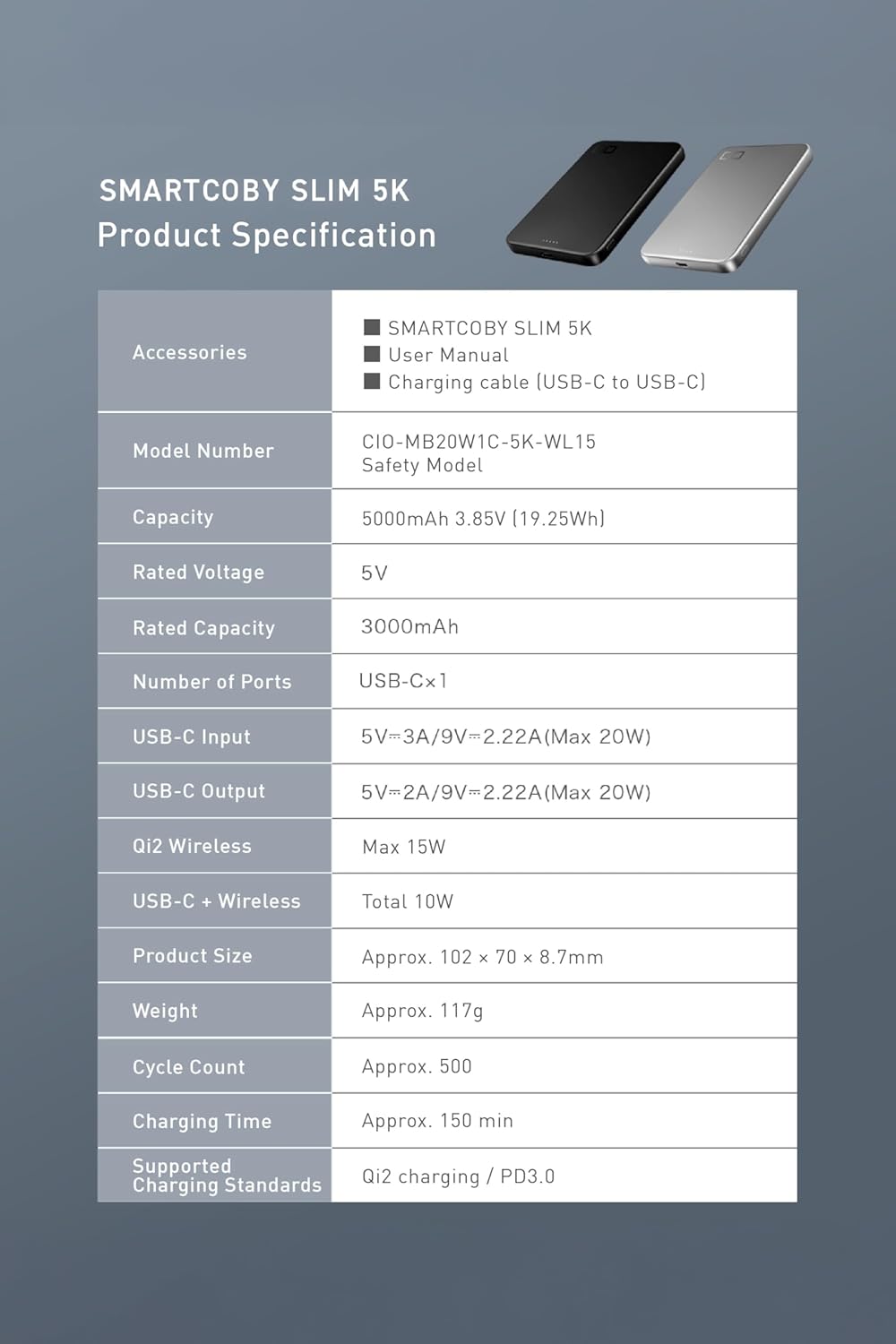
Image: A detailed table listing the product specifications including model number, capacity, input/output, dimensions, weight, and charging standards.
9. Warranty and Support
As a Japanese manufacturer, CIO is committed to providing support for any product issues. If you experience any defects or malfunctions with your SMARTCOBY Slim 5K, please contact us immediately for assistance.
For customer support, please refer to the contact information provided on the product packaging or the official CIO website.


