
1. Introduction
This manual provides detailed instructions for the installation, operation, and maintenance of your OBO HANDS Tuya 2-Wire WiFi Video Doorbell System TY75T. Please read this manual thoroughly before installation and use to ensure proper functionality and safety. This system offers advanced security features including 2MP video, two-way audio, RFID card access, and remote control via the Tuya app.
2. Package Contents
Verify that all items listed below are included in your package:
- Indoor Monitor (with power adapter)
- Outdoor Doorbell Unit
- RFID Cards (various colors)
- Micro SD Card (e.g., 32GB)
- Mounting Screws and Anchors
- Connection Cables (2-wire cable, power cable)
- User Manual (this document)
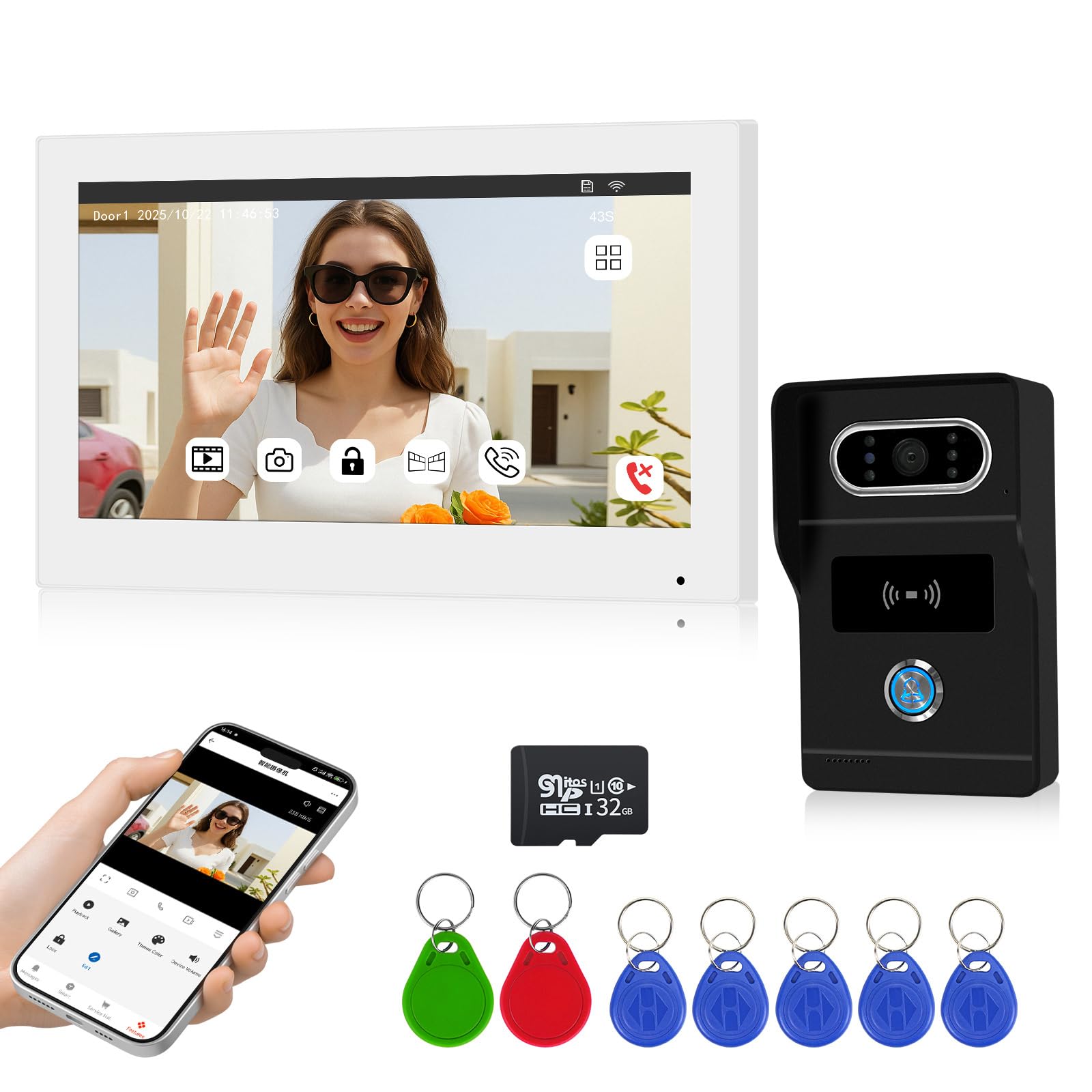
Figure 2.1: System components including indoor monitor, outdoor unit, RFID cards, and SD card.
3. Features
The OBO HANDS Tuya 2-Wire WiFi Video Doorbell System TY75T offers a range of features designed for enhanced home security and convenience:
- 2-Wire Technology: Simplifies installation by utilizing existing doorbell wiring.
- 2MP Video and Audio Transmission: Provides clear video and two-way audio communication.
- Tuya WiFi Connectivity: Enables remote access and control via the Tuya Smart app on your smartphone.
- RFID Card Unlock: Convenient access control for authorized users using RFID cards.
- 120° Night Vision: Ensures clear visibility even in low-light conditions.
- Two-Way Intercom: Communicate with visitors from the indoor monitor or your mobile phone.
- Multiple Door Opening Methods: Unlock doors/gates via indoor monitor, Tuya app, or RFID cards.
- Local & Cloud Storage: Supports Micro SD card up to 128GB for local recording and optional cloud service for video storage and playback.
- Rain-proof Outdoor Unit: Designed for outdoor use with protection against weather elements.
- High-Resolution Monitor: 1024x600 resolution indoor monitor for clear viewing.
- AHD 1080P Camera: High-definition camera for detailed video capture.

Figure 3.1: Overview of system features.
4. Setup and Installation
Follow these steps for proper installation of your video doorbell system.
4.1 Wiring the System
The system utilizes a 2-wire connection for simplified installation. Ensure power is disconnected before wiring.
- Connect the 2-wire cable from the outdoor unit to the indoor monitor.
- Connect the 12-24V power supply to the indoor monitor.
- If connecting to an electric door or gate lock, use the appropriate wiring from the indoor monitor or outdoor unit as shown in the diagram. The system can control two electric locks.

Figure 4.1: 2-Wire connection diagram.

Figure 4.2: System wiring for power and lock control.
4.2 Mounting
Mount the indoor monitor and outdoor unit securely using the provided screws and anchors. Ensure the outdoor unit is placed at an appropriate height for clear visitor viewing and is protected from direct heavy rain, despite being rain-proof.
4.3 Tuya App Setup
Download the Tuya Smart app from your device's app store. Follow the in-app instructions to add your OBO HANDS doorbell system. This typically involves creating an account, selecting 'Add Device', and following the pairing process for WiFi devices. Ensure your smartphone is connected to a 2.4GHz WiFi network during setup.
5. Operating Instructions
5.1 Two-Way Intercom
When a visitor presses the doorbell button, the indoor monitor will ring, and you will receive a notification on your Tuya app. You can then initiate two-way communication:
- From Indoor Monitor: Press the 'Talk' button on the monitor to speak with the visitor.
- From Tuya App: Answer the call notification on your smartphone to speak with the visitor remotely.

Figure 5.1: Two-way intercom in action.
5.2 Multiple Door Opening Methods
The system provides several ways to unlock connected doors or gates:
- Indoor Monitor Unlock: Press the 'Unlock' button on the indoor monitor during a call or when viewing the outdoor unit.
- Tuya App Unlock: Use the 'Unlock' function within the Tuya app from anywhere.
- RFID Cards Unlock: Present a pre-programmed RFID card to the outdoor unit's reader to unlock the door. The camera supports up to 2000 users with its built-in 125KHz RFID reader.

Figure 5.2: Various methods for unlocking doors.
5.3 Local & Cloud Storage
The system supports recording video and playback through a Micro SD card (up to 128GB) for local storage, and also offers cloud service options.
- Recording: The system can automatically record video when the doorbell is pressed or motion is detected (if enabled).
- Playback: Access recorded videos directly from the indoor monitor or through the Tuya app.

Figure 5.3: Local and cloud storage interface.
6. Maintenance
Regular maintenance ensures the longevity and optimal performance of your doorbell system.
- Cleaning: Gently wipe the indoor monitor screen and outdoor unit lens with a soft, dry cloth. Avoid abrasive cleaners or solvents.
- Connection Check: Periodically inspect all wiring connections to ensure they are secure and free from corrosion.
- Software Updates: Check the Tuya app regularly for any available firmware updates for your device to ensure you have the latest features and security patches.
- RFID Card Management: Keep track of your RFID cards. If a card is lost or stolen, remove its access from the system settings immediately.
7. Troubleshooting
If you encounter issues with your OBO HANDS doorbell system, refer to the following common problems and solutions:
- No Video/Audio:
- Check all wiring connections between the outdoor unit and indoor monitor.
- Ensure the power supply is connected and functioning.
- Restart the indoor monitor and outdoor unit by disconnecting and reconnecting power.
- WiFi Connection Issues:
- Ensure your router is broadcasting a 2.4GHz WiFi signal.
- Verify the WiFi password entered in the Tuya app is correct.
- Move the indoor monitor closer to your WiFi router or consider a WiFi extender.
- Reset the device's WiFi settings and attempt to re-pair with the Tuya app.
- Door/Gate Unlock Not Working:
- Check the wiring to the electric lock(s).
- Ensure the lock mechanism itself is functioning correctly.
- For RFID cards, ensure they are properly programmed to the system.
- Poor Night Vision:
- Ensure the outdoor unit's lens is clean and free from obstructions.
- Verify there are no strong light sources directly facing the camera at night, which can interfere with infrared.
8. Specifications
Detailed technical specifications for the OBO HANDS Tuya 2-Wire WiFi Video Doorbell System TY75T:
| Feature | Specification |
|---|---|
| Manufacturer | OBO HANDS |
| Model Number | TY75T |
| Color | White + Black |
| Camera Resolution | 2MP (AHD 1080P) |
| Monitor Resolution | 1024 x 600 |
| Night Vision | 120° View Angle |
| Connectivity | 2-Wire, WiFi (Tuya App) |
| Unlock Method | Indoor Monitor, Tuya App, RFID Card (125KHz, supports 2000 users) |
| Storage | Micro SD Card (up to 128GB), Cloud Service |
| Power Requirement | 12-24V (Power adapter included) |
| Package Dimensions | 27.1 x 25.8 x 6.1 cm |
| Item Weight | 1.27 kg |
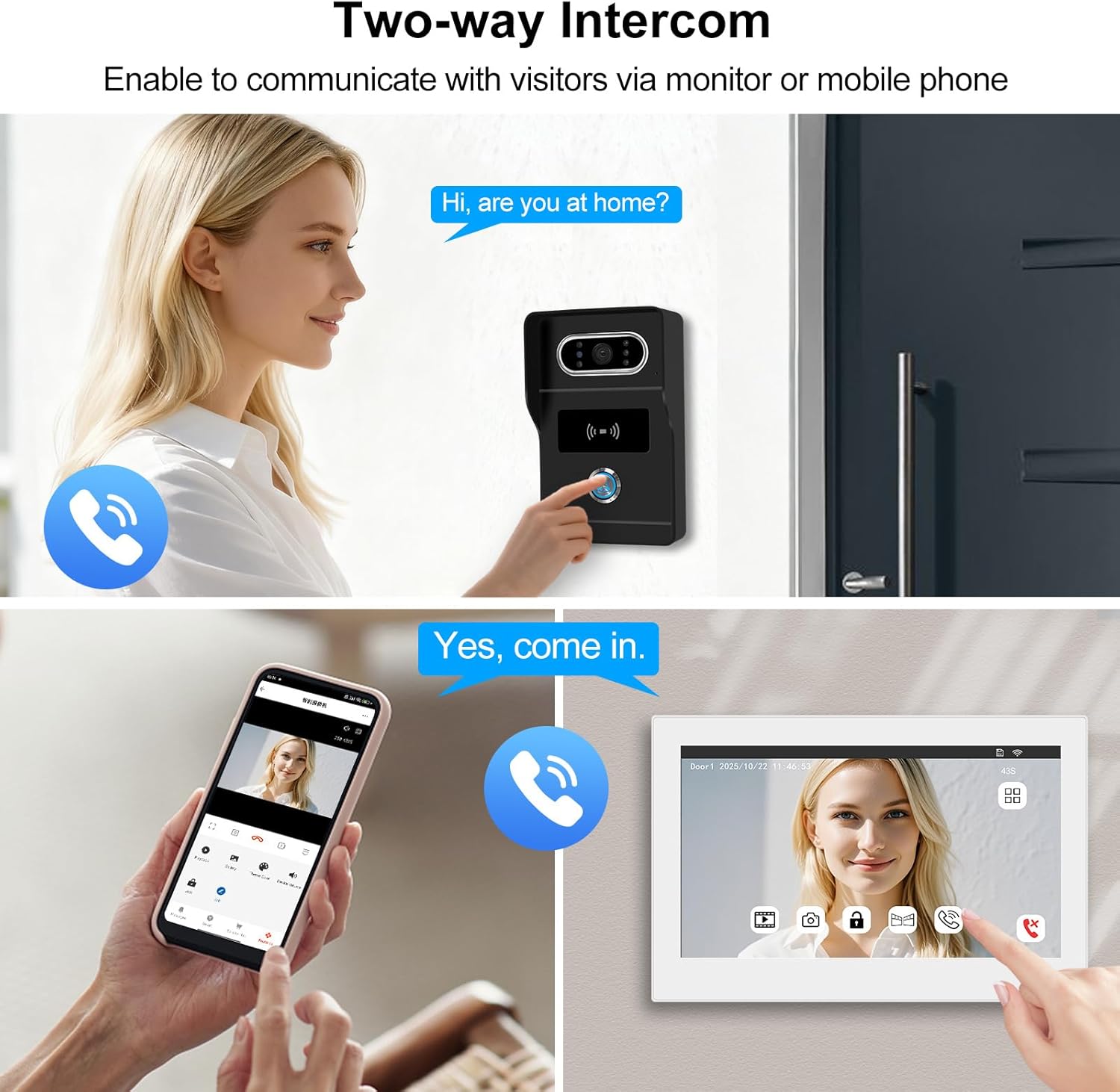
Figure 8.1: Product dimensions.
9. Warranty and Support
Information regarding warranty coverage and customer support for the OBO HANDS Tuya 2-Wire WiFi Video Doorbell System TY75T was not provided in the available product data. Please refer to the product packaging or the seller's website for specific warranty terms and contact information for technical support.