
1. Product Overview
The Warmdance 60W 9-LED RGBW Stage Light Bar (Model ZQ06190) is a versatile lighting fixture designed for various applications, including parties, concert halls, and live streaming rooms. It features 9 RGBW light sources capable of producing over 16.7 million color combinations with 0-100% linear dimming. Multiple control methods are supported, including DMX512, self-running, sound control, and remote control. The unique stand design allows for upright placement and adjustable illumination direction, in addition to traditional hanging options.

Figure 1: Overview of the Warmdance 60W 9-LED RGBW Stage Light Bar.

Figure 2: The light bar showcasing a purple lighting effect.
2. What's in the Box
Please check the contents of your package upon arrival to ensure all items are present and undamaged.
- 1 x Light Bar
- 1 x Power Cord
- 1 x Remote Control
- 1 x Bracket
- 2 x Knobs
- 2 x Black Gaskets
- 1 x Instruction Manual (this document)

Figure 3: Contents included in the product package.
3. Setup and Installation
3.1 Attaching the Bracket
The light bar comes with a versatile bracket for various mounting options. To attach the bracket:
- Align the bracket with the mounting points on the light bar.
- Secure the bracket using the provided knobs and black gaskets. Ensure they are tightened firmly to prevent movement.
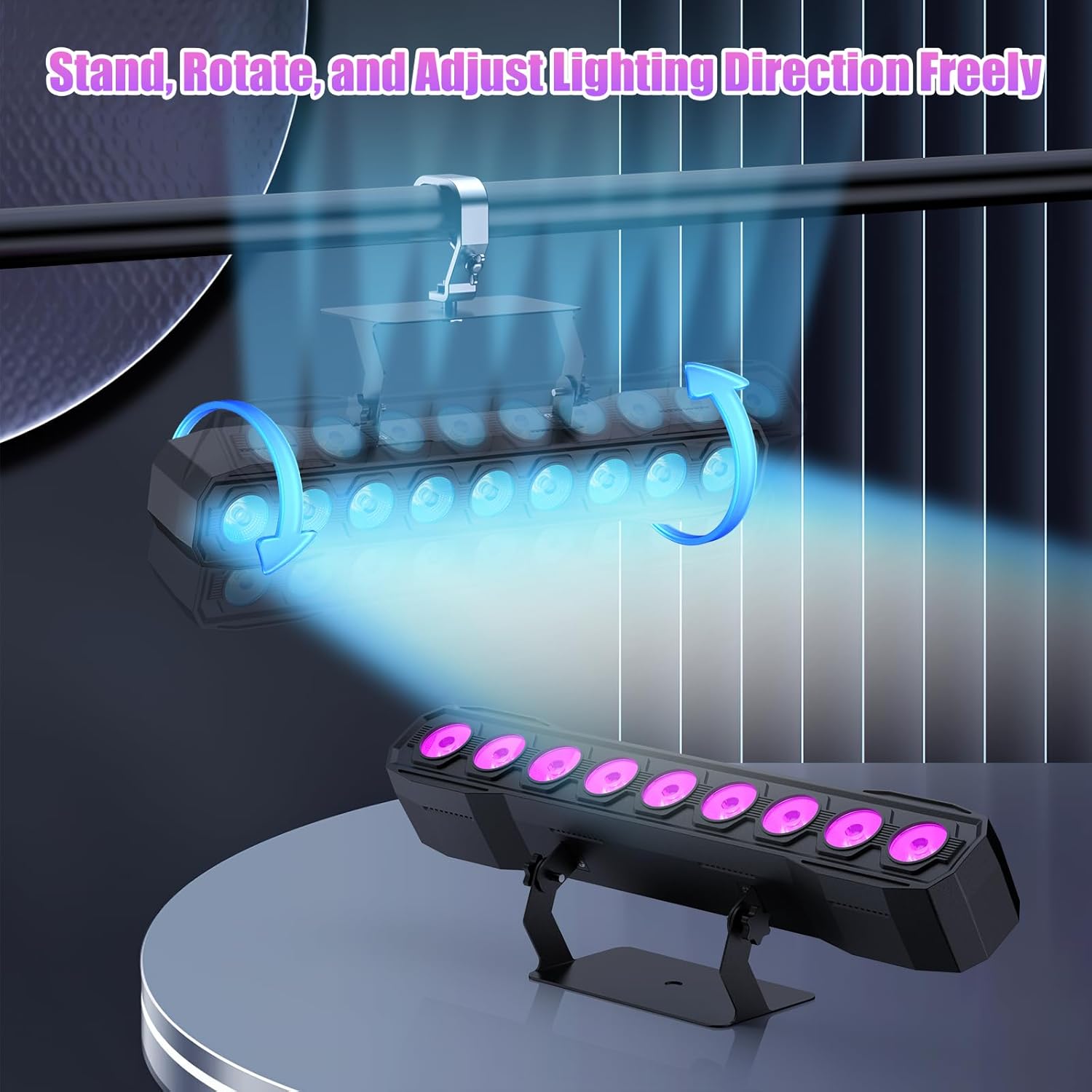
Figure 4: The light bar with its adjustable bracket, showing both stand and hanging configurations.

Figure 5: Examples of the light bar standing upright and mounted to adjust the light angle.
3.2 Mounting Options
- Flat Surface Placement: Use the stand to place the light bar upright on any flat surface. The bracket allows for adjustment of the illumination direction.
- Hanging Installation: The bracket also supports traditional hanging methods using a lamp hook (not included). Ensure the mounting surface is secure and capable of supporting the weight of the fixture.
3.3 Power Connection
Connect the provided power cord to the power input on the back of the light bar and then to a suitable power outlet (AC110-240V, 50/60Hz).

Figure 6: Back panel details showing DMX In/Out, Power Link, and Mounting Bracket.
4. Operating Instructions
The Warmdance Stage Light Bar offers diverse control methods and lighting effects.
4.1 Control Panel and Display
The light bar features a 4-digit display and four control buttons (MENU, UP, DOWN, ENTER) on its back panel for direct mode selection and parameter adjustment.

Figure 7: Detailed view of the light bar's back panel, including the 4-digit display and DMX ports.
4.2 Lighting Effects and Color Mixing
The 9 RGBW LEDs allow for a wide spectrum of colors and dynamic effects.
- Color Mixing: Achieve over 16.7 million color combinations using the RGBW light sources.
- Linear Dimming: Adjust brightness from 0% to 100%.
- Built-in Effects: Includes jumping, gradual changing (fade), pulse changing, and strobe (1-20Hz) effects.

Figure 8: Visual representation of the light bar's color mixing and dimming capabilities.

Figure 9: Examples of Strobe, Jump, Fade, and Pulse lighting effects.
4.3 Control Modes
The light bar supports several control modes for flexibility.
- DMX512 Control: Connect to a DMX console for professional lighting control. Supports 4 or 8 DMX channels.
- Self-Running (Auto) Mode: The light bar cycles through pre-programmed effects automatically.
- Sound Control Mode: The lighting effects react to ambient sound, with adjustable sensitivity (15 levels).
- Remote Control: Use the included remote for convenient wireless operation.
- Master-Slave Mode: Link multiple light bars together, where one acts as the master and others synchronize as slaves.

Figure 10: Overview of the various control modes available for the light bar.
Remote Control Functions
The remote control provides quick access to various settings:
- Light ON/OFF
- DMX Mode selection
- 4 Versatile Color Mixing Modes (Jump, Fade, Pulse, Flash)
- Sound-activated Mode (Sound1, Sound2)
- 7 Static Colors (R, G, B, Y, P, CYAN, White)
- 9 Brightness Levels
- Speed Adjustment for Color Mixing Modes
- Sound Sensitivity Adjustment (MIC +/-)
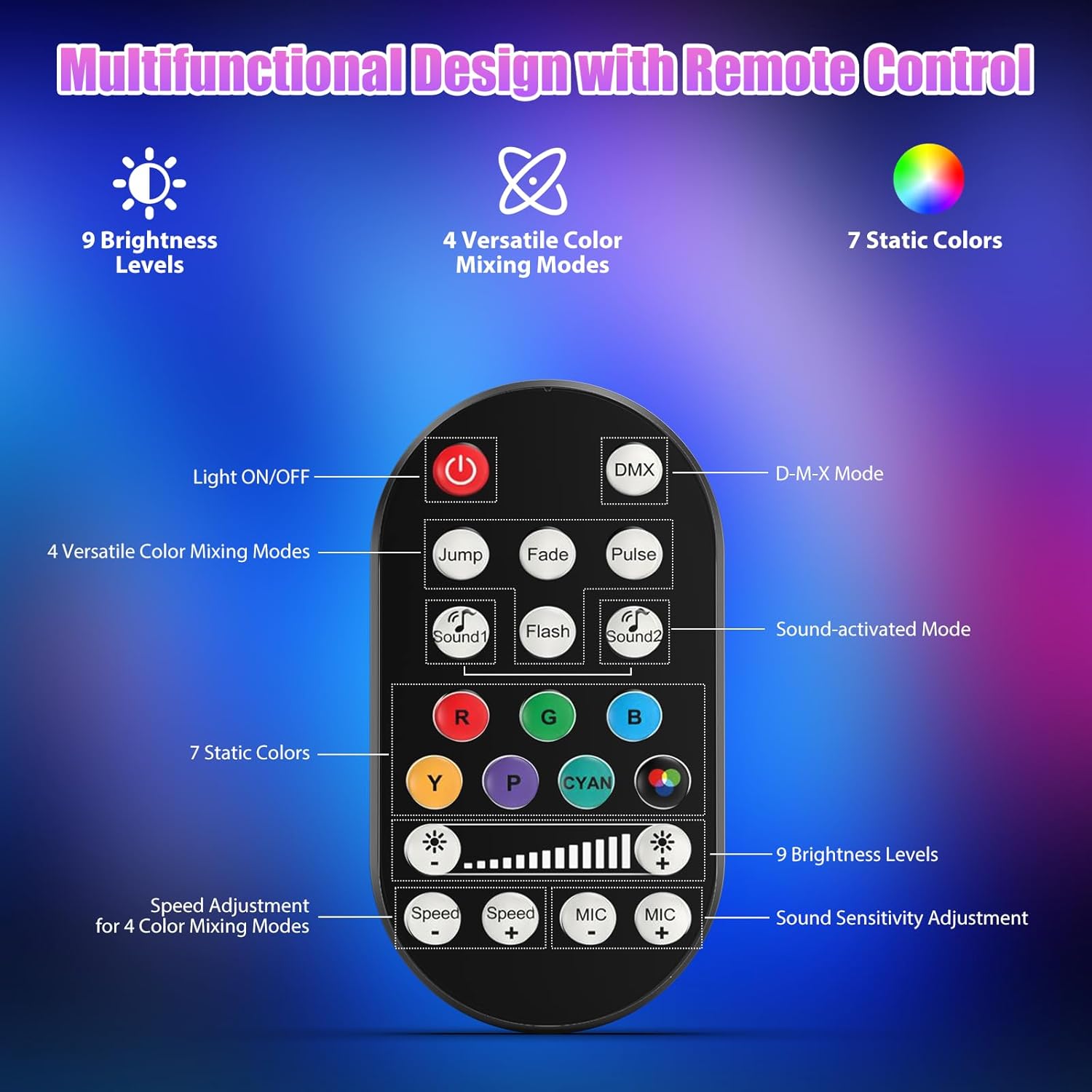
Figure 11: The remote control and its button functions.

Figure 12: Detailed breakdown of remote control functions.
4.4 Product Video Demonstration
Video 1: A demonstration of the Warmdance 60W 9-LED RGBW Stage Light Bar's features, including color mixing, dimming, strobe, jump, gradient, pulse modes, DMX control, remote control, auto mode, sound-activated mode, and master-slave mode. This video provides a visual guide to the light bar's capabilities and various operating modes.
5. Maintenance
Proper maintenance ensures the longevity and optimal performance of your light bar.
- Cleaning: Regularly wipe the exterior with a soft, dry cloth. Do not use harsh chemicals or abrasive cleaners. Ensure the light is unplugged before cleaning.
- Lens Cleaning: Gently clean the LED lenses with a soft, lint-free cloth to maintain light output clarity.
- Storage: When not in use, store the light bar in a cool, dry place away from direct sunlight and extreme temperatures.
- Inspection: Periodically check the power cord and DMX cables for any signs of damage.
6. Troubleshooting
If you encounter issues with your Warmdance Stage Light Bar, refer to the following common troubleshooting steps:
| Problem | Possible Cause | Solution |
|---|---|---|
| Light does not turn on. | No power supply; faulty power cord; unit off. | Ensure power cord is securely connected and plugged into a live outlet. Check if the power switch is ON. Try a different power outlet. |
| No light output or incorrect colors in DMX mode. | Incorrect DMX address; faulty DMX cable; DMX controller issue; incorrect DMX channel mode. | Verify DMX address and channel mode settings on the light bar match the DMX controller. Check DMX cables for damage. Ensure DMX controller is functioning correctly. |
| Sound control not responding. | Microphone sensitivity too low; no sound input. | Increase microphone sensitivity using the remote or control panel. Ensure there is sufficient sound for the light to react. |
| Remote control not working. | Battery depleted; obstruction; remote out of range. | Replace the remote control battery. Ensure no obstructions between the remote and the light bar's sensor. Operate within effective range. |
If the problem persists after attempting these steps, please contact customer support.
7. Specifications
| Feature | Detail |
|---|---|
| Model Number | ZQ06190 |
| Color | Black |
| Material | Plastic |
| Light Source Type | RGBW LEDs (9 PCS) |
| Power Source | Corded Electric |
| Rated Voltage | AC110-240V, 50/60Hz |
| Output Angle | 35 Degree |
| Illuminance | 3500 Lux @1M |
| Average LED Lifespan | 20000h |
| Lighting Effects | RGBW mix 16.7M+ Wash Effects |
| Dimming | 0-100% Linear Dimming |
| Strobe | 1-20Hz |
| Working Mode | D-M-X512 Signal / Remote Control / Master-Slave / Self-Propelled / Voice Control |
| Control Channel | 4 / 8CH |
| Surface Display | 4-digit Display |
| Protection Level | IP20 |
| Product Size (L x W x H) | 41.5 x 9.6 x 10.2 cm (16.3 x 3.8 x 4 in) |
| Product Net Weight | 0.9KG / 1.98lb |
8. Warranty Information
This Warmdance Stage Light Bar (Model ZQ06190) comes with a manufacturer's warranty of 3 months from the date of purchase. This warranty covers defects in materials and workmanship under normal use. It does not cover damage caused by misuse, accidents, unauthorized modifications, or improper installation.
Please retain your proof of purchase for warranty claims.
9. Customer Support
For technical assistance, warranty claims, or any questions regarding your Warmdance Stage Light Bar, please contact our customer support team.
Manufacturer: Shenzhen Zhuoqiong Technology Co., Ltd.
Please refer to the retailer's website or your purchase documentation for specific contact details.