
1. Product Overview
The LIVELYGLOW Small Makeup Vanity Desk with Smart LED Mirror is designed to provide a functional and stylish space for your beauty and grooming needs. It features an integrated LED mirror with adjustable colors and dimming functions, multiple storage options including drawers and shelves, and a convenient power outlet.
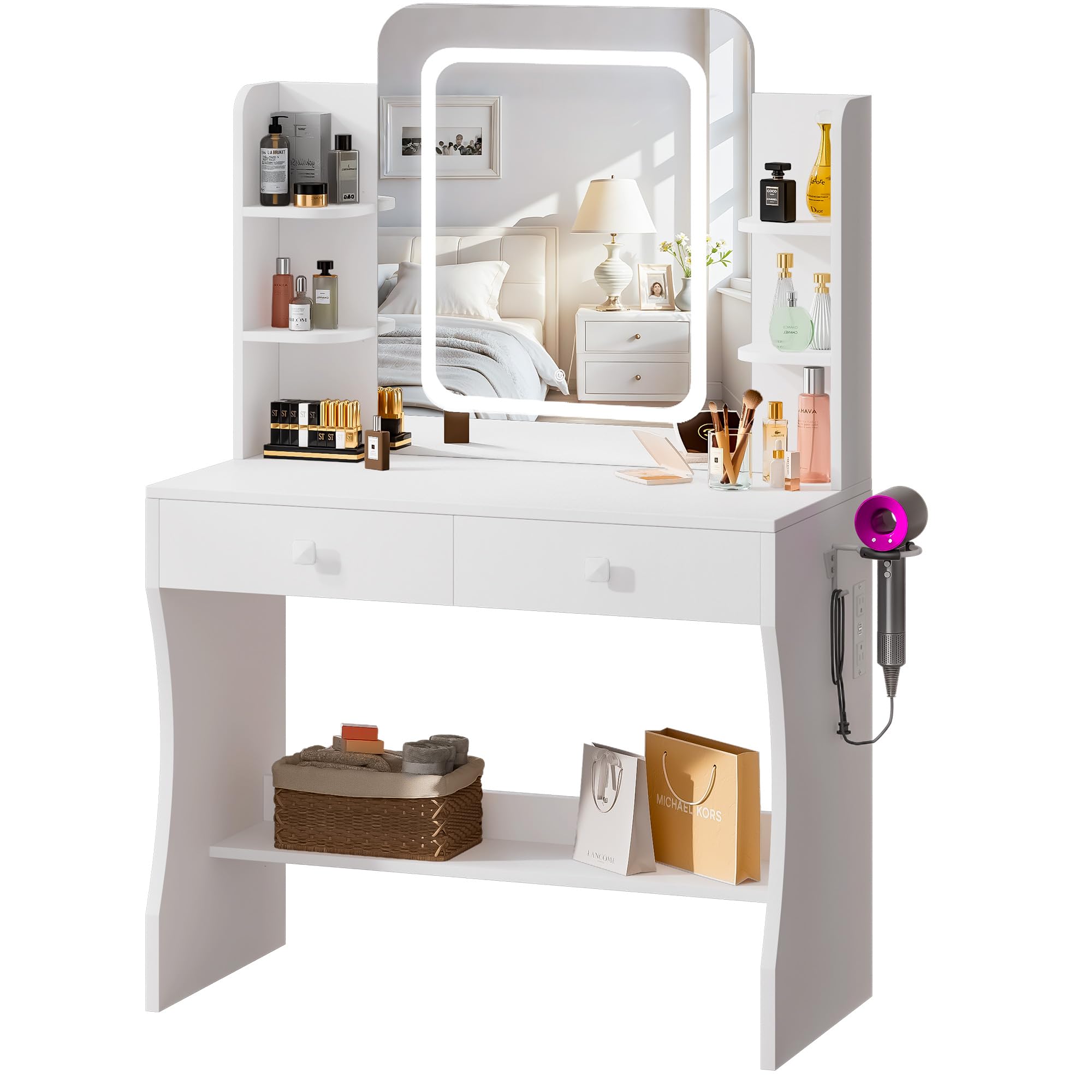
Image 1.1: LIVELYGLOW Small Makeup Vanity Desk with Smart LED Mirror. This image displays the complete vanity desk with its mirror, drawers, and shelves, highlighting its compact design and integrated features.
2. Setup and Assembly
2.1 Unpacking
Carefully remove all components from the packaging. Place them on a soft, clean surface to prevent scratches. Retain all packaging materials until assembly is complete and you have verified all parts are present.
2.2 Component Check
Before beginning assembly, ensure all parts listed in the included assembly guide are present and undamaged. If any parts are missing or damaged, do not proceed with assembly and contact customer support.
2.3 Assembly Instructions
Follow the detailed step-by-step instructions provided in the separate assembly manual included with your product. General steps typically include:
- Attach the main desk panels and frame using the provided hardware.
- Assemble and insert the drawers into their designated slots.
- Secure the mirror unit to the desk frame.
- Connect the power cable for the LED mirror to the designated port.
- Place the hairdryer bracket as desired.
Ensure all screws and fasteners are tightened securely, but do not overtighten to avoid damaging the material.
2.4 Placement
Place the assembled vanity desk on a flat, stable surface. Ensure it is positioned near a power outlet for the LED mirror and integrated power outlet functionality.
3. Operating Instructions
3.1 Smart LED Mirror
- Power On/Off: Locate the touch sensor on the mirror surface. Tap once to turn the LED lights on or off.
- Change Light Colors: With the lights on, tap the touch sensor repeatedly to cycle through the 3 available light colors (e.g., cool white, natural, warm yellow).
- Dimming Function: To adjust brightness, press and hold the touch sensor. The light will gradually dim or brighten. Release when the desired brightness is achieved.
3.2 Integrated Power Outlet
The vanity desk includes a built-in power outlet for convenience. Plug your hair dryer, curling iron, or other electronic devices directly into this outlet. Ensure the vanity desk is connected to a wall power source for the outlet to function.
3.3 Drawers and Shelves
Utilize the two drawers and five shelves for organized storage of cosmetics, brushes, and other beauty essentials. The hairdryer bracket provides a dedicated space for your hair dryer.
4. Maintenance
4.1 Cleaning the Desk Surface
Wipe the engineered wood surfaces with a soft, damp cloth. Avoid using harsh chemicals, abrasive cleaners, or excessive moisture, as these can damage the finish. Dry immediately with a clean, dry cloth.
4.2 Cleaning the Mirror
Use a glass cleaner specifically designed for mirrors and a lint-free cloth. Spray the cleaner onto the cloth, not directly onto the mirror, to prevent liquid from seeping into the LED components. Wipe gently until clean and streak-free.
4.3 General Care
- Avoid placing hot items directly on the desk surface. Use coasters or protective pads.
- Keep the desk away from direct sunlight and excessive humidity to prevent warping or discoloration.
- Periodically check and tighten any loose screws or fasteners to maintain stability.
5. Troubleshooting
5.1 LED Mirror Not Turning On
- Check Power Connection: Ensure the vanity desk's power cord is securely plugged into a functional wall outlet.
- Check Mirror Connection: Verify that the LED mirror's internal power cable is properly connected to the desk's power system as per assembly instructions.
- Test Outlet: Plug another device into the wall outlet to confirm it is supplying power.
5.2 Dimming or Color Change Not Responding
- Clean Sensor: Ensure the touch sensor on the mirror is clean and free from dirt or moisture.
- Restart: Turn the mirror off and then on again using the touch sensor.
5.3 Desk Stability Issues
- Check Fasteners: Inspect all screws and bolts to ensure they are securely tightened.
- Level Surface: Confirm the desk is placed on a completely flat and level surface.
5.4 Integrated Power Outlet Not Working
- Main Power: Ensure the vanity desk's main power cord is plugged into a live wall outlet. The integrated outlet relies on this connection.
- Overload: Avoid overloading the outlet with high-power devices simultaneously.
6. Specifications
| Feature | Detail |
|---|---|
| Brand | LIVELYGLOW |
| Model Number | WHP-DCLED |
| Product Dimensions | 15.7"D x 29.5"W x 53.9"H |
| Material | Engineered Wood |
| Color | White |
| Mirror Type | Smart LED Mirror |
| LED Functions | 3 Color Modes, Dimming Function |
| Storage | 2 Drawers, 5 Shelves |
| Additional Features | Integrated Power Outlet, Hairdryer Bracket |
7. Warranty and Support
Warranty information for your LIVELYGLOW Small Makeup Vanity Desk is typically included with the product packaging or available on the official LIVELYGLOW website. Please refer to these resources for details regarding coverage and terms.
For technical support, missing parts, or any inquiries not covered in this manual, please contact LIVELYGLOW customer service through their official website or the contact information provided in your purchase documentation.