
Introduction
This manual provides comprehensive instructions for the setup, operation, maintenance, and troubleshooting of your T-Wolf T60 Wired 60% Mechanical Keyboard. Please read this manual carefully before using the product to ensure proper function and longevity.
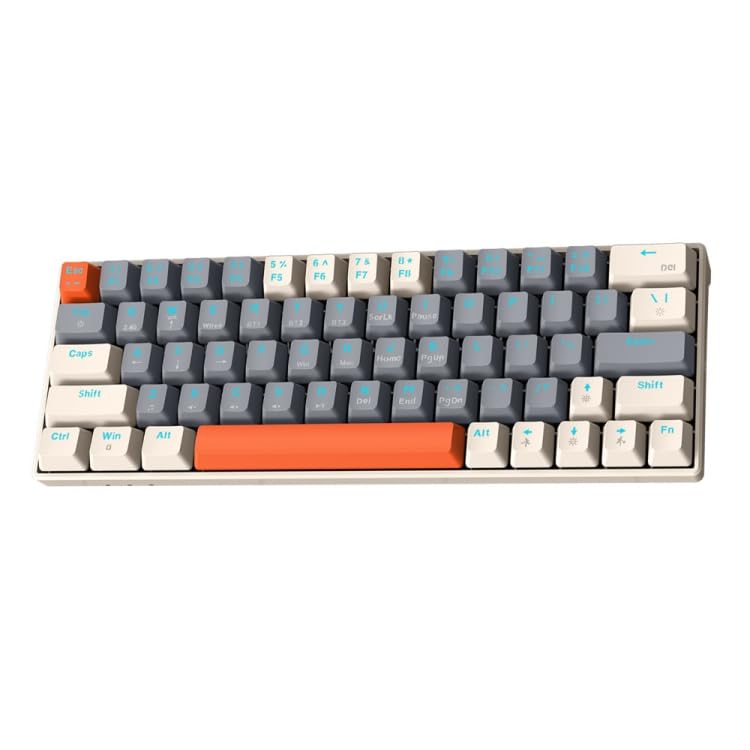
Image: T-Wolf T60 Wired 60% Mechanical Keyboard. This image displays the compact design of the keyboard, highlighting its 63-key layout and wired connectivity.
Setup
- Unboxing: Carefully remove the keyboard and all included accessories from the packaging. Verify that all components are present: T-Wolf T60 keyboard and USB-C to USB cable.
- Connecting the Keyboard:
- Locate the USB-C port on the keyboard.
- Insert the USB-C end of the provided cable into the keyboard's USB-C port.
- Insert the USB-A end of the cable into an available USB 2.0 port on your computer (PC, desktop, or laptop).
- Driver Installation: The T-Wolf T60 keyboard is plug-and-play. Your operating system should automatically detect and install the necessary drivers. No manual driver installation is typically required.
- Initial Test: Open a text editor or word processor and type to confirm the keyboard is functioning correctly.
Operation
The T-Wolf T60 is a 60% mechanical keyboard with 63 keys, designed for efficient typing and gaming. It features RGB backlighting and multi-key anti-ghosting.
- Basic Key Functions: All standard alphanumeric and symbol keys function as expected. Due to the compact 60% layout, some functions (like F-keys, arrow keys, and navigation keys) are accessed via a Function (Fn) key combination. Refer to the keyboard's keycap legends for specific Fn key combinations.
- RGB Backlighting: The keyboard features customizable RGB backlighting.
- To cycle through different lighting modes, use the designated Fn key combination (e.g., Fn + \ or Fn + P).
- To adjust brightness, use the designated Fn key combination (e.g., Fn + Up/Down arrow keys, if available via Fn layer).
- To change lighting speed, use the designated Fn key combination (e.g., Fn + Left/Right arrow keys, if available via Fn layer).
- Multi-Key Anti-Ghosting: This feature ensures that multiple simultaneous key presses are registered accurately, which is beneficial for fast-paced gaming and complex commands.
Maintenance
Proper maintenance helps extend the lifespan of your keyboard.
- Cleaning:
- Disconnect the keyboard from your computer before cleaning.
- Use a can of compressed air to remove dust and debris from between the keycaps.
- Wipe the keycaps and keyboard surface with a soft, slightly damp, lint-free cloth. Avoid excessive moisture.
- Do not use harsh chemicals, abrasive cleaners, or solvents, as these can damage the keyboard's finish and keycap legends.
- Storage: When not in use for extended periods, store the keyboard in a clean, dry environment away from direct sunlight and extreme temperatures.
- Cable Care: Avoid bending or twisting the USB-C cable excessively to prevent internal damage.
Troubleshooting
If you encounter issues with your T-Wolf T60 keyboard, refer to the following common solutions:
- Keyboard Not Responding:
- Ensure the USB-C cable is securely connected to both the keyboard and the computer.
- Try connecting the keyboard to a different USB port on your computer.
- Test the keyboard on another computer to determine if the issue is with the keyboard or the original computer's setup.
- Restart your computer.
- RGB Backlighting Not Working or Incorrect:
- Ensure the keyboard is properly connected and receiving power.
- Try cycling through the RGB modes using the Fn key combinations mentioned in the Operation section.
- Check if the brightness is set to maximum.
- Keys Not Registering or Double-Typing:
- Clean the keyboard thoroughly, especially around the affected keys, using compressed air.
- Ensure no debris is lodged under the keycaps.
- If the issue persists, it may indicate a hardware fault.
Specifications
| Feature | Detail |
|---|---|
| Brand | T-WOLF |
| Model | T60 |
| Connectivity Technology | USB-C (Wired) |
| Compatible Devices | PC, desktop, laptop |
| Keyboard Description | Gaming, Mechanical |
| Number of Keys | 63 |
| Special Features | RGB Backlighting, Multi-Key Anti-Ghosting |
| Material | Plastic |
| Keyboard Layout | QWERTY |
Warranty and Support
For warranty information and technical support, please refer to the documentation provided with your purchase or contact the retailer/manufacturer directly. Keep your proof of purchase for warranty claims.
Manufacturer: T-Wolf


