
1. Product Overview
This manual provides instructions for the Jocoevol Full LED Bed Frame, Model C-1619-2. This bed frame features a multi-functional storage headboard, integrated LED lighting, a built-in charging station, and two large storage drawers. It is designed for a full-size mattress and offers a blend of comfort and practicality.

Figure 1: Jocoevol Full LED Bed Frame, Pink
2. Safety Information
- Exercise caution around sharp edges during assembly and use.
- Do not exceed the maximum weight capacity of 800 lbs.
- Follow all assembly instructions carefully to ensure stability and prevent injury.
- Keep small parts away from children during assembly to prevent choking hazards.
- Ensure all connections for the charging station and LED lights are secure before use.
3. Package Contents
Before beginning assembly, verify that all components are present and undamaged. Refer to the included installation manual for a detailed parts list.
- Headboard with integrated storage and LED lighting
- Bed frame side rails and footboard
- Wooden slats and support legs
- Two storage drawers
- Charging station module (pre-installed in headboard)
- Remote control for LED lights
- Hardware kit (screws, bolts, Allen wrench)
- Installation Manual
4. Setup and Assembly
Assembly is required for this bed frame. It is recommended that two adults perform the assembly to ensure safety and ease of construction. A cordless drill with hex bits may be helpful for faster assembly, but all necessary tools are typically included.
- Unpack Components: Carefully remove all parts from the packaging and lay them out on a clean, soft surface to prevent scratches. Identify each part using the provided installation manual.
- Assemble Headboard: Follow the step-by-step instructions in the included manual to assemble the headboard structure, including the storage shelves and the flip-top compartment. Ensure all connections are tight.
- Attach Charging Station and LED Lights: Connect the charging station and LED light strips as indicated in the manual. Ensure all wiring is properly routed and secured.
- Construct Bed Frame: Assemble the side rails and footboard. Attach them securely to the headboard.
- Install Slats: Place the wooden slats onto the bed frame. The slats feature a Velcro design for quick attachment and a quiet design to eliminate friction noise.
- Assemble and Insert Drawers: Assemble the two storage drawers according to the manual. Insert them into the designated slots at the foot of the bed.
- Final Checks: Verify that all screws are tightened, and the frame is stable. Adjust the support legs if necessary to ensure even contact with the floor.
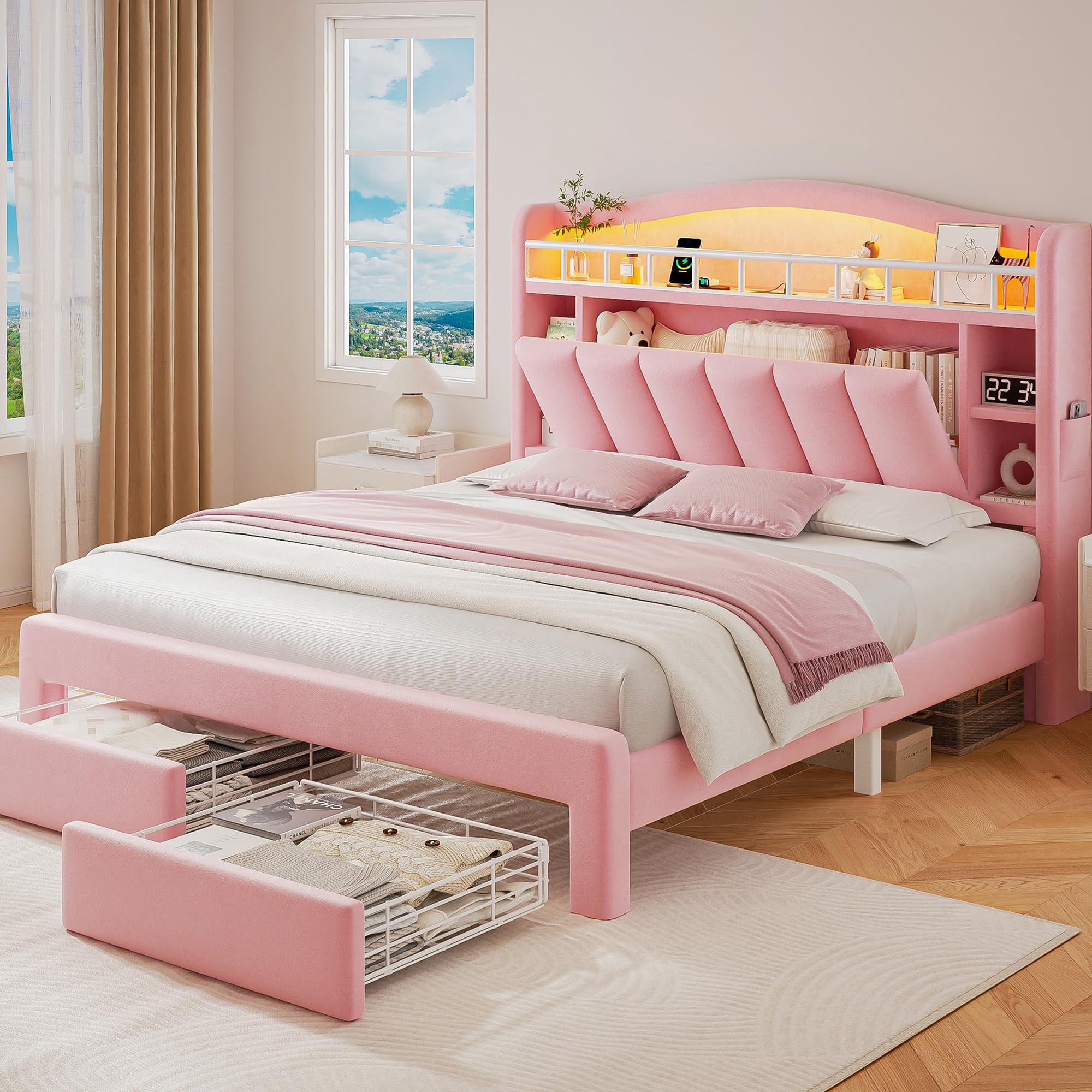
Figure 2: Product dimensions and component overview for assembly.

Figure 3: Details on Velcro slat design, quiet construction, and adjustable support legs.
5. Operating Instructions
5.1 LED Lighting System
The integrated RGB LED lighting system offers 16 million colors and over 20 lighting effects. It can be controlled via a remote control or a smartphone application.
- Remote Control: Point the remote control towards the LED receiver on the headboard. Use the buttons to power on/off, change colors, adjust brightness, and select lighting modes.
- Smartphone App: Download the compatible app (refer to the installation manual for app name and QR code). Pair your device via Bluetooth. The app allows for advanced control, including custom color settings, dynamic modes, music synchronization, and scheduling.

Figure 4: RGB LED lighting control via app and remote.
5.2 Charging Station
The headboard includes a built-in charging station with 2 AC power outlets, 2 USB-A ports, and 1 USB-C port.
- Power Connection: Ensure the bed frame's power cord is securely plugged into a functional wall outlet.
- Using Ports: Connect your devices (phones, tablets, laptops, lamps) directly to the available AC outlets, USB-A ports, or USB-C port.
- Safety: Do not overload the charging station. Avoid spilling liquids near the outlets.

Figure 5: Integrated charging station details.
5.3 Storage Features
- Headboard Shelves: Use the open shelving display for decorative items, books, or frequently accessed personal items. The top platform is suitable for phones and glasses.
- Hidden Compartment: The flip-top compartment behind the padded headboard provides discreet storage for private items.
- Side Phone Pocket: A convenient pocket on the side of the headboard is ideal for storing your phone.
- Storage Drawers: The two large drawers at the foot of the bed are designed for storing off-season clothing, bedding, or other household items. They feature smooth-gliding wheels and a dust-proof pad design.

Figure 6: Detailed view of the storage headboard.

Figure 7: Under-bed storage drawers with smooth wheels and dust-proof lining.
6. Maintenance
- Cleaning Upholstery: For general cleaning, gently vacuum the velvet upholstery with a soft brush attachment. For spills, blot immediately with a clean, dry cloth. For stubborn stains, consult a professional upholstery cleaner. Avoid harsh chemicals.
- Frame Care: Periodically check all bolts and screws to ensure they remain tight. Retighten if necessary to maintain stability.
- LED Lights: The LED lights are designed for long-term use. If issues arise, refer to the troubleshooting section.
- Charging Station: Keep the charging ports free of dust and debris. Do not insert foreign objects into the ports.
- Drawers: Keep the drawer tracks clean to ensure smooth operation.
7. Troubleshooting
| Problem | Possible Cause | Solution |
|---|---|---|
| LED lights not turning on or responding to remote/app. | Loose power connection; remote battery low; app not paired; LED strip damage. | Check power cord connection. Replace remote battery. Re-pair app via Bluetooth. Inspect LED strip for visible damage. |
| Charging ports not working. | Bed frame not plugged in; device cable faulty; port damage. | Ensure bed frame is plugged into a live outlet. Try a different charging cable. Test with another device. |
| Bed frame feels unstable or squeaks. | Loose bolts/screws; uneven floor; incorrect assembly. | Retighten all assembly hardware. Adjust support legs for even contact. Review assembly steps in the manual. |
| Drawers are difficult to open/close. | Obstruction in track; track dirty; drawer overloaded. | Clear any obstructions. Clean drawer tracks. Reduce weight in drawers. |
8. Specifications
| Feature | Detail |
|---|---|
| Model Number | C-1619-2 |
| Size | Full |
| Material | Engineered Wood, Velvet Upholstery |
| Product Dimensions (L x W x H) | 84" x 54.3" x 50.5" |
| Item Weight | 119.5 Pounds |
| Weight Capacity | 800 lbs |
| Charging Ports | 2 AC Outlets, 2 USB-A Ports, 1 USB-C Port |
| LED Lighting | RGB, 16 Million Colors, 20+ Effects, App/Remote Control |
| Drawers | 2, with smooth-gliding wheels and dust-proof pads |
| Headboard Features | Open shelving, hidden flip-top compartment, side phone pocket |
| Required Assembly | Yes |
| Compatible Mattress Size | Full (No box spring needed, mattress no larger than 12 inches) |
9. Warranty Information
Specific warranty details for the Jocoevol Full LED Bed Frame are not provided in this document. Please refer to the product packaging, the retailer's website, or contact Jocoevol customer service for comprehensive warranty information.
10. Customer Support
If you encounter any issues or have questions regarding your Jocoevol Full LED Bed Frame, please contact the retailer where the product was purchased or visit the official Jocoevol website for support resources and contact information.