
1. Important Safety Instructions
When using electrical appliances, basic safety precautions should always be followed to reduce the risk of fire, electric shock, and injury to persons. Read all instructions carefully before operating the TORNADO Air Fryer.
- Always ensure the basket is fully and correctly installed before operation to prevent accidents.
- Do not touch hot surfaces. Use handles or knobs.
- To protect against electric shock, do not immerse the cord, plugs, or the main unit in water or other liquid.
- Close supervision is necessary when any appliance is used by or near children.
- Unplug from outlet when not in use and before cleaning. Allow to cool before putting on or taking off parts.
- Do not operate any appliance with a damaged cord or plug, or after the appliance malfunctions or has been damaged in any manner.
- Do not place on or near a hot gas or electric burner, or in a heated oven.
- Ensure adequate ventilation around the appliance during use.
- This appliance is equipped with overheat protection. If the internal temperature exceeds a safe limit, the appliance will automatically shut off.
2. Product Overview
The TORNADO Air Fryer TFE-A1808TS1A is an 8-liter capacity appliance designed for healthier cooking with minimal to no oil. It features an electronic touch screen glass panel for intuitive control and a non-stick coated bowl for easy cleaning.

Figure 2.1: Front view of the TORNADO Air Fryer, highlighting the digital touch screen and control icons.
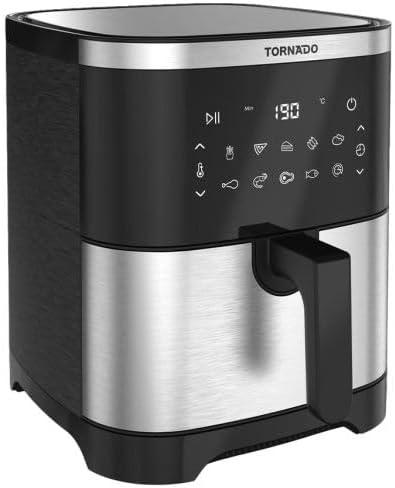
Figure 2.2: Angled view of the TORNADO Air Fryer, illustrating its compact design and the integrated basket handle.
Key Components:
- Electronic Touch Screen Glass Panel: For setting temperature, time, and selecting pre-set programs.
- Cooking Basket: Removable, non-stick coated for easy food handling and cleaning.
- Main Unit: Stainless steel and plastic body housing the heating element and fan.
- Non-slip Feet: Provides stability during operation.
3. Setup
- Unpacking: Carefully remove the air fryer and all packaging materials. Retain packaging for future storage or transport if needed.
- Placement: Place the air fryer on a stable, heat-resistant, and level surface. Ensure there is at least 10 cm (4 inches) of clear space around the back and sides of the appliance for proper ventilation. Do not place it directly against a wall or under cabinets.
- Initial Cleaning: Before first use, wipe the exterior of the air fryer with a damp cloth. Remove the cooking basket and wash it thoroughly with warm, soapy water. Rinse and dry completely.
- Power Connection: Plug the power cord into a grounded electrical outlet (220-240 Volt, 50 Hz).
4. Operating Instructions
4.1 Basic Operation
- Power On: Plug in the air fryer. The display will illuminate. Press the power icon on the touch screen to turn the unit on.
- Preheating (Optional): For best results, preheat the air fryer for 3-5 minutes at the desired cooking temperature.
- Load Food: Carefully pull out the cooking basket using the handle. Place your ingredients into the basket. Do not overfill the basket to allow for proper air circulation. The air fryer operates with minimal to no oil, supporting healthier cooking.
- Insert Basket: Push the cooking basket back into the air fryer until it clicks securely into place. The unit will automatically power on when the pot is inserted and power off when removed.
- Set Temperature and Time:
- Manual Setting: Use the temperature control icons to set the desired temperature (up to 200°C) and the timer icons to set the cooking time (up to 90 minutes).
- Pre-set Programs: Select one of the 9 pre-set cooking programs by tapping the corresponding icon on the touch screen. The available programs are: French fries, Pizza, Cake, Ribs, Sweet potato, Chicken pieces, Shrimp, Meat, Fish. Each program has a default temperature and time, which can be adjusted manually if needed.
- Start Cooking: Press the start/pause icon to begin the cooking process. The Circulation Air Tech will ensure even cooking.
- Check Food: During cooking, you can pull out the basket to check or shake the food. The air fryer will pause automatically and resume once the basket is reinserted.
- Automatic Shut-off: The air fryer will automatically shut off when the timer reaches zero and emit a food readiness alert.
- Remove Food: Carefully pull out the basket and transfer the cooked food to a serving dish.
5. Maintenance and Cleaning
Regular cleaning ensures optimal performance and extends the lifespan of your TORNADO Air Fryer. The non-stick coated bowl makes cleaning easy.
- Unplug and Cool: Always unplug the air fryer from the power outlet and allow it to cool completely before cleaning.
- Clean the Basket and Bowl: Remove the cooking basket and bowl. Wash them with warm, soapy water and a non-abrasive sponge. For stubborn food residue, soak them in warm water for about 10 minutes before cleaning. The non-stick coating should not be scrubbed with metal utensils or abrasive cleaners.
- Clean the Interior: Wipe the interior of the air fryer with a damp cloth. If necessary, use a mild detergent. Ensure no water enters the heating element area.
- Clean the Exterior: Wipe the exterior of the air fryer with a damp cloth. Do not use harsh chemicals or abrasive materials.
- Storage: Ensure all parts are completely dry before storing the appliance. Store in a cool, dry place.
6. Troubleshooting
If you encounter issues with your TORNADO Air Fryer, refer to the following common problems and solutions:
- Appliance does not turn on:
- Check if the power cord is securely plugged into a grounded electrical outlet.
- Ensure the cooking basket is fully inserted into the main unit.
- Food is not cooked evenly:
- Do not overfill the basket. Cook food in smaller batches if necessary.
- Shake or flip ingredients halfway through the cooking process.
- Ensure the correct temperature and cooking time are set for the specific food item.
- White smoke comes from the appliance:
- This may indicate that fatty ingredients are cooking, or there is residual grease from previous use. Clean the basket and bowl thoroughly.
- Ensure no excess oil or fat is dripping onto the heating element.
- Appliance emits a burning smell:
- This could be due to food residue on the heating element. Unplug the unit and allow it to cool, then clean the interior carefully.
7. Specifications
| Model Number | TFE-A1808TS1A |
| Electric Power | 1800 Watt |
| Capacity | 8 Liter |
| Color | Stainless x Black |
| Body Material | Stainless steel and plastic |
| Control Method | Electronic Touch Screen Glass Panel |
| Timer | Up to 90 Minutes |
| Temperature Range | Up to 200°C |
| Voltage | 220 - 240 Volt ~ 50 Hz |
| Dimensions (W x D x H) | 430 x 315 x 363 mm |
| Net Weight | 4.5 Kg |
| Gross Weight | 6 Kg |
| Country of Origin | Egypt |
| Special Features | Non-stick coated bowl, Circulation Air Tech, 9 Pre-set cooking programs, Manual setting option, Automatic shut-off with food readiness alert, Auto power off/on when pulling pot, Overheat protection, Non-slip feet. |
8. Warranty and Support
The TORNADO Air Fryer TFE-A1808TS1A comes with a 1 Year full free warranty from the date of purchase. This warranty covers manufacturing defects under normal use conditions.
For warranty claims, technical support, or service inquiries, please refer to the contact information provided with your purchase documentation or visit the official Tornado website.


