
Introduction
This manual provides instructions for the proper installation, operation, and maintenance of your Generic Weatherproof Case, designed specifically for the IKEA Parasoll Door and Window Sensor. This case offers robust protection against various outdoor elements, ensuring the longevity and optimal performance of your sensor in exposed environments.
Package Contents
Before proceeding with installation, please verify that all components are present:
- 1 x Weatherproof Case for IKEA Parasoll Sensor
- (Mounting hardware may vary; refer to packaging for specifics)
Setup and Installation
Follow these steps to properly install your IKEA Parasoll Door and Window Sensor into the weatherproof case and mount it securely.
1. Inserting the Sensor
- Carefully open the weatherproof case.
- Align your IKEA Parasoll Door and Window Sensor with the internal contours of the case. The case is designed for a snug fit to prevent movement and ensure proper sealing.
- Gently press the sensor into place until it is fully seated within the case. Ensure no cables or parts of the sensor are pinched.
- Close the case securely, ensuring all latches or screws (if applicable) are fastened to create a watertight seal.
2. Mounting the Case
The case can be mounted on various surfaces. Use appropriate mounting hardware (not always included) for your specific installation location.
- Choose a suitable location for your sensor, ensuring it is within range of your smart home system and positioned correctly for door/window monitoring.
- Mark the desired mounting points on the surface using the case as a template.
- Drill pilot holes if necessary, using a drill bit appropriate for your mounting surface and hardware.
- Secure the weatherproof case to the surface using screws or other suitable mounting hardware. Ensure it is firmly attached and does not wobble.
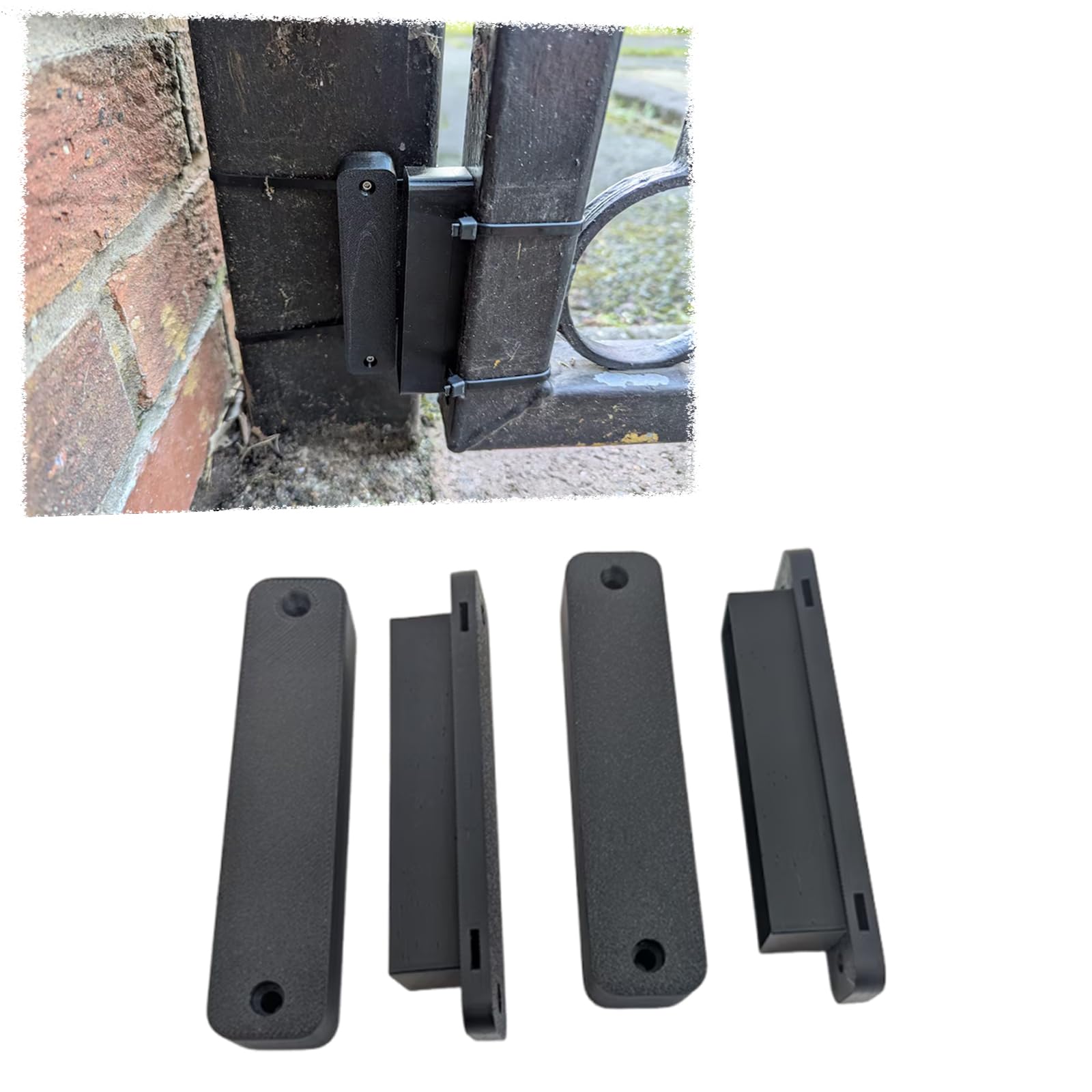
Image: The Generic Weatherproof Case for IKEA Parasoll Door and Window Sensor, illustrating its design and how it might appear when installed. This case provides a protective enclosure for the sensor, safeguarding it from environmental factors.
Operation
Once properly installed, the weatherproof case operates passively by providing continuous protection to your IKEA Parasoll Door and Window Sensor. It shields the sensor from rain, snow, dust, and UV radiation, allowing the sensor to function reliably in outdoor or exposed conditions without interference.
The case does not require any active operation. Its primary function is to maintain the integrity and performance of the enclosed sensor by creating a protective barrier against environmental elements.
Maintenance
To ensure the continued effectiveness and longevity of your weatherproof case, periodic maintenance is recommended:
- Cleaning: Wipe the exterior of the case with a soft, damp cloth to remove dirt, dust, or debris. Avoid using abrasive cleaners or solvents, as these may damage the material.
- Inspection: Periodically inspect the case for any signs of damage, such as cracks, loose seals, or dislodged mounting hardware. Ensure the case remains securely closed and sealed.
- Sensor Check: Occasionally check the enclosed IKEA Parasoll sensor to ensure it is still functioning correctly and has not been affected by moisture or debris.
Troubleshooting
If you encounter issues with your IKEA Parasoll Door and Window Sensor while it is housed in the weatherproof case, consider the following:
- Sensor Malfunction: If the sensor is not reporting correctly, first remove it from the case and test its functionality independently. This helps determine if the issue is with the sensor itself or the case.
- Moisture Inside Case: If you observe moisture or condensation inside the case, check that it was properly closed and sealed during installation. Ensure all latches or screws are tightened. Re-seal the case carefully.
- Poor Signal: While the case is designed not to impede signal, extreme mounting locations or dense materials nearby could affect wireless range. Try repositioning the sensor or its hub if signal issues persist.
- Physical Damage: Inspect the case for any visible damage that might compromise its protective capabilities. If damaged, replacement may be necessary.
Specifications
| Brand | Generic |
| Model Number | A917 |
| Compatibility | IKEA Parasoll Door and Window Sensor |
| Material | High-quality, durable, weather-resistant material (as per product description) |
| Protection | Waterproof, Dustproof, UV Resistant |
Warranty and Support
For warranty information or technical support regarding your Generic Weatherproof Case, please refer to the contact information provided with your purchase or visit the manufacturer's official website. Keep your proof of purchase for warranty claims.


