1. Safety Information
Before operating your iScooter F3 Electric Scooter, please read this manual thoroughly and retain it for future reference. Always wear a helmet and appropriate safety gear. Adhere to all local traffic laws and regulations.
- Always wear a helmet and protective gear (knee pads, elbow pads) when riding.
- Do not ride in wet conditions, heavy rain, or through puddles deeper than 1 inch.
- Avoid riding on uneven surfaces, steep inclines, or over obstacles.
- Ensure all components are securely fastened before each ride.
- Do not exceed the maximum weight limit of 264 pounds.
- Keep both hands on the handlebars while riding.
- Familiarize yourself with the braking system before riding at higher speeds.
- This scooter is intended for adult use.
2. Product Overview
The iScooter F3 is an electric scooter designed for urban commuting and recreational riding, featuring a powerful motor, long-range battery, and comfortable design with a seat and basket.
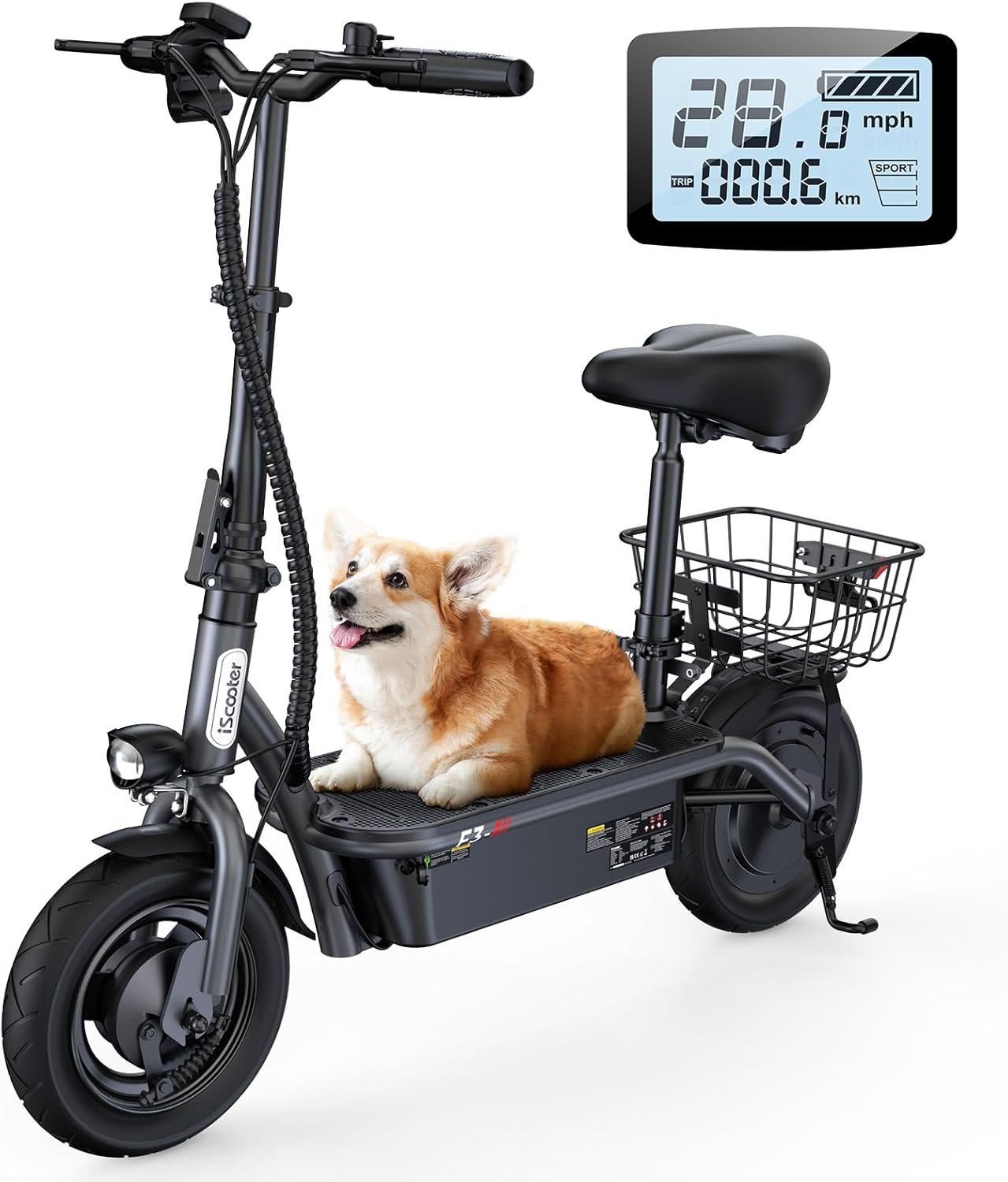
Image: The iScooter F3 Electric Scooter, fully assembled with its seat and rear basket, shown from a front-left angle. An LCD display is visible in the top right corner.
3. Setup and Assembly
The iScooter F3 arrives partially assembled. Follow these steps to complete the setup:
- Unboxing and Inspection: Carefully remove all components from the packaging. Inspect for any damage during transit. Ensure all parts listed in the packing list are present.
- Handlebar Installation: Insert the handlebar stem into the main frame. Ensure it is fully seated and align the handlebar. Secure it using the provided fasteners and tools. Tighten all bolts firmly.
- Seat and Basket Attachment: Attach the seat post to the designated slot on the scooter frame. Adjust the seat height to a comfortable position and secure it. Install the rear basket onto its mounting points, ensuring it is stable.
- Front Wheel Attachment (if separate): If the front wheel is not pre-installed, attach it to the front fork. Ensure the axle is correctly aligned and secured with the nuts.
- Tire Inflation: The tires may not be fully inflated upon arrival. Inflate both 10-inch pneumatic tires to the recommended pressure (check the tire sidewall for specifications) before your first ride. Proper tire pressure is crucial for optimal performance and ride comfort.
- Adjusting Handlebar and Seat Height: The handlebar and seat height are adjustable to accommodate different rider sizes. Loosen the quick-release clamps or bolts, adjust to the desired height, and securely tighten them.

Image: Close-up view of the iScooter F3's adjustable handlebar and seat, with arrows indicating the upward and downward adjustment range for both components.

Image: A detailed view of the iScooter F3's folding mechanism, showing how the scooter can be compacted for storage or transport.
4. Operating Instructions
4.1 Powering On/Off
- To power on, press and hold the power button on the display.
- To power off, press and hold the power button again until the display turns off.
4.2 Riding Modes and Speed Control
The F3 electric scooter offers three speed modes:
- Mode 1 (ECO): Approximately 9 mph
- Mode 2 (TOUR): Approximately 21 mph
- Mode 3 (SPORT): Approximately 28 mph
To switch between speed modes, press the 'M' button on the display twice quickly.

Image: Close-up of the iScooter F3's LCD display, showing speed (28.0 mph), battery status, and mileage. The 'M' button for mode switching is highlighted, along with text indicating the three speed modes.
4.3 Braking System
The iScooter F3 is equipped with front and rear drum brakes for reliable stopping power. The power-off brake system adds an extra layer of security. To brake, gently squeeze the brake levers on the handlebars. Apply both brakes simultaneously for optimal stopping performance.

Image: A visual representation of the iScooter F3's double braking system, highlighting the electronic brake and the front and rear drum brakes for enhanced safety.
4.4 Lighting
The scooter features bright front and rear lights to enhance visibility, especially during nighttime or low-light conditions. Ensure these lights are functioning correctly before riding in the dark.

Image: A split image showing the bright front headlight and the warning taillight of the iScooter F3, emphasizing their role in safe night riding.
5. Battery Charging
The iScooter F3 is equipped with a high-capacity 48V 13Ah battery, providing up to 37 miles of range. To charge the battery:
- Locate the charging port on the scooter.
- Ensure the scooter is powered off before charging.
- Connect the charger to the charging port, then plug the charger into a standard wall outlet.
- The indicator light on the charger will typically show red during charging and turn green when fully charged.
- Do not overcharge the battery. Disconnect the charger once charging is complete.

Image: An X-ray style view of the iScooter F3's battery compartment, illustrating the high-capacity 48V 13Ah battery that provides up to 37 miles of range.
6. Maintenance
Regular maintenance ensures the longevity and safe operation of your iScooter F3.
- Tire Pressure: Regularly check and maintain the correct tire pressure for the 10-inch pneumatic tires. Under-inflated tires can affect range and ride quality.
- Brake Inspection: Periodically inspect the front and rear drum brakes for wear and proper function. Adjust or replace brake components as needed.
- Cleaning: Clean the scooter with a damp cloth. Avoid using high-pressure water jets, which can damage electrical components.
- Storage: Store the scooter in a dry, cool place away from direct sunlight and extreme temperatures. If storing for an extended period, ensure the battery is partially charged (around 50-70%) and recharge it every 1-2 months to prevent deep discharge.
- Fastener Check: Periodically check all bolts and fasteners to ensure they are tight and secure.
7. Troubleshooting
If you encounter issues with your iScooter F3, please refer to the following common troubleshooting tips. If the problem persists, contact customer support.
- Scooter not turning on: Ensure the battery is charged. Check all connections.
- Reduced range or power: Check tire pressure. Ensure the battery is fully charged. Riding conditions (hills, heavy loads, cold weather) can affect performance.
- Brakes not responding: Inspect brake levers and cables for damage or looseness.
- Unusual noises: Stop riding immediately and inspect the scooter for loose parts or damage.
8. Specifications
| Feature | Specification |
|---|---|
| Model Name | F3 |
| Motor Power | 1000W |
| Battery Capacity | 48V 13Ah |
| Maximum Speed | 28 MPH |
| Maximum Range | 37 Miles |
| Tire Size | 10 Inches |
| Tire Type | Pneumatic |
| Weight Limit | 264 Pounds |
| Item Weight | 43 Pounds |
| Product Dimensions (LxWxH) | 40.55" x 21.85" x 37.4" |
| Frame Material | Carbon Steel Alloy |
| Brake Style | Front and Rear Drum Brakes |
| Special Features | Adjustable Handlebar Height, Adjustable Seat, Basket |
9. Warranty and Support
9.1 Warranty Information
The iScooter F3 Electric Scooter comes with a limited warranty. The warranty period is typically 1 year for the scooter and 6 months for certain components like the battery. Please refer to your purchase documentation for specific terms and conditions. An extended 2-year protection plan may also be available for purchase.
9.2 Customer Support
For any questions, technical assistance, or warranty claims, please contact iScooter customer support:
- Phone: +1 (855) 916-2366
- Email: support@iscooterglobal.com
Our support team is available to assist you with any issues quickly and effectively.

Image: A graphic displaying iScooter's customer support contact details, including a call center phone number and an email address for live chat support.


