1. Introduction
This manual provides essential information for the safe and efficient use of your VIVO T4 Pro 5G smartphone. Please read this guide thoroughly before using your device to ensure optimal performance and longevity. The VIVO T4 Pro 5G is a high-performance smartphone designed for advanced mobile communication and multimedia experiences.
2. Package Contents
Verify that your package contains the following items:
- VIVO T4 Pro 5G Smartphone
- Power Adapter
- USB Type-C Cable
- SIM Ejector Tool
- Quick Start Guide
- Safety Information
Note: Contents may vary by region.
3. Device Overview
Familiarize yourself with the physical components of your VIVO T4 Pro 5G.
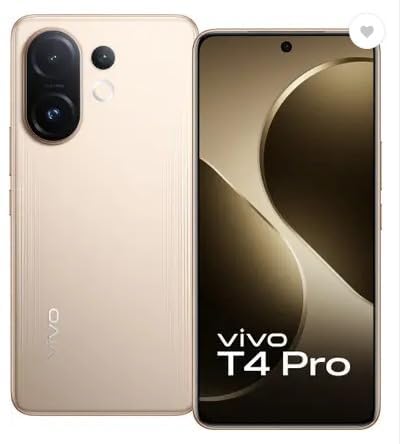
Figure 3.1: Front and Rear View of the VIVO T4 Pro 5G. This image displays the overall design of the smartphone, highlighting its sleek profile and the placement of the rear camera module.
3.1. Physical Buttons and Ports
- Power Button: Located on the right side, used to power on/off the device, or wake/sleep the screen.
- Volume Buttons: Located above the power button, used to adjust media volume, call volume, and notification volume.
- USB Type-C Port: Located at the bottom, used for charging and data transfer.
- SIM Card Tray: Typically on the side, for inserting Nano-SIM cards and microSD cards.
- Speakers: Located at the bottom for audio output.
- Microphones: Integrated for calls and voice recording.
3.2. Camera System
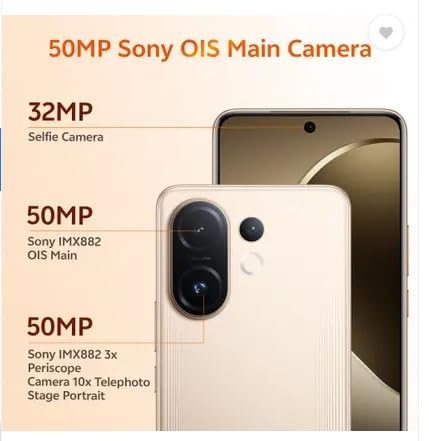
Figure 3.2: Detailed view of the VIVO T4 Pro 5G camera system. This image illustrates the arrangement of the 50MP Sony OIS Main Camera, 50MP Sony IMX882 3x Periscope Camera, and the 32MP Selfie Camera.
The VIVO T4 Pro 5G features an advanced camera system for high-quality photography and videography:
- Rear Cameras: Includes a 50MP Sony OIS Main Camera and a 50MP Sony IMX882 3x Periscope Camera for versatile shooting, including telephoto and portrait modes.
- Front Camera: A 32MP Selfie Camera for clear self-portraits and video calls.
3.3. Internal Components

Figure 3.3: Representation of the Snapdragon 7 Gen 4 processor. This image highlights the powerful chipset responsible for the device's performance.
The device is powered by a Snapdragon 7 Gen 4 processor, ensuring smooth performance for demanding applications and multitasking.
3.4. Durability Features

Figure 3.4: Illustration of the VIVO T4 Pro 5G's IP68 and IP69 water and dust protection. This image demonstrates the device's resistance to environmental elements.
The VIVO T4 Pro 5G features IP68 and IP69 ratings for industry-leading water and dust protection, enhancing its durability in various environments.
4. Setup
4.1. Inserting SIM Card and microSD Card
- Locate the SIM card tray on the side of your device.
- Insert the SIM ejector tool into the small hole next to the tray and press firmly until the tray pops out.
- Place your Nano-SIM card(s) and/or microSD card into the designated slots on the tray. Ensure the gold contacts face downwards.
- Carefully reinsert the tray into the device until it clicks into place.
4.2. Initial Power On and Basic Setup
- Press and hold the Power button until the VIVO logo appears.
- Follow the on-screen prompts to select your language, region, and connect to a Wi-Fi network.
- Sign in with your Google account or create a new one to access Google services and the Play Store.
- Set up your preferred screen lock method (PIN, pattern, password, fingerprint, or face unlock).
- Complete the remaining setup steps as guided by the device.
5. Operating Instructions
5.1. Basic Navigation
- Home Screen: Swipe left or right to navigate between home screens.
- App Drawer: Swipe up from the bottom of the screen to access all installed applications.
- Notifications Panel: Swipe down from the top of the screen to view notifications and quick settings.
- Recent Apps: Swipe up and hold from the bottom (gesture navigation) or tap the square button (3-button navigation) to view recently used applications.
5.2. Making Calls and Sending Messages
- Calls: Open the Phone app, enter the number, and tap the call icon. To answer an incoming call, swipe up. To reject, swipe down.
- Messages: Open the Messages app, tap the "Start chat" or "+" icon, enter the recipient's number or select from contacts, type your message, and tap send.
5.3. Connecting to Networks
- Wi-Fi: Go to Settings > Network & internet > Wi-Fi. Turn Wi-Fi on, select your desired network, and enter the password if required.
- Bluetooth: Go to Settings > Connected devices > Bluetooth. Turn Bluetooth on, scan for devices, and pair with your desired accessory.
- Mobile Data: Go to Settings > Network & internet > Mobile network. Ensure Mobile data is enabled.
5.4. Using the Camera
The VIVO T4 Pro 5G camera offers various modes and features:
- Open the Camera app.
- Select your desired mode (e.g., Photo, Portrait, Video, Night, Pro).
- Tap the shutter button to capture a photo or start/stop video recording.
- Use pinch-to-zoom or the on-screen zoom controls to adjust magnification, including the 3x optical zoom.
- Access settings within the camera app to adjust resolution, filters, and other parameters.
6. Maintenance
6.1. Cleaning Your Device
- Use a soft, lint-free cloth to wipe the screen and body.
- Avoid using harsh chemicals, abrasive materials, or compressed air.
- For stubborn smudges, slightly dampen the cloth with water or a screen cleaner designed for electronics.
6.2. Battery Care
- Avoid extreme temperatures, as they can degrade battery life.
- Use only the original or certified charging accessories.
- Do not fully discharge the battery frequently. Optimal battery health is maintained between 20% and 80% charge.
6.3. Software Updates
Regularly check for and install software updates to ensure your device has the latest features, security patches, and performance improvements. Go to Settings > System > System update.
7. Troubleshooting
| Problem | Solution |
|---|---|
| Device does not turn on | Ensure the battery is charged. Connect to the power adapter and wait a few minutes before attempting to power on again. If unresponsive, perform a force restart by holding the Power button for 10-15 seconds. |
| Apps are crashing or freezing | Close and reopen the app. Clear the app's cache (Settings > Apps > [App Name] > Storage & cache > Clear cache). Update the app from the Play Store. If the issue persists, uninstall and reinstall the app. |
| Poor network connectivity | Check if Wi-Fi or mobile data is enabled. Restart your device. Reset network settings (Settings > System > Reset options > Reset Wi-Fi, mobile & Bluetooth). Ensure your SIM card is properly inserted. |
| Battery drains quickly | Reduce screen brightness, disable unnecessary background apps, turn off Wi-Fi/Bluetooth/GPS when not in use. Check battery usage in Settings > Battery to identify power-hungry apps. |
| Fingerprint sensor not working | Ensure your finger is clean and dry. Re-register your fingerprints in Settings > Security & privacy > Device unlock > Fingerprint. |
7.1. Factory Reset
If you encounter persistent issues that cannot be resolved through basic troubleshooting, a factory reset may be necessary. Warning: A factory reset will erase all data on your device. Back up important data before proceeding. Go to Settings > System > Reset options > Erase all data (factory reset).
8. Specifications
| Model Name | VIVO T4 Pro 5G |
| Operating System | Android 14 |
| Processor | Snapdragon 7 Gen 4 (2.8 GHz) |
| RAM | 8 GB |
| Internal Storage | 128 GB |
| Display Resolution | 1080 x 2392 pixels |
| Connectivity | 5G, Wi-Fi, Bluetooth, GPS |
| Audio Port | USB Type C |
| Battery Capacity | 6500 Milliamp Hours |
| Dimensions (LxWxH) | 16.4 x 7.7 x 0.8 Centimeters |
| Item Weight | 250 g |
| Color | Blaze Gold |
| Manufacturer | Vivo Mobile India Pvt. Ltd. |
9. Warranty and Support
9.1. Product Warranty
Your VIVO T4 Pro 5G smartphone comes with a standard manufacturer's warranty. Please refer to the warranty card included in your package for specific terms, conditions, and duration. Keep your purchase receipt as proof of purchase for warranty claims.
9.2. Customer Support
For technical assistance, service, or further inquiries, please contact VIVO customer support. You can find contact information on the official VIVO website or in the support section of your device's settings.
- Online Support: Visit the official VIVO India Support Website for FAQs, troubleshooting guides, and service center locations.
- Service Centers: Locate authorized VIVO service centers for in-person assistance.


