
1. Introduction
Thank you for choosing the PeakDo LinkPower Power Bank and Tripod Adapter. This device is specifically designed to provide portable power and versatile mounting options for your Starlink Mini. It ensures extended operation and flexible deployment of your Starlink Mini in various environments. Please read this manual thoroughly before use to ensure proper operation and to maximize the product's lifespan.
2. Product Overview
The PeakDo LinkPower combines a high-capacity power bank with a custom-fit tripod adapter for the Starlink Mini. Its compact design integrates seamlessly with the Starlink Mini, offering an all-in-one portable solution for off-grid internet access.
Key Features:
- Custom-Fit Design: Precisely shaped for the Starlink Mini with a secure snap-on buckle.
- High Capacity: 27500mAh / 99Wh battery provides over 4 hours of Starlink Mini operation.
- Flight Approved: Under 100Wh, suitable for air travel.
- Bidirectional USB-C PD: Supports up to 100W input and 65W output for versatile charging.
- Manual Switch & LCD: Physical power switch for DC port control and a clear LCD for real-time battery status.
- App Control: Bluetooth connectivity for remote monitoring and control via a mobile application.
- Dual-Threaded Mounting: Features 1/4" and 3/8" threaded holes for tripod and accessory attachment.

Image: The PeakDo LinkPower Power Bank highlighting its 99Wh capacity and airline-approved status, suitable for travel.
3. Setup
Follow these steps to set up your PeakDo LinkPower with the Starlink Mini:
- Attach to Starlink Mini: Align the PeakDo LinkPower with the back of your Starlink Mini. Gently press until the snap-on buckle engages, securing the power bank to the Starlink Mini. Ensure a firm connection.
- Connect Power Cable: Connect the power cable from the Starlink Mini to the DC output port on the PeakDo LinkPower.
- Initial Charge: Before first use, fully charge the PeakDo LinkPower using a compatible USB-C PD charger. Refer to the 'Charging the Device' section for details.
- Mounting (Optional): If using a tripod or other mounting accessory, attach it to the 1/4" or 3/8" threaded holes on the PeakDo LinkPower.
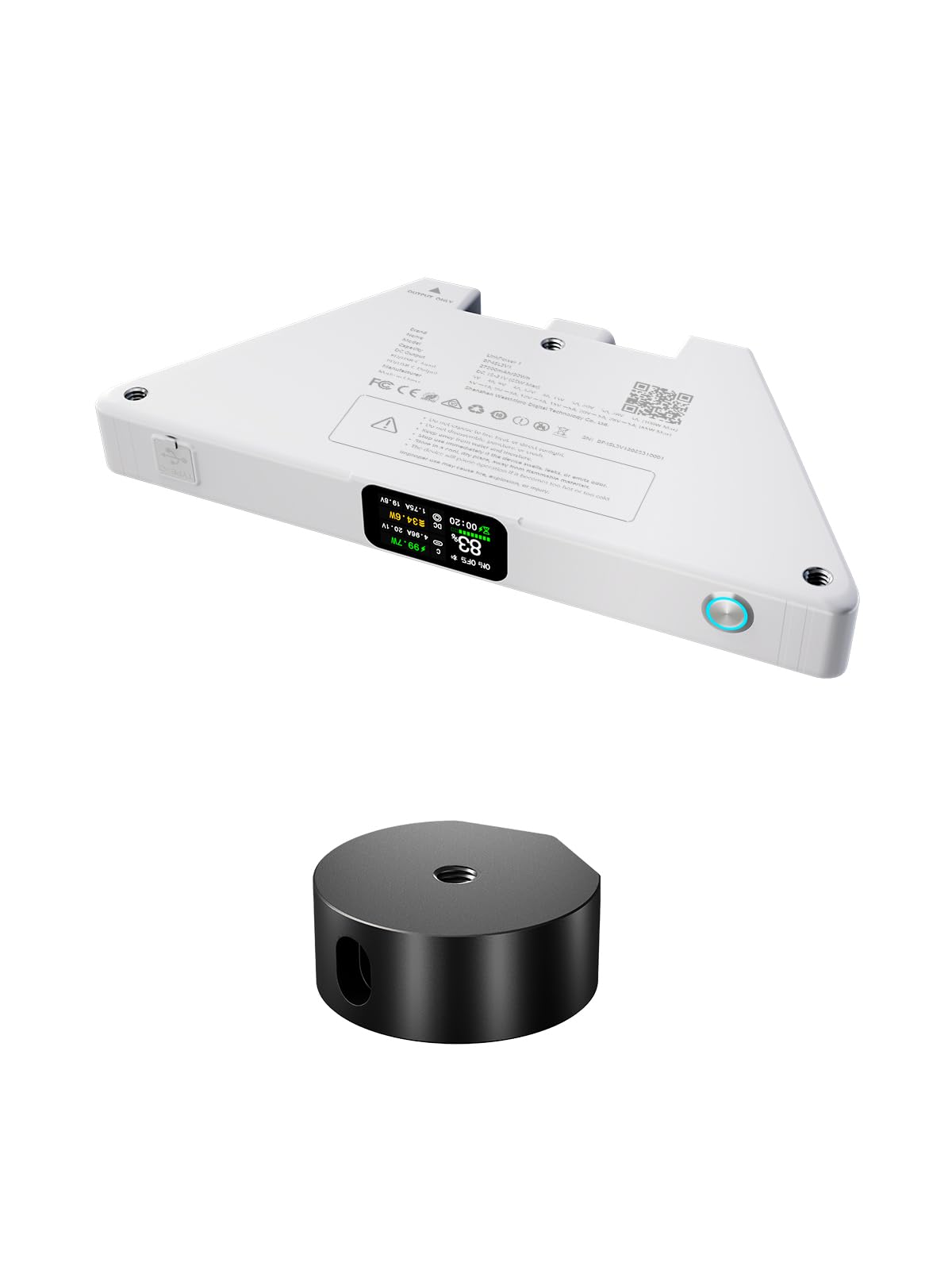
Image: Rear view of the Starlink Mini with the PeakDo LinkPower Power Bank securely attached, showing the integrated design.
4. Operation
Operating the PeakDo LinkPower is straightforward:
- Powering On/Off (DC Port): Use the physical power switch on the device to turn the DC output port on or off. This controls power delivery to your Starlink Mini.
- USB-C Port: The USB-C port remains active at all times, allowing you to charge other devices (e.g., phones, laptops) simultaneously or charge the power bank itself.
- LCD Display: The integrated LCD screen provides real-time information on battery status, output power, and other relevant metrics.
5. Charging the Device
The PeakDo LinkPower supports fast charging for both input and output:
- Input Charging: Connect a USB-C PD charger (up to 100W max) to the USB-C port to recharge the power bank.
- Output Charging: The USB-C port provides up to 65W output for charging phones, laptops, and other compatible devices.
- Simultaneous Operation: You can power your Starlink Mini via the DC port while simultaneously charging the PeakDo LinkPower through its USB-C input.

Image: Visual representation of the bidirectional USB-C Power Delivery feature, indicating a maximum 100W fast charging input and a maximum 65W output for devices like phones and laptops.
6. Mounting and Compatibility
The PeakDo LinkPower is designed for specific compatibility and offers flexible mounting options:
Compatibility:
- Starlink Mini Only: This power bank is compatible exclusively with the Starlink Mini. It is not compatible with other Starlink models such as Standard Actuated (V2), Starlink Gen 3, or Starlink FlaHigh Performance.
- Pipe Adapter: The tripod adapter is compatible only with the old version Starlink Mini pipe adapter. It is not compatible with the new version pipe adapter which features three holes.
Mounting Options:
- The device includes 3 standard 1/4" screw holes for easy mounting on various tripods.
- It also features 3/8" threaded holes, offering versatile attachment to clamps, brackets, and other accessories.
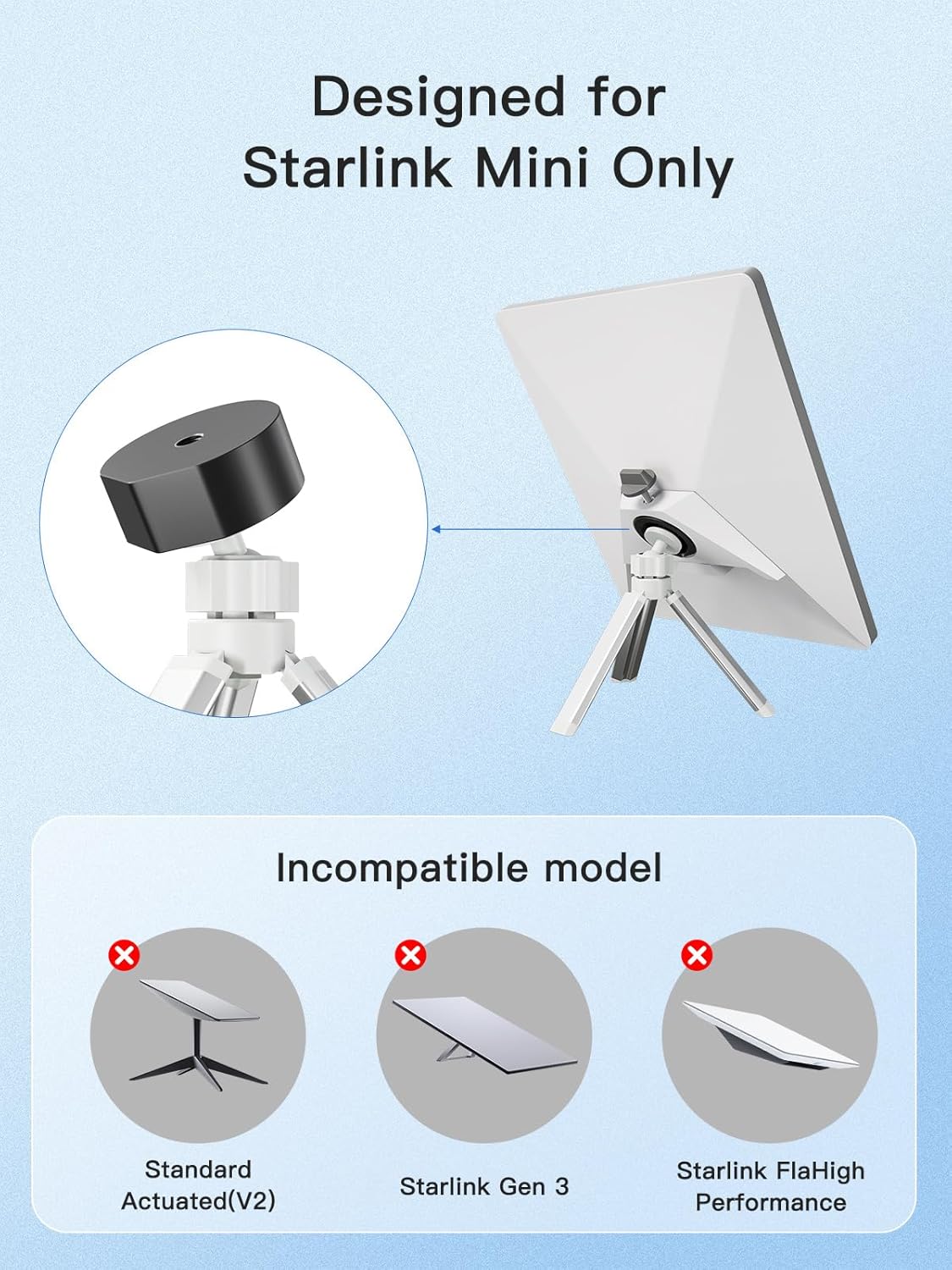
Image: A diagram illustrating that the PeakDo LinkPower is designed exclusively for Starlink Mini, explicitly showing other Starlink models (Standard Actuated V2, Gen 3, FlaHigh Performance) as incompatible.
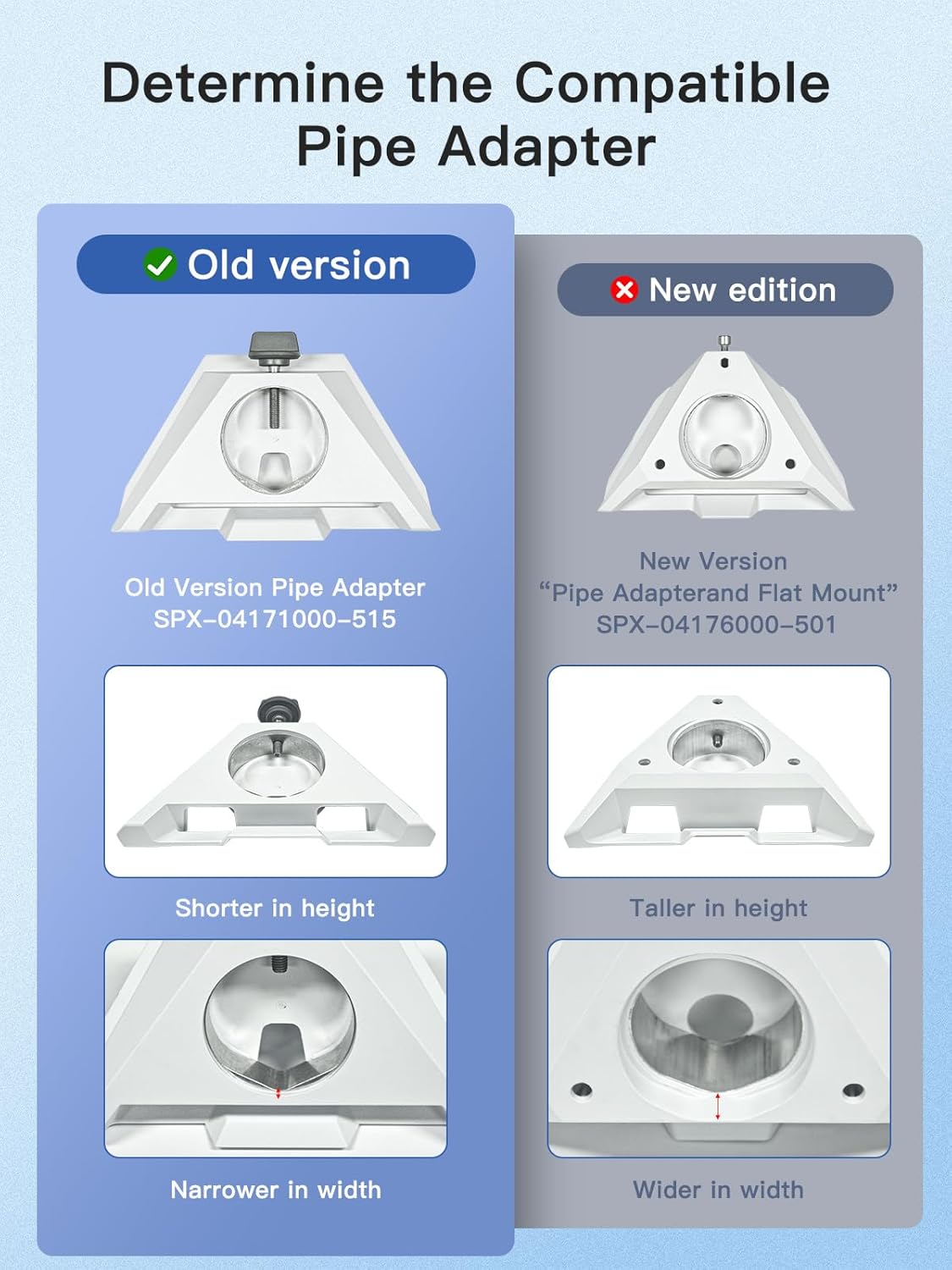
Image: A visual guide to determine the compatible pipe adapter, comparing the 'Old version' (SPX-04171000-515) which is shorter and narrower, with the 'New edition' (SPX-04176000-501) which is taller and wider, indicating compatibility only with the old version.
7. App Control
For enhanced control and monitoring, the PeakDo LinkPower can be managed via a mobile application:
- Bluetooth Connectivity: Connect your smartphone or computer to the PeakDo LinkPower via Bluetooth.
- Remote Monitoring: The app allows you to view real-time battery status, power delivery, and other operational data.
- Remote Control: Manage power settings and other functions remotely, providing convenience whether you are nearby or off-site.

Image: A smartphone displaying the PeakDo LinkPower application interface, showing battery percentage, system status, and controls for enabling/disabling DC and Type-C ports via Bluetooth.
8. Specifications
| Feature | Specification |
|---|---|
| Battery Capacity | 27500mAh / 99Wh |
| DC Output Runtime (Starlink Mini) | Over 4 hours |
| USB-C Input (PD) | Max 100W |
| USB-C Output (PD) | Max 65W |
| Weight | Approximately 1.42 lbs |
| Mounting Threads | 1/4" and 3/8" |
| Control Interface | Manual Switch, LCD Display, Bluetooth App |
| Compatibility | Starlink Mini (old version pipe adapter only) |
9. Troubleshooting
If you encounter issues with your PeakDo LinkPower, refer to the following common solutions:
- Device Not Powering On:
- Ensure the power bank is sufficiently charged. Check the LCD display for battery level.
- Verify the DC power switch is in the 'On' position if powering the Starlink Mini.
- Starlink Mini Not Receiving Power:
- Confirm the power cable between the power bank and Starlink Mini is securely connected.
- Check if the DC output is enabled via the physical switch or the app.
- Slow Charging or Not Charging:
- Ensure your USB-C charger and cable support Power Delivery (PD) and are capable of delivering sufficient wattage (up to 100W for fastest charging).
- Try a different USB-C cable or charger.
- App Connectivity Issues:
- Ensure Bluetooth is enabled on your mobile device.
- Make sure the PeakDo LinkPower is within Bluetooth range.
- Restart the app and/or your mobile device.
10. Safety Information
Please observe the following safety precautions:
- Do not expose the device to extreme temperatures, direct sunlight, or moisture.
- Avoid dropping or subjecting the device to severe impacts.
- Do not attempt to disassemble, repair, or modify the device. This will void the warranty and may cause damage or injury.
- Keep out of reach of children.
- Dispose of the device and its battery responsibly according to local regulations.
11. Warranty and Support
PeakDo products are designed for reliability and performance. For warranty information, technical support, or service inquiries, please refer to the official PeakDo website or contact their customer service directly. Keep your purchase receipt as proof of purchase for warranty claims.


